# React
> Display documents in a React app with the DocumentViewer component of tx-react-ds-document-viewer: pass clientId or an access token and call loadDocument.
- **Product:** DS Server
- **Section:** Documentation
- **Kind:** Topic
- **Path:** DS Server > Getting Started > Document Viewer > React
- **2325 words**
- **Web URL:** https://docs.textcontrol.com/ds-server/getting-started/document-viewer/react/
- **LLMs URL:** https://docs.textcontrol.com/ds-server/getting-started/document-viewer/react/llms.txt
- **LLMs-Full URL:** https://docs.textcontrol.com/ds-server/getting-started/document-viewer/react/llms-full.txt
---
The `DocumentViewer` component of the npm package `@txtextcontrol/tx-react-ds-document-viewer` displays documents in a React application. It requests an access token from DS Server, loads the viewer from there and shows the document you pass as a property. Starting from an empty Vite project, you prepare a security profile, add the component and load another document with the JavaScript API.
### Prerequisites
- [Node.js](https://nodejs.org/en/download/) and npm, and an editor such as [Visual Studio Code](https://code.visualstudio.com/).
- A DS Server that is installed, licensed and reachable from the browser, as the [Installation Guide](https://docs.textcontrol.com/ds-server/installation/llms-full.txt) and [Licensing](https://docs.textcontrol.com/ds-server/administration/licensing/llms-full.txt) describe. The samples use `http://localhost:5000`. With a trial token instead, skip the next section, use `https://trial.dsserver.io` as the service URL and the client ID and secret of the token; see [Trial Token](https://docs.textcontrol.com/ds-server/getting-started/trial-token/llms-full.txt).
The package requires React 19 and DS Server 5.0 or later.
### Prepare a Security Profile
With a client ID and secret, the component requests its token from the browser with the client credentials grant type, which the security profile must allow. If you created a profile for the [Document Editor in React](https://docs.textcontrol.com/ds-server/getting-started/document-editor/react/llms-full.txt), use it. Otherwise:
1. In the admin portal of DS Server, choose **Security Profiles**, click **+ Create new profile**, enter a name and click **Create**.
2. Copy the **Client ID** and the **Client Secret** of the new profile.
3. Switch on **Allow "Client Credentials" grant type**, which is off by default, and click **Done**.
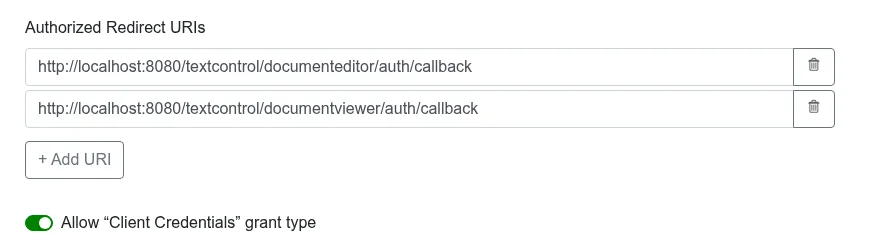
Credentials in the JavaScript of a page are visible to its visitors. Use them for development; in production, pass a token your server requested to the `accessToken` property, as [Use an Access Token](#use-an-access-token) shows.
### Create the React Application
1. Open a command prompt and create a new React application with Vite:
```bash
npm create vite@latest my-ds-viewer-app
```
Select **React** as the framework and **JavaScript** as the variant, and choose a linter. Answer **No** to *Install with npm and start now?*, because the next step installs the dependencies.
2. Change to the new folder and install the dependencies:
```bash
cd my-ds-viewer-app
npm install
```
3. Install the Document Viewer package:
```bash
npm i @txtextcontrol/tx-react-ds-document-viewer
```
### Add the Viewer Component
Open *src/App.jsx*, replace its complete content with the following code and save the file. Replace the service URL, the client ID and the client secret with your values.
```jsx
import DocumentViewerPackage from '@txtextcontrol/tx-react-ds-document-viewer';
// Vite 8 returns the CommonJS module for a default import
const DocumentViewer = DocumentViewerPackage.default ?? DocumentViewerPackage;
function App() {
return (
);
}
export default App;
```
#### What the Code Does
- The package is a CommonJS module, and under Vite 8 the default import returns the whole module object. The code takes the component from its `default` property and falls back to the import itself for earlier Vite versions.
- `width` and `height` set the size of the viewer, and `serviceURL` is the address of DS Server.
- `clientId` and `clientSecret` are the credentials of the security profile. Unlike the editor, the viewer takes them as separate properties, not in an `authSettings` object. The README of the package spells the first one `clientID`, but the component reads `clientId`.
- `documentData` is the document as a Base64-encoded string, here the text "Hello there", and `documentPath` the name the viewer displays.
[React](https://docs.textcontrol.com/ds-server/client-libraries/react/#documentviewer) in Client-Side Libraries lists every property, including `dock`, `showThumbnailPane` and the `signatureSettings` for a signing process.
### Run the Application
1. In the command prompt, start the development server:
```bash
npm run dev
```
2. Open the address it prints, `http://localhost:5173` by default, in your browser.
The page shows the Document Viewer with its toolbar, the thumbnail pane and the text "Hello there".
### Load a Document With the JavaScript API
The `onLoad` property runs a function when the viewer script is loaded and the global [`TXDocumentViewer`](https://docs.textcontrol.com/ds-server/reference/javascript-document-viewer/txdocumentviewer/llms-full.txt) object exists. The following version of *src/App.jsx* adds a button that replaces the displayed document with [`loadDocument`](https://docs.textcontrol.com/ds-server/reference/javascript-document-viewer/documentviewercontroller/loaddocument-method/llms-full.txt):
```jsx
import DocumentViewerPackage from '@txtextcontrol/tx-react-ds-document-viewer';
// Vite 8 returns the CommonJS module for a default import
const DocumentViewer = DocumentViewerPackage.default ?? DocumentViewerPackage;
function App() {
function handleLoad() {
console.log('The TXDocumentViewer object exists from now on.');
}
function loadWelcome() {
TXDocumentViewer.loadDocument(btoa('Welcome to DS Server'), 'welcome.html');
}
return (
<>
);
}
export default App;
```
`loadDocument` takes the document as a Base64-encoded string and the document name for the status bar.
### Use an Access Token
To keep the client secret on your server, request the token there and pass it to the `accessToken` property instead of `clientId` and `clientSecret`. Render the component only after the token has arrived. Replace `https://localhost:7143/api/token` with the address of your token endpoint:
```jsx
import { useEffect, useState } from 'react';
import DocumentViewerPackage from '@txtextcontrol/tx-react-ds-document-viewer';
// Vite 8 returns the CommonJS module for a default import
const DocumentViewer = DocumentViewerPackage.default ?? DocumentViewerPackage;
function App() {
const [accessToken, setAccessToken] = useState(null);
useEffect(() => {
// request the access token from your own backend
fetch('https://localhost:7143/api/token')
.then(response => response.json())
.then(token => setAccessToken(token.access_token));
}, []);
if (!accessToken) {
return null;
}
return (
);
}
export default App;
```
[Keep the Client Secret on Your Server](https://docs.textcontrol.com/ds-server/getting-started/document-editor/javascript/#keep-the-client-secret-on-your-server) shows an ASP.NET Core endpoint that returns the token. The Vite development server runs on another origin, so the endpoint must allow it with a CORS policy, and it must be protected, because it gives a token to anyone who calls it.
### Troubleshooting
- **"Element type is invalid"** in the browser console: the plain default import returned the module object. Take the component from `default`, as the code above does.
- **"DS Server is not registered."** On a DS Server without a license, this message appears in red at the top of the page instead of the viewer. Register the server in the admin portal, as [Licensing](https://docs.textcontrol.com/ds-server/administration/licensing/llms-full.txt) describes.
- **`Could not retrieve OAuth token. Error: unsupported_grant_type`** in the browser console: the security profile doesn't allow the client credentials grant type.
[Document Editor and Viewer](https://docs.textcontrol.com/ds-server/troubleshooting/editor-viewer/llms-full.txt) in Troubleshooting covers more problems.
### Next Steps
- [React](https://docs.textcontrol.com/ds-server/client-libraries/react/#documentviewer): every property of the viewer component and its signature settings.
- [Document Viewer JavaScript API](https://docs.textcontrol.com/ds-server/reference/javascript-document-viewer/txdocumentviewer/llms-full.txt): annotations, forms, signatures and events.
- [Document Editor in React](https://docs.textcontrol.com/ds-server/getting-started/document-editor/react/llms-full.txt): edit documents in the same application.
- [Supported File Formats](https://docs.textcontrol.com/ds-server/overview/file-formats/llms-full.txt): the formats the viewer displays.
---
## Nearby
- **Previous:** [Angular](https://docs.textcontrol.com/ds-server/getting-started/document-viewer/angular/llms-full.txt)
- **Next:** [JavaScript](https://docs.textcontrol.com/ds-server/getting-started/document-viewer/javascript/llms-full.txt)