# HTML Content
> Merge formatted HTML with strong, em and u tags into merge fields with the mergeHtml setting: the html wrapper, kept font settings and curl and .NET samples.
- **Product:** ReportingCloud
- **Section:** Documentation
- **Kind:** Topic
- **Path:** ReportingCloud > Mail Merge > HTML Content
- **1574 words**
- **Web URL:** https://docs.textcontrol.com/reporting-cloud/mail-merge/html-content/
- **LLMs URL:** https://docs.textcontrol.com/reporting-cloud/mail-merge/html-content/llms.txt
- **LLMs-Full URL:** https://docs.textcontrol.com/reporting-cloud/mail-merge/html-content/llms-full.txt
---
A comment that a user typed into a rich text box of your application can be partly bold or italic, while a merge field normally receives plain text. With the merge setting `mergeHtml`, the value of a field can be formatted HTML instead, and ReportingCloud applies its formatting to the merged text. Formatted comments are the typical case, and the sample below merges one.
The field that receives the HTML is an ordinary merge field, as [Merge Fields](https://docs.textcontrol.com/reporting-cloud/mail-merge/fields/llms-full.txt) describes, and the request is a [POST /v1/document/merge](https://docs.textcontrol.com/reporting-cloud/reference/web-api/document/merge/post/llms-full.txt) request like those of the [Overview](https://docs.textcontrol.com/reporting-cloud/mail-merge/overview/llms-full.txt), with one setting added.
### How HTML Content Is Merged
HTML in field data is a setting of the merge, not of the field or the template:
- **The setting.** `mergeHtml` in the `mergeSettings` object of the request specifies whether field data can contain formatted HTML. It is `false` by default.
- **The format of a value.** A value that contains HTML is enclosed in an `` element as a whole, from the first to the last character. Within it, simple formatting such as ``, `` and `` applies bold, italic and underlined text.
- **What the field keeps.** The font name, the font size, the text color and the background color of the field in the template are kept when the HTML is merged, so HTML can't change them; set them on the field in the template.
- **Where it works.** `mergeHtml` is only active in `POST /v1/document/merge`. The [POST /v1/document/findandreplace](https://docs.textcontrol.com/reporting-cloud/reference/web-api/document/findandreplace/post/llms-full.txt) endpoint accepts the same settings object but doesn't merge HTML.
A value in the merge data looks like this:
```html
Strong text and emphasized text
```
### Prepare the Template
The sample template, *comments.tx*, has a table with a merge field named `comments`. The field is formatted in the template with a larger orange font:
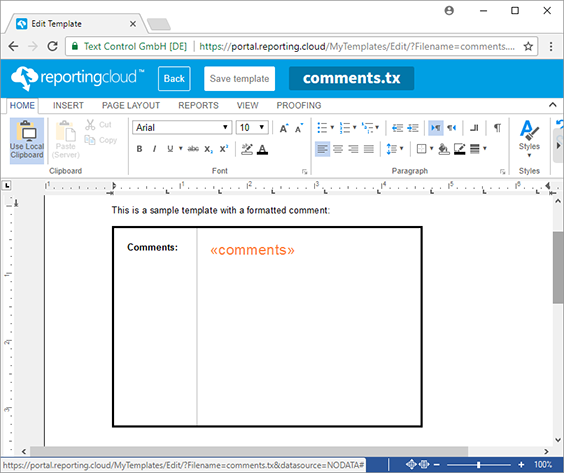
Any template with a merge field works the same way. [Template Editor](https://docs.textcontrol.com/reporting-cloud/portal/template-editor/llms-full.txt) describes how to insert and format a merge field.
### Merge HTML With the Web API
Save the following body as *merge.json*. Its single record holds the HTML comment, and `mergeSettings` turns on `mergeHtml`:
```json
{
"mergeData": [
{
"comments": "Longer strong text with normal text and emphasized text"
}
],
"mergeSettings": { "mergeHtml": true }
}
```
Then merge it into *comments.tx* from the template storage and decode the result:
```bash
curl -X POST "https://api.reporting.cloud/v1/document/merge?templateName=comments.tx&returnFormat=PDF" \
-H "Authorization: ReportingCloud-APIKey $REPORTINGCLOUD_API_KEY" \
-H "Content-Type: application/json" \
--data-binary @merge.json \
-o result.json
jq -r '.[0]' result.json | base64 -d > comments.pdf
```
The merged field shows "Longer strong text" in bold, then normal text and "emphasized text" in italics. The font, its size and its orange color come from the field in the template:
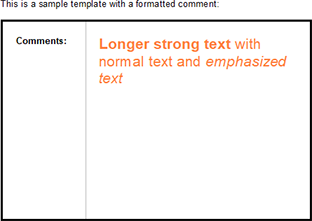
The value is a JSON string, so quotation marks and backslashes in the HTML must be escaped. When your application builds the body with a JSON serializer or with `jq`, the escaping is done for you.
### Merge HTML With .NET
With the .NET SDK, the package `TXTextControl.ReportingCloud` described in [.NET](https://docs.textcontrol.com/reporting-cloud/sdks/dotnet/llms-full.txt), the comment is a `string` property of the merge data, and `MergeHtml` is a property of `MergeSettings`:
```csharp
using TXTextControl.ReportingCloud;
ReportingCloud rc = new ReportingCloud(Environment.GetEnvironmentVariable("REPORTINGCLOUD_API_KEY"));
var mergeData = new[]
{
new
{
// The whole value is enclosed in an html element
comments = "Longer strong text with normal text and emphasized text"
}
};
MergeBody mergeBody = new MergeBody
{
MergeData = mergeData,
MergeSettings = new MergeSettings { MergeHtml = true }
};
List documents = rc.MergeDocument(mergeBody, "comments.tx", ReturnFormat.PDF);
File.WriteAllBytes("comments.pdf", documents[0]);
```
The code works as follows:
- `comments` has the name of the merge field, and its value is the HTML enclosed in ``.
- `MergeHtml = true` in `MergeSettings` makes the merge apply the HTML formatting.
- `MergeDocument` returns one byte array per created document. With one record, the list holds one document.
The PHP, Java and Ruby SDKs have the setting as well, under the names that [Merge Settings](https://docs.textcontrol.com/reporting-cloud/mail-merge/settings/#set-merge-settings-in-the-sdks) lists.
### Next Steps
- [Merge Settings](https://docs.textcontrol.com/reporting-cloud/mail-merge/settings/llms-full.txt): `mergeHtml` and the other options of the merge.
- [Merge Fields](https://docs.textcontrol.com/reporting-cloud/mail-merge/fields/llms-full.txt): name and format the fields that receive the HTML.
- [Templates and Merging](https://docs.textcontrol.com/reporting-cloud/troubleshooting/mail-merge/llms-full.txt): what to check when the HTML formatting isn't applied.
---
## Nearby
- **Previous:** [Conditional Blocks](https://docs.textcontrol.com/reporting-cloud/mail-merge/conditional-content/llms-full.txt)
- **Next:** [Merge Settings](https://docs.textcontrol.com/reporting-cloud/mail-merge/settings/llms-full.txt)