# Spelling Correction Modes and UI Provider
> Bind WPF controls to SpellingCorrectionUIProvider: suggestions, enabled states per mode, a sentence preview, editing a word by hand and a custom dialog.
- **Product:** TX Spell .NET for WPF
- **Section:** Documentation
- **Kind:** Topic
- **Path:** TX Spell .NET for WPF > Spell Checking > Spelling Correction Modes and UI Provider
- **9024 words**
- **Web URL:** https://docs.textcontrol.com/tx-spell-dotnet-wpf/spell-checking/correction-modes/
- **LLMs URL:** https://docs.textcontrol.com/tx-spell-dotnet-wpf/spell-checking/correction-modes/llms.txt
- **LLMs-Full URL:** https://docs.textcontrol.com/tx-spell-dotnet-wpf/spell-checking/correction-modes/llms-full.txt
---
The spell check dialog is one way to correct words; a panel docked beside the editor, a correction bar or a dialog in your own design are others. For those, TX Spell .NET provides the [SpellingCorrectionUIProvider](https://docs.textcontrol.com/tx-spell-dotnet-wpf/reference/txtextcontrol-proofing/spellingcorrectionuiprovider/llms-full.txt). It keeps track of the word being corrected, its suggestions and which commands make sense for it, and your controls bind to these values with WPF data binding. You write the layout; the provider decides when **Change** is enabled and what the list of suggestions holds.
### What the Provider Does
You get the provider from the [SpellingCorrectionUIProvider](https://docs.textcontrol.com/tx-spell-dotnet-wpf/reference/txtextcontrol-wpf-proofing/txspellchecker/spellingcorrectionuiprovider-property/llms-full.txt) property of the `TXSpellChecker`. It works through the misspelled words of a `TextControl` or a text, one at a time, and it always knows the state of the correction: whether there is a word to correct, whether suggestions were found, whether the user is editing the word. This state is its *mode*.
Five properties of the provider split the work. Each returns an object of a nested class with a different name:
| Property | Returns | Holds |
|---|---|---|
| [StateManaging](https://docs.textcontrol.com/tx-spell-dotnet-wpf/reference/txtextcontrol-proofing/spellingcorrectionuiprovider/statemanaging-property/llms-full.txt) | [StateManager](https://docs.textcontrol.com/tx-spell-dotnet-wpf/reference/txtextcontrol-proofing/spellingcorrectionuiprovider-statemanager/llms-full.txt) | The connected control, the current word and the mode |
| [CorrectionHandling](https://docs.textcontrol.com/tx-spell-dotnet-wpf/reference/txtextcontrol-proofing/spellingcorrectionuiprovider/correctionhandling-property/llms-full.txt) | [CorrectionHandler](https://docs.textcontrol.com/tx-spell-dotnet-wpf/reference/txtextcontrol-proofing/spellingcorrectionuiprovider-correctionhandler/llms-full.txt) | The commands, such as `Change` and `Ignore`, and whether each is enabled |
| [SuggestionsHandling](https://docs.textcontrol.com/tx-spell-dotnet-wpf/reference/txtextcontrol-proofing/spellingcorrectionuiprovider/suggestionshandling-property/llms-full.txt) | [SuggestionsHandler](https://docs.textcontrol.com/tx-spell-dotnet-wpf/reference/txtextcontrol-proofing/spellingcorrectionuiprovider-suggestionshandler/llms-full.txt) | The suggestions for the current word |
| [SuggestionDictionariesHandling](https://docs.textcontrol.com/tx-spell-dotnet-wpf/reference/txtextcontrol-proofing/spellingcorrectionuiprovider/suggestiondictionarieshandling-property/llms-full.txt) | `SuggestionDictionariesHandler` | The dictionaries the suggestions come from |
| [PreviewHandling](https://docs.textcontrol.com/tx-spell-dotnet-wpf/reference/txtextcontrol-proofing/spellingcorrectionuiprovider/previewhandling-property/llms-full.txt) | [PreviewHandler](https://docs.textcontrol.com/tx-spell-dotnet-wpf/reference/txtextcontrol-proofing/spellingcorrectionuiprovider-previewhandler/llms-full.txt) | The position of the sentence that contains the current word |
Code uses the property names: `txSpellChecker1.SpellingCorrectionUIProvider.CorrectionHandling.Change(...)`. The five objects raise `PropertyChanged` when one of their values changes, which is what data binding needs. Every change of the current word updates the mode, the suggestions and the enabled states, and bound controls follow without an event handler of yours.
### The Correction Modes
[Mode](https://docs.textcontrol.com/tx-spell-dotnet-wpf/reference/txtextcontrol-proofing/spellingcorrectionuiprovider-statemanager/mode-property/llms-full.txt) returns a value of [TXSpell.SpellingCorrectionMode](https://docs.textcontrol.com/tx-spell-dotnet-wpf/reference/txtextcontrol-proofing/txspell-spellingcorrectionmode/enumeration/llms-full.txt):
| Mode | Meaning |
|---|---|
| `InitialState` | No `TextControl` and no text is connected. This is the state before the first `SetCurrent`, and after `Cancel` or `SetCurrent` with `null` |
| `NoWordsToCorrectFound` | The connected control or text has no words to correct |
| `NoWordToCorrectSelected` | `SetCurrent` with a text position found no word to correct at that position; `CurrentWordToCorrect` is `null` |
| `SuggestionsCreated` | There is a word to correct, and suggestions were created for it |
| `NoSuggestionsCreated` | There is a word to correct, but no suggestions were found |
| `WordToCorrectIsDuplicate` | The word to correct repeats the word in front of it |
| `WordToCorrectEditing` | The user is editing the word by hand, for example in a preview |
| `OptionsSettings` | The options are being changed, for example in the options dialog |
| `CorrectionCompleted` | Every word was handled; nothing is left to correct |
The mode decides which commands of the `CorrectionHandler` are enabled:
| Command | Enabled in |
|---|---|
| [Change](https://docs.textcontrol.com/tx-spell-dotnet-wpf/reference/txtextcontrol-proofing/spellingcorrectionuiprovider-correctionhandler/change-method/llms-full.txt), [ChangeAll](https://docs.textcontrol.com/tx-spell-dotnet-wpf/reference/txtextcontrol-proofing/spellingcorrectionuiprovider-correctionhandler/changeall-method/llms-full.txt) | `SuggestionsCreated`, `WordToCorrectEditing` |
| [Delete](https://docs.textcontrol.com/tx-spell-dotnet-wpf/reference/txtextcontrol-proofing/spellingcorrectionuiprovider-correctionhandler/delete-method/llms-full.txt), [Ignore](https://docs.textcontrol.com/tx-spell-dotnet-wpf/reference/txtextcontrol-proofing/spellingcorrectionuiprovider-correctionhandler/ignore-method/llms-full.txt) | `SuggestionsCreated`, `NoSuggestionsCreated`, `WordToCorrectIsDuplicate` |
| [IgnoreAll](https://docs.textcontrol.com/tx-spell-dotnet-wpf/reference/txtextcontrol-proofing/spellingcorrectionuiprovider-correctionhandler/ignoreall-method/llms-full.txt) | `SuggestionsCreated`, `NoSuggestionsCreated` |
| [AddToDictionary](https://docs.textcontrol.com/tx-spell-dotnet-wpf/reference/txtextcontrol-proofing/spellingcorrectionuiprovider-correctionhandler/addtodictionary-method/llms-full.txt) | `SuggestionsCreated`, `NoSuggestionsCreated`, when an editable user dictionary of the word's language exists |
A duplicated word can be deleted or ignored but not changed: there is nothing to replace it with. Each command has a matching property, such as [IsChangeEnabled](https://docs.textcontrol.com/tx-spell-dotnet-wpf/reference/txtextcontrol-proofing/spellingcorrectionuiprovider-correctionhandler/ischangeenabled-property/llms-full.txt), [IsIgnoreEnabled](https://docs.textcontrol.com/tx-spell-dotnet-wpf/reference/txtextcontrol-proofing/spellingcorrectionuiprovider-correctionhandler/isignoreenabled-property/llms-full.txt) and [IsDeleteEnabled](https://docs.textcontrol.com/tx-spell-dotnet-wpf/reference/txtextcontrol-proofing/spellingcorrectionuiprovider-correctionhandler/isdeleteenabled-property/llms-full.txt), to bind the `IsEnabled` property of a button to.
### Build a Correction Panel
This window has a `TextControl`, and to its right a list of suggestions with three buttons: **Change**, **Ignore** and **Delete**. The bindings are written in XAML, against the spell checker resource of the window:
```xml
```
The code-behind connects the editor once it is loaded and handles the three buttons:
```csharp
using System.ComponentModel;
using System.Windows;
using TXTextControl.Proofing;
using TXTextControl.WPF.Proofing;
namespace SpellingCorrectionSample
{
public partial class MainWindow : Window
{
private readonly TXSpellChecker txSpellChecker1;
public MainWindow()
{
InitializeComponent();
txSpellChecker1 = (TXSpellChecker)FindResource("txSpellChecker1");
}
private void textControl1_Loaded(object sender, RoutedEventArgs e)
{
textControl1.Text = "This is a sampke text with a mistkae.";
SpellingCorrectionUIProvider provider = txSpellChecker1.SpellingCorrectionUIProvider;
// Select each new word to correct in the editor
provider.StateManaging.PropertyChanged += StateManaging_PropertyChanged;
// Connect the editor: its first misspelled word becomes the word to correct
provider.StateManaging.SetCurrent(textControl1);
}
private void StateManaging_PropertyChanged(object sender, PropertyChangedEventArgs e)
{
if (e.PropertyName != "CurrentWordToCorrect") return;
if (txSpellChecker1.SpellingCorrectionUIProvider.StateManaging.CurrentWordToCorrect is TXTextControl.MisspelledWord word)
{
word.Select();
}
else
{
textControl1.Select(0, 0);
}
}
private void buttonChange_Click(object sender, RoutedEventArgs e)
{
if (listBoxSuggestions.SelectedItem != null)
{
txSpellChecker1.SpellingCorrectionUIProvider.CorrectionHandling.Change(listBoxSuggestions.SelectedItem.ToString());
}
}
private void buttonIgnore_Click(object sender, RoutedEventArgs e) =>
txSpellChecker1.SpellingCorrectionUIProvider.CorrectionHandling.Ignore();
private void buttonDelete_Click(object sender, RoutedEventArgs e) =>
txSpellChecker1.SpellingCorrectionUIProvider.CorrectionHandling.Delete();
}
}
```
The code works as follows:
- The bindings take the spell checker resource as their `Source` and walk the path to the provider: `ItemsSource` fills the list with [Suggestions](https://docs.textcontrol.com/tx-spell-dotnet-wpf/reference/txtextcontrol-proofing/spellingcorrectionuiprovider-suggestionshandler/suggestions-property/llms-full.txt), and each `IsEnabled` follows the provider, so a button is grayed out whenever its command is not available in the current mode.
- [SetCurrent](https://docs.textcontrol.com/tx-spell-dotnet-wpf/reference/txtextcontrol-proofing/spellingcorrectionuiprovider-statemanager/setcurrent-method/llms-full.txt) connects the `TextControl` in its `Loaded` event. Its first misspelled word becomes [CurrentWordToCorrect](https://docs.textcontrol.com/tx-spell-dotnet-wpf/reference/txtextcontrol-proofing/spellingcorrectionuiprovider-statemanager/currentwordtocorrect-property/llms-full.txt), a `MisspelledWord`. If the text has none, the mode becomes `NoWordsToCorrectFound`. Another overload takes a string, for text that is not in a `TextControl`.
- `PropertyChanged` of the `StateManager` reports each new word; the handler selects it, so the user sees which word the panel is about.
- `Change`, `Ignore` and `Delete` handle the current word, and the provider moves on to the next one. After the last word, the mode is `CorrectionCompleted` and all buttons are disabled.
### Add More Commands and Settings
The *SpellingCorrectionUIProvider Advanced* sample of the setup extends this panel. Each addition binds to another member:
- **Change All, Ignore All and Add To Dictionary.** Bind buttons to [IsChangeAllEnabled](https://docs.textcontrol.com/tx-spell-dotnet-wpf/reference/txtextcontrol-proofing/spellingcorrectionuiprovider-correctionhandler/ischangeallenabled-property/llms-full.txt), [IsIgnoreAllEnabled](https://docs.textcontrol.com/tx-spell-dotnet-wpf/reference/txtextcontrol-proofing/spellingcorrectionuiprovider-correctionhandler/isignoreallenabled-property/llms-full.txt) and [IsAddToDictionaryEnabled](https://docs.textcontrol.com/tx-spell-dotnet-wpf/reference/txtextcontrol-proofing/spellingcorrectionuiprovider-correctionhandler/isaddtodictionaryenabled-property/llms-full.txt), and call `ChangeAll`, `IgnoreAll` and `AddToDictionary` from them.
- **A dictionary choice.** Bind the `ItemsSource` of a `ComboBox` to `SuggestionDictionariesHandling.SuggestionDictionaries`, the dictionaries in the language of the current word, and its `IsEnabled` to `SuggestionDictionariesHandling.IsSuggestionDictionariesEnabled`, which tells whether suggestion dictionaries are available. In its `SelectionChanged` event, assign an array with the chosen dictionary to `SuggestionDictionariesHandling.SelectedSuggestionDictionaries`. The suggestions update on their own.
- **The sentence of the word.** A preview shows the sentence that contains the current word; [Show the Sentence of the Word](#show-the-sentence-of-the-word) builds it.
- **Correcting by hand.** When no suggestion fits, the user types the word into a text box; [Edit the Word by Hand](#edit-the-word-by-hand) shows how.
- **The number of suggestions.** [MaxSuggestions](https://docs.textcontrol.com/tx-spell-dotnet-wpf/reference/txtextcontrol-proofing/spellingcorrectionuiprovider-suggestionshandler/maxsuggestions-property/llms-full.txt) limits the list; the default is 10.
The dictionary choice takes these lines in the `StackPanel` of the window:
```xml
```
Its handler goes into *MainWindow.xaml.cs*, which needs `using System.Windows.Controls;` for the event arguments:
```csharp
private void comboBoxSuggestionDictionaries_SelectionChanged(object sender, SelectionChangedEventArgs e)
{
if (comboBoxSuggestionDictionaries.SelectedItem is Dictionary dictionary)
{
// Create the suggestions from the chosen dictionary only
txSpellChecker1.SpellingCorrectionUIProvider.SuggestionDictionariesHandling.SelectedSuggestionDictionaries =
new Dictionary[] { dictionary };
}
}
```
### Show the Sentence of the Word
A word is easier to correct in its context. [PreviewSentenceBounds](https://docs.textcontrol.com/tx-spell-dotnet-wpf/reference/txtextcontrol-proofing/spellingcorrectionuiprovider-previewhandler/previewsentencebounds-property/llms-full.txt) of the `PreviewHandler` is an array of two integers: the start position and the length of the sentence that contains the current word. The provider sets it again for each new word. It holds positions, not text, so a value converter of the binding turns it into the sentence.
Add the converter class to the project, in the namespace of the window:
```csharp
using System;
using System.Globalization;
using System.Windows.Data;
using TXTextControl.WPF.Proofing;
namespace SpellingCorrectionSample
{
public class PreviewBoundsConverter : IValueConverter
{
public object Convert(object value, Type targetType, object parameter, CultureInfo culture)
{
if (value is int[] bounds && parameter is TXSpellChecker spellChecker &&
spellChecker.SpellingCorrectionUIProvider.StateManaging.CurrentWordToCorrect is TXTextControl.MisspelledWord word)
{
// The text part of the TextControl that holds the current word
var textPart = (TXTextControl.IFormattedText)spellChecker.SpellingCorrectionUIProvider.StateManaging.CurrentIFormattedText;
TXTextControl.Paragraph paragraph = textPart.Paragraphs.GetItem(word.Start);
// Paragraph.Start is one-based: subtract Start - 1 to get the offset in the paragraph
return paragraph.Text.Substring(bounds[0] - (paragraph.Start - 1), bounds[1]);
}
return "";
}
public object ConvertBack(object value, Type targetType, object parameter, CultureInfo culture) =>
throw new NotSupportedException();
}
}
```
Declare the converter as a resource beside the spell checker, and bind a `TextBlock` above the list of suggestions to the bounds. The prefix `local` maps the namespace of the project; add `xmlns:local="clr-namespace:SpellingCorrectionSample"` to the `Window` element:
```xml
```
```xml
```
The code works as follows:
- [IsPreviewSentenceBoundsEnabled](https://docs.textcontrol.com/tx-spell-dotnet-wpf/reference/txtextcontrol-proofing/spellingcorrectionuiprovider-previewhandler/ispreviewsentenceboundsenabled-property/llms-full.txt) tells whether `PreviewSentenceBounds` provides bounds for the current word; the `TextBlock` is disabled when it doesn't.
- The binding passes the spell checker to the converter as `ConverterParameter`, so that the converter reaches the provider.
- [CurrentIFormattedText](https://docs.textcontrol.com/tx-spell-dotnet-wpf/reference/txtextcontrol-proofing/spellingcorrectionuiprovider-statemanager/currentiformattedtext-property/llms-full.txt) is the text part of the `TextControl` that holds the current word: the main text, a header, a footer or a text frame. Its type is `object`, and the converter casts it to `IFormattedText`.
- [Paragraphs](https://docs.textcontrol.com/tx-text-control-dotnet-wpf/reference/txtextcontrol/iformattedtext/paragraphs-property/llms-full.txt) and [GetItem](https://docs.textcontrol.com/tx-text-control-dotnet-wpf/reference/txtextcontrol/paragraphcollection/getitem-method/llms-full.txt) find the paragraph at the word. `GetItem` takes a zero-based text position; the one-based [Start](https://docs.textcontrol.com/tx-text-control-dotnet-wpf/reference/txtextcontrol/misspelledword/start-property/llms-full.txt) of the word points into the word, so the paragraph is the same.
- The offset arithmetic is the part to get right. [Paragraph.Start](https://docs.textcontrol.com/tx-text-control-dotnet-wpf/reference/txtextcontrol/paragraph/start-property/llms-full.txt) is the one-based number of the paragraph's first character, so `paragraph.Start - 1` is its zero-based position. Subtracting it from the start of the sentence gives the index of the sentence in [Paragraph.Text](https://docs.textcontrol.com/tx-text-control-dotnet-wpf/reference/txtextcontrol/paragraph/text-property/llms-full.txt), and the second value of the array is the length to cut out.
### Edit the Word by Hand
When no suggestion fits, the user types the correct word into a `TextBox` below the list. An **Undo Edit** button next to it returns to the suggestions. The text box shows the current word through a second converter, which turns a `MisspelledWord` into its text:
```csharp
using System;
using System.Globalization;
using System.Windows.Data;
namespace SpellingCorrectionSample
{
public class MisspelledWordConverter : IValueConverter
{
public object Convert(object value, Type targetType, object parameter, CultureInfo culture) =>
value is TXTextControl.MisspelledWord word ? word.Text : "";
public object ConvertBack(object value, Type targetType, object parameter, CultureInfo culture) =>
throw new NotSupportedException();
}
}
```
Declare it in the resources with ``, and add the text box, the button and a `TextBlock` for messages to the `StackPanel`:
```xml
```
The handlers go into *MainWindow.xaml.cs*, which needs `using System.Windows.Controls;` and `using System.Windows.Input;`. The new `buttonChange_Click` replaces the one of the panel above:
```csharp
private void textBoxEdit_PreviewKeyDown(object sender, KeyEventArgs e)
{
// The first key the user presses starts editing the word
txSpellChecker1.SpellingCorrectionUIProvider.StateManaging.IsWordToCorrectEditing = true;
}
private void textBoxEdit_TextChanged(object sender, TextChangedEventArgs e)
{
TXSpell.SpellingCorrectionMode mode = txSpellChecker1.SpellingCorrectionUIProvider.StateManaging.Mode;
// A duplicate has nothing to check, and after the last word there is no word left
if (mode == TXSpell.SpellingCorrectionMode.WordToCorrectIsDuplicate ||
mode == TXSpell.SpellingCorrectionMode.CorrectionCompleted) return;
txSpellChecker1.SpellingCorrectionUIProvider.CorrectionHandling.CheckCorrectedWord(textBoxEdit.Text, out string message);
textBlockMessage.Text = message;
}
private void buttonChange_Click(object sender, RoutedEventArgs e)
{
SpellingCorrectionUIProvider provider = txSpellChecker1.SpellingCorrectionUIProvider;
if (provider.StateManaging.IsWordToCorrectEditing)
{
// Replace the word with the text the user typed
provider.CorrectionHandling.Change(textBoxEdit.Text);
}
else if (listBoxSuggestions.SelectedItem != null)
{
provider.CorrectionHandling.Change(listBoxSuggestions.SelectedItem.ToString());
}
}
private void buttonUndoEdit_Click(object sender, RoutedEventArgs e)
{
SpellingCorrectionUIProvider provider = txSpellChecker1.SpellingCorrectionUIProvider;
// Leave the editing mode and show the misspelled word again
provider.StateManaging.IsWordToCorrectEditing = false;
textBoxEdit.Text = ((TXTextControl.MisspelledWord)provider.StateManaging.CurrentWordToCorrect).Text;
}
```
The code works as follows:
- The binding of the text box is `OneWay`: it shows each new [CurrentWordToCorrect](https://docs.textcontrol.com/tx-spell-dotnet-wpf/reference/txtextcontrol-proofing/spellingcorrectionuiprovider-statemanager/currentwordtocorrect-property/llms-full.txt), and what the user types doesn't flow back to the provider.
- `PreviewKeyDown` sets [IsWordToCorrectEditing](https://docs.textcontrol.com/tx-spell-dotnet-wpf/reference/txtextcontrol-proofing/spellingcorrectionuiprovider-statemanager/iswordtocorrectediting-property/llms-full.txt) to `true` before the first character arrives. The mode becomes `WordToCorrectEditing`, which enables **Change**, **Change All** and **Undo Edit** through their bindings. Setting the property has an effect only while there is a current word.
- [CheckCorrectedWord](https://docs.textcontrol.com/tx-spell-dotnet-wpf/reference/txtextcontrol-proofing/spellingcorrectionuiprovider-correctionhandler/checkcorrectedword-method/llms-full.txt) returns `true` when the typed word is in one of the selected suggestion dictionaries. Otherwise, its `out` parameter holds a message for the user, which the `TextBlock` shows; for a correct word, the message is empty. The method works only in the modes `SuggestionsCreated` and `WordToCorrectEditing`, and `TextChanged` also fires when the binding fills the box, so the handler skips a duplicate and the end of the correction.
- **Change** takes the typed text while the user is editing, and the selected suggestion otherwise. A **Change All** button does the same with `ChangeAll`.
- **Undo Edit** is enabled by [IsUndoEditEnabled](https://docs.textcontrol.com/tx-spell-dotnet-wpf/reference/txtextcontrol-proofing/spellingcorrectionuiprovider-correctionhandler/isundoeditenabled-property/llms-full.txt) in the mode `WordToCorrectEditing`. Its handler sets `IsWordToCorrectEditing` back to `false` and puts the misspelled word back into the box.
### Build a Complete Spell Check Dialog
The third sample of the setup, *Custom SpellCheckDialog*, builds a full spell check dialog on the provider, with the same parts as the ready-made dialog of TX Spell .NET shown here:
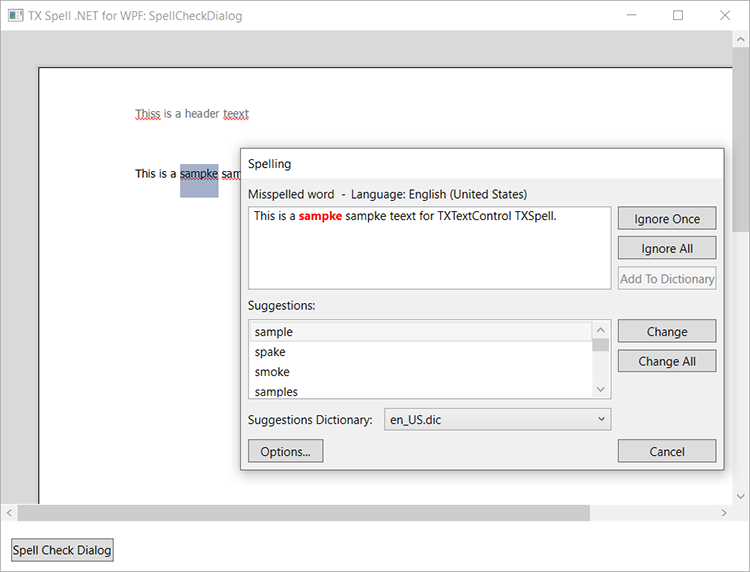
Such a dialog adds three rules to the panel above:
1. **Open it only when there is something to correct.** Call `SetCurrent` first and read `Mode`. If it is `NoWordsToCorrectFound`, show a message instead of the dialog. Either way, reset the provider with [Cancel](https://docs.textcontrol.com/tx-spell-dotnet-wpf/reference/txtextcontrol-proofing/spellingcorrectionuiprovider-statemanager/cancel-method/llms-full.txt) afterward, which returns it to `InitialState`.
2. **Switch buttons by mode.** In `WordToCorrectEditing`, the **Ignore** button becomes **Undo Edit**. For `WordToCorrectIsDuplicate`, **Change** becomes **Delete** and calls `Delete`.
3. **Protect ignored words during the options dialog.** Set [IsOptionsSettings](https://docs.textcontrol.com/tx-spell-dotnet-wpf/reference/txtextcontrol-proofing/spellingcorrectionuiprovider-statemanager/isoptionssettings-property/llms-full.txt) to `true` before you open the options dialog with [OptionsDialog](https://docs.textcontrol.com/tx-spell-dotnet-wpf/reference/txtextcontrol-wpf-proofing/txspellchecker/optionsdialog-method/llms-full.txt): this keeps the words ignored so far. Set it back to `false` when the dialog closes; the `TextControl` is then checked again with the new settings, and the stored ignored words are reset.
[Spell Check Dialog](https://docs.textcontrol.com/tx-spell-dotnet-wpf/user-interface/spell-check-dialog/llms-full.txt) describes the ready-made dialog, which is often enough, and [Spell Checking Examples](https://docs.textcontrol.com/tx-spell-dotnet-wpf/examples/spell-checking/llms-full.txt) lists the three samples.
### Next Steps
- [Events](https://docs.textcontrol.com/tx-spell-dotnet-wpf/spell-checking/events/llms-full.txt): the event-based alternative, for the dialog and the context menus of TX Spell .NET.
- [Incorrect Words and Suggestions](https://docs.textcontrol.com/tx-spell-dotnet-wpf/spell-checking/suggestions/llms-full.txt): the lists behind the provider.
- [Suggestion Controls](https://docs.textcontrol.com/tx-spell-dotnet-wpf/user-interface/suggestions/llms-full.txt): the suggestion lists of the dialog and the context menu, and a `ListBox` of your own.
- [Options Dialog](https://docs.textcontrol.com/tx-spell-dotnet-wpf/user-interface/options-dialog/llms-full.txt): the settings the user can change during a correction.
---
## Nearby
- **Previous:** [Checking Text Parts](https://docs.textcontrol.com/tx-spell-dotnet-wpf/spell-checking/text-parts/llms-full.txt)
- **Next:** [Events](https://docs.textcontrol.com/tx-spell-dotnet-wpf/spell-checking/events/llms-full.txt)