# XML Basics
> Walk through the XML Basics sample for Visual Basic: load an XML file with Load format 10, format it with a CSS style sheet and validate it with a DTD.
- **Product:** TX Text Control ActiveX
- **Section:** Documentation
- **Kind:** Topic
- **Path:** TX Text Control ActiveX > Document Editor > Working With XML Files > XML Basics
- **2046 words**
- **Web URL:** https://docs.textcontrol.com/tx-text-control-activex/document-editor/xml/basics/
- **LLMs URL:** https://docs.textcontrol.com/tx-text-control-activex/document-editor/xml/basics/llms.txt
- **LLMs-Full URL:** https://docs.textcontrol.com/tx-text-control-activex/document-editor/xml/basics/llms-full.txt
---
Three files work together when `TXTextControl` opens an XML document: the XML file holds the data, a CSS file says how it looks and a DTD says which elements it may contain. The XML Basics sample program for Visual Basic opens such a file, and walking through its three files shows what each one contributes.
The source code of the sample is in the *Samples\\vb6\\XMLBasics* sample source directory.
### Open an XML File in the Sample Program
The sample program has one menu item, **Open File**. Its source code looks like the **Open File** routine of the other TX Text Control sample programs. The main difference is the *Format* parameter of the [Load](https://docs.textcontrol.com/tx-text-control-activex/reference/txtextcontrol/load-method/llms-full.txt) method, which has the value 10 to load an XML file:
```vbscript
With CommonDialog1
.Filter = "XML (*.xml)|*.xml"
.Flags = cdlOFNFileMustExist Or cdlOFNHideReadOnly
.CancelError = True
.ShowOpen
If .FileName <> "" Then
TXTextControl1.Load .FileName, , 10
End If
End With
```
A lot happens behind the scenes, however. When you load the sample file *address.xml*, `TXTextControl` loads the XML file and also:
- validates it automatically with the DTD it references;
- formats it according to the CSS style sheet provided.
The following sections look at the three files involved.
### The XML File
The XML file contains a list of addresses:
```xml
Paul
Baker Street
London
paul@hotmail.com
George
george@hotmail.com
```
Unlike an HTML or RTF file, an XML file contains no information about how the text is displayed or formatted.
### The CSS File
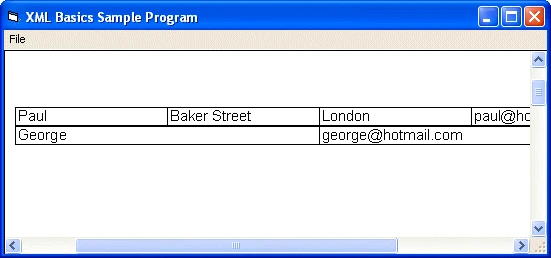
Line 2 of the XML file references a style sheet file called *address.css*. This CSS file tells `TXTextControl` to display an address entry as a table, with the individual elements as table cells that have a border 1 pixel wide and a font size of 11 points:
```css
address { display: table }
address_record { display: table-row}
name, street, city, email { display: table-cell; border: 1px solid; font-size: 11pt }
```
When you load *address.xml* with the sample program, `TXTextControl` displays it according to this style sheet:
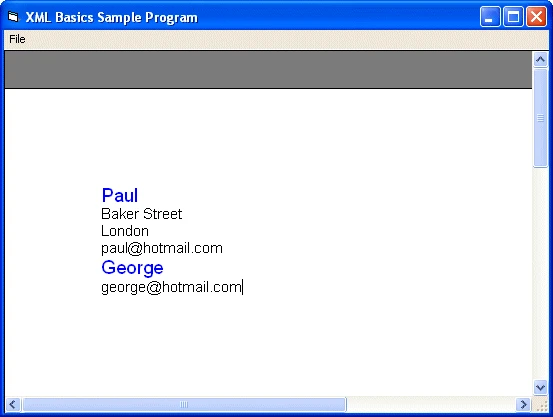
A change to the CSS file can make the text appear in a completely different way. For example, the following style sheet shows a list instead of a table:
```css
name { display: block; font-size: 14pt; color: blue }
street, city, email { display: list-item; font-size: 11pt}
```
With this style sheet, `TXTextControl` displays the XML data as follows:
### The DTD File
The DTD specifies which elements may occur in an XML file and how the elements are ordered or nested. The sample DTD specifies that an *address* contains one or more *address\_record* elements, which in turn contain a *name*, a *street*, a *city* and an *email*. The *street* and *city* elements are optional:
```xml
```
When it loads an XML file, `TXTextControl` checks whether the XML code is valid, which means that it follows the rules specified in the DTD. If it doesn't, an error occurs. In the following example, the required `` element has been removed:
```xml
Baker Street
London
paul@hotmail.com
```
Loading this XML code raises an error:
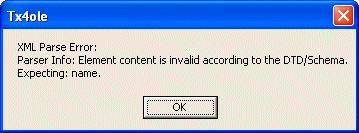
This strict error checking is considered one of the major strengths of XML: it ensures that a document always has a certain structure, so that other applications can process it.
### Next Steps
- [Loading and Saving XML Files](https://docs.textcontrol.com/tx-text-control-activex/document-editor/xml/load-save/llms-full.txt): the events for invalid and not well-formed documents and saving the CSS file.
- [Editing XML Files](https://docs.textcontrol.com/tx-text-control-activex/document-editor/xml/editing/llms-full.txt): the XML editor mode and the combo boxes that insert and delete elements.
- [Programming XML Documents](https://docs.textcontrol.com/tx-text-control-activex/document-editor/xml/programming/llms-full.txt): reading and changing elements with `XMLElements` in code.
---
## Nearby
- **Previous:** [Programming XML Documents](https://docs.textcontrol.com/tx-text-control-activex/document-editor/xml/programming/llms-full.txt)
- **Next:** [Printing](https://docs.textcontrol.com/tx-text-control-activex/document-editor/printing/llms-full.txt)