# Charts and Barcodes
> Charts and barcodes in the Document Editor: chart events and frames, and inserting, changing, exporting and removing barcodes such as QR codes from JavaScript.
- **Product:** TX Text Control .NET Server
- **Section:** Documentation
- **Kind:** Topic
- **Path:** TX Text Control .NET Server > Document Editor > Charts and Barcodes
- **3799 words**
- **Web URL:** https://docs.textcontrol.com/tx-text-control-dotnet-server/document-editor/charts-barcodes/
- **LLMs URL:** https://docs.textcontrol.com/tx-text-control-dotnet-server/document-editor/charts-barcodes/llms.txt
- **LLMs-Full URL:** https://docs.textcontrol.com/tx-text-control-dotnet-server/document-editor/charts-barcodes/llms-full.txt
---
Business graphics and codes for invoices, tickets or labels have objects of their own in the Document Editor. Your code reacts to charts, and it inserts, changes, exports and removes barcodes such as QR codes from JavaScript.
The examples extend the view of the [ASP.NET Core](https://docs.textcontrol.com/tx-text-control-dotnet-server/getting-started/document-editor/aspnet-core/llms-full.txt) tutorial. Charts and barcodes are frames, like images and text frames: [Images](https://docs.textcontrol.com/tx-text-control-dotnet-server/document-editor/images/llms-full.txt) explains how frames are placed, and [Shapes](https://docs.textcontrol.com/tx-text-control-dotnet-server/document-editor/shapes/llms-full.txt) how frames in general are selected and changed.
### Charts
A chart in a document is a chart frame, which holds the chart and its data. Users insert charts from the **Insert** tab of the ribbon and change them with the contextual chart tools that the editor shows for a selected chart. A chart is saved and loaded with the TX Text Control format and RTF; other formats store an image of the chart.
#### What Your Code Can Do With Charts
The JavaScript API has no chart objects and no methods that create or change a chart. It raises four events: `chartCreated`, `chartDeleted`, `chartSelected` and `chartDeselected`. Their handlers receive [ChartEventArgs](https://docs.textcontrol.com/tx-text-control-dotnet-server/reference/javascript/charteventargs/llms-full.txt), whose [chartFrame](https://docs.textcontrol.com/tx-text-control-dotnet-server/reference/javascript/charteventargs/chartframe-property/llms-full.txt) contains the ID, name, location and text position of the chart.
The following code remembers the selected chart and opens the dialog box for the frame attributes of the selected frame. Add it below the editor in *Views/Home/Index.cshtml*:
```html
```
[showDialog](https://docs.textcontrol.com/tx-text-control-dotnet-server/reference/javascript/txtextcontrol/showdialog-method/llms-full.txt) with `FrameAttributesDialog` from [DialogBoxKind](https://docs.textcontrol.com/tx-text-control-dotnet-server/reference/javascript/txtextcontrol/dialogboxkind-enumeration/llms-full.txt) opens the formatting attributes of the selected frame.
On the server, [ServerTextControl.Charts](https://docs.textcontrol.com/tx-text-control-dotnet-server/reference/txtextcontrol/servertextcontrol/charts-property/llms-full.txt) returns the charts of a document. Each [ChartFrame](https://docs.textcontrol.com/tx-text-control-dotnet-server/reference/txtextcontrol-datavisualization/chartframe/llms-full.txt) is associated with a chart control of `System.Windows.Forms.DataVisualization.Charting`, which holds the appearance and the data. In templates, charts can be filled with data by `MailMerge`, which raises [ChartMerged](https://docs.textcontrol.com/tx-text-control-dotnet-server/reference/txtextcontrol-documentserver/mailmerge/chartmerged-event/llms-full.txt) for each merged chart. The blog article [Using MailMerge with Chart Objects and JSON Data](https://www.textcontrol.com/blog/2019/07/18/using-mailmerge-with-chart-objects-and-json-data/) shows how a chart is connected to data.
### Barcodes
A barcode is a barcode frame that encodes a text as a one- or two-dimensional code, such as a QR code. Barcodes are built into TX Text Control and are saved and loaded with the TX Text Control format and RTF; other formats store an image of the barcode. Unlike charts, barcodes are fully available in the JavaScript API. Users insert them with the **Barcode** button of the **Insert** tab, whose menu lists the barcode types by name, such as QRCode, Code128, EAN13 and Datamatrix.
| Object | Represents | You get it from |
|---|---|---|
| [BarcodeCollection](https://docs.textcontrol.com/tx-text-control-dotnet-server/reference/javascript/barcodecollection/llms-full.txt) | The barcodes of the text part with the input focus: the main text, a header or footer, or a text frame | [TXTextControl.barcodes](https://docs.textcontrol.com/tx-text-control-dotnet-server/reference/javascript/txtextcontrol/barcodes-property/llms-full.txt) |
| [BarcodeFrame](https://docs.textcontrol.com/tx-text-control-dotnet-server/reference/javascript/barcodeframe/llms-full.txt) | The frame with its position and size, with the [FrameBase](https://docs.textcontrol.com/tx-text-control-dotnet-server/reference/javascript/framebase/llms-full.txt) methods of all frames | The callbacks of `BarcodeCollection` |
| [Barcode](https://docs.textcontrol.com/tx-text-control-dotnet-server/reference/javascript/barcode/llms-full.txt) | The code itself: type, text, colors and text display | [BarcodeFrame.barcode](https://docs.textcontrol.com/tx-text-control-dotnet-server/reference/javascript/barcodeframe/barcode-property/llms-full.txt) |
#### Insert a Barcode
`BarcodeCollection` inserts barcodes inline, anchored or at a fixed position, like images. Except for `addWithMouse`, its insert methods take the parameters in an order that differs from the other collections: **the callback comes first**, followed by the error callback, the barcode type and the text.
The following code inserts a QR code inline at the input position, and a second one anchored and right-aligned with the text flowing around it:
```html
```
The code works as follows:
- [addInline](https://docs.textcontrol.com/tx-text-control-dotnet-server/reference/javascript/barcodecollection/addinline-method/llms-full.txt) takes the callback, the error callback, the type from [TXTextControl.BarcodeType](https://docs.textcontrol.com/tx-text-control-dotnet-server/reference/javascript/txtextcontrol-barcodetype/llms-full.txt), the text to encode and the text position; `-1` stands for the input position.
- [addAnchored](https://docs.textcontrol.com/tx-text-control-dotnet-server/reference/javascript/barcodecollection/addanchored-method/llms-full.txt) also takes the horizontal alignment and the insertion mode, a value of [FrameInsertionMode](https://docs.textcontrol.com/tx-text-control-dotnet-server/reference/javascript/txtextcontrol/frameinsertionmode-enumeration/llms-full.txt).
- The callback receives the new `BarcodeFrame`. [setName](https://docs.textcontrol.com/tx-text-control-dotnet-server/reference/javascript/framebase/setname-method/llms-full.txt) and [setID](https://docs.textcontrol.com/tx-text-control-dotnet-server/reference/javascript/framebase/setid-method/llms-full.txt) give it a name or ID to find it later.
- [Barcode.setForeColor](https://docs.textcontrol.com/tx-text-control-dotnet-server/reference/javascript/barcode/setforecolor-method/llms-full.txt) sets the color of the code as a CSS color string.
With the input position at the beginning of a letter, **Insert Anchored QR Code** places the code at the right margin, and the text flows around it:
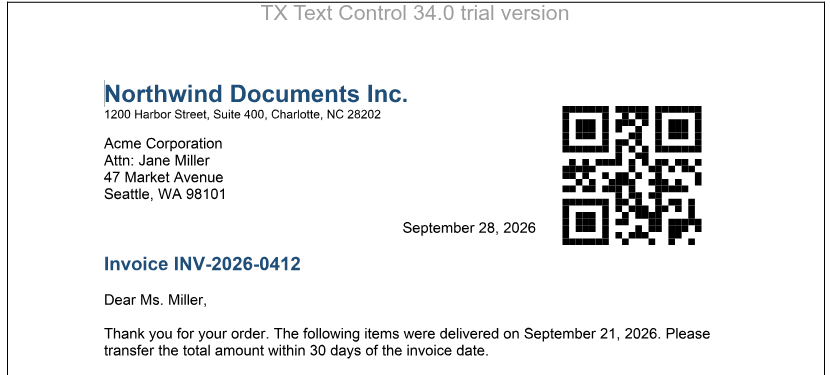
Further methods insert a barcode at a fixed position on a page ([addAtFixedPositionOnPage](https://docs.textcontrol.com/tx-text-control-dotnet-server/reference/javascript/barcodecollection/addatfixedpositiononpage-method/llms-full.txt)) or let the user draw it ([addWithMouse](https://docs.textcontrol.com/tx-text-control-dotnet-server/reference/javascript/barcodecollection/addwithmouse-method/llms-full.txt)).
#### Change, Export and Remove a Barcode
[BarcodeCollection.getItem](https://docs.textcontrol.com/tx-text-control-dotnet-server/reference/javascript/barcodecollection/getitem-method/llms-full.txt) without an ID passes the barcode that the user has selected, and [getItemByName](https://docs.textcontrol.com/tx-text-control-dotnet-server/reference/javascript/barcodecollection/getitembyname-method/llms-full.txt) finds one by its name. The following code changes the text of the selected barcode, shows it as a PNG image and removes the barcode named "invoice-qr":
```html
```
- [Barcode.setText](https://docs.textcontrol.com/tx-text-control-dotnet-server/reference/javascript/barcode/settext-method/llms-full.txt) changes the encoded text.
- [saveImage](https://docs.textcontrol.com/tx-text-control-dotnet-server/reference/javascript/barcode/saveimage-method/llms-full.txt) takes a format from [ImageFormat](https://docs.textcontrol.com/tx-text-control-dotnet-server/reference/javascript/txtextcontrol/imageformat-enumeration/llms-full.txt) first and passes the image as Base64 data to its callback.
- [remove](https://docs.textcontrol.com/tx-text-control-dotnet-server/reference/javascript/barcodecollection/remove-method/llms-full.txt) removes the barcode from the document.
#### Barcode Settings
| Method of `Barcode` | Sets |
|---|---|
| [setBarcodeType](https://docs.textcontrol.com/tx-text-control-dotnet-server/reference/javascript/barcode/setbarcodetype-method/llms-full.txt) | The type of code |
| [setBackColor](https://docs.textcontrol.com/tx-text-control-dotnet-server/reference/javascript/barcode/setbackcolor-method/llms-full.txt) | The background color |
| [setAngle](https://docs.textcontrol.com/tx-text-control-dotnet-server/reference/javascript/barcode/setangle-method/llms-full.txt) | The rotation angle of the code |
| [setAlignment](https://docs.textcontrol.com/tx-text-control-dotnet-server/reference/javascript/barcode/setalignment-method/llms-full.txt) | The position of the code inside the frame, a value of [BarcodeAlignment](https://docs.textcontrol.com/tx-text-control-dotnet-server/reference/javascript/txtextcontrol/barcodealignment-enumeration/llms-full.txt) such as `MiddleCenter` |
| [setShowText](https://docs.textcontrol.com/tx-text-control-dotnet-server/reference/javascript/barcode/setshowtext-method/llms-full.txt), [setTextAlignment](https://docs.textcontrol.com/tx-text-control-dotnet-server/reference/javascript/barcode/settextalignment-method/llms-full.txt) | Whether the encoded text is shown, and whether below or above the code |
| [setAdditionalText](https://docs.textcontrol.com/tx-text-control-dotnet-server/reference/javascript/barcode/setadditionaltext-method/llms-full.txt) | An additional text below or above the code |
| [setUpperTextLength](https://docs.textcontrol.com/tx-text-control-dotnet-server/reference/javascript/barcode/setuppertextlength-method/llms-full.txt) | The maximum length of the text; the frame keeps its size, so a shorter text produces a smaller code |
The reference page of `TXTextControl.BarcodeType` refers to the list of barcode types. [TXTextControl.barcodeTypeSettings](https://docs.textcontrol.com/tx-text-control-dotnet-server/reference/javascript/txtextcontrol/barcodetypesettings-property/llms-full.txt) contains the settings that depend on the type, such as whether a check value is included and shown.
The editor raises `barcodeCreated`, `barcodeDeleted`, `barcodeSelected` and `barcodeDeselected`. Their handlers receive [BarcodeEventArgs](https://docs.textcontrol.com/tx-text-control-dotnet-server/reference/javascript/barcodeeventargs/llms-full.txt) with the ID, name, location and text position of the barcode.
#### Barcodes in Templates and on the Server
In a template, a barcode is filled with data like a merge field: `MailMerge` uses its name to find the data and raises [BarcodeMerged](https://docs.textcontrol.com/tx-text-control-dotnet-server/reference/txtextcontrol-documentserver/mailmerge/barcodemerged-event/llms-full.txt) for each merged barcode. See [Barcodes](https://docs.textcontrol.com/tx-text-control-dotnet-server/mail-merge/barcodes/llms-full.txt) in Mail Merge and Reporting. To create barcodes in code on the server, use [ServerTextControl.Barcodes](https://docs.textcontrol.com/tx-text-control-dotnet-server/reference/txtextcontrol/servertextcontrol/barcodes-property/llms-full.txt); the blog article [Adding QR Codes to PDF Documents in C# .NET](https://www.textcontrol.com/blog/2025/07/15/adding-qr-codes-to-pdf-documents-in-csharp-dotnet/) shows how.
### Next Steps
- [Shapes](https://docs.textcontrol.com/tx-text-control-dotnet-server/document-editor/shapes/llms-full.txt): drawings and text frames.
- [Signature Fields](https://docs.textcontrol.com/tx-text-control-dotnet-server/document-editor/signature-fields/llms-full.txt): frames that hold signatures.
- [Events](https://docs.textcontrol.com/tx-text-control-dotnet-server/document-editor/events/llms-full.txt): all chart, barcode and frame events.
---
## Nearby
- **Previous:** [Shapes](https://docs.textcontrol.com/tx-text-control-dotnet-server/document-editor/shapes/llms-full.txt)
- **Next:** [Headers and Footers](https://docs.textcontrol.com/tx-text-control-dotnet-server/document-editor/headers-footers/llms-full.txt)