# Comments
> Comments in the Document Editor: add comments and replies from JavaScript, list them with author and time, remove them, show the sidebar and react to events.
- **Product:** TX Text Control .NET Server
- **Section:** Documentation
- **Kind:** Topic
- **Path:** TX Text Control .NET Server > Document Editor > Comments
- **3343 words**
- **Web URL:** https://docs.textcontrol.com/tx-text-control-dotnet-server/document-editor/comments/
- **LLMs URL:** https://docs.textcontrol.com/tx-text-control-dotnet-server/document-editor/comments/llms.txt
- **LLMs-Full URL:** https://docs.textcontrol.com/tx-text-control-dotnet-server/document-editor/comments/llms-full.txt
---
In review workflows, users discuss parts of a document in comments without changing its text. Next to how comments work in the Document Editor, you see how your code adds, lists, answers and removes them.
The examples extend the view of the [ASP.NET Core](https://docs.textcontrol.com/tx-text-control-dotnet-server/getting-started/document-editor/aspnet-core/llms-full.txt) tutorial.
### How Comments Work
A comment is a note attached to a piece of text. It stores the comment text, the author, the time it was created and the replies of other users. Comments are compatible with MS Word and are saved and loaded with DOCX, RTF and the TX Text Control format.
Users work with comments in the editor:
- They select text and add a comment from the context menu or with the comment group of the **Proofing** tab. The comment is added when they close the input box.
- The context menu of a comment changes or removes it, or adds a reply.
- The comments sidebar lists all comments with their author and time and has a **Reply** link for each. It is one of the sidebars that the toggle button in the top right corner of the ribbon opens.
- A comment can also be attached to a tracked change. It is removed when the change is accepted or rejected; see [Track Changes](https://docs.textcontrol.com/tx-text-control-dotnet-server/document-editor/track-changes/llms-full.txt).
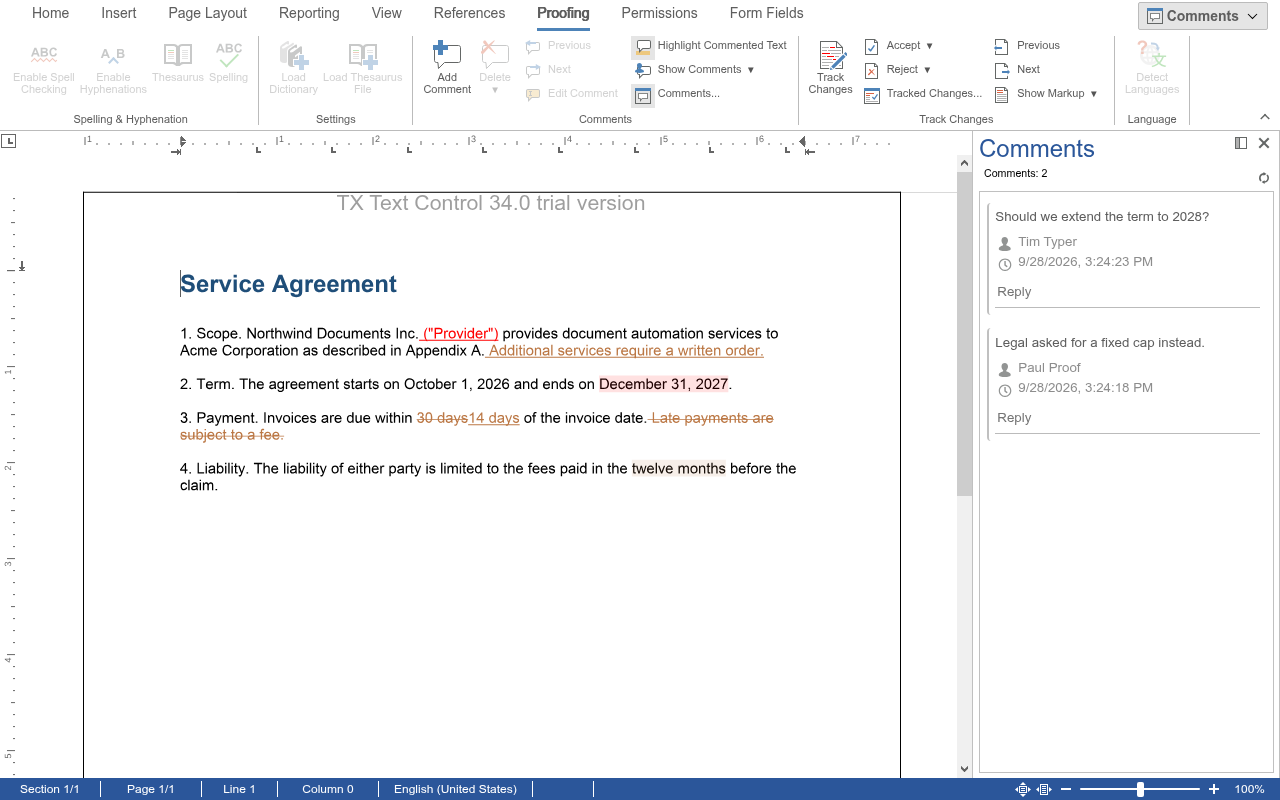
The author of a new comment is the current user, the first name of the user names that you pass to the editor with [TextControlSettings.UserNames](https://docs.textcontrol.com/tx-text-control-dotnet-server/reference/txtextcontrol-web-mvc/textcontrolsettings/usernames-property/llms-full.txt) in a view, or with `userNames` of [DocumentEditorSettings](https://docs.textcontrol.com/tx-text-control-dotnet-server/reference/javascript/documenteditorsettings/usernames-property/llms-full.txt) in a JavaScript page. If the list is empty, the author is unknown.
### Add, List and Remove Comments
[TXTextControl.comments](https://docs.textcontrol.com/tx-text-control-dotnet-server/reference/javascript/formattedtext/comments-property/llms-full.txt) returns the [CommentCollection](https://docs.textcontrol.com/tx-text-control-dotnet-server/reference/javascript/commentcollection/llms-full.txt) of the main text. Each comment in it is a [CommentedText](https://docs.textcontrol.com/tx-text-control-dotnet-server/reference/javascript/commentedtext/llms-full.txt) object.
The following view sets the author, opens the comments sidebar and highlights all comments. Its buttons comment the selected text, reply to the comment at the input position, list all comments and remove a comment. Replace the content of *Views/Home/Index.cshtml*:
```cshtml
@using TXTextControl.Web.MVC
@Html.TXTextControl().TextControl(settings => {
settings.UserNames = new string[] { "Tim Typer" };
}).Render()
```
The code works as follows:
- [CommentCollection.add](https://docs.textcontrol.com/tx-text-control-dotnet-server/reference/javascript/commentcollection/add-method/llms-full.txt) comments the text that is currently selected. The callback receives [CommentCallbackData](https://docs.textcontrol.com/tx-text-control-dotnet-server/reference/javascript/commentcallbackdata/llms-full.txt): [addResult](https://docs.textcontrol.com/tx-text-control-dotnet-server/reference/javascript/commentcallbackdata/addresult-property/llms-full.txt) is `Successful` or a reason from [AddResult](https://docs.textcontrol.com/tx-text-control-dotnet-server/reference/javascript/txtextcontrol/addresult-enumeration/llms-full.txt) such as `NoSelection`, and [comment](https://docs.textcontrol.com/tx-text-control-dotnet-server/reference/javascript/commentcallbackdata/comment-property/llms-full.txt) is the new comment. With `null` instead of a text, the editor opens an input box for the user.
- [getItem](https://docs.textcontrol.com/tx-text-control-dotnet-server/reference/javascript/commentcollection/getitem-method/llms-full.txt) passes the comment at the input position. [addReply](https://docs.textcontrol.com/tx-text-control-dotnet-server/reference/javascript/commentcollection/addreply-method/llms-full.txt) adds a reply with a text to a comment.
- [forEach](https://docs.textcontrol.com/tx-text-control-dotnet-server/reference/javascript/collection/foreach-method/llms-full.txt) calls the function for each comment. [getText](https://docs.textcontrol.com/tx-text-control-dotnet-server/reference/javascript/commentedtext/gettext-method/llms-full.txt) passes the commented text and [getComment](https://docs.textcontrol.com/tx-text-control-dotnet-server/reference/javascript/commentedtext/getcomment-method/llms-full.txt) the text of the comment. [getCreationTime](https://docs.textcontrol.com/tx-text-control-dotnet-server/reference/javascript/commentedtext/getcreationtime-method/llms-full.txt) passes the time as a Unix timestamp in milliseconds, which `new Date` converts.
- [remove](https://docs.textcontrol.com/tx-text-control-dotnet-server/reference/javascript/commentcollection/remove-method/llms-full.txt) removes a comment. The commented text stays in the document.
- [setCommentHighlightMode](https://docs.textcontrol.com/tx-text-control-dotnet-server/reference/javascript/txtextcontrol/setcommenthighlightmode-method/llms-full.txt) sets whether commented text is highlighted, with a value of [HighlightMode](https://docs.textcontrol.com/tx-text-control-dotnet-server/reference/javascript/txtextcontrol/highlightmode-enumeration/llms-full.txt): `Never`, `Activated` (while the input position is in the comment), `Always` or `Auto`.
Select a word, click **Comment Selection**, and the comment appears in the sidebar with the author Tim Typer.
To comment a range without selecting it, [addAtPosition](https://docs.textcontrol.com/tx-text-control-dotnet-server/reference/javascript/commentcollection/addatposition-method/llms-full.txt) takes the comment text, the one-based start position and the length.
### Move Through Comments and Replies
[getNextItem](https://docs.textcontrol.com/tx-text-control-dotnet-server/reference/javascript/commentcollection/getnextitem-method/llms-full.txt) and [getPreviousItem](https://docs.textcontrol.com/tx-text-control-dotnet-server/reference/javascript/commentcollection/getpreviousitem-method/llms-full.txt) pass the next and the previous comment in the text. The following function moves to the next comment and logs its replies:
```javascript
function goToNextComment() {
TXTextControl.comments.getNextItem(function (comment) {
if (!comment) {
return;
}
comment.scrollTo();
comment.getReplies(function (replies) {
if (replies === null) {
return; // the comment has no replies
}
replies.forEach(function (reply) {
reply.getComment(function (replyText) {
console.log("Reply: " + replyText);
});
});
});
});
}
```
- [scrollTo](https://docs.textcontrol.com/tx-text-control-dotnet-server/reference/javascript/commentedtext/scrollto-method/llms-full.txt) moves the input position to the comment and scrolls it into view.
- [getReplies](https://docs.textcontrol.com/tx-text-control-dotnet-server/reference/javascript/commentedtext/getreplies-method/llms-full.txt) passes an array of the replies, or `null`. A reply is a `CommentedText` as well; [getRepliedComment](https://docs.textcontrol.com/tx-text-control-dotnet-server/reference/javascript/commentedtext/getrepliedcomment-method/llms-full.txt) passes the comment it answers.
### Other Properties of a Comment
A `CommentedText` also has [setComment](https://docs.textcontrol.com/tx-text-control-dotnet-server/reference/javascript/commentedtext/setcomment-method/llms-full.txt) to change the text of the comment, [getStart](https://docs.textcontrol.com/tx-text-control-dotnet-server/reference/javascript/commentedtext/getstart-method/llms-full.txt) and [getLength](https://docs.textcontrol.com/tx-text-control-dotnet-server/reference/javascript/commentedtext/getlength-method/llms-full.txt) for the commented range, [setID](https://docs.textcontrol.com/tx-text-control-dotnet-server/reference/javascript/commentedtext/setid-method/llms-full.txt) for an identifier of your choice, [setHighlightColor](https://docs.textcontrol.com/tx-text-control-dotnet-server/reference/javascript/commentedtext/sethighlightcolor-method/llms-full.txt) for the color, and [setActive](https://docs.textcontrol.com/tx-text-control-dotnet-server/reference/javascript/commentedtext/setactive-method/llms-full.txt) to deactivate a comment.
### React to Comments
The editor raises `commentCreated` and `commentDeleted`, `commentChanged` when the text of a comment changes, `commentStateChanged` when a comment becomes active or inactive and `commentedTextEntered` and `commentedTextLeft` when the input position moves into or out of commented text. The handlers receive [CommentEventArgs](https://docs.textcontrol.com/tx-text-control-dotnet-server/reference/javascript/commenteventargs/llms-full.txt), whose `commentedText` is a [CommentedTextInfo](https://docs.textcontrol.com/tx-text-control-dotnet-server/reference/javascript/commentedtextinfo/llms-full.txt) object. Unlike a `CommentedText`, it has no methods and no callbacks; its properties hold the values of the comment when the event was raised:
| Property | Contains |
|---|---|
| `comment`, `userName` | The text of the comment and the name of the user who wrote it |
| `creationTime` | The time the comment was created, as a Unix time stamp in milliseconds |
| `start`, `length` | The one-based start position of the commented text and its length in characters |
| `id`, `number` | The identifier of the comment and its number in the text flow of the document |
| `active` | Whether the comment is active |
| `highlightColor`, `highlightMode` | The highlight color as a CSS color string, and the highlight mode, a value of [HighlightMode](https://docs.textcontrol.com/tx-text-control-dotnet-server/reference/javascript/txtextcontrol/highlightmode-enumeration/llms-full.txt) |
[Events](https://docs.textcontrol.com/tx-text-control-dotnet-server/document-editor/events/llms-full.txt) lists all events.
The blog article [Comments JavaScript API: Useful Tips and Tricks](https://www.textcontrol.com/blog/2024/04/01/comments-javascript-api-useful-tips-and-tricks/) shows more uses of the API. To read the comments of stored documents on the server, use [ServerTextControl.Comments](https://docs.textcontrol.com/tx-text-control-dotnet-server/reference/txtextcontrol/servertextcontrol/comments-property/llms-full.txt).
### Next Steps
- [Track Changes](https://docs.textcontrol.com/tx-text-control-dotnet-server/document-editor/track-changes/llms-full.txt): record and review changes.
- [Context Menus](https://docs.textcontrol.com/tx-text-control-dotnet-server/document-editor/ribbon-ui/context-menus/llms-full.txt): change the context menu, including the menu of comments.
- [Loading and Saving Documents](https://docs.textcontrol.com/tx-text-control-dotnet-server/document-editor/load-save/llms-full.txt): save documents with their comments.
---
## Nearby
- **Previous:** [Track Changes](https://docs.textcontrol.com/tx-text-control-dotnet-server/document-editor/track-changes/llms-full.txt)
- **Next:** [Document Protection](https://docs.textcontrol.com/tx-text-control-dotnet-server/document-editor/protection/llms-full.txt)