# Form Fields
> Create fillable forms in the Document Editor: text, check box, drop-down and date fields from JavaScript, form protection, validation, values and PDF export.
- **Product:** TX Text Control .NET Server
- **Section:** Documentation
- **Kind:** Topic
- **Path:** TX Text Control .NET Server > Document Editor > Form Fields
- **4170 words**
- **Web URL:** https://docs.textcontrol.com/tx-text-control-dotnet-server/document-editor/form-fields/
- **LLMs URL:** https://docs.textcontrol.com/tx-text-control-dotnet-server/document-editor/form-fields/llms.txt
- **LLMs-Full URL:** https://docs.textcontrol.com/tx-text-control-dotnet-server/document-editor/form-fields/llms-full.txt
---
Applications, contracts and questionnaires that users fill out in the browser are built as forms in the Document Editor. The way leads from the available form fields and inserting them through the JavaScript API to a protected form that users fill out, and ends with your code reading the values and exporting the result.
The examples extend the view of the [ASP.NET Core](https://docs.textcontrol.com/tx-text-control-dotnet-server/getting-started/document-editor/aspnet-core/llms-full.txt) tutorial. [Fields](https://docs.textcontrol.com/tx-text-control-dotnet-server/document-editor/fields/llms-full.txt) explains fields in general.
### Form Field Types
A form field is a field that users fill out. Users insert form fields on the **Form Fields** tab of the ribbon. Its **Insert Form Fields** group has five small buttons: text form field, check box, combo box, drop-down list and date form field. **Highlight Form Fields** marks the fields in the document:
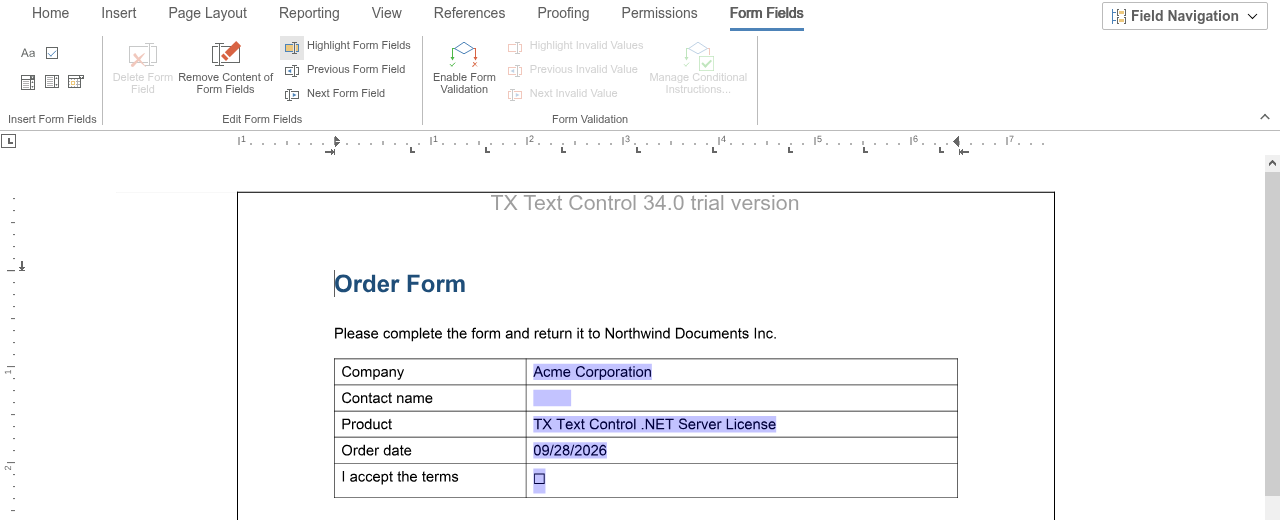
In the JavaScript API, [TXTextControl.formFields](https://docs.textcontrol.com/tx-text-control-dotnet-server/reference/javascript/formattedtext/formfields-property/llms-full.txt) returns a [FormFieldCollection](https://docs.textcontrol.com/tx-text-control-dotnet-server/reference/javascript/formfieldcollection/llms-full.txt) with a method for each type:
| Form field | Object | Inserted with |
|---|---|---|
| Text field | [TextFormField](https://docs.textcontrol.com/tx-text-control-dotnet-server/reference/javascript/textformfield/llms-full.txt) | [addTextFormField](https://docs.textcontrol.com/tx-text-control-dotnet-server/reference/javascript/formfieldcollection/addtextformfield-method/llms-full.txt) |
| Check box | [CheckFormField](https://docs.textcontrol.com/tx-text-control-dotnet-server/reference/javascript/checkformfield/llms-full.txt) | [addCheckFormField](https://docs.textcontrol.com/tx-text-control-dotnet-server/reference/javascript/formfieldcollection/addcheckformfield-method/llms-full.txt) |
| Drop-down list or combo box | [SelectionFormField](https://docs.textcontrol.com/tx-text-control-dotnet-server/reference/javascript/selectionformfield/llms-full.txt) | [addSelectionFormField](https://docs.textcontrol.com/tx-text-control-dotnet-server/reference/javascript/formfieldcollection/addselectionformfield-method/llms-full.txt) |
| Date field with a date picker | [DateFormField](https://docs.textcontrol.com/tx-text-control-dotnet-server/reference/javascript/dateformfield/llms-full.txt) | [addDateFormField](https://docs.textcontrol.com/tx-text-control-dotnet-server/reference/javascript/formfieldcollection/adddateformfield-method/llms-full.txt) |
A selection form field is a drop-down list when users can only choose one of its items, and a combo box when they can also type a value. The inherited [setEditable](https://docs.textcontrol.com/tx-text-control-dotnet-server/reference/javascript/textfield/seteditable-method/llms-full.txt) method decides which: `false` for a drop-down list, `true` for a combo box.
### Insert Form Fields
The methods insert a form field at the current input position. The text, selection and date methods take the width in twips that the field has while it is empty, where 0 stands for a default width. The check box method takes the initial state instead.
The following code inserts one field of each type. Add it below the editor in *Views/Home/Index.cshtml*:
```html
```
The code works as follows:
- Each `add` method passes the new form field to its callback. [setName](https://docs.textcontrol.com/tx-text-control-dotnet-server/reference/javascript/textfield/setname-method/llms-full.txt) gives it the name under which your code and exported PDF forms identify the value.
- [setDescriptiveText](https://docs.textcontrol.com/tx-text-control-dotnet-server/reference/javascript/formfield/setdescriptivetext-method/llms-full.txt) sets the text that screen readers use for the field.
- [setItems](https://docs.textcontrol.com/tx-text-control-dotnet-server/reference/javascript/selectionformfield/setitems-method/llms-full.txt) sets the items of the drop-down list; an item can't be an empty string. [setSelectedIndex](https://docs.textcontrol.com/tx-text-control-dotnet-server/reference/javascript/selectionformfield/setselectedindex-method/llms-full.txt) selects the first item; -1 selects none.
#### Settings of the Form Field Types
- **Text fields** grow with their text. [setEmptyWidth](https://docs.textcontrol.com/tx-text-control-dotnet-server/reference/javascript/textformfield/setemptywidth-method/llms-full.txt) sets their width while they are empty.
- **Check boxes** show a character for each state. [setChecked](https://docs.textcontrol.com/tx-text-control-dotnet-server/reference/javascript/checkformfield/setchecked-method/llms-full.txt) sets the state, and [setCheckedCharacter](https://docs.textcontrol.com/tx-text-control-dotnet-server/reference/javascript/checkformfield/setcheckedcharacter-method/llms-full.txt) and [setUncheckedCharacter](https://docs.textcontrol.com/tx-text-control-dotnet-server/reference/javascript/checkformfield/setuncheckedcharacter-method/llms-full.txt) the characters.
- **Date fields** show a date picker when the user clicks into them. [setDate](https://docs.textcontrol.com/tx-text-control-dotnet-server/reference/javascript/dateformfield/setdate-method/llms-full.txt) sets the date, and [setDateFormat](https://docs.textcontrol.com/tx-text-control-dotnet-server/reference/javascript/dateformfield/setdateformat-method/llms-full.txt) a format from [getSupportedDateFormats](https://docs.textcontrol.com/tx-text-control-dotnet-server/reference/javascript/dateformfield/getsupporteddateformats-method/llms-full.txt); with an empty string, the default format of the field's culture is used.
[FormFieldCollection.getItem](https://docs.textcontrol.com/tx-text-control-dotnet-server/reference/javascript/formfieldcollection/getitem-method/llms-full.txt) passes the form field at the input position, or the field with an ID as the third parameter, and [remove](https://docs.textcontrol.com/tx-text-control-dotnet-server/reference/javascript/formfieldcollection/remove-method/llms-full.txt) removes a form field.
### Let Users Fill Out the Form
A form is ready for users when the document is protected so that only the form fields can be changed. This takes two settings: the document permissions of the document allow filling in form fields, and the editor runs in the `ReadAndSelect` edit mode, in which the text can be read and selected but not changed.
1. In the editor, open the **Permissions** tab. In the **Restrict Editing** group, select **Read Only** and leave **Restrict filling in Form Fields** cleared, so that `allowEditingFormFields` stays `true`.
2. Click **Enforce Protection**.
3. Save the document, for example in the TX Text Control format, as described in [Loading and Saving Documents](https://docs.textcontrol.com/tx-text-control-dotnet-server/document-editor/load-save/llms-full.txt).
4. Load the form in a view whose edit mode is `ReadAndSelect`:
```cshtml
@using TXTextControl.Web.MVC
@Html.TXTextControl().TextControl(settings => {
settings.EditMode = TXTextControl.Web.EditMode.ReadAndSelect;
}).LoadText("Documents/form.tx", TXTextControl.Web.StreamType.InternalUnicodeFormat).Render()
```
[TextControlSettings.EditMode](https://docs.textcontrol.com/tx-text-control-dotnet-server/reference/txtextcontrol-web-mvc/textcontrolsettings/editmode-property/llms-full.txt) sets the edit mode when the view is rendered. In JavaScript, [setEditMode](https://docs.textcontrol.com/tx-text-control-dotnet-server/reference/javascript/txtextcontrol/seteditmode-method/llms-full.txt) changes it while the editor is open, and [TXTextControl.documentPermissions](https://docs.textcontrol.com/tx-text-control-dotnet-server/reference/javascript/txtextcontrol/documentpermissions-property/llms-full.txt) returns the permissions with [allowEditingFormFields](https://docs.textcontrol.com/tx-text-control-dotnet-server/reference/javascript/documentpermissions/alloweditingformfields-property/llms-full.txt).
In the protected form, users can only fill out the form fields. [FormField.setEnabled](https://docs.textcontrol.com/tx-text-control-dotnet-server/reference/javascript/formfield/setenabled-method/llms-full.txt) with `false` excludes a single field; it takes effect in the `ReadAndSelect` mode when form fields may be edited.
### Validate Form Fields
Forms can contain conditional instructions: rules that enable or disable fields, check values or set a value depending on other fields. Users add them with the **Form Validation** group of the **Form Fields** tab: **Enable Form Validation** turns validation on, **Manage Conditional Instructions...** creates and edits the rules, and **Highlight Invalid Values**, **Previous Invalid Value** and **Next Invalid Value** show the values that a rule marked as invalid. [Conditional Instructions](https://docs.textcontrol.com/tx-text-control-dotnet-server/document-processing/conditional-instructions/llms-full.txt) describes the dialog box, the conditions and instructions it offers and a complete booking form.
The rules are applied when the protected form opens and whenever a value they test changes, only while form field validation is turned on, which your code does with [setIsFormFieldValidationEnabled](https://docs.textcontrol.com/tx-text-control-dotnet-server/reference/javascript/txtextcontrol/setisformfieldvalidationenabled-method/llms-full.txt):
```javascript
TXTextControl.addEventListener("documentLoaded", function () {
TXTextControl.setIsFormFieldValidationEnabled(true);
});
```
The blog article [Building a Credit Card Payment Form with Conditional Instructions](https://www.textcontrol.com/blog/2023/03/24/building-a-credit-card-payment-form-with-conditional-instructions/) builds a form with such rules.
### Read the Values
The following code logs every change of a form field, lists the current values and exports the form as a PDF document with the values as static text:
```html
```
- The four events are raised when the value of a field has changed, by code or by the user, and not at every keystroke: `formFieldCheckChanged` when a check box is clicked or toggled with the keyboard, `formFieldDateChanged` and `formFieldSelectionChanged` when a date or an item is picked, and these two and `formFieldTextChanged` when the user has typed a new value and leaves the field. Conditional instructions are evaluated at the same moments. Their handlers receive the field data in `formField`: the name and text of every form field, [checked](https://docs.textcontrol.com/tx-text-control-dotnet-server/reference/javascript/checkformfieldinfo/checked-property/llms-full.txt) for check boxes and [date](https://docs.textcontrol.com/tx-text-control-dotnet-server/reference/javascript/dateformfieldinfo/date-property/llms-full.txt) for date fields.
- [getTextFieldsByType](https://docs.textcontrol.com/tx-text-control-dotnet-server/reference/javascript/formattedtext/gettextfieldsbytype-method/llms-full.txt) with `FormFields` passes the names and texts of all form fields at once.
- [flattenFormFields](https://docs.textcontrol.com/tx-text-control-dotnet-server/reference/javascript/txtextcontrol/flattenformfields-method/llms-full.txt) converts all form fields to static text, so that the values can no longer be changed.
- [saveDocument](https://docs.textcontrol.com/tx-text-control-dotnet-server/reference/javascript/txtextcontrol/savedocument-method/llms-full.txt) with `AdobePDF` saves the result as a PDF document.
To keep the form fillable in the PDF document, save without flattening: form fields are exported as PDF form fields with their names and values. Saved as DOCX, form fields become content controls. [PDF Forms](https://docs.textcontrol.com/tx-text-control-dotnet-server/pdf/forms/llms-full.txt) explains how to read the values of filled PDF forms on the server.
### Next Steps
- [Conditional Instructions](https://docs.textcontrol.com/tx-text-control-dotnet-server/document-processing/conditional-instructions/llms-full.txt): rules that validate and change form fields.
- [Content Controls](https://docs.textcontrol.com/tx-text-control-dotnet-server/document-editor/content-controls/llms-full.txt): what happens to content controls from MS Word documents.
- [Events](https://docs.textcontrol.com/tx-text-control-dotnet-server/document-editor/events/llms-full.txt): all form field events.
- [Flatten Forms](https://docs.textcontrol.com/tx-text-control-dotnet-server/pdf/forms/flatten/llms-full.txt): flatten forms on the server.
- [Document Protection](https://docs.textcontrol.com/tx-text-control-dotnet-server/document-editor/protection/llms-full.txt): document permissions and editable regions.
---
## Nearby
- **Previous:** [Subtext Parts](https://docs.textcontrol.com/tx-text-control-dotnet-server/document-editor/subtext-parts/llms-full.txt)
- **Next:** [Content Controls](https://docs.textcontrol.com/tx-text-control-dotnet-server/document-editor/content-controls/llms-full.txt)