# Text and Paragraph Formatting
> Format text in the Document Editor from JavaScript: fonts and colors with Selection, alignment and spacing with ParagraphFormat, lists, tab stops and styles.
- **Product:** TX Text Control .NET Server
- **Section:** Documentation
- **Kind:** Topic
- **Path:** TX Text Control .NET Server > Document Editor > Text and Paragraph Formatting
- **4592 words**
- **Web URL:** https://docs.textcontrol.com/tx-text-control-dotnet-server/document-editor/formatting/
- **LLMs URL:** https://docs.textcontrol.com/tx-text-control-dotnet-server/document-editor/formatting/llms.txt
- **LLMs-Full URL:** https://docs.textcontrol.com/tx-text-control-dotnet-server/document-editor/formatting/llms-full.txt
---
Formatting doesn't have to come from the ribbon. From buttons, templates or rules of your application, the JavaScript API of the Document Editor sets the character formatting of the selection and the formatting of paragraphs, creates numbered and bulleted lists and applies tab stops and formatting styles.
The examples extend the view of the [ASP.NET Core](https://docs.textcontrol.com/tx-text-control-dotnet-server/getting-started/document-editor/aspnet-core/llms-full.txt) tutorial. [JavaScript API](https://docs.textcontrol.com/tx-text-control-dotnet-server/document-editor/javascript-api/llms-full.txt) explains the callbacks that all calls on this page use.
### How Formatting Works
Users format text with the **Home** tab of the ribbon, in its Font, Paragraph and Styles groups:

Your code formats the same text through objects of the JavaScript API:
| Object | Formats | You get it from |
|---|---|---|
| [Selection](https://docs.textcontrol.com/tx-text-control-dotnet-server/reference/javascript/selection/llms-full.txt) | Characters: font, size, bold, colors and other attributes | [TXTextControl.selection](https://docs.textcontrol.com/tx-text-control-dotnet-server/reference/javascript/txtextcontrol/selection-property/llms-full.txt) |
| [ParagraphFormat](https://docs.textcontrol.com/tx-text-control-dotnet-server/reference/javascript/paragraphformat/llms-full.txt) | Paragraphs: alignment, indents, spacing, frames and tab stops | [Selection.paragraphFormat](https://docs.textcontrol.com/tx-text-control-dotnet-server/reference/javascript/selection/paragraphformat-property/llms-full.txt) |
| [ListFormat](https://docs.textcontrol.com/tx-text-control-dotnet-server/reference/javascript/listformat/llms-full.txt) | Numbered and bulleted lists | [Selection.listFormat](https://docs.textcontrol.com/tx-text-control-dotnet-server/reference/javascript/selection/listformat-property/llms-full.txt) |
| [ParagraphStyle](https://docs.textcontrol.com/tx-text-control-dotnet-server/reference/javascript/paragraphstyle/llms-full.txt) and [InlineStyle](https://docs.textcontrol.com/tx-text-control-dotnet-server/reference/javascript/inlinestyle/llms-full.txt) | Named sets of attributes that you apply to paragraphs or to parts of a paragraph | [TXTextControl.paragraphStyles](https://docs.textcontrol.com/tx-text-control-dotnet-server/reference/javascript/txtextcontrol/paragraphstyles-property/llms-full.txt) and [TXTextControl.inlineStyles](https://docs.textcontrol.com/tx-text-control-dotnet-server/reference/javascript/txtextcontrol/inlinestyles-property/llms-full.txt) |
The set methods change the selected text, or the selected paragraphs. To select text from code, assign the start position and length to `TXTextControl.selection`, for example `TXTextControl.selection = { start: 0, length: 10 };`, or call [TXTextControl.select](https://docs.textcontrol.com/tx-text-control-dotnet-server/reference/javascript/txtextcontrol/select-method/llms-full.txt).
Each get method passes the value to a callback. If the selection contains different values, for example two font sizes, a get method such as [getFontSize](https://docs.textcontrol.com/tx-text-control-dotnet-server/reference/javascript/selection/getfontsize-method/llms-full.txt) passes the default value of the attribute instead; for different fonts, [getFontName](https://docs.textcontrol.com/tx-text-control-dotnet-server/reference/javascript/selection/getfontname-method/llms-full.txt) passes an empty string.
Most sizes and distances are in twips, 1/20 of a point: 240 twips are 12 points. The font size of the selection is an exception: [Selection.setFontSize](https://docs.textcontrol.com/tx-text-control-dotnet-server/reference/javascript/selection/setfontsize-method/llms-full.txt) takes points.
### Format Characters
These methods of `Selection` set character attributes. Each one takes the value, an optional callback and an optional error callback:
| Method | Value |
|---|---|
| [setFontName](https://docs.textcontrol.com/tx-text-control-dotnet-server/reference/javascript/selection/setfontname-method/llms-full.txt) | The name of the font |
| `setFontSize` | The size in points |
| [setBold](https://docs.textcontrol.com/tx-text-control-dotnet-server/reference/javascript/selection/setbold-method/llms-full.txt), [setItalic](https://docs.textcontrol.com/tx-text-control-dotnet-server/reference/javascript/selection/setitalic-method/llms-full.txt), [setStrikeout](https://docs.textcontrol.com/tx-text-control-dotnet-server/reference/javascript/selection/setstrikeout-method/llms-full.txt) | `true` or `false` |
| [setUnderline](https://docs.textcontrol.com/tx-text-control-dotnet-server/reference/javascript/selection/setunderline-method/llms-full.txt) | A value of [FontUnderlineStyle](https://docs.textcontrol.com/tx-text-control-dotnet-server/reference/javascript/txtextcontrol/fontunderlinestyle-enumeration/llms-full.txt) |
| [setForeColor](https://docs.textcontrol.com/tx-text-control-dotnet-server/reference/javascript/selection/setforecolor-method/llms-full.txt), [setTextBackColor](https://docs.textcontrol.com/tx-text-control-dotnet-server/reference/javascript/selection/settextbackcolor-method/llms-full.txt) | A color string, for example `"#1F4E79"` |
| [setBaseline](https://docs.textcontrol.com/tx-text-control-dotnet-server/reference/javascript/selection/setbaseline-method/llms-full.txt) | The distance from the baseline in twips |
| [setAutoBaseline](https://docs.textcontrol.com/tx-text-control-dotnet-server/reference/javascript/selection/setautobaseline-method/llms-full.txt) | Automatic superscript or subscript, a value of [AutoBaseline](https://docs.textcontrol.com/tx-text-control-dotnet-server/reference/javascript/txtextcontrol/autobaseline-enumeration/llms-full.txt) |
| [setCapitals](https://docs.textcontrol.com/tx-text-control-dotnet-server/reference/javascript/selection/setcapitals-method/llms-full.txt) | Capitals or small capitals, a value of [Capitals](https://docs.textcontrol.com/tx-text-control-dotnet-server/reference/javascript/txtextcontrol/capitals-enumeration/llms-full.txt) |
| [setCharacterSpacing](https://docs.textcontrol.com/tx-text-control-dotnet-server/reference/javascript/selection/setcharacterspacing-method/llms-full.txt) | Twips added to each character; a negative value reduces the spacing |
| [setCharacterScaling](https://docs.textcontrol.com/tx-text-control-dotnet-server/reference/javascript/selection/setcharacterscaling-method/llms-full.txt) | The character width in percent of the average width |
| [setCulture](https://docs.textcontrol.com/tx-text-control-dotnet-server/reference/javascript/selection/setculture-method/llms-full.txt) | The language of the text, for example `"de-DE"`, used for spell checking |
Other methods change the selection as a whole: [growFont](https://docs.textcontrol.com/tx-text-control-dotnet-server/reference/javascript/selection/growfont-method/llms-full.txt) and [shrinkFont](https://docs.textcontrol.com/tx-text-control-dotnet-server/reference/javascript/selection/shrinkfont-method/llms-full.txt) change the font size, [changeCapitalization](https://docs.textcontrol.com/tx-text-control-dotnet-server/reference/javascript/selection/changecapitalization-method/llms-full.txt) converts the text to upper or lower case, and [removeFormatting](https://docs.textcontrol.com/tx-text-control-dotnet-server/reference/javascript/selection/removeformatting-method/llms-full.txt) resets the character attributes to their defaults.
### Format Paragraphs
`Selection.paragraphFormat` returns the formatting of the selected paragraphs. Its set methods include:
| Method | Sets |
|---|---|
| [setAlignment](https://docs.textcontrol.com/tx-text-control-dotnet-server/reference/javascript/paragraphformat/setalignment-method/llms-full.txt) | The alignment, a value of [HorizontalAlignment](https://docs.textcontrol.com/tx-text-control-dotnet-server/reference/javascript/txtextcontrol/horizontalalignment-enumeration/llms-full.txt): `Left`, `Right`, `Center` or `Justify` |
| [setLeftIndent](https://docs.textcontrol.com/tx-text-control-dotnet-server/reference/javascript/paragraphformat/setleftindent-method/llms-full.txt), [setRightIndent](https://docs.textcontrol.com/tx-text-control-dotnet-server/reference/javascript/paragraphformat/setrightindent-method/llms-full.txt), [setHangingIndent](https://docs.textcontrol.com/tx-text-control-dotnet-server/reference/javascript/paragraphformat/sethangingindent-method/llms-full.txt) | The indents in twips |
| [setTopDistance](https://docs.textcontrol.com/tx-text-control-dotnet-server/reference/javascript/paragraphformat/settopdistance-method/llms-full.txt), [setBottomDistance](https://docs.textcontrol.com/tx-text-control-dotnet-server/reference/javascript/paragraphformat/setbottomdistance-method/llms-full.txt) | The space to the previous and the next paragraph in twips |
| [setLineSpacing](https://docs.textcontrol.com/tx-text-control-dotnet-server/reference/javascript/paragraphformat/setlinespacing-method/llms-full.txt) | The line spacing in percent of the font size |
| [setAbsoluteLineSpacing](https://docs.textcontrol.com/tx-text-control-dotnet-server/reference/javascript/paragraphformat/setabsolutelinespacing-method/llms-full.txt) | A fixed line spacing in twips |
| [setBackColor](https://docs.textcontrol.com/tx-text-control-dotnet-server/reference/javascript/paragraphformat/setbackcolor-method/llms-full.txt) | The background color |
| [setFrame](https://docs.textcontrol.com/tx-text-control-dotnet-server/reference/javascript/paragraphformat/setframe-method/llms-full.txt), [setFrameStyle](https://docs.textcontrol.com/tx-text-control-dotnet-server/reference/javascript/paragraphformat/setframestyle-method/llms-full.txt), [setFrameLineWidth](https://docs.textcontrol.com/tx-text-control-dotnet-server/reference/javascript/paragraphformat/setframelinewidth-method/llms-full.txt), [setFrameLineColor](https://docs.textcontrol.com/tx-text-control-dotnet-server/reference/javascript/paragraphformat/setframelinecolor-method/llms-full.txt) | Lines around the paragraph: which lines, single or double, their width in twips and their color |
| [setKeepWithNext](https://docs.textcontrol.com/tx-text-control-dotnet-server/reference/javascript/paragraphformat/setkeepwithnext-method/llms-full.txt), [setKeepLinesTogether](https://docs.textcontrol.com/tx-text-control-dotnet-server/reference/javascript/paragraphformat/setkeeplinestogether-method/llms-full.txt), [setPageBreakBefore](https://docs.textcontrol.com/tx-text-control-dotnet-server/reference/javascript/paragraphformat/setpagebreakbefore-method/llms-full.txt) | How the paragraph is split across pages |
The following buttons format the selected text and paragraphs. A helper function turns each set method into a promise, so that the calls run one after another, and [beginUndoAction](https://docs.textcontrol.com/tx-text-control-dotnet-server/reference/javascript/txtextcontrol/beginundoaction-method/llms-full.txt) and [endUndoAction](https://docs.textcontrol.com/tx-text-control-dotnet-server/reference/javascript/txtextcontrol/endundoaction-method/llms-full.txt) make all changes one undo step. Add the code below the editor in *Views/Home/Index.cshtml*:
```html
```
Select a line of text and click **Format Heading**: the line becomes a centered, bold, blue heading, and **Ctrl+Z** removes all changes at once. Select several paragraphs and click **Numbered List** to number them A), B), C).
### Create Lists
`Selection.listFormat` turns the selected paragraphs into a list. [setType](https://docs.textcontrol.com/tx-text-control-dotnet-server/reference/javascript/listformat/settype-method/llms-full.txt) sets the kind of list with a value of [ListType](https://docs.textcontrol.com/tx-text-control-dotnet-server/reference/javascript/txtextcontrol/listtype-enumeration/llms-full.txt): `Bulleted`, `Numbered`, `Structured` or `None`. In a structured list, the numbers of the higher levels are shown in front of each number, as in 1.2.3.
Further methods set the details:
- [setNumberFormat](https://docs.textcontrol.com/tx-text-control-dotnet-server/reference/javascript/listformat/setnumberformat-method/llms-full.txt) chooses Arabic numbers, letters or Roman numbers with a value of [NumberFormat](https://docs.textcontrol.com/tx-text-control-dotnet-server/reference/javascript/txtextcontrol/numberformat-enumeration/llms-full.txt).
- [setFirstNumber](https://docs.textcontrol.com/tx-text-control-dotnet-server/reference/javascript/listformat/setfirstnumber-method/llms-full.txt) and [setRestartNumbering](https://docs.textcontrol.com/tx-text-control-dotnet-server/reference/javascript/listformat/setrestartnumbering-method/llms-full.txt) control where the numbering starts.
- [setLevel](https://docs.textcontrol.com/tx-text-control-dotnet-server/reference/javascript/listformat/setlevel-method/llms-full.txt) sets the level of an item in a bulleted or numbered list.
- [setBulletCharacter](https://docs.textcontrol.com/tx-text-control-dotnet-server/reference/javascript/listformat/setbulletcharacter-method/llms-full.txt) sets the character of a bulleted list.
- [setTextBeforeNumber](https://docs.textcontrol.com/tx-text-control-dotnet-server/reference/javascript/listformat/settextbeforenumber-method/llms-full.txt) and [setTextAfterNumber](https://docs.textcontrol.com/tx-text-control-dotnet-server/reference/javascript/listformat/settextafternumber-method/llms-full.txt) add text around the number, and [setFormatCharacter](https://docs.textcontrol.com/tx-text-control-dotnet-server/reference/javascript/listformat/setformatcharacter-method/llms-full.txt) chooses a tab or a space between the number and the text.
### Set Tab Stops
Tab stops belong to the paragraph format. [setTabPositions](https://docs.textcontrol.com/tx-text-control-dotnet-server/reference/javascript/paragraphformat/settabpositions-method/llms-full.txt) takes an array of positions in twips, and [setTabTypes](https://docs.textcontrol.com/tx-text-control-dotnet-server/reference/javascript/paragraphformat/settabtypes-method/llms-full.txt) an array of the same length with values of [TabType](https://docs.textcontrol.com/tx-text-control-dotnet-server/reference/javascript/txtextcontrol/tabtype-enumeration/llms-full.txt): `LeftTab`, `RightTab`, `CenterTab`, `DecimalTab` or `RightBorderTab`. [setTabLeaders](https://docs.textcontrol.com/tx-text-control-dotnet-server/reference/javascript/paragraphformat/settableaders-method/llms-full.txt) fills the space before a tab stop with dots, dashes or a line, for example in a table of contents.
Users set tab stops in the ruler bar or in the tabs dialog box.
### Use Formatting Styles
A formatting style is a named set of formatting attributes. Paragraph styles format complete paragraphs, and inline styles format parts of a paragraph. When you change a style, every paragraph that uses it changes as well, so styles keep a document consistent.
- [ParagraphStyleCollection.add](https://docs.textcontrol.com/tx-text-control-dotnet-server/reference/javascript/paragraphstylecollection/add-method/llms-full.txt) adds a paragraph style with a name and passes the new style to its callback; [getItem](https://docs.textcontrol.com/tx-text-control-dotnet-server/reference/javascript/paragraphstylecollection/getitem-method/llms-full.txt) returns a style by name, or `null`. The inline style collection has the same methods.
- The set methods of a style, such as [FormattingStyle.setItalic](https://docs.textcontrol.com/tx-text-control-dotnet-server/reference/javascript/formattingstyle/setitalic-method/llms-full.txt), take a callback that isn't optional. A paragraph style also has its own [paragraphFormat](https://docs.textcontrol.com/tx-text-control-dotnet-server/reference/javascript/paragraphstyle/paragraphformat-property/llms-full.txt).
- [FormattingStyle.apply](https://docs.textcontrol.com/tx-text-control-dotnet-server/reference/javascript/formattingstyle/apply-method/llms-full.txt) applies the changed attributes of a style to the document.
- [Selection.setFormattingStyle](https://docs.textcontrol.com/tx-text-control-dotnet-server/reference/javascript/selection/setformattingstyle-method/llms-full.txt) assigns a style to the selected text.
The following button creates a paragraph style named "Note" the first time it is clicked and assigns it to the selected paragraphs:
```html
```
The callbacks are nested because each step depends on the previous one: the style must exist before its attributes are set, and it must be applied before it is assigned.
### Open the Built-In Dialog Boxes
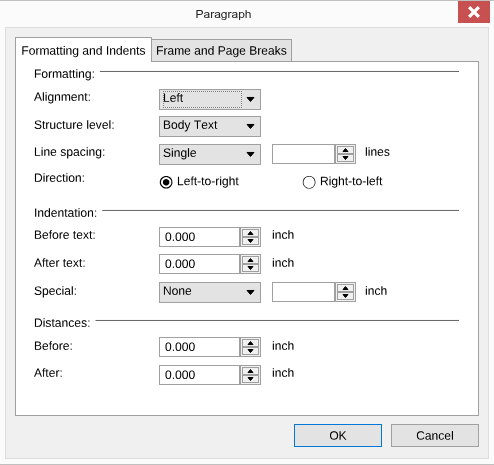
Instead of building your own controls, you can open the dialog boxes of the editor with [showDialog](https://docs.textcontrol.com/tx-text-control-dotnet-server/reference/javascript/txtextcontrol/showdialog-method/llms-full.txt) and a value of [DialogBoxKind](https://docs.textcontrol.com/tx-text-control-dotnet-server/reference/javascript/txtextcontrol/dialogboxkind-enumeration/llms-full.txt), for example `FontDialog`, `ParagraphFormatDialog`, `ListFormatDialog`, `FormattingStylesDialog` or `TabDialog`:
```javascript
TXTextControl.showDialog(TXTextControl.DialogBoxKind.ParagraphFormatDialog);
```
The call opens the **Paragraph** dialog box for the selected paragraphs, the same one the dialog box launcher in the corner of the Paragraph group opens:
### React to Formatting Changes
The editor raises `charFormatChanged` when the character formatting of the selection or the input position changes, and `paragraphFormatChanged` when the formatting of the selected paragraphs changes. Use them, for example, to update the state of your own formatting buttons. [TXTextControl.inputFormat](https://docs.textcontrol.com/tx-text-control-dotnet-server/reference/javascript/txtextcontrol/inputformat-property/llms-full.txt) returns all formatting attributes at the input position and has events for single attributes, such as `boldChanged`. [Events](https://docs.textcontrol.com/tx-text-control-dotnet-server/document-editor/events/llms-full.txt) lists all events.
Whether formatting is allowed at all depends on the edit mode and the [document permissions](https://docs.textcontrol.com/tx-text-control-dotnet-server/document-editor/protection/llms-full.txt): [getCanCharacterFormat](https://docs.textcontrol.com/tx-text-control-dotnet-server/reference/javascript/txtextcontrol/getcancharacterformat-method/llms-full.txt) tells your code whether the selected text can be formatted.
### Next Steps
- [Tables](https://docs.textcontrol.com/tx-text-control-dotnet-server/document-editor/tables/llms-full.txt): insert and format tables.
- [Sections](https://docs.textcontrol.com/tx-text-control-dotnet-server/document-editor/sections/llms-full.txt): page size, margins and columns.
- [Headers and Footers](https://docs.textcontrol.com/tx-text-control-dotnet-server/document-editor/headers-footers/llms-full.txt): text that repeats on every page.
- [Ribbon](https://docs.textcontrol.com/tx-text-control-dotnet-server/document-editor/ribbon-ui/ribbon/llms-full.txt): change the ribbon that users format text with.
---
## Nearby
- **Previous:** [Editing Text](https://docs.textcontrol.com/tx-text-control-dotnet-server/document-editor/editing-text/llms-full.txt)
- **Next:** [Tables](https://docs.textcontrol.com/tx-text-control-dotnet-server/document-editor/tables/llms-full.txt)