# Headers and Footers
> Add headers and footers in the Document Editor from JavaScript: for all or single sections, first and even pages, their text, distance and page number fields.
- **Product:** TX Text Control .NET Server
- **Section:** Documentation
- **Kind:** Topic
- **Path:** TX Text Control .NET Server > Document Editor > Headers and Footers
- **2494 words**
- **Web URL:** https://docs.textcontrol.com/tx-text-control-dotnet-server/document-editor/headers-footers/
- **LLMs URL:** https://docs.textcontrol.com/tx-text-control-dotnet-server/document-editor/headers-footers/llms.txt
- **LLMs-Full URL:** https://docs.textcontrol.com/tx-text-control-dotnet-server/document-editor/headers-footers/llms-full.txt
---
Text that repeats on every page, such as page numbers, belongs in headers and footers. In documents and templates created in the Document Editor, your code adds and changes them with JavaScript: for the whole document or a single section, for the first page and for even pages.
The examples extend the view of the [ASP.NET Core](https://docs.textcontrol.com/tx-text-control-dotnet-server/getting-started/document-editor/aspnet-core/llms-full.txt) tutorial. A section is a part of a document with its own page settings and headers and footers; [Sections](https://docs.textcontrol.com/tx-text-control-dotnet-server/document-editor/sections/llms-full.txt) explains how to insert them.
### How Headers and Footers Work
A header or footer is a [HeaderFooter](https://docs.textcontrol.com/tx-text-control-dotnet-server/reference/javascript/headerfooter/llms-full.txt) object. Like the main text, it is a text part with its own selection, paragraphs and fields, so the formatting methods of [Text and Paragraph Formatting](https://docs.textcontrol.com/tx-text-control-dotnet-server/document-editor/formatting/llms-full.txt) work in it as well.
Headers and footers belong to collections of the type [HeaderFooterCollection](https://docs.textcontrol.com/tx-text-control-dotnet-server/reference/javascript/headerfootercollection/llms-full.txt). There are two places to get them:
- **For all sections**, [TXTextControl.headersAndFooters](https://docs.textcontrol.com/tx-text-control-dotnet-server/reference/javascript/txtextcontrol/headersandfooters-property/llms-full.txt). A header added here appears in every section. The headers of the sections are connected, so changing the content of one changes all of them.
- **For one section**, [Section.headersAndFooters](https://docs.textcontrol.com/tx-text-control-dotnet-server/reference/javascript/section/headersandfooters-property/llms-full.txt). Use it when a section needs a header of its own.
The collections have three methods, each taking a value of [HeaderFooterType](https://docs.textcontrol.com/tx-text-control-dotnet-server/reference/javascript/txtextcontrol/headerfootertype-enumeration/llms-full.txt): [add](https://docs.textcontrol.com/tx-text-control-dotnet-server/reference/javascript/headerfootercollection/add-method/llms-full.txt) adds a header or footer and passes `true` to its callback if it was added, [getItem](https://docs.textcontrol.com/tx-text-control-dotnet-server/reference/javascript/headerfootercollection/getitem-method/llms-full.txt) passes the header or footer to its callback, and [remove](https://docs.textcontrol.com/tx-text-control-dotnet-server/reference/javascript/headerfootercollection/remove-method/llms-full.txt) removes it.
### Header and Footer Types
| Type | Appears on |
|---|---|
| `Header`, `Footer` | All pages; if there is an even header or footer, only the odd pages |
| `FirstPageHeader`, `FirstPageFooter` | The first page of the document or of the section |
| `EvenHeader`, `EvenFooter` | The even pages |
A document with a cover page, for example, has a `FirstPageHeader` that stays empty and a `Header` for all other pages.
### Add a Footer With Page Numbers
A page number field shows the number of the page it is on. It exists only in headers and footers: [HeaderFooter.pageNumberFields](https://docs.textcontrol.com/tx-text-control-dotnet-server/reference/javascript/headerfooter/pagenumberfields-property/llms-full.txt) returns the page number fields of a header or footer.
The following code adds a footer to all sections and inserts a right-aligned page number. Add it below the editor in *Views/Home/Index.cshtml*:
```html
```
The code works as follows:
- `headersAndFooters.add` adds a footer of the type `Footer`. The callback receives `true` if the footer was added.
- `getItem` passes the new [HeaderFooter](https://docs.textcontrol.com/tx-text-control-dotnet-server/reference/javascript/headerfooter/llms-full.txt) to its callback. Its `selection` works like [TXTextControl.selection](https://docs.textcontrol.com/tx-text-control-dotnet-server/reference/javascript/txtextcontrol/selection-property/llms-full.txt), but inside the footer.
- [PageNumberFieldCollection.add](https://docs.textcontrol.com/tx-text-control-dotnet-server/reference/javascript/pagenumberfieldcollection/add-method/llms-full.txt) inserts a page number field. By default, it shows Arabic numbers that start with 1.
- [PageNumberField.setNumberFormat](https://docs.textcontrol.com/tx-text-control-dotnet-server/reference/javascript/pagenumberfield/setnumberformat-method/llms-full.txt) takes a value of [NumberFormat](https://docs.textcontrol.com/tx-text-control-dotnet-server/reference/javascript/txtextcontrol/numberformat-enumeration/llms-full.txt), for example `RomanNumbers` for I, II, III.
Click **Add Page Numbers** and scroll through the document: every page shows its number in the bottom right corner.
A page number field has two more settings: [setStartNumber](https://docs.textcontrol.com/tx-text-control-dotnet-server/reference/javascript/pagenumberfield/setstartnumber-method/llms-full.txt) sets the number of the first page, and [setShowNumberOfPages](https://docs.textcontrol.com/tx-text-control-dotnet-server/reference/javascript/pagenumberfield/setshownumberofpages-method/llms-full.txt) makes the field show the total number of pages instead of the page number. To add text such as "Page" to a header or footer, use the [setText](https://docs.textcontrol.com/tx-text-control-dotnet-server/reference/javascript/selection/settext-method/llms-full.txt) method of its selection.
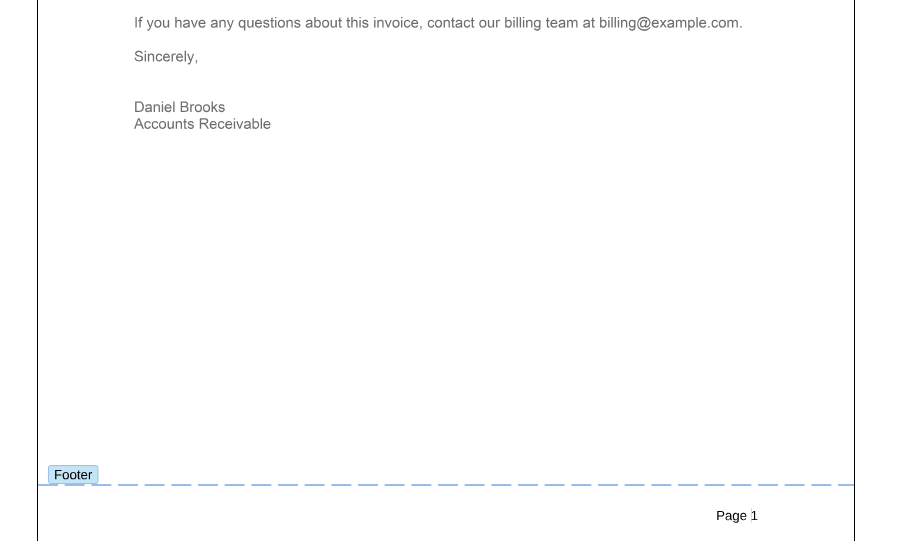
The following picture shows the footer with the text "Page " inserted in front of the field. While the input position is in a footer, the editor marks it with a dashed line and a **Footer** label, and the **Page Number** button of the **Insert** tab becomes available:
### Give a Section Its Own Header
When a document has several sections, each new section starts with the headers and footers of the previous one, connected to them. To give a section a different header, get the header from the section's collection and disconnect it with [setConnectedToPrevious](https://docs.textcontrol.com/tx-text-control-dotnet-server/reference/javascript/headerfooter/setconnectedtoprevious-method/llms-full.txt):
```html
```
- [TXTextControl.sections](https://docs.textcontrol.com/tx-text-control-dotnet-server/reference/javascript/txtextcontrol/sections-property/llms-full.txt) with [getItem](https://docs.textcontrol.com/tx-text-control-dotnet-server/reference/javascript/sectioncollection/getitem-method/llms-full.txt) returns the section that contains the input position.
- `setConnectedToPrevious(false)` separates the header from the header of the previous section. A connected header always has the same content as the previous one.
- [setDistance](https://docs.textcontrol.com/tx-text-control-dotnet-server/reference/javascript/headerfooter/setdistance-method/llms-full.txt) sets the distance of the header from the top of the page in twips, 1/1440 inch. For a footer, it is the distance from the bottom.
- [activate](https://docs.textcontrol.com/tx-text-control-dotnet-server/reference/javascript/headerfooter/activate-method/llms-full.txt) moves the input position into the header, so that the user can type the text. [deactivate](https://docs.textcontrol.com/tx-text-control-dotnet-server/reference/javascript/headerfooter/deactivate-method/llms-full.txt) returns it to the main text.
Place the cursor in a section after the first one and click **Add Section Header**. The cursor moves into the header of this section, and the text you type there doesn't change the header of the previous section.
### React When a Header or Footer Is Edited
The editor raises `headerFooterActivated` when the input position moves into a header or footer and `headerFooterDeactivated` when it leaves. The handler receives [HeaderFooterEventArgs](https://docs.textcontrol.com/tx-text-control-dotnet-server/reference/javascript/headerfootereventargs/llms-full.txt) with the type of the header or footer, its distance and whether it is connected to the previous section. `mainTextActivated` is raised when the main text receives the input position again. [Events](https://docs.textcontrol.com/tx-text-control-dotnet-server/document-editor/events/llms-full.txt) lists all events.
### Next Steps
- [Sections](https://docs.textcontrol.com/tx-text-control-dotnet-server/document-editor/sections/llms-full.txt): insert sections with their own page layout.
- [Fields](https://docs.textcontrol.com/tx-text-control-dotnet-server/document-editor/fields/llms-full.txt): the other fields of a document.
- [Headers and Footers](https://docs.textcontrol.com/tx-text-control-dotnet-server/document-processing/headers-footers/llms-full.txt) in Document Processing: add headers and footers on the server with `ServerTextControl`.
---
## Nearby
- **Previous:** [Charts and Barcodes](https://docs.textcontrol.com/tx-text-control-dotnet-server/document-editor/charts-barcodes/llms-full.txt)
- **Next:** [Sections](https://docs.textcontrol.com/tx-text-control-dotnet-server/document-editor/sections/llms-full.txt)