# Sections
> Use sections in the Document Editor from JavaScript: insert section breaks, set landscape orientation, columns, page margins and borders, restart page numbers.
- **Product:** TX Text Control .NET Server
- **Section:** Documentation
- **Kind:** Topic
- **Path:** TX Text Control .NET Server > Document Editor > Sections
- **2324 words**
- **Web URL:** https://docs.textcontrol.com/tx-text-control-dotnet-server/document-editor/sections/
- **LLMs URL:** https://docs.textcontrol.com/tx-text-control-dotnet-server/document-editor/sections/llms.txt
- **LLMs-Full URL:** https://docs.textcontrol.com/tx-text-control-dotnet-server/document-editor/sections/llms-full.txt
---
A landscape appendix or a two-column part needs a page layout of its own, and sections provide it. From JavaScript, your application inserts section breaks in the Document Editor and sets the orientation, the columns, the page margins and the page numbering of a section.
The examples extend the view of the [ASP.NET Core](https://docs.textcontrol.com/tx-text-control-dotnet-server/getting-started/document-editor/aspnet-core/llms-full.txt) tutorial.
### What a Section Is
A section is a part of a document with its own page size and margins and its own headers and footers. Every document has at least one section, and the sections are numbered from 1. Sections let one document combine different layouts, for example:
- a cover page without a header, followed by the content with a header and page numbers
- a table in landscape orientation between pages in portrait orientation
- a part with two columns
A section begins at a section break. When you insert one, the new section takes over all settings of the previous section, and you change the ones that should differ. The page size and the headers and footers can only differ for a section that begins on a new page.
### Insert a Section Break
[TXTextControl.sections](https://docs.textcontrol.com/tx-text-control-dotnet-server/reference/javascript/txtextcontrol/sections-property/llms-full.txt) returns the [SectionCollection](https://docs.textcontrol.com/tx-text-control-dotnet-server/reference/javascript/sectioncollection/llms-full.txt) of the document. [SectionCollection.add](https://docs.textcontrol.com/tx-text-control-dotnet-server/reference/javascript/sectioncollection/add-method/llms-full.txt) inserts a section break at the current input position. If the input position is inside a paragraph or a table, the break splits it in two. The first parameter is a value of [SectionBreakKind](https://docs.textcontrol.com/tx-text-control-dotnet-server/reference/javascript/txtextcontrol/sectionbreakkind-enumeration/llms-full.txt):
| Value | The new section begins |
|---|---|
| `BeginAtNewPage` | On the next page, with a new paragraph |
| `BeginAtNewLine` | On the next line, with a new paragraph |
[addAtTextPosition](https://docs.textcontrol.com/tx-text-control-dotnet-server/reference/javascript/sectioncollection/addattextposition-method/llms-full.txt) inserts the break at a text position instead.
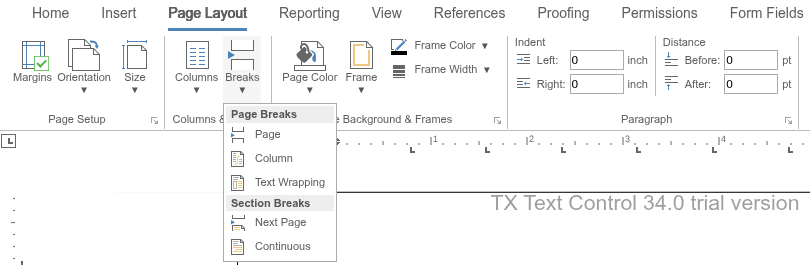
Users insert section breaks with the **Breaks** button of the **Page Layout** tab. Its **Section Breaks** entries correspond to the two values: **Next Page** to `BeginAtNewPage` and **Continuous** to `BeginAtNewLine`. The **Page Setup** and **Columns & Breaks** groups of the same tab set the margins, orientation, size and columns:
### Format a Section
[SectionCollection.getItem](https://docs.textcontrol.com/tx-text-control-dotnet-server/reference/javascript/sectioncollection/getitem-method/llms-full.txt) passes a [Section](https://docs.textcontrol.com/tx-text-control-dotnet-server/reference/javascript/section/llms-full.txt) to its callback: without a number, the section that contains the input position, and with a number as the second parameter, the section with that number. Its [format](https://docs.textcontrol.com/tx-text-control-dotnet-server/reference/javascript/section/format-property/llms-full.txt) property returns a [SectionFormat](https://docs.textcontrol.com/tx-text-control-dotnet-server/reference/javascript/sectionformat/llms-full.txt) with these set methods:
| Method | Sets |
|---|---|
| [setLandscape](https://docs.textcontrol.com/tx-text-control-dotnet-server/reference/javascript/sectionformat/setlandscape-method/llms-full.txt) | Landscape (`true`) or portrait (`false`) orientation |
| [setColumns](https://docs.textcontrol.com/tx-text-control-dotnet-server/reference/javascript/sectionformat/setcolumns-method/llms-full.txt) | The number of page columns |
| [setEqualColumnWidth](https://docs.textcontrol.com/tx-text-control-dotnet-server/reference/javascript/sectionformat/setequalcolumnwidth-method/llms-full.txt) | Whether all columns have the same width, calculated from the page size |
| [setColumnWidths](https://docs.textcontrol.com/tx-text-control-dotnet-server/reference/javascript/sectionformat/setcolumnwidths-method/llms-full.txt) | The widths of the columns in twips |
| [setColumnLineWidth](https://docs.textcontrol.com/tx-text-control-dotnet-server/reference/javascript/sectionformat/setcolumnlinewidth-method/llms-full.txt), [setColumnLineColor](https://docs.textcontrol.com/tx-text-control-dotnet-server/reference/javascript/sectionformat/setcolumnlinecolor-method/llms-full.txt) | A line between the columns: its width in twips (0 for no line) and its color |
| [setRestartPageNumbering](https://docs.textcontrol.com/tx-text-control-dotnet-server/reference/javascript/sectionformat/setrestartpagenumbering-method/llms-full.txt) | Whether the page numbers start again in this section |
| [setBreakKind](https://docs.textcontrol.com/tx-text-control-dotnet-server/reference/javascript/sectionformat/setbreakkind-method/llms-full.txt) | Whether the section begins on a new page or a new line |
The following buttons insert a section break and format the section that contains the input position. Add the code below the editor in *Views/Home/Index.cshtml*:
```html
```
Place the cursor where the new layout should begin and click **Insert Section Break**. The text after the cursor moves to a new page. Click into that page and then **Landscape, Two Columns**: the pages of the new section turn to landscape orientation with two columns, while the pages before the break keep their layout.
### Page Size, Margins and Borders
`SectionFormat` has three more properties for the page of a section:
- [pageSize](https://docs.textcontrol.com/tx-text-control-dotnet-server/reference/javascript/sectionformat/pagesize-property/llms-full.txt) returns a [PageSize](https://docs.textcontrol.com/tx-text-control-dotnet-server/reference/javascript/pagesize/llms-full.txt) with the methods `setWidth` and `setHeight`.
- [pageMargins](https://docs.textcontrol.com/tx-text-control-dotnet-server/reference/javascript/sectionformat/pagemargins-property/llms-full.txt) returns [PageMargins](https://docs.textcontrol.com/tx-text-control-dotnet-server/reference/javascript/pagemargins/llms-full.txt) with `setLeft`, `setTop`, `setRight` and `setBottom`.
- [pageBorder](https://docs.textcontrol.com/tx-text-control-dotnet-server/reference/javascript/sectionformat/pageborder-property/llms-full.txt) returns a [PageBorder](https://docs.textcontrol.com/tx-text-control-dotnet-server/reference/javascript/pageborder/llms-full.txt), a border in the page margin with separate lines for each side. It can be limited to the first page or leave out the first page.
The values of page sizes and margins are in the page unit of the document, which [TXTextControl.setPageUnit](https://docs.textcontrol.com/tx-text-control-dotnet-server/reference/javascript/txtextcontrol/setpageunit-method/llms-full.txt) sets with a value of [MeasuringUnit](https://docs.textcontrol.com/tx-text-control-dotnet-server/reference/javascript/txtextcontrol/measuringunit-enumeration/llms-full.txt), such as `Twips` or `Millimeter`. For the page size and margins of the whole document, use [TXTextControl.pageSize](https://docs.textcontrol.com/tx-text-control-dotnet-server/reference/javascript/txtextcontrol/pagesize-property/llms-full.txt) and [TXTextControl.pageMargins](https://docs.textcontrol.com/tx-text-control-dotnet-server/reference/javascript/txtextcontrol/pagemargins-property/llms-full.txt), whose default unit is 1/100 inch.
To let users change these settings in a dialog box, open the section format dialog box of the editor:
```javascript
TXTextControl.showDialog(TXTextControl.DialogBoxKind.SectionFormatDialog);
```
### Find the Sections of a Document
`SectionCollection` is a collection like the others of the API, so [getCount](https://docs.textcontrol.com/tx-text-control-dotnet-server/reference/javascript/collection/getcount-method/llms-full.txt) passes the number of sections and [forEach](https://docs.textcontrol.com/tx-text-control-dotnet-server/reference/javascript/collection/foreach-method/llms-full.txt) calls a function for each one. A `Section` also returns its [number](https://docs.textcontrol.com/tx-text-control-dotnet-server/reference/javascript/section/getnumber-method/llms-full.txt), its one-based [start](https://docs.textcontrol.com/tx-text-control-dotnet-server/reference/javascript/section/getstart-method/llms-full.txt) and its [length](https://docs.textcontrol.com/tx-text-control-dotnet-server/reference/javascript/section/getlength-method/llms-full.txt) in characters, and [select](https://docs.textcontrol.com/tx-text-control-dotnet-server/reference/javascript/section/select-method/llms-full.txt) selects its text.
The editor raises `pageFormatChanged` when the page format changes; see [Events](https://docs.textcontrol.com/tx-text-control-dotnet-server/document-editor/events/llms-full.txt).
### Next Steps
- [Headers and Footers](https://docs.textcontrol.com/tx-text-control-dotnet-server/document-editor/headers-footers/llms-full.txt): give a section its own header and page numbers.
- [Text and Paragraph Formatting](https://docs.textcontrol.com/tx-text-control-dotnet-server/document-editor/formatting/llms-full.txt): page breaks within a section.
- [Sections](https://docs.textcontrol.com/tx-text-control-dotnet-server/document-processing/sections/llms-full.txt) in Document Processing: work with sections on the server with `ServerTextControl`.
---
## Nearby
- **Previous:** [Headers and Footers](https://docs.textcontrol.com/tx-text-control-dotnet-server/document-editor/headers-footers/llms-full.txt)
- **Next:** [Footnotes](https://docs.textcontrol.com/tx-text-control-dotnet-server/document-editor/footnotes/llms-full.txt)