# Shapes
> Handle drawings with MS Word shapes in the Document Editor from JavaScript: drawing events, frames and marker lines, plus adding text frames with borders.
- **Product:** TX Text Control .NET Server
- **Section:** Documentation
- **Kind:** Topic
- **Path:** TX Text Control .NET Server > Document Editor > Shapes
- **3509 words**
- **Web URL:** https://docs.textcontrol.com/tx-text-control-dotnet-server/document-editor/shapes/
- **LLMs URL:** https://docs.textcontrol.com/tx-text-control-dotnet-server/document-editor/shapes/llms.txt
- **LLMs-Full URL:** https://docs.textcontrol.com/tx-text-control-dotnet-server/document-editor/shapes/llms-full.txt
---
Not everything in a document is part of the text flow. Drawings with MS Word-compatible shapes, text frames, charts and barcodes are objects that users draw or place over the text in the Document Editor, and your code can do different things with each of them through the JavaScript API, up to where the API ends. That matters when your application works with documents that contain shapes or adds boxes of text.
The examples extend the view of the [ASP.NET Core](https://docs.textcontrol.com/tx-text-control-dotnet-server/getting-started/document-editor/aspnet-core/llms-full.txt) tutorial.
### Drawings and Shapes
A drawing is a frame in the document that holds one or more shapes, such as rectangles, arrows or callouts. The shapes are compatible with the preset shapes of MS Word, so drawings from DOCX documents keep their shapes when they are loaded and saved.
In the editor, a drawing behaves in two ways:
- **As a frame.** The user selects the drawing as a whole and moves, resizes, aligns and wraps it like an image.
- **As a canvas.** A double-click inside the drawing activates it. The user then selects and changes the single shapes inside: their type, fill, outline and order.
Users insert drawings and shapes with the **Shape** button of the **Insert** tab. Its menu groups the shapes by kind and also creates an empty drawing canvas and turns the drawing marker lines on and off:
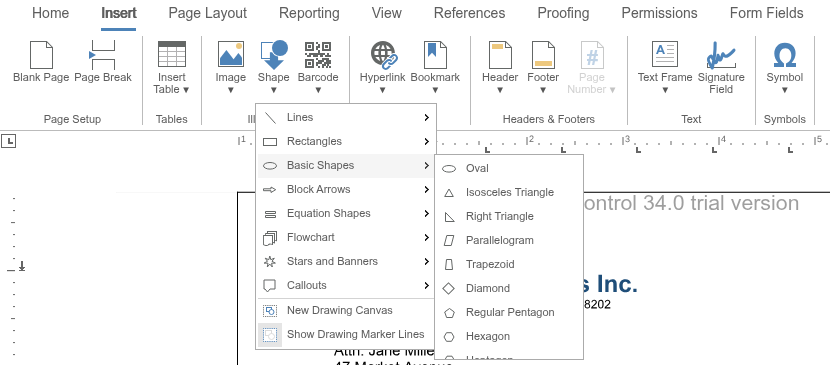
Users format drawings and shapes with the contextual tabs that the editor shows for them.
#### What Your Code Can Do With Drawings
The JavaScript API has no methods that create a drawing, add a shape to it or read or change a single shape. Shapes come from the user interface of the editor or from a loaded document. Your code can:
- **React to drawings.** The editor raises `drawingCreated`, `drawingDeleted`, `drawingSelected`, `drawingDeselected`, `drawingActivated` and `drawingDeactivated`. The handlers receive [DrawingEventArgs](https://docs.textcontrol.com/tx-text-control-dotnet-server/reference/javascript/drawingeventargs/llms-full.txt), whose [drawingFrame](https://docs.textcontrol.com/tx-text-control-dotnet-server/reference/javascript/drawingeventargs/drawingframe-property/llms-full.txt) contains the ID, name, location and text position of the drawing.
- **Change the frame of a drawing.** [TXTextControl.frames](https://docs.textcontrol.com/tx-text-control-dotnet-server/reference/javascript/formattedtext/frames-property/llms-full.txt) returns the frames of the document. [FrameCollection.getItem](https://docs.textcontrol.com/tx-text-control-dotnet-server/reference/javascript/framecollection/getitem-method/llms-full.txt) without an ID passes the frame that the user has selected, as a [FrameBase](https://docs.textcontrol.com/tx-text-control-dotnet-server/reference/javascript/framebase/llms-full.txt) object. Its methods change the size, alignment, position and insertion mode of the frame, without changing the shapes inside.
- **Show marker lines.** [setDrawingMarkerLines](https://docs.textcontrol.com/tx-text-control-dotnet-server/reference/javascript/txtextcontrol/setdrawingmarkerlines-method/llms-full.txt) shows a marker frame around drawings, so that users see their position and size.
- **Select drawings behind the text.** [setSelectObjects](https://docs.textcontrol.com/tx-text-control-dotnet-server/reference/javascript/txtextcontrol/setselectobjects-method/llms-full.txt) with `true` lets a mouse click select a drawing that lies behind the text.
The following code turns on marker lines, logs selected drawings and describes or locks the drawing that the user has selected. Add it below the editor in *Views/Home/Index.cshtml*:
```html
```
- [setDescriptiveText](https://docs.textcontrol.com/tx-text-control-dotnet-server/reference/javascript/framebase/setdescriptivetext-method/llms-full.txt) sets the text that screen readers use for the drawing.
- [setMoveable](https://docs.textcontrol.com/tx-text-control-dotnet-server/reference/javascript/framebase/setmoveable-method/llms-full.txt) and [setSizeable](https://docs.textcontrol.com/tx-text-control-dotnet-server/reference/javascript/framebase/setsizeable-method/llms-full.txt) with `false` keep users from moving and resizing the frame with the mouse.
`frames.getItem` passes whichever frame is selected: a drawing, an image, a text frame or a barcode. Call the functions after the user has selected a drawing.
On the server, [ServerTextControl.Drawings](https://docs.textcontrol.com/tx-text-control-dotnet-server/reference/txtextcontrol/servertextcontrol/drawings-property/llms-full.txt) reads and removes the drawings of a document, and [TXDrawingCore](https://docs.textcontrol.com/tx-text-control-dotnet-server/reference/txtextcontrol-drawing/txdrawingcore/llms-full.txt), added in version 33.0, creates shapes and renders them as SVG, which you insert as an image. [Text Frames and Shapes](https://docs.textcontrol.com/tx-text-control-dotnet-server/document-processing/text-frames-shapes/llms-full.txt) shows both.
### Text Frames
A text frame is a rectangle with text that users edit like the main text. Unlike drawings, text frames are fully programmable: [TXTextControl.textFrames](https://docs.textcontrol.com/tx-text-control-dotnet-server/reference/javascript/txtextcontrol/textframes-property/llms-full.txt) returns a [TextFrameCollection](https://docs.textcontrol.com/tx-text-control-dotnet-server/reference/javascript/textframecollection/llms-full.txt) that adds, finds and removes them. A [TextFrame](https://docs.textcontrol.com/tx-text-control-dotnet-server/reference/javascript/textframe/llms-full.txt) is a text part of its own, with a selection, paragraphs and tables.
Text frames are placed like images: inline with [addInline](https://docs.textcontrol.com/tx-text-control-dotnet-server/reference/javascript/textframecollection/addinline-method/llms-full.txt), whose error callback comes before the callback, anchored to a paragraph with [addAnchored](https://docs.textcontrol.com/tx-text-control-dotnet-server/reference/javascript/textframecollection/addanchored-method/llms-full.txt) or [addAnchoredAtLocation](https://docs.textcontrol.com/tx-text-control-dotnet-server/reference/javascript/textframecollection/addanchoredatlocation-method/llms-full.txt), or at a fixed position with [addAtFixedPositionOnPage](https://docs.textcontrol.com/tx-text-control-dotnet-server/reference/javascript/textframecollection/addatfixedpositiononpage-method/llms-full.txt) and [addAtFixedPositionInDocument](https://docs.textcontrol.com/tx-text-control-dotnet-server/reference/javascript/textframecollection/addatfixedpositionindocument-method/llms-full.txt). With [addWithMouse](https://docs.textcontrol.com/tx-text-control-dotnet-server/reference/javascript/textframecollection/addwithmouse-method/llms-full.txt), the user draws the frame. [Images](https://docs.textcontrol.com/tx-text-control-dotnet-server/document-editor/images/llms-full.txt) explains the kinds of placement and the insertion modes.
The following code inserts a text frame with a double blue border at the input position and fills it with text:
```html
```
The code works as follows:
- `addAnchored` takes the size as an object with `width` and `height` in twips, the alignment, the text position (`-1` for the input position) and a value of [TextFrameInsertionMode](https://docs.textcontrol.com/tx-text-control-dotnet-server/reference/javascript/txtextcontrol/textframeinsertionmode-enumeration/llms-full.txt). `DisplaceText` lets the text flow around the frame. The callback receives the new text frame.
- [setID](https://docs.textcontrol.com/tx-text-control-dotnet-server/reference/javascript/textframe/setid-method/llms-full.txt) gives the frame the ID 1, which `removeTextFrame` passes to [getItem](https://docs.textcontrol.com/tx-text-control-dotnet-server/reference/javascript/textframecollection/getitem-method/llms-full.txt) to find it again.
- [setBorderWidth](https://docs.textcontrol.com/tx-text-control-dotnet-server/reference/javascript/textframe/setborderwidth-method/llms-full.txt) sets the width of the border in twips; 0 removes the border. [setBorderColor](https://docs.textcontrol.com/tx-text-control-dotnet-server/reference/javascript/textframe/setbordercolor-method/llms-full.txt) and [setBorderStyle](https://docs.textcontrol.com/tx-text-control-dotnet-server/reference/javascript/textframe/setborderstyle-method/llms-full.txt) set its color and a single or double line from [FrameStyle](https://docs.textcontrol.com/tx-text-control-dotnet-server/reference/javascript/txtextcontrol/framestyle-enumeration/llms-full.txt). Both were added in version 30.0, together with [getBorderColor](https://docs.textcontrol.com/tx-text-control-dotnet-server/reference/javascript/textframe/getbordercolor-method/llms-full.txt) and [getBorderStyle](https://docs.textcontrol.com/tx-text-control-dotnet-server/reference/javascript/textframe/getborderstyle-method/llms-full.txt), which pass the current color and style of the border to a callback, as [getBorderWidth](https://docs.textcontrol.com/tx-text-control-dotnet-server/reference/javascript/textframe/getborderwidth-method/llms-full.txt) passes its width.
- The `selection` of the text frame works like the selection of the main text; [setText](https://docs.textcontrol.com/tx-text-control-dotnet-server/reference/javascript/selection/settext-method/llms-full.txt) inserts the text into the frame.
Further methods of `TextFrame` set the background color ([setBackColor](https://docs.textcontrol.com/tx-text-control-dotnet-server/reference/javascript/textframe/setbackcolor-method/llms-full.txt)), the transparency from 0.0 to 1.0 ([setTransparency](https://docs.textcontrol.com/tx-text-control-dotnet-server/reference/javascript/textframe/settransparency-method/llms-full.txt)) and the distance between the border and the text ([setInternalMargins](https://docs.textcontrol.com/tx-text-control-dotnet-server/reference/javascript/textframe/setinternalmargins-method/llms-full.txt)). [activate](https://docs.textcontrol.com/tx-text-control-dotnet-server/reference/javascript/textframe/activate-method/llms-full.txt) moves the input position into the frame. Frames without a border are shown with marker lines when [setTextFrameMarkerLines](https://docs.textcontrol.com/tx-text-control-dotnet-server/reference/javascript/txtextcontrol/settextframemarkerlines-method/llms-full.txt) is turned on.
The editor raises `textFrameCreated`, `textFrameDeleted`, `textFrameSelected` and `textFrameDeselected`, and `textFrameActivated` and `textFrameDeactivated` when the input position moves into or out of a text frame.
### Charts and Barcodes
Charts and barcodes are frames as well:
- **Charts** are inserted and formatted with the ribbon. The JavaScript API has no chart objects; it raises the events `chartCreated`, `chartDeleted`, `chartSelected` and `chartDeselected`.
- **Barcodes** are available in the JavaScript API: [TXTextControl.barcodes](https://docs.textcontrol.com/tx-text-control-dotnet-server/reference/javascript/txtextcontrol/barcodes-property/llms-full.txt) returns the barcodes of the text part with the input focus, and [BarcodeCollection.addInline](https://docs.textcontrol.com/tx-text-control-dotnet-server/reference/javascript/barcodecollection/addinline-method/llms-full.txt) inserts a barcode of a type and with a text. Its callback is the first parameter.
[Charts and Barcodes](https://docs.textcontrol.com/tx-text-control-dotnet-server/document-editor/charts-barcodes/llms-full.txt) describes both in detail.
### Next Steps
- [Images](https://docs.textcontrol.com/tx-text-control-dotnet-server/document-editor/images/llms-full.txt): placement and insertion modes of frames.
- [Events](https://docs.textcontrol.com/tx-text-control-dotnet-server/document-editor/events/llms-full.txt): all frame, drawing and text frame events.
- [Charts and Barcodes](https://docs.textcontrol.com/tx-text-control-dotnet-server/document-editor/charts-barcodes/llms-full.txt): charts and barcodes in the editor.
- [Barcodes](https://docs.textcontrol.com/tx-text-control-dotnet-server/mail-merge/barcodes/llms-full.txt) in Mail Merge and Reporting: fill barcodes with data in templates.
---
## Nearby
- **Previous:** [Images](https://docs.textcontrol.com/tx-text-control-dotnet-server/document-editor/images/llms-full.txt)
- **Next:** [Charts and Barcodes](https://docs.textcontrol.com/tx-text-control-dotnet-server/document-editor/charts-barcodes/llms-full.txt)