# Spell Checking
> Add TX Spell .NET spell checking to the Document Editor: TXTextControl.TXSpell.Core.SDK, languages, user dictionaries, misspelled words and hyphenation.
- **Product:** TX Text Control .NET Server
- **Section:** Documentation
- **Kind:** Topic
- **Path:** TX Text Control .NET Server > Document Editor > Spell Checking
- **3433 words**
- **Web URL:** https://docs.textcontrol.com/tx-text-control-dotnet-server/document-editor/spell-checking/
- **LLMs URL:** https://docs.textcontrol.com/tx-text-control-dotnet-server/document-editor/spell-checking/llms.txt
- **LLMs-Full URL:** https://docs.textcontrol.com/tx-text-control-dotnet-server/document-editor/spell-checking/llms-full.txt
---
With TX Spell .NET, the Document Editor highlights spelling errors as users type. You add it to your application and control it through the JavaScript API: turning it on, setting the language of text, managing dictionaries, opening the spell checking dialog boxes, working with misspelled words and hyphenating words.
The examples extend the application of the [ASP.NET Core](https://docs.textcontrol.com/tx-text-control-dotnet-server/getting-started/document-editor/aspnet-core/llms-full.txt) tutorial.
### What You Need
Spell checking is provided by TX Spell .NET, a separate Text Control product. It provides the NuGet package `TXTextControl.TXSpell.Core.SDK` for .NET and ASP.NET Core applications. When the application that hosts the Document Editor backend includes this package and spell checking is turned on, misspelled words are highlighted as users type.
Add the package to the ASP.NET Core project, next to the packages of the tutorial:
```bash
dotnet add package TXTextControl.TXSpell.Core.SDK
```
The package adds the required files and the folders for the dictionaries to the project. For licensing questions about TX Spell .NET, contact the [Text Control sales team](https://www.textcontrol.com/contact/).
### Turn Spell Checking On
[setIsSpellCheckingEnabled](https://docs.textcontrol.com/tx-text-control-dotnet-server/reference/javascript/txtextcontrol/setisspellcheckingenabled-method/llms-full.txt) turns spell checking on or off, and [getIsSpellCheckingEnabled](https://docs.textcontrol.com/tx-text-control-dotnet-server/reference/javascript/txtextcontrol/getisspellcheckingenabled-method/llms-full.txt) passes the current state. The following view turns it on when the editor is loaded and adds buttons for the functions of this page. Replace the content of *Views/Home/Index.cshtml*:
```cshtml
@using TXTextControl.Web.MVC
@Html.TXTextControl().TextControl().Render()
```
Type a sentence with a spelling mistake: the misspelled word is underlined with a red wavy line. A right-click on it opens a context menu with suggestions and the commands **Ignore**, **Ignore All** and **Add to Dictionary**:
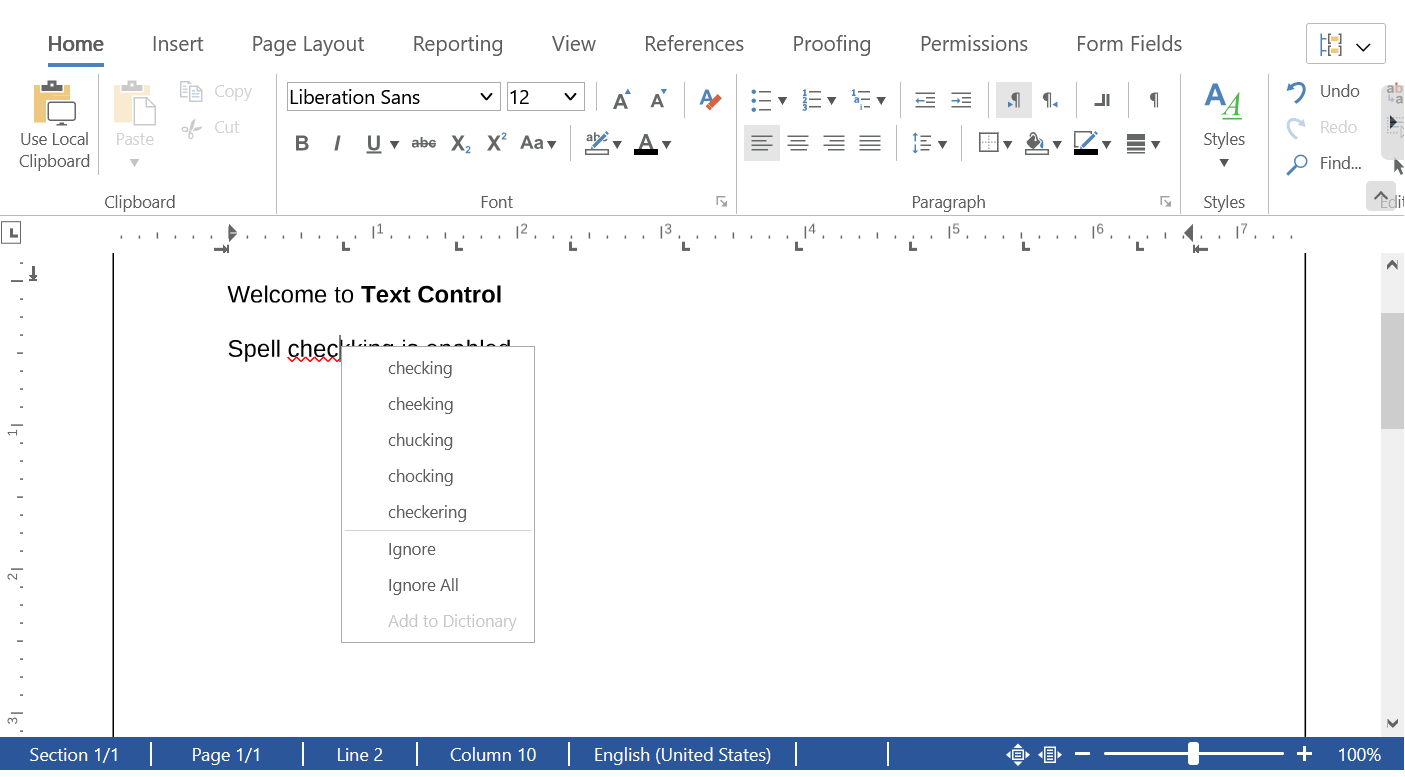
The functions are explained in the following sections. The older property `isSpellCheckingEnabled` is obsolete; use the get and set methods.
### Set the Language of Text
Spell checking uses the dictionary for the language of the text. The language is a character attribute:
- [Selection.setCulture](https://docs.textcontrol.com/tx-text-control-dotnet-server/reference/javascript/selection/setculture-method/llms-full.txt) sets the language of the selected text with a culture name such as `"en-US"` or `"de-DE"`. The `setLanguage` function of the view uses it.
- [FormattingStyle.setCulture](https://docs.textcontrol.com/tx-text-control-dotnet-server/reference/javascript/formattingstyle/setculture-method/llms-full.txt) sets the language of a formatting style, so that all text with that style is checked in that language.
- [setIsLanguageDetectionEnabled](https://docs.textcontrol.com/tx-text-control-dotnet-server/reference/javascript/txtextcontrol/setislanguagedetectionenabled-method/llms-full.txt) turns the automatic detection of the language on or off.
Users set the language of the selected text in the language dialog box, which [showDialog](https://docs.textcontrol.com/tx-text-control-dotnet-server/reference/javascript/txtextcontrol/showdialog-method/llms-full.txt) opens with `LanguageDialog` from [DialogBoxKind](https://docs.textcontrol.com/tx-text-control-dotnet-server/reference/javascript/txtextcontrol/dialogboxkind-enumeration/llms-full.txt).
### Dictionaries
The dictionaries are files on the server. [TXTextControl.Proofing](https://docs.textcontrol.com/tx-text-control-dotnet-server/reference/javascript/txtextcontrol-proofing/llms-full.txt) contains the methods that manage them:
- [getDictionaryList](https://docs.textcontrol.com/tx-text-control-dotnet-server/reference/javascript/txtextcontrol-proofing/getdictionarylist-method/llms-full.txt) passes an array of [DictionaryInfo](https://docs.textcontrol.com/tx-text-control-dotnet-server/reference/javascript/dictionaryinfo/llms-full.txt) objects with the [fileName](https://docs.textcontrol.com/tx-text-control-dotnet-server/reference/javascript/dictionaryinfo/filename-property/llms-full.txt) of each dictionary and whether it [isLoaded](https://docs.textcontrol.com/tx-text-control-dotnet-server/reference/javascript/dictionaryinfo/isloaded-property/llms-full.txt).
- [loadDictionary](https://docs.textcontrol.com/tx-text-control-dotnet-server/reference/javascript/txtextcontrol-proofing/loaddictionary-method/llms-full.txt) loads a dictionary by its file name, and [removeDictionary](https://docs.textcontrol.com/tx-text-control-dotnet-server/reference/javascript/txtextcontrol-proofing/removedictionary-method/llms-full.txt) removes it from the loaded dictionaries.
TX Spell .NET supports most Hunspell dictionaries of OpenOffice. The license terms of each dictionary apply.
#### User Dictionaries
A user dictionary contains words that the spell checker accepts in addition to a dictionary, such as product names. [loadUserDictionary](https://docs.textcontrol.com/tx-text-control-dotnet-server/reference/javascript/txtextcontrol-proofing/loaduserdictionary-method/llms-full.txt) creates one with a name, an array of words and a language:
```javascript
function loadCompanyTerms() {
TXTextControl.Proofing.loadUserDictionary("company", ["Contoso", "Fabrikam"], "en-US");
}
```
[addWordToUserDictionary](https://docs.textcontrol.com/tx-text-control-dotnet-server/reference/javascript/txtextcontrol-proofing/addwordtouserdictionary-method/llms-full.txt) adds words to it, and [saveUserDictionary](https://docs.textcontrol.com/tx-text-control-dotnet-server/reference/javascript/txtextcontrol-proofing/saveuserdictionary-method/llms-full.txt) passes the name and the words to a callback, so that your code can store them and load them again the next time.
### Spell Checking Dialog Boxes
[showHtmlDialog](https://docs.textcontrol.com/tx-text-control-dotnet-server/reference/javascript/txtextcontrol/showhtmldialog-method/llms-full.txt) opens the dialog boxes of the editor with a value of [HtmlDialogBoxKind](https://docs.textcontrol.com/tx-text-control-dotnet-server/reference/javascript/txtextcontrol/htmldialogboxkind-enumeration/llms-full.txt):
| Value | Dialog box |
|---|---|
| `SpellCheckDialog` | Checks the spelling of the document word by word |
| `LoadDictionaryDialog` | Loads dictionaries |
| `ThesaurusDialog` | Looks up synonyms |
| `LoadThesaurusDialog` | Loads thesaurus files |
### Work With Misspelled Words
[TXTextControl.misspelledWords](https://docs.textcontrol.com/tx-text-control-dotnet-server/reference/javascript/formattedtext/misspelledwords-property/llms-full.txt) returns the [MisspelledWordCollection](https://docs.textcontrol.com/tx-text-control-dotnet-server/reference/javascript/misspelledwordcollection/llms-full.txt) of the main text. Its methods take a value of [MisspelledWordKind](https://docs.textcontrol.com/tx-text-control-dotnet-server/reference/javascript/txtextcontrol/misspelledwordkind-enumeration/llms-full.txt): `Normal` for misspelled words, `Duplicate` for a word that repeats the word in front of it, `Ignored` for words the user has ignored, or `All`.
- [getCountOf](https://docs.textcontrol.com/tx-text-control-dotnet-server/reference/javascript/misspelledwordcollection/getcountof-method/llms-full.txt) passes the number of words of a kind, as the `countMisspelledWords` function of the view shows.
- [getItemAtInputPosition](https://docs.textcontrol.com/tx-text-control-dotnet-server/reference/javascript/misspelledwordcollection/getitematinputposition-method/llms-full.txt) passes the misspelled word at the input position; if there is none, the next one.
- [remove](https://docs.textcontrol.com/tx-text-control-dotnet-server/reference/javascript/misspelledwordcollection/remove-method/llms-full.txt) replaces a misspelled word with a corrected text.
- [MisspelledWord.setIsIgnored](https://docs.textcontrol.com/tx-text-control-dotnet-server/reference/javascript/misspelledword/setisignored-method/llms-full.txt) with `true` ignores a word: it stays in the collection, but it is no longer underlined.
The following function corrects the misspelled word at the input position:
```javascript
function correctWord(correctedText) {
TXTextControl.misspelledWords.getItemAtInputPosition(TXTextControl.MisspelledWordKind.Normal, function (word) {
if (!word) {
return;
}
TXTextControl.misspelledWords.remove(word, correctedText, function (removed) {
console.log("Corrected: " + removed);
});
});
}
```
The editor raises `spellCheckText` when text has changed and needs to be checked; see [Events](https://docs.textcontrol.com/tx-text-control-dotnet-server/document-editor/events/llms-full.txt).
The blog article [Document Editor with TX Spell .NET on Linux using ASP.NET Core](https://www.textcontrol.com/blog/2026/01/28/document-editor-tx-spell-net-linux-aspnet-core/) sets up spell checking in an application that runs on Linux.
### Hyphenate Words
With hyphenation turned on, a word that doesn't fit at the end of a line is divided and continued on the next line. Like spell checking, hyphenation is calculated by TX Spell .NET, in the language of the text. [setIsHyphenationEnabled](https://docs.textcontrol.com/tx-text-control-dotnet-server/reference/javascript/txtextcontrol/setishyphenationenabled-method/llms-full.txt) turns it on or off, and [getIsHyphenationEnabled](https://docs.textcontrol.com/tx-text-control-dotnet-server/reference/javascript/txtextcontrol/getishyphenationenabled-method/llms-full.txt) passes the current state.
The following code turns hyphenation on together with spell checking and logs each word that is hyphenated. Add it to the view of "Turn Spell Checking On":
```html
```
- The `hyphenateWord` event is raised when a word doesn't fit in the line and has to be hyphenated. The handler receives [HyphenateWordEventArgs](https://docs.textcontrol.com/tx-text-control-dotnet-server/reference/javascript/hyphenatewordeventargs/llms-full.txt).
- [word](https://docs.textcontrol.com/tx-text-control-dotnet-server/reference/javascript/hyphenatewordeventargs/word-property/llms-full.txt) is the word, [dividePos](https://docs.textcontrol.com/tx-text-control-dotnet-server/reference/javascript/hyphenatewordeventargs/dividepos-property/llms-full.txt) the position at which it is divided, and [maxDividePos](https://docs.textcontrol.com/tx-text-control-dotnet-server/reference/javascript/hyphenatewordeventargs/maxdividepos-property/llms-full.txt) the largest position at which it can be divided.
The older property `isHyphenationEnabled` is obsolete; use the get and set methods.
### Next Steps
- [Text and Paragraph Formatting](https://docs.textcontrol.com/tx-text-control-dotnet-server/document-editor/formatting/llms-full.txt): set the language of text and styles.
- [Localization](https://docs.textcontrol.com/tx-text-control-dotnet-server/document-editor/ribbon-ui/localization/llms-full.txt): the language of the editor's user interface.
- [Deployment Guide](https://docs.textcontrol.com/tx-text-control-dotnet-server/deployment/llms-full.txt): deploy the application with its dictionaries.
---
## Nearby
- **Previous:** [Document Protection](https://docs.textcontrol.com/tx-text-control-dotnet-server/document-editor/protection/llms-full.txt)
- **Next:** [Viewing and Printing](https://docs.textcontrol.com/tx-text-control-dotnet-server/document-editor/viewing-printing/llms-full.txt)