# Subtext Parts
> Mark parts of a document as subtext parts in the Document Editor: add, read, save and remove them from JavaScript, store data with them and use their events.
- **Product:** TX Text Control .NET Server
- **Section:** Documentation
- **Kind:** Topic
- **Path:** TX Text Control .NET Server > Document Editor > Subtext Parts
- **3671 words**
- **Web URL:** https://docs.textcontrol.com/tx-text-control-dotnet-server/document-editor/subtext-parts/
- **LLMs URL:** https://docs.textcontrol.com/tx-text-control-dotnet-server/document-editor/subtext-parts/llms.txt
- **LLMs-Full URL:** https://docs.textcontrol.com/tx-text-control-dotnet-server/document-editor/subtext-parts/llms-full.txt
---
The clauses of a contract or the text blocks of a template span several words or paragraphs, and subtext parts let your code identify such pieces in the Document Editor. In JavaScript, you add a subtext part, store data with it, read its text, save its content and remove it.
The examples extend the view of the [ASP.NET Core](https://docs.textcontrol.com/tx-text-control-dotnet-server/getting-started/document-editor/aspnet-core/llms-full.txt) tutorial.
### What a Subtext Part Is
A document consists of text parts: the main text, the headers and footers and the text frames. A subtext part is a piece of such a text part that your code defines, so that it can find and process this piece later. Each subtext part has:
- a **name** and an **ID**, which identify it; both are optional
- **data**, a string of your own, for example JSON
- a **highlight mode** and color, so that users can see where it is
Subtext parts follow these rules:
- A subtext part covers at least one character. When its last character is deleted, the subtext part is deleted as well.
- Subtext parts can be nested, but they can't overlap. A nested subtext part must be shorter than the one that contains it, and the outer subtext part must be added first.
- Two subtext parts can follow each other directly. The position between them belongs to the second one.
Merge blocks are subtext parts as well: a merge block is a subtext part whose name starts with `txmb_`, followed by the block name. [Merge Blocks](https://docs.textcontrol.com/tx-text-control-dotnet-server/getting-started/mail-merge/blocks/llms-full.txt) explains how they are used in templates. To make parts of a protected document editable, use editable regions instead, as described in [Document Protection](https://docs.textcontrol.com/tx-text-control-dotnet-server/document-editor/protection/llms-full.txt).
### Add and List Subtext Parts
[TXTextControl.subTextParts](https://docs.textcontrol.com/tx-text-control-dotnet-server/reference/javascript/formattedtext/subtextparts-property/llms-full.txt) returns the [SubTextPartCollection](https://docs.textcontrol.com/tx-text-control-dotnet-server/reference/javascript/subtextpartcollection/llms-full.txt) of the main text; headers, footers and text frames have their own. The following code marks the selected text as a subtext part with data, lists all subtext parts and removes the one at the input position. Add it below the editor in *Views/Home/Index.cshtml*:
```html
```
The code works as follows:
- [SubTextPartCollection.add](https://docs.textcontrol.com/tx-text-control-dotnet-server/reference/javascript/subtextpartcollection/add-method/llms-full.txt) takes a name, an ID, the start position and the length. The name can be `null` or an empty string and the ID can be 0 if you don't need them. The start position is one-based, while [Selection.getStart](https://docs.textcontrol.com/tx-text-control-dotnet-server/reference/javascript/selection/getstart-method/llms-full.txt) passes a zero-based position, so the code adds 1.
- The callback receives [SubTextPartCallbackData](https://docs.textcontrol.com/tx-text-control-dotnet-server/reference/javascript/subtextpartcallbackdata/llms-full.txt), whose `subTextPart` is the new [SubTextPart](https://docs.textcontrol.com/tx-text-control-dotnet-server/reference/javascript/subtextpart/llms-full.txt). Its `addResult` property holds a value of [AddResult](https://docs.textcontrol.com/tx-text-control-dotnet-server/reference/javascript/txtextcontrol/addresult-enumeration/llms-full.txt); besides `Successful`, it can report reasons such as `Overlapping`. The reference describes `addResult` as a second parameter of the callback, but in the Document Editor of `TXTextControl.Web` 34.5.0 the callback receives only the one object, with `addResult` as its property. `Combined` means that the new subtext part directly follows one with the same name and ID and has been merged into it.
- [setHighlightMode](https://docs.textcontrol.com/tx-text-control-dotnet-server/reference/javascript/subtextpart/sethighlightmode-method/llms-full.txt) takes a value of [HighlightMode](https://docs.textcontrol.com/tx-text-control-dotnet-server/reference/javascript/txtextcontrol/highlightmode-enumeration/llms-full.txt): `Always`, `Never` or `Activated` to highlight the subtext part only while it contains the input position and the editor has the focus. [setData](https://docs.textcontrol.com/tx-text-control-dotnet-server/reference/javascript/subtextpart/setdata-method/llms-full.txt) stores a string.
- [forEach](https://docs.textcontrol.com/tx-text-control-dotnet-server/reference/javascript/collection/foreach-method/llms-full.txt) calls the function for every subtext part. [getNumber](https://docs.textcontrol.com/tx-text-control-dotnet-server/reference/javascript/subtextpart/getnumber-method/llms-full.txt) passes its number in the order of the text, starting with 1.
- [getItem](https://docs.textcontrol.com/tx-text-control-dotnet-server/reference/javascript/subtextpartcollection/getitem-method/llms-full.txt) passes the subtext part at the input position. [remove](https://docs.textcontrol.com/tx-text-control-dotnet-server/reference/javascript/subtextpartcollection/remove-method/llms-full.txt) takes two Boolean values: whether the text stays in the document, and whether nested subtext parts stay. The second is ignored when the text is removed.
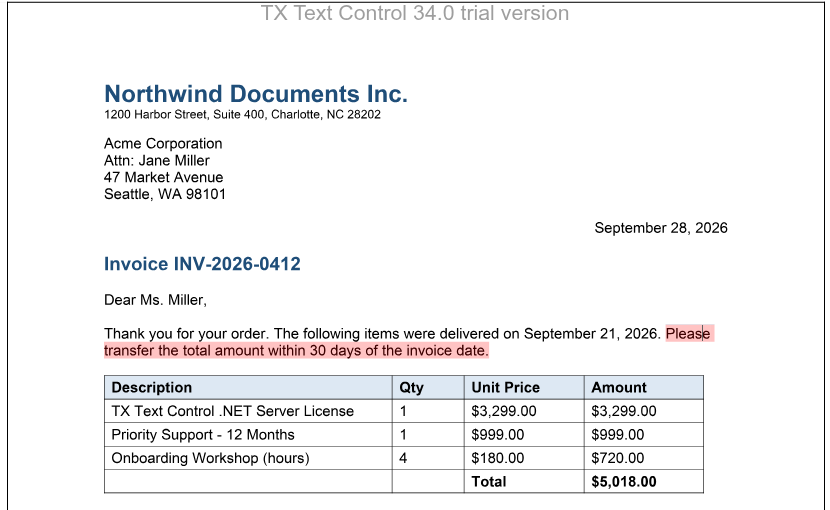
Select a sentence and click **Mark Selection**: the sentence is highlighted. Click **List Subtext Parts** to see it in the console, and move the cursor into it to see the `subTextPartEntered` message.
In the JavaScript API, `getItem` only finds the subtext part at the input position. To find one by its name or ID, go through the collection with `forEach` and compare [getName](https://docs.textcontrol.com/tx-text-control-dotnet-server/reference/javascript/subtextpart/getname-method/llms-full.txt) or [getID](https://docs.textcontrol.com/tx-text-control-dotnet-server/reference/javascript/subtextpart/getid-method/llms-full.txt). [clear](https://docs.textcontrol.com/tx-text-control-dotnet-server/reference/javascript/subtextpartcollection/clear-method/llms-full.txt) removes all subtext parts.
### Read the Data and Content of a Subtext Part
The following code logs the data, the number of nested subtext parts and the content as HTML of the subtext part at the input position:
```html
```
- [getData](https://docs.textcontrol.com/tx-text-control-dotnet-server/reference/javascript/subtextpart/getdata-method/llms-full.txt) passes the string that `setData` stored.
- [getChildren](https://docs.textcontrol.com/tx-text-control-dotnet-server/reference/javascript/subtextpart/getchildren-method/llms-full.txt) passes an array of the nested subtext parts. [getNestedLevel](https://docs.textcontrol.com/tx-text-control-dotnet-server/reference/javascript/subtextpart/getnestedlevel-method/llms-full.txt) passes the level of a subtext part (1 for the top level), and [getOuterSubTextPart](https://docs.textcontrol.com/tx-text-control-dotnet-server/reference/javascript/subtextpart/getoutersubtextpart-method/llms-full.txt) the subtext part that contains it.
- [save](https://docs.textcontrol.com/tx-text-control-dotnet-server/reference/javascript/subtextpart/save-method/llms-full.txt) saves only the content of the subtext part, in any format of `StreamType`. As with `saveDocument`, `data` contains plain text for HTML and RTF and a base64-encoded string for binary formats.
Other methods of a subtext part pass its text ([getText](https://docs.textcontrol.com/tx-text-control-dotnet-server/reference/javascript/subtextpart/gettext-method/llms-full.txt)), its position ([getStart](https://docs.textcontrol.com/tx-text-control-dotnet-server/reference/javascript/subtextpart/getstart-method/llms-full.txt) and [getLength](https://docs.textcontrol.com/tx-text-control-dotnet-server/reference/javascript/subtextpart/getlength-method/llms-full.txt); the start is one-based) and the fields it contains ([getTextFields](https://docs.textcontrol.com/tx-text-control-dotnet-server/reference/javascript/subtextpart/gettextfields-method/llms-full.txt), which requires a field type, a callback and an error callback). [scrollTo](https://docs.textcontrol.com/tx-text-control-dotnet-server/reference/javascript/subtextpart/scrollto-method/llms-full.txt) moves the input position to the beginning of the subtext part and scrolls it into view; its callback isn't optional.
### Change the Text of Many Subtext Parts
When your code changes the text of several subtext parts, each change moves the positions of the following ones. Calls sent in a `forEach` loop run at the same time and can insert text at wrong positions. Process one subtext part after the other with `async` and `await`, starting with the last one, as described in [JavaScript API](https://docs.textcontrol.com/tx-text-control-dotnet-server/document-editor/javascript-api/#promises-and-async-await). The blog article [Updating SubTextParts using JavaScript Promises](https://www.textcontrol.com/blog/2022/12/23/updating-subtextparts-using-javascript-promises/) shows this procedure.
### React to Subtext Part Events
The editor raises `subTextPartCreated` and `subTextPartDeleted` when a subtext part is added or deleted, `subTextPartEntered` and `subTextPartLeft` when the input position moves into or out of one, and `subTextPartClicked` and `subTextPartDoubleClicked`. The handlers receive [SubTextPartEventArgs](https://docs.textcontrol.com/tx-text-control-dotnet-server/reference/javascript/subtextparteventargs/llms-full.txt) with the name, ID, number, nesting level, start and length of the subtext part, but not its data. [Events](https://docs.textcontrol.com/tx-text-control-dotnet-server/document-editor/events/llms-full.txt) lists all events.
### Save and Load Subtext Parts
- Subtext parts grow as users type in them. Save documents with subtext parts in the TX Text Control format, which is the format that keeps the data of subtext parts.
- In DOCX documents, bookmarks that span several characters can be loaded as subtext parts with [LoadSettings.loadSubTextParts](https://docs.textcontrol.com/tx-text-control-dotnet-server/reference/javascript/txtextcontrol-loadsettings/loadsubtextparts-property/llms-full.txt).
- To save a document without its subtext parts, pass `SubTextParts` from [OmittedContent](https://docs.textcontrol.com/tx-text-control-dotnet-server/reference/javascript/txtextcontrol-savesettings/omittedcontent-enumeration/llms-full.txt) in [SaveSettings.omittedContent](https://docs.textcontrol.com/tx-text-control-dotnet-server/reference/javascript/txtextcontrol-savesettings/omittedcontent-property/llms-full.txt). The text and its formatting are kept.
On the server, [ServerTextControl.SubTextParts](https://docs.textcontrol.com/tx-text-control-dotnet-server/reference/txtextcontrol/servertextcontrol/subtextparts-property/llms-full.txt) returns the subtext parts of a document that the editor has saved. The blog article [The Power of SubTextParts: Typical Use Cases](https://www.textcontrol.com/blog/2024/02/09/the-power-of-subtextparts-typical-use-cases/) describes applications of subtext parts.
The methods `getSubTextParts` of `TXTextControl` and `addSubTextPart`, `getSubTextParts` and `removeSubTextPart` of `TextPart` are obsolete; use the collection.
### Next Steps
- [Fields](https://docs.textcontrol.com/tx-text-control-dotnet-server/document-editor/fields/llms-full.txt): mark single positions or words instead of longer text.
- [Document Protection](https://docs.textcontrol.com/tx-text-control-dotnet-server/document-editor/protection/llms-full.txt): make parts of a protected document editable.
- [Merge Blocks](https://docs.textcontrol.com/tx-text-control-dotnet-server/mail-merge/blocks/llms-full.txt): repeat parts of a template for each record.
---
## Nearby
- **Previous:** [Fields](https://docs.textcontrol.com/tx-text-control-dotnet-server/document-editor/fields/llms-full.txt)
- **Next:** [Form Fields](https://docs.textcontrol.com/tx-text-control-dotnet-server/document-editor/form-fields/llms-full.txt)