# XML Processing
> Edit XML data in the WPF TextControl: load files with a DTD and CSS, handle XmlInvalid in XAML, change XmlElement objects and save the XML and its styles.
- **Product:** TX Text Control .NET for WPF
- **Section:** Documentation
- **Kind:** Topic
- **Path:** TX Text Control .NET for WPF > Document Processing > XML Processing
- **3812 words**
- **Web URL:** https://docs.textcontrol.com/tx-text-control-dotnet-wpf/document-processing/xml/
- **LLMs URL:** https://docs.textcontrol.com/tx-text-control-dotnet-wpf/document-processing/xml/llms.txt
- **LLMs-Full URL:** https://docs.textcontrol.com/tx-text-control-dotnet-wpf/document-processing/xml/llms-full.txt
---
Structured XML data, such as an address list or a product catalog, can be edited in the WPF `TextControl` like a document. TX Text Control reads the XML file with the two files it refers to: a document type definition (DTD), the rules for which elements may appear where, and a CSS stylesheet, which formats the elements. Users edit the formatted result while every change is checked against the DTD, and code-behind reads, replaces, adds and removes elements by name.
The Enterprise edition includes XML editing; see [Editions](https://docs.textcontrol.com/tx-text-control-dotnet-wpf/overview/editions/llms-full.txt). Code on this page belongs in *MainWindow.xaml.cs* with the `TextControl` named `textControl1`. To use XML as the data of a mail merge instead, read [JSON and XML](https://docs.textcontrol.com/tx-text-control-dotnet-wpf/mail-merge/data-sources/json-xml/llms-full.txt).
*MainWindow.xaml.cs* needs these `using` directives:
```csharp
using System.Text;
using System.Windows;
using TXTextControl;
```
### The Three Files of an XML Document
The sample is an address list, *address.xml*. Its second and third lines name the stylesheet and the DTD:
```xml
Paul
Baker Street
London
paul@hotmail.com
George
george@hotmail.com
```
*address.dtd* requires at least one record and, in each record, a name and an email address, with an optional street and city between them:
```text
```
The DTD doesn't have to be a file of its own. It can also be written inline, in square brackets inside the `DOCTYPE` declaration of the XML file, so that one file carries the data and its rules:
```xml
]>
...
```
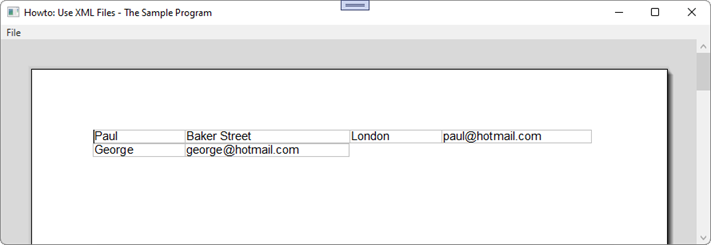
*address.css* turns the list into a table:
```css
address { display: table }
address_record { display: table-row }
name, street, city, email { display: table-cell; border: 1px; font-size: 11pt }
```
This is what the WPF `TextControl` shows after loading the three files:
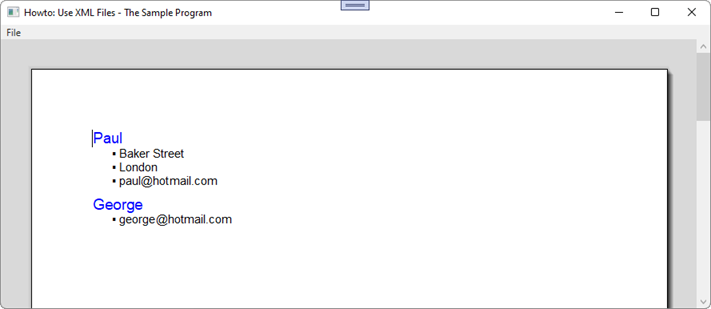
Only the stylesheet decides the layout. These rules show each name as a blue heading and the other elements as a list:
```css
name { display: block; font-size: 14pt; color: blue }
street, city, email { display: list-item; font-size: 11pt }
```
### Load an XML File and Handle Errors
Pass `StreamType.XMLFormat` to `Load`. Two events report problems with the file; attach them in *MainWindow.xaml*:
```xml
```
The code-behind loads the file, shows whether the document is validated, and reports errors:
```csharp
private void OpenXml_Click(object sender, RoutedEventArgs e)
{
textControl1.Load("address.xml", StreamType.XMLFormat);
statusText.Text = textControl1.XmlEditMode == XmlEditMode.Validate
? "Valid XML: changes are checked against the DTD"
: "Not validated";
}
private void textControl1_XmlInvalid(object sender, XmlErrorEventArgs e)
{
MessageBox.Show($"The document doesn't match its DTD: {e.Reason} (line {e.LineNumber}, position {e.LinePosition})");
}
private void textControl1_XmlNotWellFormed(object sender, XmlErrorEventArgs e)
{
MessageBox.Show($"The file isn't well-formed XML: {e.Reason} (line {e.LineNumber})");
}
```
| The file | Event | Result |
|---|---|---|
| Matches its DTD | None | Loaded with the CSS styles; [XmlEditMode](https://docs.textcontrol.com/tx-text-control-dotnet-wpf/reference/txtextcontrol-wpf/textcontrol/xmleditmode-property/llms-full.txt) is `Validate` |
| Breaks a rule of the DTD | [XmlInvalid](https://docs.textcontrol.com/tx-text-control-dotnet-wpf/reference/txtextcontrol-wpf/textcontrol/xmlinvalid-event/llms-full.txt) | Loaded as a normal document, without validation |
| Contains invalid XML syntax | [XmlNotWellFormed](https://docs.textcontrol.com/tx-text-control-dotnet-wpf/reference/txtextcontrol-wpf/textcontrol/xmlnotwellformed-event/llms-full.txt) | Not loaded |
[XmlErrorEventArgs](https://docs.textcontrol.com/tx-text-control-dotnet-wpf/reference/txtextcontrol/xmlerroreventargs/llms-full.txt) describes the error with [Reason](https://docs.textcontrol.com/tx-text-control-dotnet-wpf/reference/txtextcontrol/xmlerroreventargs/reason-property/llms-full.txt), [LineNumber](https://docs.textcontrol.com/tx-text-control-dotnet-wpf/reference/txtextcontrol/xmlerroreventargs/linenumber-property/llms-full.txt), [LinePosition](https://docs.textcontrol.com/tx-text-control-dotnet-wpf/reference/txtextcontrol/xmlerroreventargs/lineposition-property/llms-full.txt), [FilePosition](https://docs.textcontrol.com/tx-text-control-dotnet-wpf/reference/txtextcontrol/xmlerroreventargs/fileposition-property/llms-full.txt) and [URL](https://docs.textcontrol.com/tx-text-control-dotnet-wpf/reference/txtextcontrol/xmlerroreventargs/url-property/llms-full.txt). Where a value is 0 or an empty string, the information isn't available. The `statusText` of the handler is a `TextBlock` in the window. `Load(StreamType.XMLFormat)` without a file name shows the **Open** dialog box filtered to XML files.
### What Changes in the XML Editor Mode
While `XmlEditMode` is `Validate`, the editor protects the structure of the document:
- Text can be typed and deleted only in elements that contain text. A selection stays inside one element and expands to its whole text when the user drags across elements. TAB and SHIFT+TAB select the next and the previous element.
- Formatting commands change the style of the current element, because XML carries no formatting. In code, [FormattingStylesDialog](https://docs.textcontrol.com/tx-text-control-dotnet-wpf/reference/txtextcontrol-wpf/textcontrol/formattingstylesdialog-method/llms-full.txt) opens the style dialog, and [InlineStyles](https://docs.textcontrol.com/tx-text-control-dotnet-wpf/reference/txtextcontrol-wpf/textcontrol/inlinestyles-property/llms-full.txt) and [ParagraphStyles](https://docs.textcontrol.com/tx-text-control-dotnet-wpf/reference/txtextcontrol-wpf/textcontrol/paragraphstyles-property/llms-full.txt) change the styles directly.
- Text pasted from another document loses its formatting.
- `Selection.Load` and `Selection.Save` can't be used, because an XML document can't be part of another document.
`Validate` can't be set in code; loading a valid file switches it on. Setting `XmlEditMode` to `NoValidate` ends validation. The `TextControl` then works as a normal editor, and the document can't be saved as XML any more, because it may no longer be valid.
### Work With Elements in Code
[GetXmlElements](https://docs.textcontrol.com/tx-text-control-dotnet-wpf/reference/txtextcontrol-wpf/textcontrol/getxmlelements-method/llms-full.txt) takes an element name and returns an [XmlElementCollection](https://docs.textcontrol.com/tx-text-control-dotnet-wpf/reference/txtextcontrol/xmlelementcollection/llms-full.txt) of [XmlElement](https://docs.textcontrol.com/tx-text-control-dotnet-wpf/reference/txtextcontrol/xmlelement/llms-full.txt) objects. When an element has sub-elements, its text consists of their texts, one per line, separated by `\n`. The handler below lists the names, rewrites the second record and inserts a third one:
```csharp
private void EditElements_Click(object sender, RoutedEventArgs e)
{
StringBuilder names = new StringBuilder();
foreach (XmlElement name in textControl1.GetXmlElements("name"))
{
names.AppendLine(name.Text);
}
statusText.Text = names.ToString();
XmlElementCollection records = textControl1.GetXmlElements("address_record");
// One line per sub-element: name and email
records.GetItem(2).Text = "George\ngeorge@textcontrol.com";
// -1 ignores the "before" position; 2 inserts after the second record
XmlElement newRecord = new XmlElement("address_record", "Ringo\nAbbey Road\nLondon\nringo@hotmail.com");
if (!records.Add(newRecord, -1, 2))
{
MessageBox.Show("The DTD doesn't allow this record here.");
}
}
```
The code works as follows:
- [GetItem](https://docs.textcontrol.com/tx-text-control-dotnet-wpf/reference/txtextcontrol/xmlelementcollection/getitem-method/llms-full.txt) returns the element with a one-based index or `null`; without a parameter, the element at the input position.
- [XmlElement.Text](https://docs.textcontrol.com/tx-text-control-dotnet-wpf/reference/txtextcontrol/xmlelement/text-property/llms-full.txt) reads and writes the text, one line per sub-element.
- The [XmlElement constructor](https://docs.textcontrol.com/tx-text-control-dotnet-wpf/reference/txtextcontrol/xmlelement/constructor/llms-full.txt) takes the name and, optionally, the text of the new element.
- [XmlElementCollection.Add](https://docs.textcontrol.com/tx-text-control-dotnet-wpf/reference/txtextcontrol/xmlelementcollection/add-method/llms-full.txt) places the element before or after a position in the collection, where 0 stands for the element at the input position and -1 ignores the parameter. If the DTD doesn't allow the element there, `Add` returns `false` and `XmlInvalid` occurs.
[Remove](https://docs.textcontrol.com/tx-text-control-dotnet-wpf/reference/txtextcontrol/xmlelementcollection/remove-method/llms-full.txt) deletes the element with a one-based index, or with 0 the one at the input position. For sub-elements, [AddChild](https://docs.textcontrol.com/tx-text-control-dotnet-wpf/reference/txtextcontrol/xmlelement/addchild-method/llms-full.txt), [GetChildItem](https://docs.textcontrol.com/tx-text-control-dotnet-wpf/reference/txtextcontrol/xmlelement/getchilditem-method/llms-full.txt) and [RemoveChild](https://docs.textcontrol.com/tx-text-control-dotnet-wpf/reference/txtextcontrol/xmlelement/removechild-method/llms-full.txt) are available; the DTD determines where a new child goes. Any change that would break the DTD fails, such as removing the only remaining record.
### Save the XML File and Its Styles
The XML file receives the elements and their text only. Formatting belongs in the stylesheet, which is saved in a separate call:
```csharp
private void SaveXml_Click(object sender, RoutedEventArgs e)
{
textControl1.Save("address.xml", StreamType.XMLFormat);
textControl1.Save("address.css", StreamType.CascadingStylesheet);
}
```
The DTD is never changed or saved, and TX Text Control can't create an XML document from scratch; it edits XML files that come with a DTD.
### Next Steps
- [Stylesheets](https://docs.textcontrol.com/tx-text-control-dotnet-wpf/document-editor/stylesheets/llms-full.txt): the formatting styles that shape XML documents.
- [Loading Documents](https://docs.textcontrol.com/tx-text-control-dotnet-wpf/document-processing/loading/llms-full.txt): the other formats `Load` reads.
- [JSON and XML](https://docs.textcontrol.com/tx-text-control-dotnet-wpf/mail-merge/data-sources/json-xml/llms-full.txt): XML as data for a mail merge.
- [Saving and Converting Documents](https://docs.textcontrol.com/tx-text-control-dotnet-wpf/document-processing/saving-converting/llms-full.txt): save documents in other formats.
---
## Nearby
- **Previous:** [Comments and Tracked Changes](https://docs.textcontrol.com/tx-text-control-dotnet-wpf/document-processing/comments-changes/llms-full.txt)
- **Next:** [Printing](https://docs.textcontrol.com/tx-text-control-dotnet-wpf/document-processing/printing/llms-full.txt)