# Assemblies and XAML Namespaces
> Map TXTextControl.WPF in XAML with clr-namespace, find the assembly of each namespace from TXTextControl.dll to TXDocumentServer.WPF and add using directives.
- **Product:** TX Text Control .NET for WPF
- **Section:** Documentation
- **Kind:** Topic
- **Path:** TX Text Control .NET for WPF > Installation Guide > Assemblies and XAML Namespaces
- **2350 words**
- **Web URL:** https://docs.textcontrol.com/tx-text-control-dotnet-wpf/installation/xaml-namespaces/
- **LLMs URL:** https://docs.textcontrol.com/tx-text-control-dotnet-wpf/installation/xaml-namespaces/llms.txt
- **LLMs-Full URL:** https://docs.textcontrol.com/tx-text-control-dotnet-wpf/installation/xaml-namespaces/llms-full.txt
---
XAML knows nothing about TX Text Control until a window maps a prefix to a .NET namespace in an assembly: only then does `` name a real class. TX Text Control .NET for WPF 34.0 consists of a dozen assemblies, and its classes are spread over several namespaces. The tables below show which assembly holds which namespace, how a window declares the namespace of the controls and which `using` directives the code-behind needs, so you can read the declarations Visual Studio writes and write your own.
### The Assemblies
The NuGet package `TXTextControl.TextControl.WPF.SDK` brings the same managed assemblies into a .NET project, in its folder *lib/net8.0*, that the setup installs in the *Assembly* folder for .NET Framework projects:
| Assembly | Namespaces | What it contains |
|---|---|---|
| *TXTextControl.WPF.dll* | `TXTextControl.WPF` | The WPF controls: [TextControl](https://docs.textcontrol.com/tx-text-control-dotnet-wpf/reference/txtextcontrol-wpf/textcontrol/llms-full.txt), the bars, the ribbon tabs, [Sidebar](https://docs.textcontrol.com/tx-text-control-dotnet-wpf/reference/txtextcontrol-wpf/sidebar/llms-full.txt), the dialog boxes and the value converters |
| *TXTextControl.dll* | `TXTextControl`, `TXTextControl.DataVisualization` | The document object model that the editor and the engine share, such as [Selection](https://docs.textcontrol.com/tx-text-control-dotnet-wpf/reference/txtextcontrol/selection/llms-full.txt) and [VersionInfo](https://docs.textcontrol.com/tx-text-control-dotnet-wpf/reference/txtextcontrol/versioninfo/llms-full.txt), and the chart frames such as [ChartFrame](https://docs.textcontrol.com/tx-text-control-dotnet-wpf/reference/txtextcontrol-datavisualization/chartframe/llms-full.txt) |
| *TXTextControl.Server.dll* | `TXTextControl` | [ServerTextControl](https://docs.textcontrol.com/tx-text-control-dotnet-wpf/reference/txtextcontrol/servertextcontrol/llms-full.txt), the document engine without a user interface |
| *TXDocumentServer.dll* | `TXTextControl.DocumentServer` and the namespaces below it, such as `TXTextControl.DocumentServer.Fields` and `TXTextControl.DocumentServer.DataSources` | [MailMerge](https://docs.textcontrol.com/tx-text-control-dotnet-wpf/reference/txtextcontrol-documentserver/mailmerge/llms-full.txt), the field classes such as [DateField](https://docs.textcontrol.com/tx-text-control-dotnet-wpf/reference/txtextcontrol-documentserver-fields/datefield/llms-full.txt), and [DataSourceManager](https://docs.textcontrol.com/tx-text-control-dotnet-wpf/reference/txtextcontrol-documentserver-datasources/datasourcemanager/llms-full.txt) |
| *TXDocumentServer.WPF.dll* | `TXTextControl.DocumentServer.WPF` | The WPF dialog boxes for merge blocks, such as [FilterAndSortDialog](https://docs.textcontrol.com/tx-text-control-dotnet-wpf/reference/txtextcontrol-documentserver-wpf/filterandsortdialog/llms-full.txt) |
| *TXDrawing.dll*, *TXDrawing.WPF.dll* | `TXTextControl.Drawing`, `TXTextControl.WPF.Drawing` | Shapes and drawings, with [TXDrawingControl](https://docs.textcontrol.com/tx-text-control-dotnet-wpf/reference/txtextcontrol-wpf-drawing/txdrawingcontrol/llms-full.txt) for WPF |
| *TXBarcode.dll*, *TXBarcode.WPF.dll* | `TXTextControl.Barcode`, `TXTextControl.WPF.Barcode` | Barcodes, with [TXBarcodeControl](https://docs.textcontrol.com/tx-text-control-dotnet-wpf/reference/txtextcontrol-wpf-barcode/txbarcodecontrol/llms-full.txt) for WPF |
| *TXImageProvider.dll*, *TXSVGResources.dll*, *txpdf.dll* | | Supporting assemblies of the engine |
Beside them are the German resources, in the subfolder *de*, and the native libraries for 32-bit and 64-bit Windows, which [32-bit and 64-bit Applications](https://docs.textcontrol.com/tx-text-control-dotnet-wpf/installation/requirements/32-bit-64-bit/llms-full.txt) describes. Your application deploys all of these files; see [Managed Assemblies and Native Libraries](https://docs.textcontrol.com/tx-text-control-dotnet-wpf/deployment/assemblies/llms-full.txt).
In a .NET project, the package references every assembly for you. In a .NET Framework project, Visual Studio adds the reference to *TXTextControl.WPF* when you place the first control from the toolbox, and you add references to the other assemblies of the *Assembly* folder that your code uses, such as *TXTextControl.dll* for `Selection` or *TXDocumentServer.dll* for `MailMerge`.
### Declare the Namespace of the Controls in XAML
A WPF window declares the namespace of the controls in its root element with a `clr-namespace` mapping. When you add the first control from the toolbox, Visual Studio writes the declaration with the prefix `WPF`:
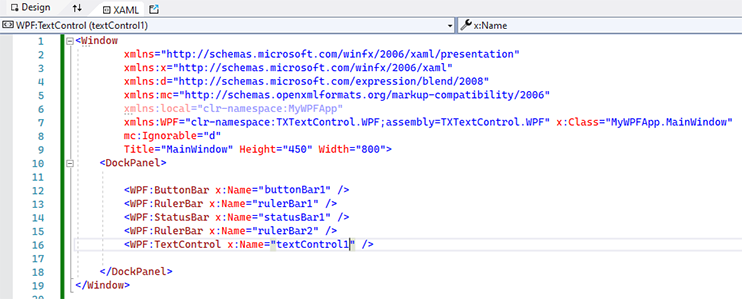
Written by hand, a complete window with the editor looks like this:
```xml
```
The declaration works as follows:
- **`xmlns:WPF`** defines the prefix. The name is yours to choose: this documentation and the samples of Text Control use `WPF`, and the Simple sample uses `my`. Every element of the window uses the prefix its root element declares.
- **`clr-namespace:TXTextControl.WPF`** is the .NET namespace of the controls.
- **`assembly=TXTextControl.WPF`** is the name of the assembly, without *.dll*. The project must reference it, through the package or directly.
All toolbox items of TX Text Control are in this one namespace, so a window with the editor, its bars, sidebars and ribbon tabs needs only this declaration. The `Ribbon` that hosts the ribbon tabs is part of WPF and needs no prefix.
### Declare Further Namespaces
The other namespaces rarely appear in XAML, because drawings, barcodes and the merge block dialog boxes are created in code. When a window does need one, it declares it the same way, with the assembly from the table above:
```xml
xmlns:WPF="clr-namespace:TXTextControl.WPF;assembly=TXTextControl.WPF"
xmlns:txdrawing="clr-namespace:TXTextControl.WPF.Drawing;assembly=TXDrawing.WPF"
xmlns:txbarcode="clr-namespace:TXTextControl.WPF.Barcode;assembly=TXBarcode.WPF"
xmlns:txmerge="clr-namespace:TXTextControl.DocumentServer.WPF;assembly=TXDocumentServer.WPF"
xmlns:txtextcontrol="clr-namespace:TXTextControl;assembly=TXTextControl"
```
A namespace can be spread over several assemblies: `TXTextControl` is in *TXTextControl.dll* and in *TXTextControl.Server.dll*. A `clr-namespace` mapping names one assembly, so it finds only the classes of that assembly, and a class in the other one needs a second declaration with its own prefix.
TX Spell .NET for WPF, the spell checker for TX Text Control, adds its own namespace, `TXTextControl.WPF.Proofing` in the assembly *TXSpell.WPF*. See [Integrating TX Spell .NET for WPF](https://docs.textcontrol.com/tx-text-control-dotnet-wpf/integration/tx-spell/llms-full.txt).
### Use the Namespaces in Code-Behind
In *MainWindow.xaml.cs*, the field that XAML generates for `textControl1` already has its full type, `TXTextControl.WPF.TextControl`. The classes you reach through it, and the classes you create yourself, need `using` directives for their namespaces:
```csharp
using System.Windows;
using TXTextControl;
using TXTextControl.DocumentServer;
namespace MyWpfApp;
public partial class MainWindow : Window
{
public MainWindow()
{
InitializeComponent();
}
private void textControl1_Loaded(object sender, RoutedEventArgs e)
{
// Selection is in the namespace TXTextControl, in TXTextControl.dll
textControl1.Selection.Bold = true;
// MailMerge is in TXTextControl.DocumentServer, in TXDocumentServer.dll
using (MailMerge mailMerge = new MailMerge())
{
mailMerge.TextComponent = textControl1;
}
}
}
```
The code works as follows:
- `using TXTextControl;` makes the shared document classes available, such as the `Selection` that [TextControl.Selection](https://docs.textcontrol.com/tx-text-control-dotnet-wpf/reference/txtextcontrol-wpf/textcontrol/selection-property/llms-full.txt) returns. [Bold](https://docs.textcontrol.com/tx-text-control-dotnet-wpf/reference/txtextcontrol/selection/bold-property/llms-full.txt) formats the selected text.
- `using TXTextControl.DocumentServer;` makes `MailMerge` available. [TextComponent](https://docs.textcontrol.com/tx-text-control-dotnet-wpf/reference/txtextcontrol-documentserver/mailmerge/textcomponent-property/llms-full.txt) connects it to the editor.
- The handler runs for `Loaded="textControl1_Loaded"` on the `TextControl` element, once the control is ready to be used.
Add `using TXTextControl.WPF;` when the code-behind creates WPF controls of TX Text Control itself; [Creating and Configuring Controls in Code](https://docs.textcontrol.com/tx-text-control-dotnet-wpf/integration/controls-in-code/llms-full.txt) shows how.
### Related Pages
- [XAML Namespaces and Assembly References](https://docs.textcontrol.com/tx-text-control-dotnet-wpf/troubleshooting/xaml-namespaces/llms-full.txt) in Troubleshooting: when a declaration or a reference is missing.
- [XAML Integration](https://docs.textcontrol.com/tx-text-control-dotnet-wpf/integration/xaml/llms-full.txt): declare and configure the controls in XAML.
- [Visual Studio Toolbox and XAML Designer](https://docs.textcontrol.com/tx-text-control-dotnet-wpf/installation/toolbox/llms-full.txt): let the toolbox write the declaration for you.
- [.NET API](https://docs.textcontrol.com/tx-text-control-dotnet-wpf/reference/dotnet-api/llms-full.txt): the reference of every namespace.
---
## Nearby
- **Previous:** [Visual Studio Toolbox and XAML Designer](https://docs.textcontrol.com/tx-text-control-dotnet-wpf/installation/toolbox/llms-full.txt)
- **Next:** [License Configuration](https://docs.textcontrol.com/tx-text-control-dotnet-wpf/installation/licensing/llms-full.txt)