# Attachments
> Attach XML, JSON or CSV to PDF and PDF/A-3 from a WPF TextControl with EmbeddedFile, edit them in the WPF Sidebar and read them with Attachments.GetFromFile.
- **Product:** TX Text Control .NET for WPF
- **Section:** Documentation
- **Kind:** Topic
- **Path:** TX Text Control .NET for WPF > PDF Processing > Attachments
- **4610 words**
- **Web URL:** https://docs.textcontrol.com/tx-text-control-dotnet-wpf/pdf/attachments/
- **LLMs URL:** https://docs.textcontrol.com/tx-text-control-dotnet-wpf/pdf/attachments/llms.txt
- **LLMs-Full URL:** https://docs.textcontrol.com/tx-text-control-dotnet-wpf/pdf/attachments/llms-full.txt
---
Invoices often travel as a PDF with a machine-readable copy inside: the XML of a ZUGFeRD invoice, the JSON data of a report or the spreadsheet behind a contract. With TX Text Control .NET for WPF, such embedded files are part of the document in the `TextControl`. Code attaches them before the document is saved as PDF, the **DocumentSettings** panel of the WPF sidebar lets users manage them, and a loaded PDF brings its attachments along. The sections below cover the classes, the relationship and MIME type that PDF/A-3 asks for, electronic invoices and extracting attachments from received PDF files.
For a first PDF saved from the editor window, see [Create a PDF](https://docs.textcontrol.com/tx-text-control-dotnet-wpf/getting-started/pdf/create/llms-full.txt) in Getting Started.
### How Attachments Work
Each attachment is an [EmbeddedFile](https://docs.textcontrol.com/tx-text-control-dotnet-wpf/reference/txtextcontrol/embeddedfile/llms-full.txt): a file name, the file's data and optional properties. Only PDF and PDF/A carry embedded files. They are written when the document is saved with `StreamType.AdobePDF` or `StreamType.AdobePDFA`, and every other format leaves them out.
| Property | Contains |
|---|---|
| [FileName](https://docs.textcontrol.com/tx-text-control-dotnet-wpf/reference/txtextcontrol/embeddedfile/filename-property/llms-full.txt) | The file name, optionally with a relative or absolute path; read only |
| [Data](https://docs.textcontrol.com/tx-text-control-dotnet-wpf/reference/txtextcontrol/embeddedfile/data-property/llms-full.txt) | The content, as a string or a byte array; read only |
| [MIMEType](https://docs.textcontrol.com/tx-text-control-dotnet-wpf/reference/txtextcontrol/embeddedfile/mimetype-property/llms-full.txt) | The MIME type, for example `application/json`; `application/octet-stream` if none is set |
| [Relationship](https://docs.textcontrol.com/tx-text-control-dotnet-wpf/reference/txtextcontrol/embeddedfile/relationship-property/llms-full.txt) | How the file relates to the document; PDF/A only |
| [Description](https://docs.textcontrol.com/tx-text-control-dotnet-wpf/reference/txtextcontrol/embeddedfile/description-property/llms-full.txt) | A description of the file |
| [CreationDate](https://docs.textcontrol.com/tx-text-control-dotnet-wpf/reference/txtextcontrol/embeddedfile/creationdate-property/llms-full.txt), [LastModificationDate](https://docs.textcontrol.com/tx-text-control-dotnet-wpf/reference/txtextcontrol/embeddedfile/lastmodificationdate-property/llms-full.txt) | The dates of the file; if `null`, the PDF document's dates are used |
The [EmbeddedFile constructor](https://docs.textcontrol.com/tx-text-control-dotnet-wpf/reference/txtextcontrol/embeddedfile/constructor/llms-full.txt) takes the file name, the data as a byte array or a string, and XMP metadata or `null`. XMP metadata consists of `rdf:Description` elements, which are added to the metadata of the PDF, as electronic invoices need. Another overload takes a `SafeFileHandle` and reads the file only when the document is saved.
Attachments live in three properties:
- **[WPF.TextControl.DocumentSettings](https://docs.textcontrol.com/tx-text-control-dotnet-wpf/reference/txtextcontrol-wpf/textcontrol/documentsettings-property/llms-full.txt)`.`[EmbeddedFiles](https://docs.textcontrol.com/tx-text-control-dotnet-wpf/reference/txtextcontrol/documentsettings/embeddedfiles-property/llms-full.txt)** holds the attachments of the document in the editor, or `null`. Loading a PDF fills it, the sidebar panel works on it, and every save as PDF embeds its files.
- **[SaveSettings.EmbeddedFiles](https://docs.textcontrol.com/tx-text-control-dotnet-wpf/reference/txtextcontrol/loadsavesettingsbase/embeddedfiles-property/llms-full.txt)** sets the attachments of a single save, instead of those of `DocumentSettings`.
- **[LoadSettings.EmbeddedFiles](https://docs.textcontrol.com/tx-text-control-dotnet-wpf/reference/txtextcontrol/loadsavesettingsbase/embeddedfiles-property/llms-full.txt)** reports the attachments of a loaded PDF, provided [PDFImportSettings](https://docs.textcontrol.com/tx-text-control-dotnet-wpf/reference/txtextcontrol/pdfimportsettings/enumeration/llms-full.txt) includes `LoadEmbeddedFiles`, as it does by default.
### Choose the Relationship and MIME Type
A PDF/A-3 document needs a MIME type and a relationship for each embedded file. The relationship is a string, with these predefined values:
| Relationship | Use it for |
|---|---|
| `Source` | The document the PDF was made from, for example a DOCX file |
| `Data` | Data for software, such as XML, JSON or CSV |
| `Alternative` | Another form of the same content, such as the XML of a ZUGFeRD or Factur-X invoice |
| `Supplement` | Additional material, such as appendices |
| `Unspecified` | Anything else |
Typical MIME types are `application/xml`, `application/json`, `text/csv`, `image/png` and `image/jpeg`. The blog article [Why Defining MIME Types for PDF/A Attachments Is Essential](https://www.textcontrol.com/blog/2025/12/10/why-defining-mime-types-for-pdfa-attachments-is-essential/) describes what validators check.
### Attach a File When Saving
The following `Click` handler goes into *MainWindow.xaml.cs*, which needs `using System;`, `using System.IO;`, `using System.Windows;` and `using TXTextControl;`. It embeds *data.json* from the application folder in the document of `textControl1` and saves a PDF/A file:
```csharp
private void attachDataButton_Click(object sender, RoutedEventArgs e)
{
// PDF/A requires fonts that can be embedded
textControl1.FontSettings.EmbeddableFontsOnly = true;
EmbeddedFile data = new EmbeddedFile("data.json", File.ReadAllBytes("data.json"), null)
{
Description = "Invoice data",
MIMEType = "application/json",
Relationship = "Data",
CreationDate = DateTime.Now
};
SaveSettings saveSettings = new SaveSettings()
{
EmbeddedFiles = new EmbeddedFile[] { data }
};
textControl1.Save("invoice.pdf", StreamType.AdobePDFA, saveSettings);
}
```
The code works as follows:
- [FontSettings.EmbeddableFontsOnly](https://docs.textcontrol.com/tx-text-control-dotnet-wpf/reference/txtextcontrol/fontsettings/embeddablefontsonly-property/llms-full.txt) allows only fonts that can be embedded, a requirement of PDF/A. The rules of the format are in [PDF/A](https://docs.textcontrol.com/tx-text-control-dotnet-wpf/pdf/pdf-a/llms-full.txt).
- `EmbeddedFiles` is an array, so a single `Save` embeds as many files as you pass.
- The array in `SaveSettings` applies to this file only. Assign it to `textControl1.DocumentSettings.EmbeddedFiles` instead to make the attachment part of the document for every later save.
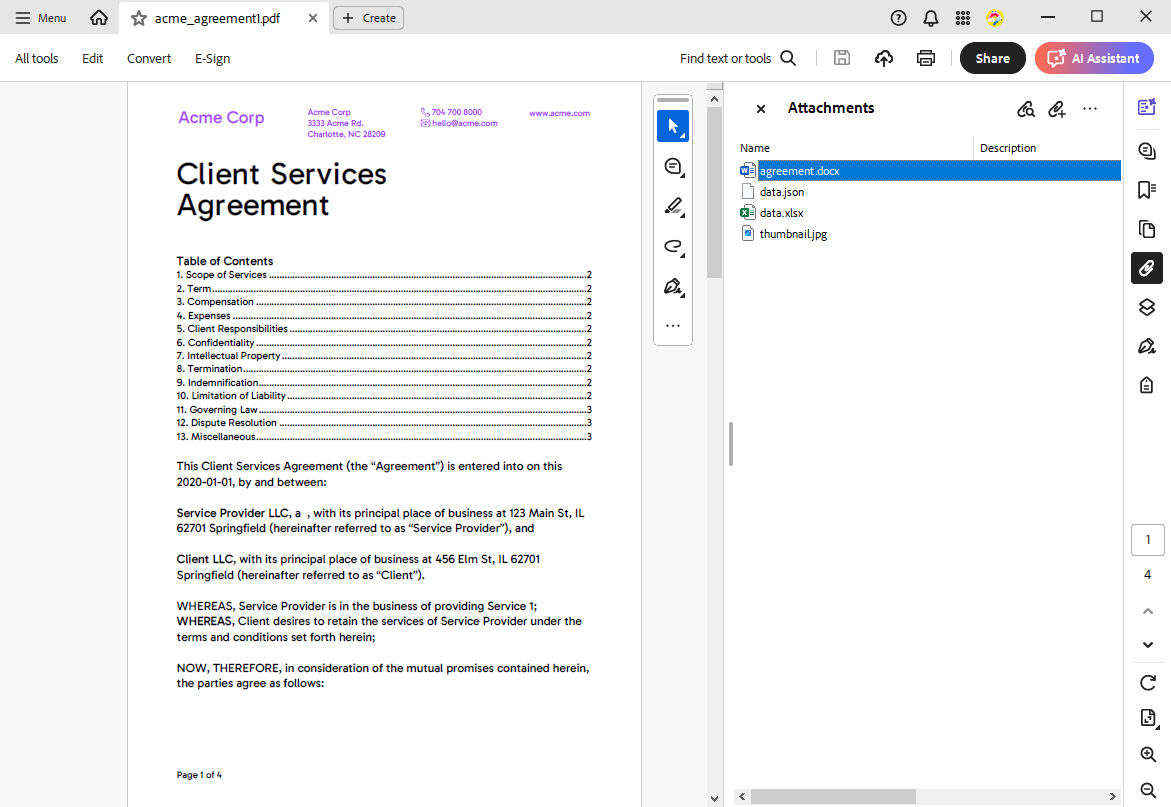
A PDF reader lists the attachments in a separate panel. In Adobe Acrobat, it shows each file with its description:
### Let Users Manage Attachments in the Sidebar
Set the [ContentLayout](https://docs.textcontrol.com/tx-text-control-dotnet-wpf/reference/txtextcontrol-wpf/sidebar/contentlayout-property/llms-full.txt) of a WPF [Sidebar](https://docs.textcontrol.com/tx-text-control-dotnet-wpf/reference/txtextcontrol-wpf/sidebar/llms-full.txt) to `DocumentSettings`, and the sidebar shows the properties of the document. Its **Embedded Files in PDF** category lists `DocumentSettings.EmbeddedFiles`: users add a file with **Add...**, write one to disk with **Save...**, delete it with **Remove** and edit its description, relationship and MIME type with **Edit...**. For a file added this way, the panel picks the MIME type from the file name extension.
The following XAML docks such a sidebar at the left of the editor, inside the `DockPanel` of *MainWindow.xaml* and before the `TextControl` element. The `WPF` prefix is the namespace declaration Visual Studio adds with the first TX Text Control element:
```xml
```
With `HorizontalAlignment` set to `Left`, the panel uses its vertical layout. A button opens it:
```csharp
private void documentSettingsButton_Click(object sender, RoutedEventArgs e)
{
sidebarLeft.ContentLayout = Sidebar.SidebarContentLayout.DocumentSettings;
sidebarLeft.IsShown = true;
}
```
`Sidebar` is in the namespace `TXTextControl.WPF`, so *MainWindow.xaml.cs* needs `using TXTextControl.WPF;` for this handler. The same panel edits the title, author, subject, keywords and custom properties, as [Document Metadata](https://docs.textcontrol.com/tx-text-control-dotnet-wpf/pdf/metadata/llms-full.txt) shows. Its elements are named after the values of [DocumentSettingsItem](https://docs.textcontrol.com/tx-text-control-dotnet-wpf/reference/txtextcontrol-wpf/sidebar/documentsettingsitem-enumeration/llms-full.txt), such as `TXITEM_EmbeddedFilesPanel`, which `FrameworkElement.FindName` finds when you want to hide one. [Sidebar and Panels](https://docs.textcontrol.com/tx-text-control-dotnet-wpf/document-editor/ribbon-ui/sidebar/llms-full.txt) covers the sidebar in general.
### Create an Electronic Invoice
A ZUGFeRD or Factur-X invoice is a PDF/A-3 document that people read, with the invoice data attached as XML that accounting software processes. XRechnung XML can be embedded in the same way since ZUGFeRD 2.1. TX Text Control creates the readable part and embeds the XML, which comes from your ERP system or a library such as ZUGFeRD-csharp.
The following handler attaches *factur-x.xml* to the invoice in the editor, passes the XMP metadata of *metadata.xml* that declares the standard, and saves PDF/A-3:
```csharp
private void createEInvoiceButton_Click(object sender, RoutedEventArgs e)
{
// PDF/A requires fonts that can be embedded
textControl1.FontSettings.EmbeddableFontsOnly = true;
// The XML invoice, created by your ERP system or an e-invoice library
byte[] invoiceXml = File.ReadAllBytes("factur-x.xml");
// rdf:Description elements that declare the invoice standard
string metadata = File.ReadAllText("metadata.xml");
EmbeddedFile invoice = new EmbeddedFile("factur-x.xml", invoiceXml, metadata)
{
Description = "factur-x",
MIMEType = "application/xml",
Relationship = "Alternative",
LastModificationDate = DateTime.Now
};
SaveSettings saveSettings = new SaveSettings()
{
EmbeddedFiles = new EmbeddedFile[] { invoice }
};
textControl1.Save("e-invoice.pdf", StreamType.AdobePDFA, saveSettings);
}
```
*metadata.xml* holds the XMP extension schema of ZUGFeRD: conformance level, document type, version and the name of the embedded file. Its full content, and XML created with ZUGFeRD-csharp, are in the blog article [Creating ZUGFeRD 2.3 (XRechnung, Factur-X) Documents with .NET C#](https://www.textcontrol.com/blog/2025/01/02/creating-zugferd-2-3-xrechnung-factur-x-documents-with-net-c-sharp/). Validate the result with a ZUGFeRD or Factur-X validation service, and consider signing the PDF so that changes to the invoice become detectable; see [Digital Signatures](https://docs.textcontrol.com/tx-text-control-dotnet-wpf/digital-signatures/llms-full.txt).
### Extract Attachments From a PDF
The static class [Attachments](https://docs.textcontrol.com/tx-text-control-dotnet-wpf/reference/txtextcontrol-documentserver-pdf/attachments/llms-full.txt) of the `TXTextControl.DocumentServer.PDF` namespace reads the attachments of a PDF file without loading it into the editor. Its namespace contains a second class named `EmbeddedFile`, so importing it next to `TXTextControl` makes the name ambiguous. Use an alias instead: `using Pdf = TXTextControl.DocumentServer.PDF;`.
The following handler asks for a PDF file and a target folder with the dialogs of `Microsoft.Win32` (`using Microsoft.Win32;`) and saves each attachment into the folder:
```csharp
private void extractAttachmentsButton_Click(object sender, RoutedEventArgs e)
{
OpenFileDialog openDialog = new OpenFileDialog() { Filter = "PDF documents (*.pdf)|*.pdf" };
OpenFolderDialog folderDialog = new OpenFolderDialog();
if (openDialog.ShowDialog(this) != true || folderDialog.ShowDialog(this) != true)
{
return;
}
Pdf.EmbeddedFile[] files = Pdf.Attachments.GetFromFile(openDialog.FileName)
?? Array.Empty();
foreach (Pdf.EmbeddedFile file in files)
{
// The file name can contain a path
string path = System.IO.Path.Combine(folderDialog.FolderName, System.IO.Path.GetFileName(file.FileName));
if (file.HasBinaryData)
{
File.WriteAllBytes(path, file.BinaryData);
}
else if (file.HasStringData)
{
File.WriteAllText(path, file.StringData);
}
}
MessageBox.Show(this, $"{files.Length} attachments saved to {folderDialog.FolderName}");
}
```
The code works as follows:
- The WPF dialogs return a `bool?`, which is `true` when the user confirmed. `OpenFolderDialog` is part of WPF since .NET 8.
- [GetFromFile](https://docs.textcontrol.com/tx-text-control-dotnet-wpf/reference/txtextcontrol-documentserver-pdf/attachments/getfromfile-method/llms-full.txt) takes the full path of a PDF file, [GetFromData](https://docs.textcontrol.com/tx-text-control-dotnet-wpf/reference/txtextcontrol-documentserver-pdf/attachments/getfromdata-method/llms-full.txt) a PDF in a byte array. Both return [DocumentServer.PDF.EmbeddedFile](https://docs.textcontrol.com/tx-text-control-dotnet-wpf/reference/txtextcontrol-documentserver-pdf/embeddedfile/llms-full.txt) objects with read-only properties; the MIME type is called [MimeType](https://docs.textcontrol.com/tx-text-control-dotnet-wpf/reference/txtextcontrol-documentserver-pdf/embeddedfile/mimetype-property/llms-full.txt) here.
- [HasBinaryData](https://docs.textcontrol.com/tx-text-control-dotnet-wpf/reference/txtextcontrol-documentserver-pdf/embeddedfile/hasbinarydata-property/llms-full.txt) and [HasStringData](https://docs.textcontrol.com/tx-text-control-dotnet-wpf/reference/txtextcontrol-documentserver-pdf/embeddedfile/hasstringdata-property/llms-full.txt) say whether [BinaryData](https://docs.textcontrol.com/tx-text-control-dotnet-wpf/reference/txtextcontrol-documentserver-pdf/embeddedfile/binarydata-property/llms-full.txt) or [StringData](https://docs.textcontrol.com/tx-text-control-dotnet-wpf/reference/txtextcontrol-documentserver-pdf/embeddedfile/stringdata-property/llms-full.txt) holds the content.
The XML of an e-invoice is the attachment with the relationship `Alternative` and a `MimeType` that ends with `xml`, because older invoices use `text/xml` and newer ones `application/xml`.
### Keep, Add and Replace Attachments
A PDF loaded into `textControl1` puts its attachments into `DocumentSettings.EmbeddedFiles`, and saving as PDF embeds them again. A user who opens, edits and saves a PDF therefore keeps its attachments. With `SaveSettings.EmbeddedFiles`, one save gets exactly the array you pass. To add a file to the existing ones, extend the array of `DocumentSettings` (the handler needs `using System.Collections.Generic;`):
```csharp
private void addAttachmentButton_Click(object sender, RoutedEventArgs e)
{
// The attachments of the loaded PDF, or none
List files = new List(
textControl1.DocumentSettings.EmbeddedFiles ?? Array.Empty());
files.Add(new EmbeddedFile("line-items.csv", File.ReadAllBytes("line-items.csv"), null)
{
Description = "Line items",
MIMEType = "text/csv"
});
// Saved with the document from now on
textControl1.DocumentSettings.EmbeddedFiles = files.ToArray();
textControl1.Save("invoice-with-line-items.pdf", StreamType.AdobePDF);
}
```
Attachments are loaded only if `LoadSettings.PDFImportSettings` contains `LoadEmbeddedFiles`. When you set the value yourself, for example to `PDFImportSettings.GenerateLines`, add `LoadEmbeddedFiles` to it; the other import settings are described in [Loading Documents](https://docs.textcontrol.com/tx-text-control-dotnet-wpf/document-processing/loading/#control-the-import-with-loadsettings). The saved file is a new PDF built from the editor's content, carrying the same attachments.
### Next Steps
- [PDF/A](https://docs.textcontrol.com/tx-text-control-dotnet-wpf/pdf/pdf-a/llms-full.txt): save archivable PDF/A-3 documents.
- [Document Metadata](https://docs.textcontrol.com/tx-text-control-dotnet-wpf/pdf/metadata/llms-full.txt): set and read title, author and keywords.
- [Signing PDF Documents](https://docs.textcontrol.com/tx-text-control-dotnet-wpf/digital-signatures/signing/llms-full.txt): sign a PDF together with its attachments.
- [Sidebar and Panels](https://docs.textcontrol.com/tx-text-control-dotnet-wpf/document-editor/ribbon-ui/sidebar/llms-full.txt): the WPF sidebar and its DocumentSettings panel.
---
## Nearby
- **Previous:** [Exporting Interactive and Flattened Forms](https://docs.textcontrol.com/tx-text-control-dotnet-wpf/pdf/forms/exporting/llms-full.txt)
- **Next:** [Text Extraction](https://docs.textcontrol.com/tx-text-control-dotnet-wpf/pdf/text-extraction/llms-full.txt)