
Merge Data
The data of a merge is the mergeData property of the request: a JSON array of records, whose names are the names of the merge fields and merge blocks in the template. Its structure decides how many documents a merge creates, which fields receive which values and how often a block is repeated. You build it by hand, with any JSON library or with an SDK, which turns your objects into this array.
How the array travels in a request, with the template and the settings, is shown in Overview. The samples here belong to sample_invoice.tx, the demo template of every trial account.
The Structure of the Data
The demo template contains merge fields outside of any block, called top-level fields, and a merge block named item with fields of its own:
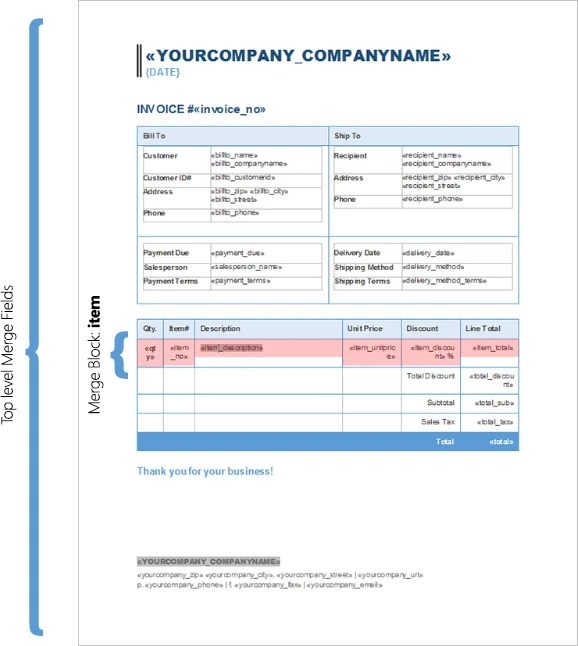
The data for this template is an array with one object per invoice. Save the following data as data.json, the file the requests of Overview send:
[
  {
    "yourcompany_companyname": "Text Control, LLC",
    "invoice_no": "778723",
    "billto_name": "Joey Montana",
    "billto_companyname": "Montana, LLC",
    "item": [
      {
        "qty": "1",
        "item_no": "1",
        "item_description": "Item description 1",
        "item_unitprice": "2663",
        "item_discount": "20",
        "item_total": "2130.40"
      },
      {
        "qty": "1",
        "item_no": "2",
        "item_description": "Item description 2",
        "item_unitprice": "5543",
        "item_discount": "0",
        "item_total": "5543"
      }
    ],
    "total_discount": "532.60",
    "total_sub": "7673.4",
    "total_tax": "537.138",
    "total": "8210.538"
  }
]
Each part of the data has its counterpart in the template:
| In the data | In the template |
|---|---|
A value of a record, such as "invoice_no": "778723" | A top-level field with the same name, invoice_no |
An array of objects, such as "item": [...] | The merge block with the name of the array, item. It is repeated for each object, and its fields, such as qty and item_total, take the values of that object |
An object inside a record or an array element, such as "product": { "name": "..." } | A field with dot notation, product.name, as Nested Blocks shows |
| An image as a Base64 string | An image placeholder, as Images describes |
A field that finds no value in the data is removed by default, as Merge Fields explains. The demo template has more fields than the sample above, such as billto_city and payment_due; the Web API tutorial has the complete invoice data.
One Record per Document
Each object at the top level of the array is a record, and the whole template is merged once for each record. Fields inside a block are repeated once for each element of the block's array, and blocks can be nested in any number of levels, as Nested Blocks shows.
The following data contains two records, so a merge creates two invoices:
[
  {
    "yourcompany_companyname": "Text Control, LLC",
    "yourcompany_zip": "28226"
  },
  {
    "yourcompany_companyname": "Text Control GmbH",
    "yourcompany_zip": "28217"
  }
]
With append=false, the response contains two documents. With append=true, or without append, both invoices are appended to one document. Create One Document or One per Record shows both requests.
A single record can also be sent as a JSON object instead of an array with one element: the MergeBody of POST /v1/document/merge accepts both. An array keeps the same form for one record and for many.
Values
The values of the official samples are JSON strings, such as "2663" in data.json, and numbers, such as "item_total": 234.56 in the Java sample of the merge reference. How a number or a date appears in the document is decided by the field and the culture:
- Formats of numbers and dates are properties of a merge field, set in the template, as Merge Fields describes.
- The culture of the merge, such as
de-DE, decides currency symbols and the language of long date formats, as Culture explains. - Formatted text in a value, enclosed in an
<html>element, keeps its bold, italic and underline formatting when themergeHtmlsetting istrue, as HTML Content shows.
Merge Objects With the .NET SDK
The .NET SDK takes your objects and serializes them into the mergeData array. The following console application merges one invoice into the demo template, with classes whose properties are named like the fields of sample_invoice.tx. It needs the NuGet package TXTextControl.ReportingCloud, as Installing an SDK describes:
using TXTextControl.ReportingCloud;

// One record: the template is merged once, and item fills the merge block
List<Invoice> invoices = new List<Invoice>
{
    new Invoice
    {
        invoice_no = "778723",
        billto_name = "Joey Montana",
        item = new List<Item>
        {
            new Item { qty = "1", item_no = "1", item_description = "Item description 1", item_total = "2130.40" },
            new Item { qty = "1", item_no = "2", item_description = "Item description 2", item_total = "5543" }
        },
        total = "8210.538"
    }
};

ReportingCloud rc = new ReportingCloud(Environment.GetEnvironmentVariable("REPORTINGCLOUD_API_KEY"));

// The SDK serializes the list into the mergeData array
MergeBody mergeBody = new MergeBody { MergeData = invoices };

List<byte[]> documents = rc.MergeDocument(mergeBody, "sample_invoice.tx", ReturnFormat.PDF, false);
File.WriteAllBytes("invoice.pdf", documents[0]);

public class Invoice
{
    public string invoice_no { get; set; } = "";
    public string billto_name { get; set; } = "";
    public List<Item> item { get; set; } = new List<Item>();
    public string total { get; set; } = "";
}

public class Item
{
    public string qty { get; set; } = "";
    public string item_no { get; set; } = "";
    public string item_description { get; set; } = "";
    public string item_total { get; set; } = "";
}
The code works as follows:
- The
ReportingCloudconstructor with one string authenticates with an API key; the class sends its requests tohttps://api.reporting.cloud. MergeDataofMergeBodytakes any object. A list becomes the JSON array of records, so the request body contains the same structure as data.json, withtemplateandmergeSettingsset tonull.- The SDK writes names in camel case: a property
InvoiceNumberis sent asinvoiceNumber, and the keys of a dictionary are changed the same way. Names that start with a lowercase letter, such asinvoice_no, are sent unchanged, which is why the classes use the names of the template's fields. MergeDocumentsends the request with the template name, the return format andappend, and returns the created documents as a list of byte arrays, already decoded from Base64.
When the names are known only at run time, such as the fields of a web form, pass a Dictionary<string, string> or a list of them, as the blog article Creating Dynamic HTML Forms Using ReportingCloud does. A single object instead of a list is sent as a JSON object rather than an array, which the Web API merges as one record, as ReportingCloud: The MergeData JSON Object Format Explained shows.
Merge Arrays With the PHP SDK
The PHP SDK takes the records as an array of associative arrays, and it sends their keys unchanged. The following script merges the same invoice; it needs the Composer package textcontrol/textcontrol-reportingcloud:
require_once __DIR__ . '/vendor/autoload.php';
use TextControl\ReportingCloud\ReportingCloud;
$reportingCloud = new ReportingCloud([
'api_key' => (string) getenv('REPORTINGCLOUD_API_KEY'),
]);
// One record: an array of associative arrays, item fills the merge block
$mergeData = [
[
'invoice_no' => '778723',
'billto_name' => 'Joey Montana',
'item' => [
['qty' => '1', 'item_no' => '1', 'item_description' => 'Item description 1', 'item_total' => '2130.40'],
['qty' => '1', 'item_no' => '2', 'item_description' => 'Item description 2', 'item_total' => '5543'],
],
'total' => '8210.538',
],
];
$documents = $reportingCloud->mergeDocument($mergeData, 'PDF', 'sample_invoice.tx');
file_put_contents('invoice.pdf', $documents[0]);
mergeDocument returns an array with the binary data of each created document. Its fifth parameter, $append, is false by default, and the SDK then leaves append out of the request, which the service answers with one document of all the records: the array holds one element. The SDK has no way to send append=false; to get one document per record, merge one record per request.
Java and Ruby
- Java. The
MergeBodyconstructor takes the records as an array or anIterableof objects, and the SDK serializes their fields with their declared names, such asrecipient_nameanditemin the Java sample of the reference. - Ruby.
MergeBody.newtakes the records as an array of hashes and raises anArgumentErrorwhen the array is empty or its first element isn't a hash.
The SDKs section describes each SDK, and the merge reference has a sample in each language.
Next Steps
- Merge Fields: name the fields of a template after the data.
- Merge Blocks: repeat parts of a template for each element of an array.
- Nested Blocks: merge data with several levels.
- Datasource Excerpts: load sample data of the same structure into the template editor.