
Hunspell and OpenOffice Dictionaries
The dictionaries of TX Spell .NET are Hunspell dictionaries, the format of the spell checkers in OpenOffice and LibreOffice. They exist for more than 60 languages, most of them are free to use and to ship with your application, and Text Control tests them and offers the approved ones for download. US English comes with TX Spell .NET; every other language is a download away. Read on for what a dictionary consists of, which languages Text Control offers, and where the files go.
What a Hunspell Dictionary Is
A Hunspell dictionary is a pair of text files with the same name:
| File | Holds |
|---|---|
| .dic | The word list: the number of words in the first line, then one word per line, with optional flags that refer to the affix file, such as 0th/pt |
| .aff | The affix rules that build the forms of a word from its stem, such as plural or past forms, and settings: the encoding of the files in the SET line, for example SET UTF-8, and replacement rules for suggestions |
Because the forms of a word are built by rules, the word list stays small. TX Spell .NET loads the pair as an OpenOfficeDictionary. Words of your own go into a user dictionary, a plain word list with the extension .txd, which User Dictionaries describes.
US English Is Included
The NuGet packages of TX Spell .NET contain the US English dictionary, en_US.dic and en_US.aff, together with the US English hyphenation list and thesaurus and the language recognition data. When you build, they are copied into the folder Dictionaries and its neighbors in the output folder, so English text is checked in a new project without any setup. The setup installs the same files below the Assembly folder of the installation.
Download More Languages
Text Control offers the tested dictionaries as ZIP archives, one per language or region, on the dictionary download page. Each archive is named dictionary.<locale>.zip, for example dictionary.de_DE.zip. Supported Languages lists the languages and what each archive contains; Arabic, Hebrew, Persian and Urdu are written from right to left, and Right-to-Left Languages covers them.
What an Archive Contains
An archive holds a folder named after the locale, with the files already sorted into the folders TX Spell .NET reads. The German archive, for example, contains:
tx_spell_dictionary.de_DE/
    Dictionaries/
        de_DE_frami.aff
        de_DE_frami.dic
        README_de_DE_frami.txt
        COPYING_GPLv2.txt
        COPYING_GPLv3.txt
    HyphenationLists/
        hyph_de_DE.dic
        README_hyph_de.txt
        COPYING_GPLv2.txt
        COPYING_GPLv3.txt
    SynonymLists/
        th_de_DE_v2.dat
        th_de_DE_v2.idx
        README_thesaurus.txt
        COPYING_GPLv2.txt
        COPYING_GPLv3.txt
- Dictionaries holds the spell checking dictionary with its license files. Every archive has it.
- HyphenationLists holds the hyphenation list of the language, where one exists; Hyphenation Lists describes them.
- SynonymLists holds the thesaurus, where one exists; Synonym Lists describes them.
The name of the dictionary file doesn't always match the locale: the German archives contain de_DE_frami.dic, de_AT_frami.dic and de_CH_frami.dic, and the Catalan archive ca.dic. The name is what you pass when you load a dictionary by name.
Install a Dictionary
Copy the files of each folder of the archive into the folder of the same name that TX Spell .NET reads, and in a .NET project let the build copy them next to the application. Add Other Languages shows the steps for .NET and .NET Framework projects, and Loading and Managing Dictionaries how the spell checker chooses among the dictionaries it finds.
Check the License of Each Dictionary
The dictionaries are written and maintained by their own authors, and each comes with its own license, in the README and COPYING files next to it in the archive. Most use the LGPL, but not all: the German dictionaries are licensed under the GPL, version 2 or 3, the French dictionary under the Mozilla Public License 2.0, and the English word list under the license of its SCOWL source. Hyphenation lists and thesaurus files carry licenses of their own as well.
The license agreement of TX Spell .NET places the dictionaries in its Dictionaries folder under the LGPL: they may be redistributed as long as they are unmodified. Ship the license files with the dictionaries, such as README_en_US.txt next to the US English dictionary, and follow the licenses of every file you ship.
How TX Spell .NET Uses the Affix Rules
TX Spell .NET reads the rules of the .aff file for more than word forms:
Suggestions. Replacement rules, written
REPin the affix file, describe typical mistakes: a missing accent, an umlaut written as two letters, "ue" for "ü", or a phonetic spelling, "f" for "ph". TX Spell .NET considers them when it creates suggestions, so "Fone" gets "Phone" as its first suggestion: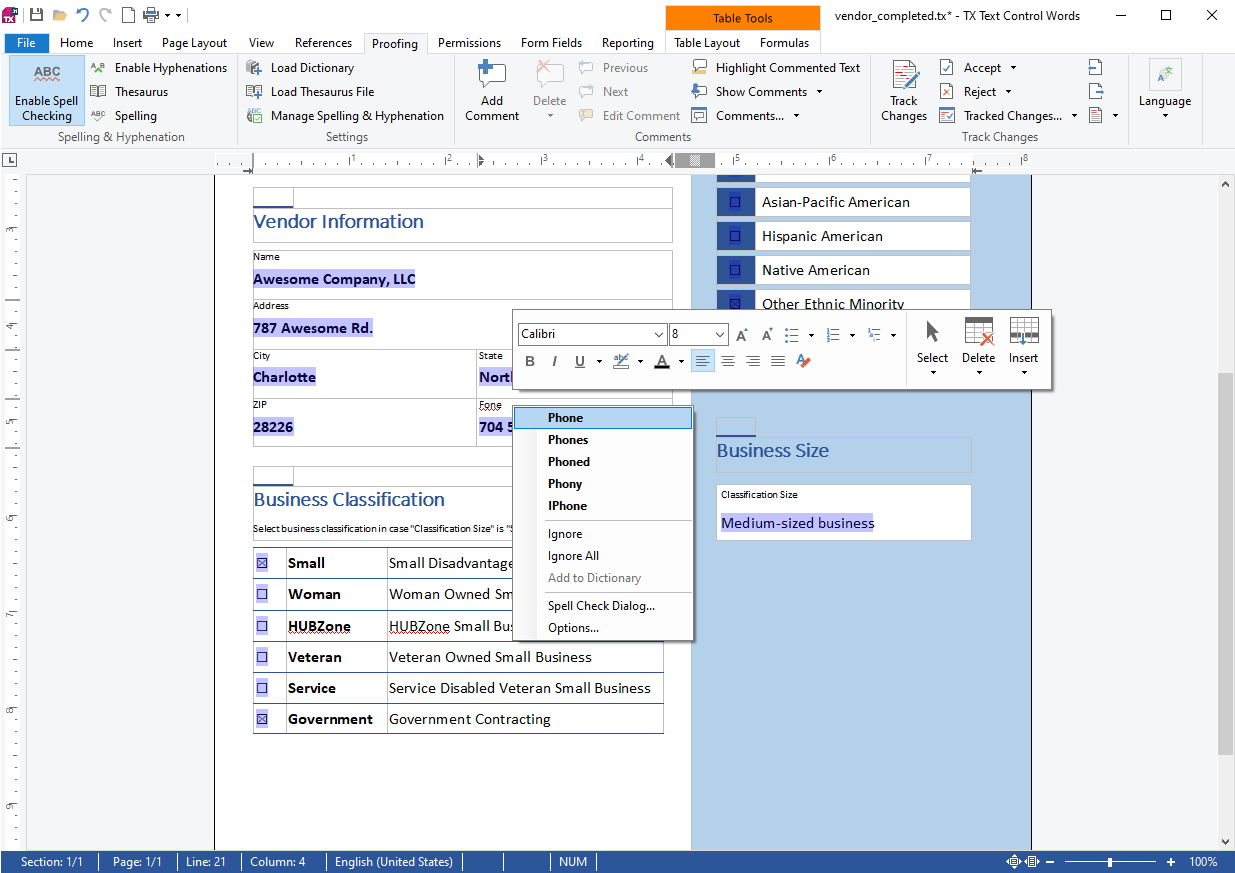
Word characters. The flags
WORDCHARS,BREAKandICONVdefine characters that belong to words, characters that are both part of a word and a delimiter, and characters that are read as another character. The same flags work at the start of a user dictionary, as User Dictionaries shows.
Next Steps
- Loading and Managing Dictionaries: load the downloaded dictionaries and choose which one is used.
- User Dictionaries: add words of your own.
- Multilingual Documents and Language Scopes: check texts in several languages at once.