
Hyphenation Lists
A hyphenation list holds the rules by which the words of one language are divided at the end of a line. TX Spell .NET reads these rules from the hyphenation dictionaries of the open source Hunspell project, the same kind of files that OpenOffice uses. Find out where the files come from, how TX Spell .NET chooses one for a text, and how to load and adjust a list in code.
What a Hyphenation List Is
A hyphenation list is a text file of patterns for one language. Its name starts with hyph_ and ends with .dic, such as hyph_en_US.dic for English (United States) or hyph_de_DE.dic for German (Germany). The first line names the encoding of the file, such as UTF-8; the patterns follow.
In code, a list is a HyphenationList. The spell checker uses a list only after it has been added to its HyphenationLists collection, and it takes the language of the list from the file name: hyph_en.dic is English, hyph_de_CH.dic German (Switzerland).
Hyphenation lists are separate from the dictionaries that check spelling. A dictionary and a hyphenation list of the same language are two files in two folders, and a language can have one without the other.
Where the Files Are
TX Spell .NET looks for hyphenation lists in the HyphenationLists folder, next to the application or, on the development machine, below the Assembly folder of the installation; HyphenationListsDirectoryPath sets another folder, as Installing Dictionaries and Language Data describes. The package TXTextControl.TXSpell.WinForms.SDK brings one list, hyph_en_US.dic, and AvailableHyphenationLists returns the names of all lists in the folder.
Get Lists for Other Languages
Text Control offers the language data of TX Spell .NET as ZIP archives, one per language, each with the folder Dictionaries and, for many languages, HyphenationLists and SynonymLists. Copy the hyph_ file from the HyphenationLists folder of an archive into the HyphenationLists folder of your application. Of the 47 archives, 32 contain a hyphenation list:
| Language | Archive | Hyphenation list |
|---|---|---|
| Afrikaans | af_ZA | hyph_af_ZA.dic |
| Bulgarian | bg_BG | hyph_bg_BG.dic |
| Catalan | ca_ES | hyph_ca.dic |
| Croatian | hr_HR | hyph_hr_HR.dic |
| Czech | cs_CZ | hyph_cs_CZ.dic |
| Danish | da_DK | hyph_da_DK.dic |
| Dutch | nl_NL | hyph_nl_NL.dic |
| English | en_AU, en_CA, en_GB, en_US | hyph_en_AU.dic, hyph_en_CA.dic, hyph_en_GB.dic, hyph_en_US.dic |
| Estonian | et_EE | hyph_et_EE.dic |
| French | fr, fr_FR | hyph_fr.dic |
| German | de_AT, de_CH, de_DE | hyph_de_AT.dic, hyph_de_CH.dic, hyph_de_DE.dic |
| Greek | el_GR | hyph_el_GR.dic |
| Irish | ga_IE | hyph_ga_IE.dic |
| Italian | it_IT | hyph_it_IT.dic |
| Norwegian | nb_NO, nn_NO | hyph_nb_NO.dic, hyph_nn_NO.dic |
| Polish | pl_PL | hyph_pl_PL.dic |
| Portuguese | pt_BR, pt_PT | hyph_pt_BR.dic, hyph_pt_PT.dic |
| Romanian | ro_RO | hyph_ro_RO.dic |
| Russian | ru_RU | hyph_ru_RU.dic |
| Serbian | sr | hyph_sr.dic, hyph_sh.dic |
| Slovak | sk_SK | hyph_sk_SK.dic |
| Slovenian | sl_SI | hyph_sl_SI.dic |
| Spanish | es_ES | hyph_es_ANY.dic |
| Swedish | sv_SE | hyph_sv.dic |
The archives of Arabic, Belarusian, Hebrew, Persian, Urdu, Vietnamese and some other languages have a dictionary but no hyphenation list. Dictionaries and Languages describes the archives, and the blog article TX Spell .NET 4.0: New Dictionaries and Hyphenation Lists Available announced them.
How a List Is Chosen
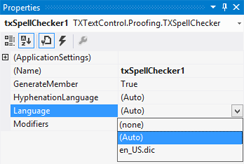
The HyphenationLanguage property of the TXSpellChecker selects the default list, the one used for text without a language of its own. It is "(Auto)" for a spell checker you drop on a form:
| Value | Default list |
|---|---|
"(Auto)" | The list in the language of the default spell check dictionary, set by Language. Without an exact match, a list of nearly the same language, such as hyph_en_US.dic for British English. When Language is "(none)", the list in the language of the application's environment |
The file name of a list, such as "hyph_de_DE.dic" | That list, from the HyphenationLists folder |
"(none)" | No list is set |
The chosen list is added to HyphenationLists, and its IsSelectedAsDefault property is true. When the folder has no list for the language, the property is reset to "(none)". With a TextControl, text that has a language of its own is hyphenated with a list of that language, as Hyphenation with TX Text Control describes.
Change How Words Are Divided
Each list has settings that apply to the words of its language:
| Property | Default | Effect |
|---|---|---|
| HyphenateCapitalizedWords | true | Words in uppercase, such as "HYPHENATION", are hyphenated |
| MinCharsAtWordBegin | 2 | The fewest characters at the begin of a word, before a division |
| MinCharsAtWordEnd | 2 | The fewest characters at the end of a word, after a division |
| UseOnlyCompoundHyphenationPoints | false | Compound words are divided only between their parts, as "Rechtschreib-prüfung" in German |
| MinSyllablesBeforeCompoundHyphenationPoint | 1 | The fewest syllables before a division between compound parts |
| MinSyllablesAfterCompoundHyphenationPoint | 1 | The fewest syllables after a division between compound parts |
With 3 characters at the begin and the end, for example, "international" is divided as inter-na-tional instead of in-ter-na-tion-al. The user changes the same settings on the Hyphenation tab of the options dialog, which The Hyphenation and Thesaurus Tabs describes.
Load a List in Code
To hyphenate another language than the default one, add its list to HyphenationLists. The file must be in the HyphenationLists folder, or you pass its full path:
using TXTextControl.Proofing;

// Load the German hyphenation list from the HyphenationLists folder
HyphenationList german = new HyphenationList("hyph_de_DE.dic");
txSpellChecker1.HyphenationLists.Add(german);

// Keep at least three characters on each line
german.MinCharsAtWordBegin = 3;
german.MinCharsAtWordEnd = 3;
The code works as follows:
- The HyphenationList constructor takes the file name or the full path. A file name without a path is looked for in the default HyphenationLists folder.
- Add checks the file. It throws an
ArgumentExceptionwhen the file doesn't exist ("File does not exist") or its name doesn't have the form hyph_*.dic ("Dictionary type is not valid."). - After
Add, Language holds the language read from the file name and Name the name you passed.
To change the settings of a list that is already loaded, such as the English list, get it by its name with GetItem:
HyphenationList english = txSpellChecker1.HyphenationLists.GetItem("hyph_en_US.dic");

if (english != null)
{
    // Don't hyphenate words in uppercase, such as product names
    english.HyphenateCapitalizedWords = false;
}
GetItem returns null when no list of that name is loaded. The indexer, HyphenationLists[0], reaches a list by its position instead.
Next Steps
- Hyphenation with TX Text Control: hyphenate the text of an editor as the user types.
- Hyphenating Text in Code: find the hyphenation points of a word.
- Options Dialog: the settings users change themselves.
- Dictionaries Not Found: what to check when words aren't hyphenated.