
Multilingual Documents and Language Scopes
A contract with an English and a German version side by side, a letter that quotes a French source, a manual translated paragraph by paragraph: many documents mix languages. TX Spell .NET checks them in all of their languages at once, with one dictionary per language, and checks each piece of text against the dictionaries of its own language when that language is known. The key is how a text gets its language, in TX Text Control and in code.
How Text Gets a Language
In TX Text Control, a language belongs to the text itself: a single character, a word or whole paragraphs can have one. The text gets its language in three ways:
- From the keyboard. When the user switches the keyboard language in Windows, the text typed next gets that language.
- From a dialog or the ribbon. The Language group of the ribbon's Proofing tab sets the language of the selected text.
- From your code, through the culture of the selection or of a style, as shown below.
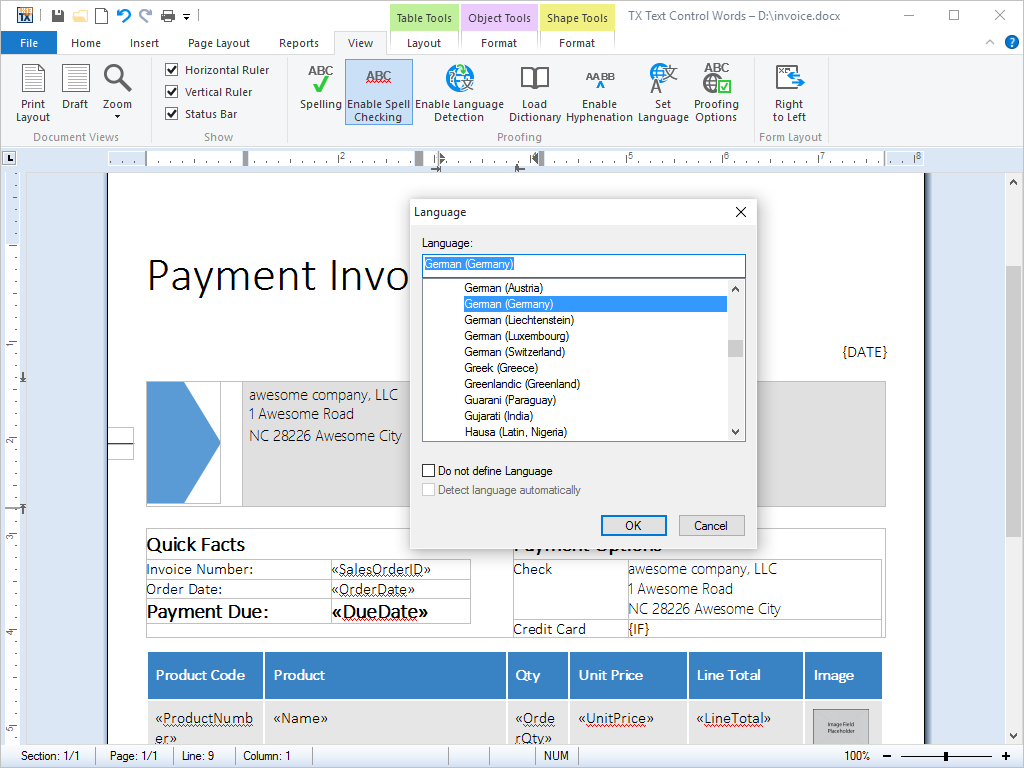
The Language dialog of TX Text Control sets the language of the selected text from a list of languages. Your code opens it with LanguageDialog:
A document loaded from a file keeps the languages stored in it; documents of TX Text Control and Microsoft Word store them. The status bar shows the language at the input position, here English in the first sentence and Spanish in the second:
With TX Spell .NET connected, TX Text Control passes the language of each word to the spell checker, which uses the dictionaries of that language for checking and for suggestions, and the hyphenation list of that language for hyphenation.
Load One Dictionary per Language
For each language of your documents, add its dictionary to Dictionaries. The English dictionary is loaded by default; this adds German:
txSpellChecker1.Dictionaries.Add(new TXTextControl.Proofing.OpenOfficeDictionary("de_DE_frami.dic"));
The dictionary takes its language from its file name, here German (Germany). Loading and Managing Dictionaries covers where the files go and how to load them; Hunspell and OpenOffice Dictionaries lists the languages Text Control offers.
Set the Language of Text in Code
The Culture property of the selection sets the language of the selected text. This handler marks the selection as German, for example from a menu item of your application:
private void menuItemGerman_Click(object sender, EventArgs e)
{
    // Check, hyphenate and suggest the selected text as German (Germany)
    textControl1.Selection.Culture = new System.Globalization.CultureInfo("de-DE");
}
The code works as follows:
- Selection is the selected text, or the input position when nothing is selected.
Cultureset tonullgives the text a neutral language, which means no specific language.- Reading
Cultureof a selection that spans several languages returns the default value; IsCommonValueSelected tells whether the selection has one language.
A style can carry a language as well: the Culture property of a formatting style gives every text of that style its language.
Check a String in One Language
Outside TX Text Control, a string has no language. Check then checks it against all enabled dictionaries, and a word counts as correct if any of them knows it. To check a string in one language, pass the language as the second argument:
using System.Globalization;

string text = "This sentense has a mistake. Dieser Satz hat einen Fehlr.";

// Every enabled dictionary: English and German words are accepted
txSpellChecker1.Check(text);

// German only: the English words are reported, too
txSpellChecker1.Check(text, new CultureInfo("de-DE"));
With the English and the German dictionary loaded, the two calls find different words:
Check(text):          sentense, Fehlr
Check(text, "de-DE"): This, sentense, has, mistake, Fehlr
With a language, Check uses the dictionaries of that language in the collection and those of the default dictionary folder. Each word it reports has the language in its Language property; without a language, the property is null. CreateSuggestions takes a language the same way, so the suggestions for a German word come from German dictionaries. Incorrect Words and Suggestions describes both methods.
In TX Text Control, a misspelled word carries the language of its text in the Culture property of the MisspelledWord.
Offer Suggestions per Language
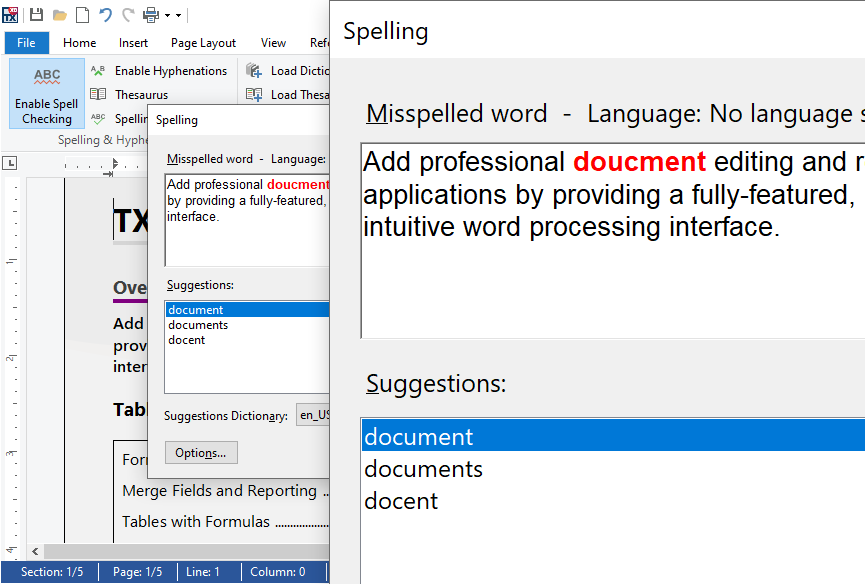
The spell check dialog shows the language of the current word in its first line and takes the suggestions from the dictionary chosen in its Suggestions Dictionary list. When a text has no language, the dialog shows "No language set":
Two settings help users with several languages:
- An "All" entry. Set IsAllItemEnabled of the dialog's SuggestionDictionaryComboBox to
true, and the list offers an entry that takes suggestions from all dictionaries at once, when more than one provides suggestions. - A matching list in your own interface. The SuggestionDictionaries of the correction UI provider hold the dictionaries in the language of the current word; Spelling Correction Modes and UI Provider binds a list to them.
Find the Languages of a Text
Text without a language, such as plain text or a document from an application that stores no languages, is checked against all dictionaries. Language detection can assign the languages instead: it splits a text into language scopes, sections of one language each, and TX Text Control can apply them to all text with a neutral language. Language Detection shows how.
Next Steps
- Language Detection: detect the languages of a text and turn on detection in TX Text Control.
- Loading and Managing Dictionaries: add the dictionaries of your languages.
- Right-to-Left Languages: Arabic, Hebrew, Persian and Urdu.