
RichTextBox and TextBox
The standard text controls of Windows Forms have no spell checking of their own, but TX Spell .NET can check their text. Two short tutorials add it to a RichTextBox, and to a TextBox along the way: one marks misspelled words while the user types, the other opens the spell check dialog. Both need only the TX Spell .NET package, not TX Text Control.
How It Works
With TX Text Control, the editor does most of the work. With a RichTextBox or a TextBox, your code does it:
- You pass the text. The Check method of the TXSpellChecker checks a string and lists the incorrect words with their positions in IncorrectWords.
- You mark the words. A
RichTextBoxcan color them; aTextBoxcan report that its text contains mistakes. - You apply the corrections. The spell check dialog tells your code which word the user changed, through the
IncorrectWordChangingevent, and your code changes the text.
Recommended Order
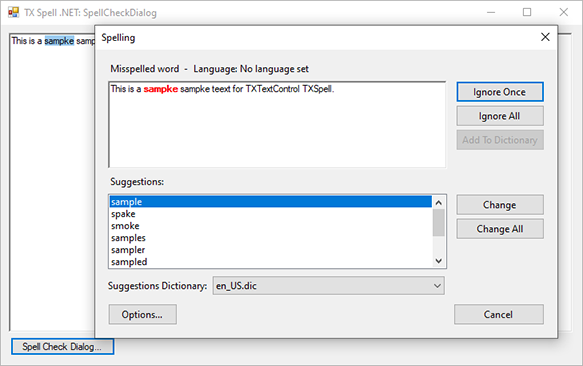
- Check Spelling as You Type: create the project, add the controls, and color misspelled words red while the user types. The page also checks a
TextBoxwhen it loses the focus. - Open the Spell Check Dialog: add a button that opens the dialog, and write each correction back into the
RichTextBox.
Pages in This Section
- Check Spelling as You Type: a
RichTextBoxthat colors misspelled words, and aTextBoxchecked in itsValidatingevent. - Open the Spell Check Dialog: the spell check dialog of TX Spell .NET for a
RichTextBox.