
Other Controls
Every control that displays text can be spell checked with TX Spell .NET, not only TX Text Control and the RichTextBox and TextBox. A grid cell, a label, a list item or the editor of another vendor: if your code can read the text and write it back, the spell checker finds the mistakes, offers suggestions and walks the user through them in its dialog. What your code has to do is the part TX Text Control would otherwise do: pass the text, and apply the corrections.
The Pattern
With any control other than TX Text Control, spell checking has the same four parts as with a RichTextBox: initialize the spell checker with Create, pass the text to Check, show the words to the user, and apply each correction in the IncorrectWordChanging event. What TX Spell .NET Does and What Your Code Does describes each part.
Check Any Control in the Dialog
This helper checks the text of any control in the spell check dialog. It takes two functions: one that reads the text of the control, and one that writes it back. The handler of IncorrectWordChanging applies each correction through them:
// Reads and writes the text of the control being checked
private Func<string> getText;
private Action<string> setText;

private void CheckInDialog(Func<string> get, Action<string> set)
{
    getText = get;
    setText = set;

    txSpellChecker1.Check(getText());
    txSpellChecker1.SpellCheckDialog.Show();
}

private void txSpellChecker1_IncorrectWordChanging(object sender, IncorrectWordChangingEventArgs e)
{
    string text = getText();
    int start = e.IncorrectWord.Start;
    int length = e.IncorrectWord.Length;

    if (e.Type == TXSpell.ChangeType.Replace)
    {
        setText(text.Remove(start, length).Insert(start, e.CorrectedWord));
    }
    else if (e.Type == TXSpell.ChangeType.Delete)
    {
        setText(text.Remove(start, length));
    }
}
To check the current cell of a DataGridView, call the helper with its text:
CheckInDialog(
    () => Convert.ToString(dataGridView1.CurrentCell.Value),
    value => dataGridView1.CurrentCell.Value = value);
Attach txSpellChecker1_IncorrectWordChanging to the IncorrectWordChanging event of the spell checker, in the events list of the Properties window or in code, and call Create once when the form is created.
The handler replaces or removes the word at its Start and Length in the text, through the two functions instead of a RichTextBox; Open the Spell Check Dialog explains the arguments of the event. Don't call Check while the dialog is open: it throws an exception. To check several controls in one dialog, hand the dialog the next text in its closing event, as Checking Multiple Controls shows.
Concepts for a DataGridView
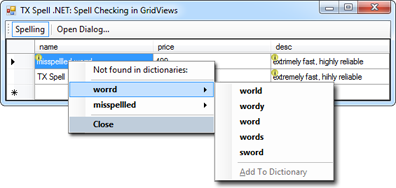
The Text Control blog showed two ways to spell check the cells of a DataGridView in From Our Labs: New Spell Checking Concepts for DataGridViews: a context menu per cell that lists its misspelled words with suggestions, and a dialog that steps through all cells. The article is from 2012 and uses a dialog of its own, from before the spell check dialog of TX Spell .NET existed; take the concept, not the code:
Code Without a Control
When there is no control at all, as in a service or a web application, the TXSpell class checks text with the same Check and CreateSuggestions methods; see Checking Text in Code. For the Document Editor of TX Text Control .NET Server, see TX Text Control .NET Server Document Editor.
Next Steps
- RichTextBox and TextBox: the pattern applied to the standard controls.
- Events: everything the arguments of
IncorrectWordChangingcarry. - Spell Check Dialog: the dialog your users work with.