
Overview
DS Server answers HTTP requests, so any application that can send one can use it. The client libraries save you that plumbing for the most common frontends: NuGet packages for ASP.NET Core and npm packages for Angular and React add the Document Editor or the Document Viewer to a page, request the OAuth access token and connect to your DS Server, and a .NET package wraps the DocumentProcessing Web API in C# methods.
What follows explains how the libraries connect to DS Server, which library belongs to which frontend and version and how you authorize them.
How the Libraries Work
DS Server provides three services: the DocumentProcessing Web API, which converts, merges and creates documents, and the two user interface components, the Document Editor and the Document Viewer. The components run in the browser, but their scripts and their document processing come from DS Server. A client library does three things for you:
- It loads the component from DS Server. The Angular and React packages add the script that DS Server serves below your service URL, such as
<serviceURL>/documenteditor/JS/ds-server-document-editor.jsfor the Document Editor, and then create the component in the page. The ASP.NET Core packages render the same component from a Razor view. - It authorizes the requests. When OAuth is enabled, as Enable OAuth describes, DS Server answers requests without a valid access token with the status code 401. The token is issued for a security profile, the set of credentials (a client ID and a client secret) that the admin creates for each application in the admin portal. The libraries request the token for you, or take one your server has requested.
- It passes your settings. Width, height, edit mode, culture, user names, the document to show and more are properties or attributes of the library, listed on the page of each frontend.
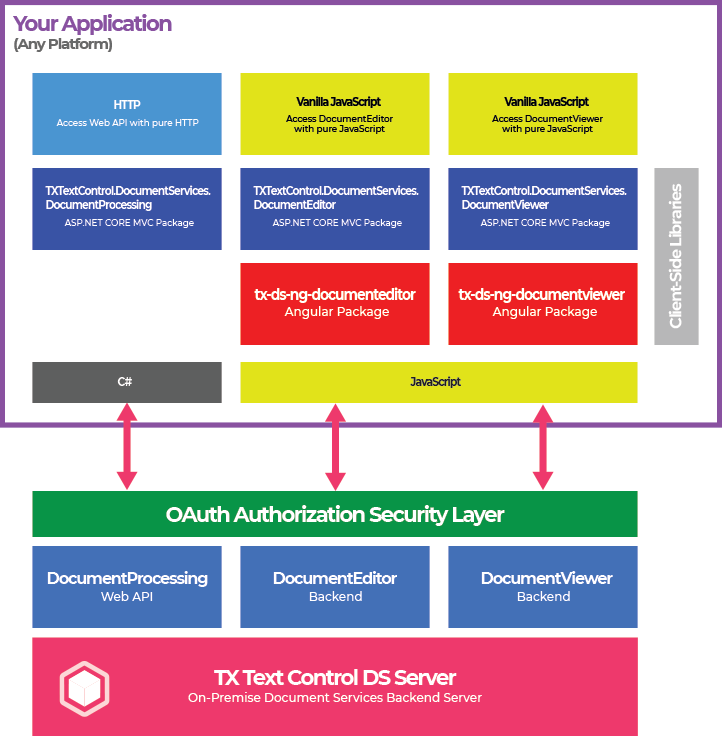
The diagram shows the parts of an application that uses a client library and how they connect:
Available Libraries
All packages are published on nuget.org and npmjs.com, not in the DS Server download. Version 5.0.0 of each package is meant for DS Server 5.0.
| Package | Registry | Frontend | Adds |
|---|---|---|---|
TXTextControl.DocumentServices.DocumentEditor | NuGet | ASP.NET Core MVC (.NET 8, .NET 10) | The Document Editor as an HTML helper for Razor views |
TXTextControl.DocumentServices.DocumentViewer | NuGet | ASP.NET Core MVC (.NET 8, .NET 10) | The Document Viewer as an HTML helper for Razor views |
TXTextControl.DocumentServices.DocumentProcessing | NuGet | Any .NET 8 or .NET 10 application | C# methods for the DocumentProcessing Web API |
TXTextControl.DocumentServices.Admin | NuGet | Any .NET 8 or .NET 10 application | C# methods for the administration Web API: security profiles, authentication servers, OAuth and the admin password |
@txtextcontrol/tx-ng-ds-document-editor | npm | Angular 19 to 21 | The tx-ds-document-editor component |
@txtextcontrol/tx-ng-ds-document-viewer | npm | Angular 19 to 21 | The tx-ds-document-viewer component |
@txtextcontrol/tx-react-ds-document-editor | npm | React 19 | The DocumentEditor component |
@txtextcontrol/tx-react-ds-document-viewer | npm | React 19 | The DocumentViewer component |
The framework versions are the target frameworks of the NuGet packages and the peer dependencies of the npm packages: @angular/core >=19.0.0 <=21.*.* and react ^19.0.0. Another NuGet package, TXTextControl.DocumentServices.Plugin.Abstractions, isn't a client library: it is what a plugin that extends DS Server itself is built with.
Authorize a Library
Every library needs the service URL of your DS Server and credentials of a security profile. Creating Security Profiles shows how the admin creates a profile and where its client ID and client secret appear. Which grant type the library uses decides what else the profile needs:
| Library | How it gets the access token | What the security profile needs |
|---|---|---|
ASP.NET Core packages with RedirectUri | Your server takes part in the authorization code flow; the package provides the callback endpoint | The redirect URI, such as https://your.app/textcontrol/documenteditor/auth/callback, under its authorized redirect URIs |
ASP.NET Core packages without RedirectUri, Angular and React packages with client ID and secret | The library sends the client ID and secret to <serviceURL>/oauth/token with the client credentials grant type | Allow "Client Credentials" grant type switched on; it is off by default |
| Angular and React packages with an access token | Your server requests the token and passes it to the component | Whatever grant type your server uses |
The client credentials of a browser component are part of the page that the browser downloads, so any visitor can read them. The blog article DS Server User Authentication with OAuth: Authorization Code Flow vs. Client Credentials Flow explains the risk. In production, request the token on your server and pass it with the accessToken attribute, as DS Server: Authorizing Angular Client Components shows for Angular. OAuth Grant Types describes the switch in the admin portal.
A trial token works with every library: set the service URL to https://trial.dsserver.io and use the client ID and secret you received. The trial profile allows the client credentials grant type. See Trial Token.
Without a Client Library
The libraries are a convenience, not a requirement:
- HTML and JavaScript. Load the component's script from DS Server and initialize it with
TXTextControl.initorTXDocumentViewer.init, as the Getting Started page JavaScript does for the Document Editor. The JavaScript API describes both objects. - Any HTTP client. Call the endpoints of the Web API directly, from any language. Web API in Getting Started sends the first requests.
Next Steps
- ASP.NET Core: install and configure the NuGet packages.
- Angular: the attributes and events of the Angular components.
- React: the properties of the React components.
- Getting Started: build a first application with one of the libraries.