
Multiple Servers With Load Balancing
When one DS Server is not enough, you run several instances behind a load balancer. Each instance is a complete DS Server with its own admin database, so two things need planning: every instance must accept the credentials and access tokens of your applications, and every request of a Document Editor session must reach the instance that holds the session.
What follows sets up a group of servers for administrators and DevOps engineers: licensing each instance, sharing the security profiles by cloning or through authentication servers, and configuring the load balancer.
Prepare Each Server
- Install DS Server on every server, in the same version, with Docker or any other way from the Installation Guide.
- Change the admin password of each instance. See Default Admin Password.
- License each instance. DS Server is licensed per server installation, and a container instance counts as one. Register each instance as described in Licensing, or with the licensing endpoints of the Web API when you create instances by script. The Licensing Overview explains the licensing model.
Clone the Security Profiles
Create the security profiles on one instance, the master server, in the admin portal or with the Web API. Then copy them to the other instances with the admin endpoints GET admin/securityprofiles, GET admin/securityprofiles/{id} and POST admin/securityprofiles. The admin endpoints take the admin user name and password in a Basic authorization header.
The following Bash script copies every profile of one instance to another. It needs curl and jq:
# Copy every security profile from one DS Server to another
SOURCE="http://dsserver1:5000"
TARGET="http://dsserver2:5000"
SOURCE_ADMIN="admin:<admin password of dsserver1>"
TARGET_ADMIN="admin:<admin password of dsserver2>"
for id in $(curl "$SOURCE_ADMIN" "$SOURCE/admin/securityprofiles" | jq '.[]'); do
curl "$SOURCE_ADMIN" "$SOURCE/admin/securityprofiles/$id" \
| jq '{name, allowClientCredentialsGrantType, expiryDate, clientCredentials}' \
| curl "$TARGET_ADMIN" "Content-Type: application/json" \
@- "$TARGET/admin/securityprofiles"
echo
done
The script works as follows:
GET admin/securityprofilesreturns the IDs of all profiles as a JSON array, such as[1,2].GET admin/securityprofiles/{id}returns one profile with its name, the client credentials (client ID, client secret and authorized redirect URIs), the client credentials grant setting and the expiry date.jqkeeps the fields that a new profile takes.allowClientCredentialsGrantTypeandexpiryDatebelong at the top level of the body, not insideclientCredentials.POST admin/securityprofilescreates the profile on the target with the same client ID and secret, and returns its new ID. A profile whose client ID already exists on the target is refused with 400 Bad Request and the message "A profile with the given client ID already exists.", so the script can run again after you add profiles.
The OAuth setting is not part of a profile: enable OAuth on each instance, in the admin portal as described in Enable OAuth or with POST admin/oauth. A setting changed through the endpoint takes effect after a restart of the instance.
With cloned profiles, every instance issues its own tokens, and a client must send a token to the instance that issued it. Configure the load balancer to keep each client on one instance, as described below.
Use Authentication Servers
Since version 3.1.0, an instance can ask other DS Server instances whether a request is authorized. You register those instances as authentication servers:
- When POST oauth/token or GET oauth/authorize can't authorize a request with the instance's own profiles, the instance forwards the request to its registered authentication servers.
- When a request carries an access token that the instance didn't issue, and OAuth is enabled on the instance, it asks its authentication servers whether the token is valid.
This allows a central authentication server: one instance holds all security profiles, and the other instances have no profiles and register the central one. The processing load stays on the instance that received the request. For redundancy, several or all instances can be authentication servers, so that requests can be authorized when one of them is unavailable.
You register authentication servers on the Authentication page of the admin portal with + Register, a name and the URL of the other instance, or with the admin endpoint POST admin/authenticationservers:
curl POST 'http://dsserver2:5000/admin/authenticationservers' \
'admin:<admin password of dsserver2>' \
'Content-Type: application/json' \
'{"name": "Authentication server", "serverUrl": "http://dsserver1:5000"}'
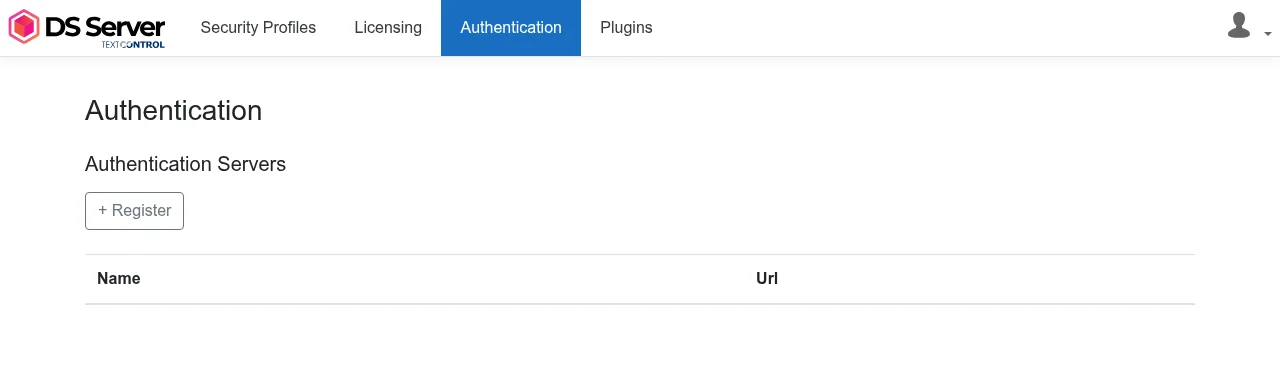
Authentication Servers describes the page and the endpoints.
Configure Sticky Sessions
A Document Editor session lives on the instance that opened it: the editor keeps a WebSocket connection to that instance. The load balancer must send every connection of a client to the same instance.
Line-of-business applications are often deployed behind a load balancer that distributes incoming traffic to healthy virtual machines or cloud services. Most cloud providers, such as Azure, offer a distribution mode called source IP affinity, also known as session affinity or client IP affinity. The load balancer uses a 2-tuple (source IP and destination IP) or a 3-tuple (source IP, destination IP and protocol) to choose the server, so connections from the same client always reach the same instance.
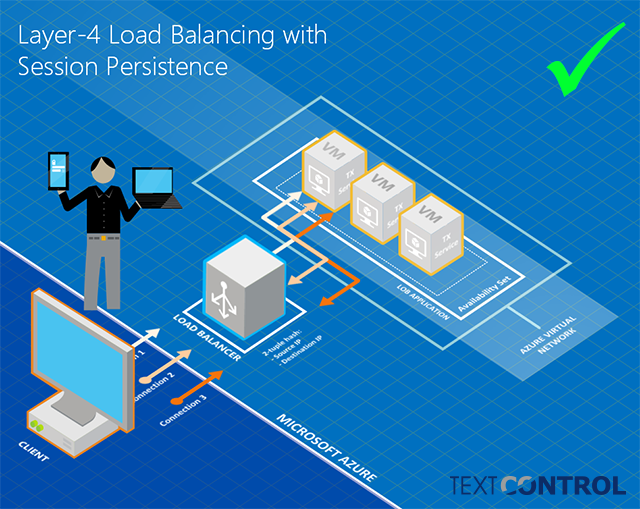
With cloned security profiles, source IP affinity also keeps a client's token requests and API calls on the same instance.
Next Steps
- Authentication Servers: register other instances to authorize requests.
- Creating Security Profiles: the profiles you share between instances.
- Installing with Official Image from Docker Hub: start instances as containers.
- Architecture: how instances, OAuth and sessions fit together.