
ASP.NET Core
Your first DocumentProcessing application is an ASP.NET Core web application that sends an HTML document to DS Server and returns the PDF that comes back to the browser. You create a security profile in the admin portal, install the TXTextControl.DocumentServices.DocumentProcessing package from nuget.org and write one controller action. The document processing itself happens on DS Server, so your application needs no TX Text Control engine of its own.
Prerequisites
- A DS Server. Either a DS Server of your own that is installed as the Installation Guide describes and registered with a serial number as Licensing shows, or a trial token for the trial server
https://trial.dsserver.io. An unregistered server refuses every DocumentProcessing request. - The .NET 10 SDK. The steps were written with Visual Studio 2026 and .NET 10 (Long Term Support). The package also supports .NET 8, and you can use the .NET CLI with any editor instead of Visual Studio.
With a trial token, skip the next section: the trial profile already exists.
Create a Security Profile
Your application authenticates at DS Server with the client ID and the client secret of a security profile, the OAuth credentials that the admin creates for each application in the admin portal. The admin portal is the root URL of your DS Server, such as http://localhost:5000, and asks for the admin user name and password.
Choose Security Profiles in the navigation bar, then click + Create new profile.
Enter a name, such as
MyDsApp, and click Create.The page now shows the profile with its Client ID and Client Secret. Copy both values with the copy buttons next to them, and click Done.
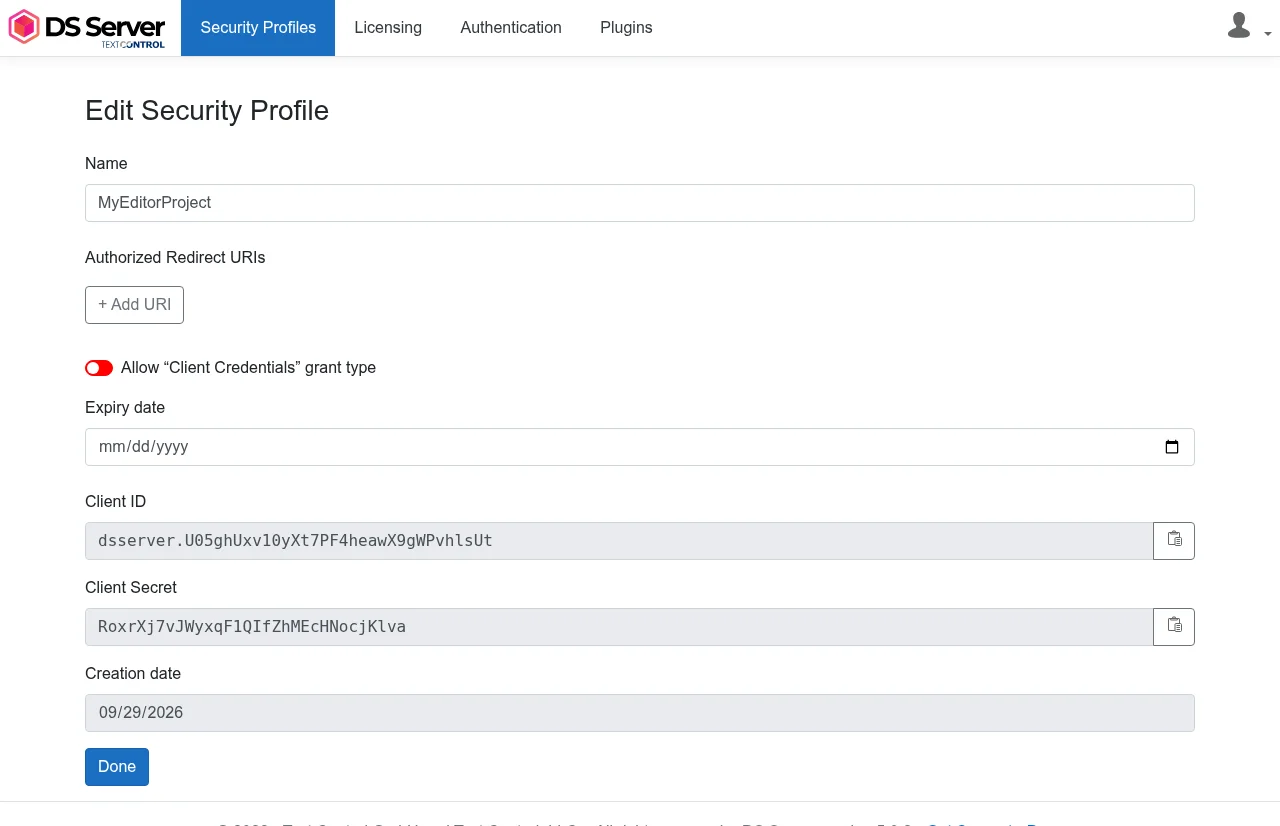
In the list of profiles, click the Edit profile icon of the new profile, turn on Allow "Client Credentials" grant type and click Save.
The client credentials grant type lets a server application request an access token with the client ID and the client secret alone, without redirecting a user. It is off by default for every new profile; OAuth Grant Types explains the setting.
A new installation of DS Server has OAuth disabled and accepts requests without an access token. The application works either way, but only with OAuth enabled does DS Server check the credentials. Turn it on with the switch at the top of the Security Profiles page, as Enable OAuth shows.
Create the Project
Use either Visual Studio or the .NET CLI.
Visual Studio
- In Visual Studio 2026, create a new project by choosing Create a new project.
- Select ASP.NET Core Web App (Model-View-Controller) as the project template and confirm with Next.
- Enter
MyDsAppas the project name, choose a location and confirm with Next. - Choose .NET 10.0 (Long Term Support) as the Framework and confirm with Create.
.NET CLI
Open a terminal and create a new MVC application:
dotnet new mvc MyDsAppChange to the project directory:
cd MyDsApp
Install the NuGet Package
TXTextControl.DocumentServices.DocumentProcessing is published on nuget.org. Version 5.0.0 is meant for DS Server 5.0 and targets .NET 8 and .NET 10. It sends your documents to the DocumentProcessing Web API and returns the results as byte arrays.
Visual Studio
- In Solution Explorer, select your project and choose Manage NuGet Packages... from the Project main menu.
- Select nuget.org as the Package source.
- Browse for
TXTextControl.DocumentServices.DocumentProcessingand install it.
.NET CLI
Add the package to the project:
dotnet add package TXTextControl.DocumentServices.DocumentProcessing
Configure the Connection
Open appsettings.json and add a DSServer section with the address of DS Server and the credentials of the security profile:
{
  "Logging": {
    "LogLevel": {
      "Default": "Information",
      "Microsoft.AspNetCore": "Warning"
    }
  },
  "AllowedHosts": "*",
  "DSServer": {
    "ServiceUrl": "http://localhost:5000",
    "ClientId": "<client ID>",
    "ClientSecret": "<client secret>"
  }
}
Replace http://localhost:5000 with the address of your DS Server, or with https://trial.dsserver.io when you use a trial token, and the placeholders with the client ID and the client secret. The client secret gives access to your DS Server: in a real application, keep it out of source control, for example in an environment variable such as DSServer__ClientSecret.
Write the Code
In the Controllers folder, add a class DocumentController.cs with the following code:
using System.Text;
using Microsoft.AspNetCore.Mvc;
using TXTextControl.DocumentServices.DocumentProcessing;
using TXTextControl.DocumentServices.DocumentProcessing.OAuth;

namespace MyDsApp.Controllers;

public class DocumentController : Controller
{
    private readonly IConfiguration _configuration;

    public DocumentController(IConfiguration configuration)
    {
        _configuration = configuration;
    }

    public async Task<IActionResult> Pdf()
    {
        // Read the connection settings from appsettings.json
        IConfigurationSection dsServer = _configuration.GetSection("DSServer");

        // Request an access token with the credentials of the security profile
        var oauthSettings = new OAuthSettings(dsServer["ClientId"], dsServer["ClientSecret"]);
        var documentProcessing = new DocumentProcessing(dsServer["ServiceUrl"], oauthSettings);

        // The document to convert: HTML, encoded as UTF-8
        byte[] html = Encoding.UTF8.GetBytes(
            "<h1>Hello DS Server</h1><p>This PDF was created by DS Server.</p>");

        // Send the document to DS Server and receive it as PDF
        byte[] pdf = await documentProcessing.Convert(html, ReturnFormat.PDF);

        return File(pdf, "application/pdf", "sample.pdf");
    }
}
What the Code Does
OAuthSettings, in theTXTextControl.DocumentServices.DocumentProcessing.OAuthnamespace, holds the client ID and the client secret. Without a third argument, the redirect URI, the package uses the client credentials grant type.- The DocumentProcessing constructor takes the service URL and the OAuth settings. It requests the access token from
<service URL>/oauth/tokenright away and sends it with every later request. Convertsends the document to the endpointPOST /documentprocessing/document/convertand returns the converted document as a byte array. TheReturnFormatvalue selects the format:PDF,PDFA,DOC,DOCX,RTF,TX,TXTorHTML. DS Server detects the format of the input document itself.Filereturns the PDF to the browser as a download named sample.pdf.
An access token expires after one hour, and the constructor requests it only once. That is why the action creates a new DocumentProcessing instance for each request instead of keeping one for the lifetime of the application.
Run the Application
- Start DS Server if it runs on your machine.
- Start the application: in Visual Studio, press F5; with the .NET CLI, run
dotnet runin the project directory. The console shows the address the application listens on, such ashttp://localhost:5034. DS Server listens on port 5000 by default, so the two don't collide. - Open
/Document/Pdfbelow that address in the browser, for examplehttp://localhost:5034/Document/Pdf.
The browser downloads sample.pdf, which shows the heading "Hello DS Server" and the paragraph below it.
Convert a Word Document
Convert takes any document format that DS Server can load, such as DOCX, RTF, HTML or PDF; Supported File Formats lists them for the Core and Classic builds. To convert a Word document instead of the HTML string:
Create a folder App_Data in the project and copy a Word document into it as sample.docx.
Add a second action to
DocumentController:public async Task<IActionResult> Word() { IConfigurationSection dsServer = _configuration.GetSection("DSServer"); var oauthSettings = new OAuthSettings(dsServer["ClientId"], dsServer["ClientSecret"]); var documentProcessing = new DocumentProcessing(dsServer["ServiceUrl"], oauthSettings); // Read a Word document from the project folder byte[] docx = await System.IO.File.ReadAllBytesAsync("App_Data/sample.docx"); byte[] pdf = await documentProcessing.Convert(docx, ReturnFormat.PDF); return File(pdf, "application/pdf", "sample.pdf"); }Open
/Document/Wordin the browser. The path App_Data/sample.docx is relative to the working directory, which is the project directory when you start the application from Visual Studio or withdotnet run.
The other methods of DocumentProcessing follow the same pattern: Merge fills a template with JSON data, Append combines documents, Thumbnails renders page images and PDF.Create creates a PDF with metadata. ASP.NET Core in Client-Side Libraries lists them with the endpoints they call.
Troubleshooting
The package reports errors as exceptions. A request that DS Server rejects throws a ServiceRequestException with the status code; a failed token request in the constructor throws an AggregateException whose inner exception holds the OAuth error.
DS Server is not registered. DS Server has no license yet:
POST request to document/convert failed: DS Server is not registered. (Status code 400 / BadRequest)Register the server with your serial number or the trial serial number, as Licensing describes.
The grant type is not allowed. The security profile doesn't allow the client credentials grant type:
OAuth access token request failed. error: "unsupported_grant_type", error_description: "This security profile does not allow the specified grant type. (client_credentials)"Turn on Allow "Client Credentials" grant type in the profile, as step 4 of Create a Security Profile shows. The error
invalid_clientmeans that the client ID or the client secret in appsettings.json is wrong.The request is unauthorized. DS Server has OAuth enabled and rejects the access token:
POST request to document/convert failed for unknown reasons. Status code 401 / Unauthorized.Check whether the security profile has an expiry date in the past. Create the instance with the constructor, as the sample does:
DocumentProcessing.CreateInstanceAsyncin version 5.0.0 of the package requests an access token but doesn't send it with the later requests.The connection is refused. DS Server doesn't run at the service URL, for example
Connection refused (localhost:5000). Check that DS Server is started and thatServiceUrlnames its address and port.
Next Steps
- Web API: the same conversion with plain HTTP requests, from any language.
- Merging Templates: merge templates with JSON data.
- Converting Documents: formats, options and form fields.
- ASP.NET Core: every package for ASP.NET Core and its settings.
- Document Editor: let users edit documents in the browser.