
Creating a Plugin
A plugin starts as an ordinary .NET class library. You add one NuGet package, implement the IPlugin interface, copy the compiled assembly into the Plugins folder of DS Server and restart the server. Follow the steps below to build MyFirstPlugin, a plugin with its own endpoint at /plugin/hello, a setting read from the configuration of DS Server and a middleware that logs each request to the endpoint.
The steps target DS Server 5.0 and version 5.0.1 of the plugin package. Plugins explains what a plugin can do and how DS Server loads it.
Prerequisites
- .NET 10 SDK. DS Server 5.0 runs on .NET 10, and the plugin targets
net10.0, as the official sample plugin does. - A DS Server 5.0 installation that you can stop and start, with write access to its folder. Installation Guide describes the ways to install it.
- A terminal for the .NET CLI and cURL. Visual Studio works as well: create a Class Library project for .NET 10 and add the package with the NuGet Package Manager.
Create the Project
Create a class library and remove the class the template adds:
dotnet new classlib MyFirstPlugin
cd MyFirstPlugin
rm Class1.cs
Install the NuGet Package
The interfaces of a plugin are in the package TXTextControl.DocumentServices.Plugin.Abstractions on nuget.org:
dotnet add package TXTextControl.DocumentServices.Plugin.Abstractions
The project file then references the package:
<Project Sdk="Microsoft.NET.Sdk">

  <PropertyGroup>
    <TargetFramework>net10.0</TargetFramework>
    <ImplicitUsings>enable</ImplicitUsings>
    <Nullable>enable</Nullable>
  </PropertyGroup>

  <ItemGroup>
    <PackageReference Include="TXTextControl.DocumentServices.Plugin.Abstractions" Version="5.0.1" />
  </ItemGroup>

</Project>
The package brings the ASP.NET Core shared framework into the project, so controllers, middleware and dependency injection are available without another reference. The official sample plugin also adds <FrameworkReference Include="Microsoft.AspNetCore.App" /> explicitly, which does no harm.
Use version 5.0.0 or later of the package with DS Server 5.0; Versions lists which package fits which DS Server version. Version 4.1.0 lacks the constant PluginContext.AuthenticationScheme, which Protect the Endpoint With OAuth uses, and the services of Plugin Services.
Write the Code
The plugin consists of three files: a class that holds a setting, a controller and the plugin class.
The Setting
GreetingState.cs holds the greeting the endpoint returns:
namespace MyFirstPlugin;

public class GreetingState
{
    public string Greeting { get; set; } = "Hello (default)";
}
The Controller
HelloController.cs is a standard ASP.NET Core API controller. DS Server adds the controllers of a plugin to its own routes, so the endpoint answers at /plugin/hello on the address of DS Server:
using Microsoft.AspNetCore.Mvc;
namespace MyFirstPlugin;
[]
[]
public class HelloController : ControllerBase
{
private readonly GreetingState m_state;
public HelloController(GreetingState state)
{
m_state = state;
}
[]
public string Get() => m_state.Greeting;
}
The controller receives GreetingState through its constructor. The plugin class registers it in the next step.
The Plugin Class
HelloPlugin.cs implements IPlugin. DS Server finds this class in the assembly and calls its members while it starts:
using Microsoft.AspNetCore.Builder;
using Microsoft.AspNetCore.Http;
using Microsoft.Extensions.DependencyInjection;
using Microsoft.Extensions.Logging;
using TXTextControl.DocumentServices.Plugin.Abstractions;

namespace MyFirstPlugin;

public class HelloPlugin : IPlugin
{
    public string Name => "MyFirstPlugin";
    public string Description => "Adds a /plugin/hello endpoint and logs its requests.";
    public string Version => "1.0.0";

    public void ConfigureServices(IServiceCollection services, PluginContext context)
    {
        // Read the greeting from the appsettings.json file of DS Server
        string greeting = context.Configuration["MyFirstPlugin:Greeting"] ?? "Hello (default)";
        services.AddSingleton(new GreetingState { Greeting = greeting });
    }

    public void ConfigureMiddleware(WebApplication app, PluginContext context)
    {
        // Log every request to the plugin's endpoint
        app.Use(async (httpContext, next) =>
        {
            if (httpContext.Request.Path.StartsWithSegments("/plugin/hello"))
            {
                ILogger<HelloPlugin> logger =
                    httpContext.RequestServices.GetRequiredService<ILogger<HelloPlugin>>();
                logger.LogInformation("MyFirstPlugin intercepted a request to /plugin/hello");
            }

            await next();
        });
    }

    public void OnStart(IServiceProvider services, PluginContext context)
    {
        ILogger<HelloPlugin>? logger = services.GetService<ILogger<HelloPlugin>>();
        GreetingState? state = services.GetService<GreetingState>();

        logger?.LogInformation("MyFirstPlugin started on DS Server {Version}. Greeting: {Greeting}",
            context.DsServerVersion, state?.Greeting);
    }

    public void OnStop()
    {
        // Release the resources the plugin holds
    }
}
What the Code Does
The members of IPlugin are called in this order. Only Name, Description and Version are required: the interface has empty default implementations of the other members, so a plugin implements only the ones it needs.
| Member | When DS Server uses it | What the plugin does there |
|---|---|---|
Name, Description, Version | At startup and on the Plugins page of the admin portal | Identify the plugin |
UIBasePath | On the Plugins page | Optional: the address of a web page of the plugin, see Add a Page to the Admin Portal |
ConfigureServices(IServiceCollection, PluginContext) | Before the DS Server application is built | Register services in the dependency injection container |
ConfigureMiddleware(WebApplication, PluginContext) | After the application is built | Add middleware and endpoints to the request pipeline |
OnStart(IServiceProvider, PluginContext) | When the plugin is loaded, right before DS Server starts serving requests | Initialize resources, with access to the registered services |
OnStop() | When the plugin is unloaded | Release resources |
PluginContext gives the plugin three properties: DsServerVersion, the version string of DS Server, such as 5.0.2.0; BaseDirectory, the installation folder of DS Server; and Configuration, the configuration of the DS Server instance, which includes its appsettings.json file. Since version 5.0.0 of the package, it also has the constant AuthenticationScheme.
In the code above:
ConfigureServicesreads the keyMyFirstPlugin:Greetingfromcontext.Configurationand registers aGreetingStateas a singleton, which the controller receives.ConfigureMiddlewareadds a middleware withapp.Use. It writes a log entry for every request whose path starts with/plugin/helloand passes the request on withnext().OnStartwrites the version of DS Server and the greeting to the log.
The documentation of the package lists every type: Plugin.Abstractions.
Configure the Plugin
A plugin reads its settings from the appsettings.json file in the DS Server folder. Add a section for MyFirstPlugin beside the existing ones:
{
  "Logging": { },
  "AllowedHosts": "*",
  "LiteDbOptions": {
    "DatabaseFileName": "Admin.db"
  },
  "MyFirstPlugin": {
    "Greeting": "Hello from MyFirstPlugin!"
  }
}
Keep the content of the existing sections; the example shortens Logging. Without the section, the endpoint returns the default greeting.
Build and Deploy the Plugin
Build the project:
dotnet buildThe assembly is written to bin/Debug/net10.0/MyFirstPlugin.dll.
Stop DS Server.
Create a subfolder for the plugin in the Plugins folder of DS Server and copy the assembly into it:
Plugins/
├── README.md
└── MyFirstPlugin/
    └── MyFirstPlugin.dll
The name of the subfolder is free. An assembly directly in Plugins is not loaded.
Start DS Server.
A plugin that references other NuGet packages needs their assemblies in the same subfolder. dotnet publish -c Release -o publish collects the plugin and its dependencies in the publish folder; copy its content into the subfolder. DS Server loads plugins only when it starts, so repeat the restart after every update of the assembly.
Test the Plugin
When DS Server starts, its console output lists every plugin it loads:
Loading plugins from '/opt/dsserver/Plugins'...
Loaded plugin: MyFirstPlugin (v1.0.0)
The entry from OnStart is in the log file of the day, in the logs folder that DS Server creates in its working directory:
[2026-09-29 07:44:57] [Information] MyFirstPlugin started on DS Server 5.0.2.0. Greeting: Hello from MyFirstPlugin!
Call the endpoint. Replace the address with the one of your DS Server:
curl http://localhost:5000/plugin/hello
Hello from MyFirstPlugin!
The middleware adds a line to the log for each request:
[2026-09-29 07:45:06] [Information] MyFirstPlugin intercepted a request to /plugin/hello
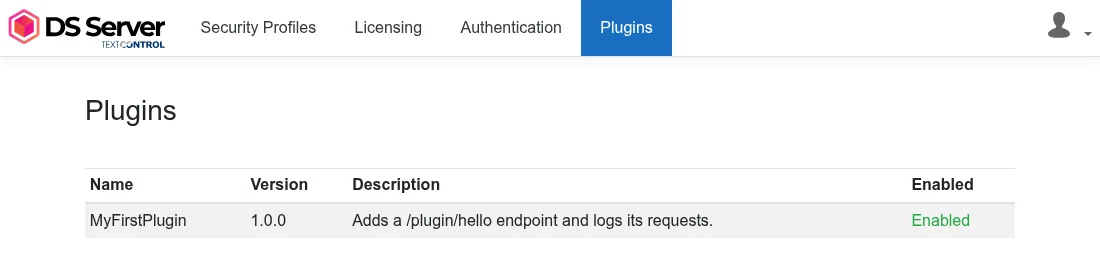
In the admin portal, the Plugins page lists the plugin with its name, version and description and shows it as enabled:
Protect the Endpoint With OAuth
The endpoints of a plugin are open: DS Server answers /plugin/hello without an access token, even when OAuth is enabled for the built-in services. To accept only requests with a valid access token of a security profile, add the Authorize attribute with the authentication scheme of DS Server. The constant PluginContext.AuthenticationScheme of the package holds its name, TXTextControl:
using Microsoft.AspNetCore.Authorization;
using Microsoft.AspNetCore.Mvc;
using TXTextControl.DocumentServices.Plugin.Abstractions;
namespace MyFirstPlugin;
[]
[]
[]
public class SecretController : ControllerBase
{
[]
public string Get() => "Only for callers with a valid access token";
}
The scheme checks the access token as it does for the built-in services. It accepts the token in an Authorization: Bearer header, in the access_token query parameter or in an access token cookie:
Request to /plugin/secret | OAuth enabled | OAuth disabled |
|---|---|---|
| Without a token | 401 Unauthorized | 200 OK |
| With an invalid token | 401 Unauthorized | 200 OK |
| With a valid access token | 200 OK | 200 OK |
Name the scheme in the attribute: [Authorize] without a scheme ends in an error 500, because DS Server defines no default scheme for it. A client obtains the token as described in OAuth Grant Types, and Enable OAuth describes the switch in the admin portal.
Add a Page to the Admin Portal
A plugin with a web interface returns its address in UIBasePath. The Plugins page then shows the plugin name as a link that opens this address in a new tab. Add the property to HelloPlugin and map a page to it at the end of ConfigureMiddleware:
// The address the Plugins page of the admin portal links the plugin name to
public string UIBasePath => "/plugin-ui/my-first-plugin";

public void ConfigureMiddleware(WebApplication app, PluginContext context)
{
    // The logging middleware from above goes here

    // Serve a page at UIBasePath
    GreetingState state = app.Services.GetRequiredService<GreetingState>();
    app.MapGet(UIBasePath, () => Results.Content(
        $"<html><body><h3>MyFirstPlugin</h3><p>Greeting: {state.Greeting}</p></body></html>",
        "text/html"));
}
The page is served without the admin password of the portal. Protect it yourself if it shows or changes settings.
Troubleshooting
The Type WebApplication Is Not Found
error CS0246: The type or namespace name 'WebApplication' could not be found
The implicit using directives of a class library do not include ASP.NET Core. Add using Microsoft.AspNetCore.Builder; to the file of the plugin class. The first plugin in the README of the package and in the blog article of version 4.1.0 lacks this directive.
DS Server Loads No Plugin
No plugins found in the plugin directory. No plugins will be loaded.
- Check that the assembly is in a subfolder of Plugins, not in Plugins itself.
- Check that the subfolder contains an assembly with a public class that implements
IPlugin. - Restart DS Server after copying the files.
When DS Server finds assemblies but none of them holds a plugin it can load, it reports instead:
Warning: No valid plugins found in the plugin directory. Make sure that the plugin assemblies reference the correct version of the TXTextControl.DocumentServices.Plugin.Abstractions.dll and that the plugins implement the IPlugin interface correctly.
Check the package version against Versions, and check the class as in step 2. A plugin that fails while it is loaded is reported in a line that starts with Failed to load plugin and ends with the error.
A Request Ends in an Error 500 After Adding Authorize
The attribute has no authentication scheme. Write [Authorize(AuthenticationSchemes = PluginContext.AuthenticationScheme)], or its value "TXTextControl", as shown in Protect the Endpoint With OAuth.
Next Steps
- Plugin Services: convert and merge documents and work with Document Editor sessions from a plugin.
- Custom Signing Endpoints: receive the documents signed in the Document Viewer in a plugin.
- TXTextControl.DocumentServices.SamplePlugin: the official sample plugin on GitHub, with a controller, a middleware, a plugin page and both plugin services.
- DS Server 4.1.0: Extend DS Server with Custom Plug-ins: the release article that introduced plugins.