
Deploying .NET Framework Applications
A WPF application for the .NET Framework is deployed by copying files: the application's executable, the assemblies of TX Spell .NET and the language data, all in one folder on the user's machine. No NuGet package does this for you, and one thing is easy to miss: the language data, which the application finds on your development machine without being copied, has to be shipped.
What Goes Next to the Executable
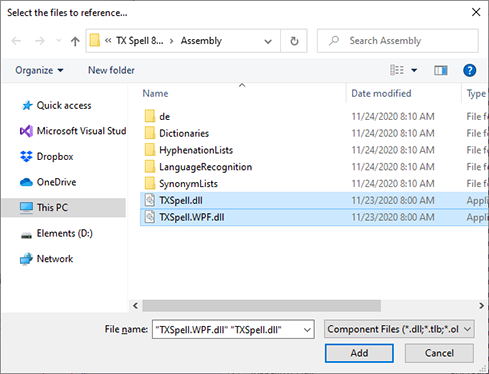
Copy these files and folders into the folder of the application's executable. They come from the Assembly folder of the TX Spell .NET installation:
MyApp.exe
TXSpell.dll
TXSpell.WPF.dll
de\
Dictionaries\
HyphenationLists\
LanguageRecognition\
SynonymLists\
Ship the de folder when the dialogs should appear in German. Every file in the four language data folders is used automatically.
Assemblies and Language Data Folders lists every file, and Installing Dictionaries and Language Data explains the folders.
Why the Build Output Isn't Enough
Warning
Works on Your Machine Only. On your development machine, the spell checker finds the language data below the Assembly folder of the installation, even when the output folder of your project has none. The machines of your users have no installation, so there it looks only in the folder of the application; Where the Spell Checker Looks explains the default and how to use another folder.
Test the deployed application on a machine without TX Spell .NET, or copy the folders into your output folder during the build, so that you see what your users see.
ASP.NET Applications
An ASP.NET application for the .NET Framework that checks text with the TXSpell class, such as the Web Forms sample on GitHub Examples, has no folder of an executable. There, TXSpell.dll and the four language data folders go into the Bin folder of the application instead.
Framework Versions
TX Spell .NET for WPF requires the .NET Framework 4.5 or higher on the user's machine. .NET and .NET Framework lists the versions.
The License Is Already Inside
In a .NET Framework project, the license is compiled into your assembly from licenses.licx when you build, so there is no license file to ship and nothing to install on the user's machine; .NET Framework Projects: licenses.licx shows the entry. Build the application with the full version of TX Spell .NET, and see Application Licensing for the checklist before a release.
After a Service Pack
A service pack keeps the assembly version, 11.0.1000.500. Install it on the development machine, rebuild the application, and ship the new assemblies from the Assembly folder with the next release.
With TX Text Control
An application that uses TX Text Control as well ships its files too: the assemblies and native libraries of TX Text Control, which its Deployment Guide lists in Deploying .NET Framework Applications. The licenses of both products are compiled from the same licenses.licx.
Next Steps
- Assemblies and Language Data Folders: every file, and where it comes from.
- Application Licensing: what to check before you ship.
- Deployment: when the deployed application doesn't find its files.