
Synonyms and Thesaurus
A thesaurus suggests other words for the same thing: "rapid" or "swift" for "fast", "dwelling" or "home" for "house". TX Spell .NET for WPF has one built in, for US English out of the box and for more than 20 other languages and regions with downloadable lists. It works in the TX Text Control editor, where users open the Thesaurus Dialog from the ribbon, and in your own code for any word.
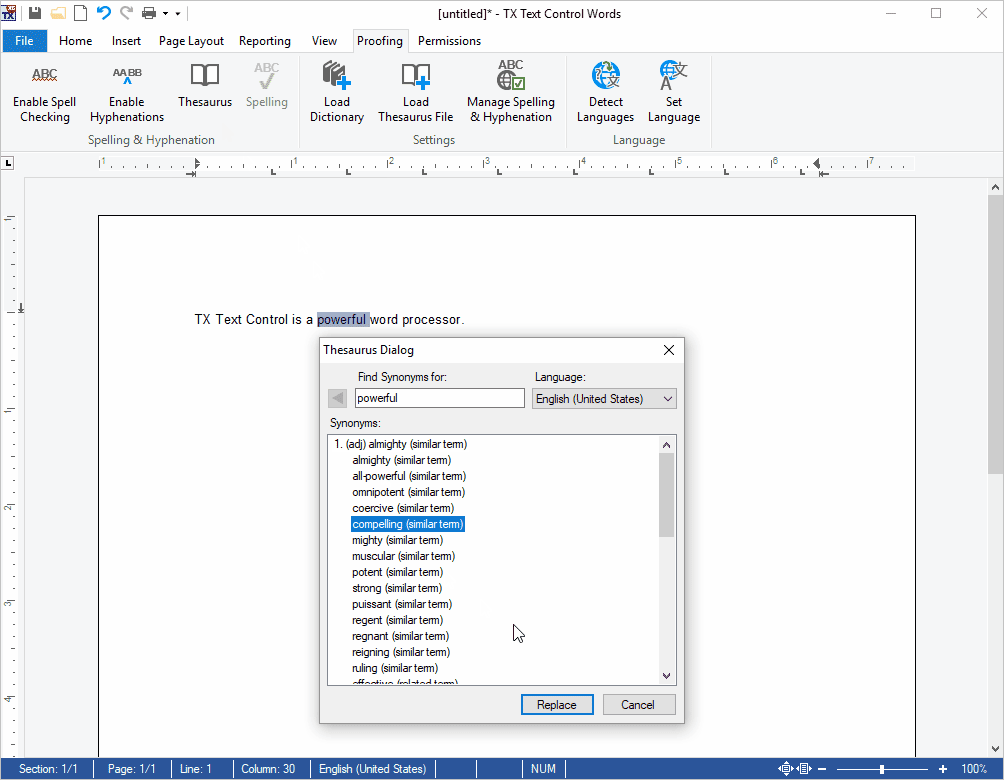
How the Thesaurus Works
- Synonym lists. The synonyms come from thesaurus files in the OpenOffice format, one list per language, in the folder SynonymLists. The package brings the US English list.
- The default list. With
SynonymLanguageat its default, "(Auto)", the spell checker uses the list in the language of its default dictionary. - Groups of synonyms. For a word,
CreateSynonymsreturns one group per meaning, each with the synonyms of that meaning. - TX Text Control. The Thesaurus button of the ribbon opens the Thesaurus Dialog, which replaces the selected word with the synonym the user picks. It needs a spell checker connected to the editor.
Find the Right Page
| If you want to | Read |
|---|---|
| Know what a synonym list is, get lists for other languages and choose one | Synonym Lists |
| Offer synonyms in the editor, in the Thesaurus Dialog and the context menu | Synonyms in the Context Menu |
| Look up synonyms for a word in code | Looking Up Synonyms in Code |
Where to Start
- Synonyms in the Context Menu, to see what users get with TX Text Control.
- Synonym Lists, before you add languages other than English.
- Looking Up Synonyms in Code, for synonyms outside the editor.
Pages in This Section
- Synonym Lists: the thesaurus files, their folder, the languages and how a list is chosen.
- Synonyms in the Context Menu: the Thesaurus Dialog of TX Text Control and a synonyms submenu in the context menu.
- Looking Up Synonyms in Code:
CreateSynonyms, synonym groups and a console application.