
Supported Languages
TX Spell .NET for WPF checks spelling in 38 languages with the dictionaries Text Control offers, and in any other language that has a Hunspell dictionary. For each language, the table below shows what is available: a dictionary for spell checking, a hyphenation list, a thesaurus for synonyms, and language detection.
What Comes With the Product
The NuGet packages and the setup bring the language data of US English: a dictionary, a hyphenation list, a thesaurus and the data for language detection. Every other language is a free download: Text Control offers the tested language data as 47 archives, one per language or region, named dictionary.<locale>.zip, such as dictionary.de_DE.zip, on the dictionary pages of TX Spell .NET for WPF. Installing Dictionaries and Language Data lists the English files and shows where the files of other languages go.
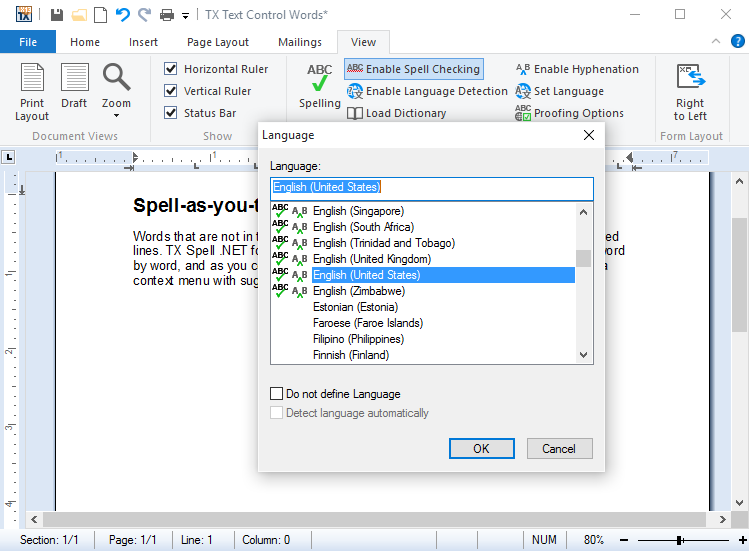
In the Language dialog of TX Text Control, here in the Windows Forms demo TX Text Control Words, small icons show for which languages a dictionary and a hyphenation list are installed:
Languages and Their Data
"Dictionary", "Hyphenation" and "Thesaurus" show whether the archive contains the file; "Detection" shows whether language detection can find the language, with the language code it uses.
| Language | Archive | Dictionary | Hyphenation | Thesaurus | Detection |
|---|---|---|---|---|---|
| Afrikaans | af_ZA | Yes | Yes | – | af |
| Arabic | ar, ar_AR | Yes | – | ar only | ar |
| Aragonese | an_ES | Yes | – | – | – |
| Armenian | hy_AM | Yes | – | – | hy |
| Belarusian | be_BY | Yes | – | – | be |
| Breton | br_FR | Yes | – | – | – |
| Bulgarian | bg_BG | Yes | Yes | Yes | bg |
| Catalan | ca_ES | Yes | Yes | Yes | ca |
| Croatian | hr_HR | Yes | Yes | – | hr |
| Czech | cs_CZ | Yes | Yes | Yes | cs |
| Danish | da_DK | Yes | Yes | Yes | da |
| Dutch | nl_NL | Yes | Yes | – | nl |
| English | en_AU, en_CA, en_GB, en_US, en_ZA | Yes | Yes, except en_ZA | Yes, except en_ZA | en |
| Estonian | et_EE | Yes | Yes | – | et |
| French | fr, fr_FR | Yes | Yes | fr only | fr |
| German | de_AT, de_CH, de_DE | Yes | Yes | Yes | de |
| Greek | el_GR | Yes | Yes | Yes | el |
| Hebrew | he_IL | Yes | – | – | he |
| Icelandic | is | Yes | – | Yes | – |
| Irish | ga_IE | Yes | Yes | Yes | – |
| Italian | it_IT | Yes | Yes | Yes | it |
| Kurdish | ku_TR | Yes | – | – | – |
| Norwegian (Bokmål) | nb_NO | Yes | Yes | Yes | no |
| Norwegian (Nynorsk) | nn_NO | Yes | Yes | – | no |
| Occitan | oc_FR | Yes | – | – | oc-FR |
| Persian | fa_IR | Yes | – | – | fa |
| Polish | pl_PL | Yes | Yes | Yes | pl |
| Portuguese | pt_BR, pt_PT | Yes | Yes | pt_PT only | pt |
| Romanian | ro_RO | Yes | Yes | Yes | ro |
| Russian | ru_RU | Yes | Yes | Yes | ru |
| Scottish Gaelic | gd_GB | Yes | – | – | – |
| Serbian | sr | Yes | Yes | – | sr |
| Slovak | sk_SK | Yes | Yes | – | sk |
| Slovenian | sl_SI | Yes | Yes | Yes | sl |
| Spanish | es_ES | Yes | Yes | – | es |
| Swedish | sv_SE | Yes | Yes | Yes | sv |
| Urdu | ur_PK | Yes | – | – | ur |
| Vietnamese | vi_VN | Yes | – | – | vi |
All 47 archives contain a dictionary, 32 a hyphenation list and 24 a thesaurus. Hyphenation Lists names the file of each hyphenation list, and Hunspell and OpenOffice Dictionaries the file of each dictionary, which doesn't always match the archive, such as de_DE_frami.dic for German.
Language Detection
Language detection finds out in which language each part of a text is written. It needs no dictionaries, only the file in the LanguageRecognition folder, and it knows 34 languages: the ones with a code in the table above, and Galician, Lithuanian and Ukrainian, for which Text Control offers no dictionary. Language Detection describes how to use it and which languages it looks for by default.
Right-to-Left Languages
Arabic, Hebrew, Persian and Urdu are written from right to left. They have dictionaries but no hyphenation lists, and their text is checked like any other; Right-to-Left Languages covers their archives and how TX Text Control lays them out.
Other Dictionaries
TX Spell .NET reads the Hunspell dictionaries of OpenOffice.org, which exist for more than 60 languages. A dictionary that Text Control doesn't offer can be added in the same way, as Hunspell and OpenOffice Dictionaries shows. Words of a special field, such as legal or medical terms, go into a user dictionary; User Dictionaries explains how.
The dictionaries have licenses of their own, which you check before you ship them; Check the License of Each Dictionary names them.
Languages of the User Interface
The languages above are the languages TX Spell .NET checks. The texts of its dialogs are in English, or in German with the satellite assembly the packages bring; Localization and Resource Kit translates them into other languages.
Next Steps
- Dictionaries and Languages: load dictionaries, check documents in several languages.
- Loading and Managing Dictionaries: add the dictionaries of a language in code.
- Hyphenation Lists: the hyphenation lists and their settings.