
Hyphenating Text in Code
TX Spell .NET finds the places where a word can be divided, for your own code to use: a label that wraps, a report layout, a text box that shows the syllables of a word. Two methods answer the question, one with every hyphenation point of a word and one with the last point before a given position. A console application shows both, with its real output, followed by the hyphenation sample of the setup.
The Two Methods
The TXSpell class and the TXSpellChecker component have the same two methods:
| Method | Returns |
|---|---|
| GetHyphenationPoints | All hyphenation points of a word, as an array of positions |
| GetHyphenationPoint | The last hyphenation point before a divide position, for a word that has to be divided there |
Both use the default hyphenation list, the one HyphenationLanguage selects, or the list of a language you pass. Hyphenation Lists describes the lists. Use TXSpell in code without a user interface, and the methods of TXSpellChecker in a WPF application that already has the component as a resource.
Create the Console Application
The console application uses the package TXTextControl.TXSpell.Core.SDK, which contains the TXSpell class and the US English language data, including the hyphenation list hyph_en_US.dic. Create the project and install the package as Checking Text in Code describes, with the name Hyphenate:
dotnet new console Hyphenate
cd Hyphenate
dotnet add package TXTextControl.TXSpell.Core.SDK
Replace the contents of Program.cs:
using System;
using System.Collections.Generic;
using TXTextControl.Proofing;

// Create the spell checker and initialize it before first use
TXSpell spell = new TXSpell();
spell.Create();

// The hyphenation lists loaded from the HyphenationLists folder
foreach (HyphenationList list in spell.HyphenationLists)
{
    Console.WriteLine($"Hyphenation list: {list.Name} ({list.Language})");
}

string[] words = { "hyphenation", "documentation", "international", "application" };

foreach (string word in words)
{
    // The positions where the word can be divided
    int[] points = spell.GetHyphenationPoints(word);

    // Split the word at these positions and join the parts with hyphens
    var parts = new List<string>();
    int index = 0;

    foreach (int point in points)
    {
        if (point > index)
        {
            parts.Add(word.Substring(index, point - index));
        }

        index = point;
    }

    Console.WriteLine($"{word}: {string.Join("-", parts)} [{string.Join(", ", points)}]");
}

// The last position at which "documentation" can be divided before position 8
int divide = spell.GetHyphenationPoint("documentation", 8);
Console.WriteLine($"documentation, divided before position 8: {"documentation".Substring(0, divide)}-");
Run it with dotnet run. The output lists the hyphenation list, each word with its parts and positions, and the division of "documentation":
Hyphenation list: hyph_en_US.dic (en-US)
hyphenation: hy-phen-ation [0, 2, 6, 11]
documentation: doc-u-men-ta-tion [0, 3, 4, 7, 9, 13]
international: in-ter-na-tion-al [0, 2, 5, 7, 11, 13]
application: ap-pli-ca-tion [0, 2, 5, 7, 11]
documentation, divided before position 8: documen-
The build shows CA1416 warnings, as Checking Text in Code explains; they don't stop the application.
What the Code Does
- Create loads the language data. Before it,
GetHyphenationPointsthrows anArgumentExceptionthat asks forCreate. - HyphenationLists holds the list chosen by
HyphenationLanguage, here the English list of the package. GetHyphenationPointsreturns the positions as character offsets from the start of the word. The loop cuts the word at each position and skips the empty part before the first one.GetHyphenationPointreturns 7 for "documentation" and position 8, so the word is divided after "documen".
How the Positions Work
The array of GetHyphenationPoints begins with 0 and ends with the length of the word; the hyphenation points are the positions in between. For "hyphenation", [0, 2, 6, 11] means the parts "hy", "phen" and "ation". A word that can't be divided, such as "cat", returns [0, 3].
Pass single words. For a text with spaces, the positions of the spaces are returned as well.
GetHyphenationPoint takes the word and a divide position, the number of characters that fit into the line. It returns the last hyphenation point at or before that position, 0 when there is none, and the length of the word when the position is at or behind its end. For "documentation" and the positions 0 to 14, it returns 0, 0, 0, 3, 4, 4, 4, 7, 7, 9, 9, 9, 9, 13 and 13.
Use the List of Another Language
Both methods have an overload with a CultureInfo, which hyphenates with the list of that language. The list must be in HyphenationLists or in the HyphenationLists folder. The British English list, from the archive of that language, divides "colourful" differently from the American one:
using System.Globalization;

int[] points = spell.GetHyphenationPoints("colourful", new CultureInfo("en-GB"));
// col-our-ful with hyph_en_GB.dic, colour-ful with hyph_en_US.dic
The methods look for a list of the exact language first. Without one, they take a list of nearly the same language, such as hyph_de_DE.dic for Austrian German. When no list fits at all, the word isn't divided: the array holds only 0 and the length.
The Hyphenation Sample of the Setup
The setup installs a WPF sample, in the Hyphenation folder below TX Spell 11.0.NET for WPF\Samples\WPF in your Documents folder, in C# and Visual Basic. It hyphenates the word typed into its text box with the rules of the options below it:
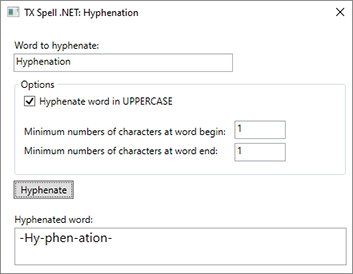
The sample calls the method of the TXSpellChecker of its window, GetHyphenationPoints, and writes the parts, joined with hyphens, into a RichTextBox. Its options set HyphenateCapitalizedWords, MinCharsAtWordBegin and MinCharsAtWordEnd of the default list. Its loop doesn't skip the positions 0 and the word length, which is why the result begins and ends with a hyphen; the loop of the console application above avoids that.
Dictionary and Language Examples lists this sample with the other samples on language data.
Next Steps
- Hyphenation Lists: the lists of other languages, and their settings.
- Hyphenation with TX Text Control: hyphenate the text of an editor automatically.
- Checking Text in Code: spell check text with the same
TXSpellclass.