
Right-to-Left Languages
Arabic, Hebrew, Persian and Urdu are written from right to left, and TX Spell .NET checks them like any other language. Their dictionaries are Hunspell dictionaries, loaded with the same code, and a text that mixes them with English is checked in one pass. What is different is on the editor's side: TX Text Control lays out the paragraphs from right to left. Support for right-to-left dictionaries was added in TX Spell .NET 4.0.
Dictionaries for Right-to-Left Languages
Text Control offers these right-to-left dictionaries on the dictionary download page:
| Language | Archive | Dictionary file | Also contains |
|---|---|---|---|
| Arabic | dictionary.ar.zip | ar.dic | A thesaurus |
| Arabic | dictionary.ar_AR.zip | ar.dic | Nothing else |
| Hebrew | dictionary.he_IL.zip | he_IL.dic | Nothing else |
| Persian | dictionary.fa_IR.zip | fa.dic | Nothing else |
| Urdu | dictionary.ur_PK.zip | ur.dic | Nothing else |
The two Arabic archives contain different dictionaries with the same file name, ar.dic, so only one of them can be in the dictionary folder. dictionary.ar.zip is the newer one and brings a thesaurus. None of the right-to-left archives contains a hyphenation list. Hunspell and OpenOffice Dictionaries shows where the files go.
Check Right-to-Left Text
Load the dictionary with its file name, as for any language:
// Check Hebrew text in addition to English
txSpellChecker1.Dictionaries.Add(new TXTextControl.Proofing.OpenOfficeDictionary("he_IL.dic"));
Loaded from the default folder, the dictionary gets its language from the file name, here Hebrew (Israel), and the spell checker uses it for the Hebrew words of a document. No setting for the writing direction is needed. A text that mixes directions is checked in one call: in a test with the English and the Hebrew dictionary loaded, the text Hello שלום wrold עולוםם returned one misspelled English and one misspelled Hebrew word.
Suggestions work the same way: for the misspelled Arabic word المدرسسة, the first suggestion is المدرسة.
Right-to-Left Text in TX Text Control
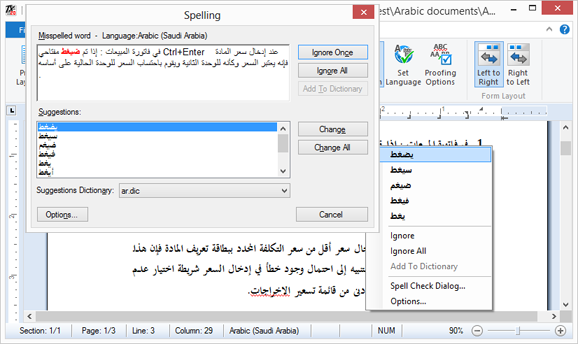
TX Text Control writes and shows right-to-left text in its paragraphs. Arabic text in a right-to-left paragraph, with a misspelled word underlined, its suggestions in the context menu and the Spelling dialog:
These members of TX Text Control set the writing direction:
| Member | Does |
|---|---|
| ParagraphFormat.Direction | Sets a paragraph to Direction LeftToRight or RightToLeft |
| Selection.ChangeDirection | Switches the direction of the selected paragraphs, and swaps their left and right alignment and tabs |
| InputFormat.RightToLeft | Gets or sets the direction at the input position |
The screenshot shows the Left to Right and Right to Left buttons of an earlier ribbon of TX Text Control Words.
Language Detection and Right-to-Left Text
Of the right-to-left languages, language detection recognizes Arabic by default. Hebrew (he), Persian (fa) and Urdu (ur) can be added to DetectableLanguageScopes; without them, a Hebrew sentence gets no language. Language Detection describes the list.
Next Steps
- Loading and Managing Dictionaries: load and remove dictionaries.
- Multilingual Documents and Language Scopes: documents that mix right-to-left and left-to-right languages.
- Language Detection: find the languages of a text.