
Introduction
If spell checking is new to your WPF application, start here: what TX Spell .NET for WPF does, what you can build with it, which controls it works with, and which version and packages are current. The details follow on the pages of the Overview and in the sections after it.
What TX Spell .NET Is
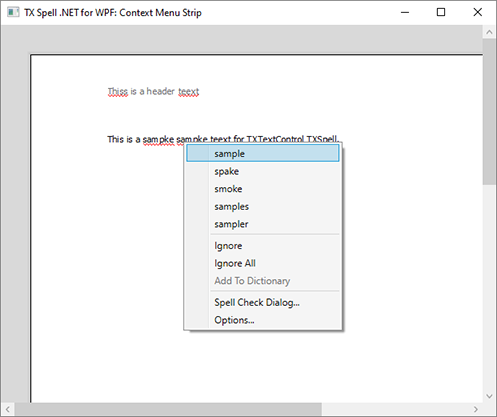
TX Spell .NET for WPF is a spell checking component for .NET desktop applications, made by Text Control GmbH. It marks misspelled words with a red wavy line as the user types, offers suggestions for them, and walks the user through a document in a spell check dialog. With the same language data, it hyphenates words at the end of a line, looks up synonyms and detects which language a text is written in.
The language data are dictionaries in the Hunspell format of OpenOffice.org. US English comes with the product; Text Control offers tested dictionaries for other languages as free downloads, and your users add their own words, such as names or technical terms, to user dictionaries. Any number of dictionaries can be loaded at the same time, so a document written in several languages is checked without switching dictionaries.
What You Can Build
| Application | What TX Spell .NET contributes | Read |
|---|---|---|
| A word processor with TX Text Control | Checking as the user types, the context menu, the spell check dialog, hyphenation | TX Text Control |
| Windows with text boxes | Checking of RichTextBox and TextBox controls as the user types or on request | RichTextBox |
| Validation of text in code | Incorrect words and suggestions, without a user interface | Checking Text in Code |
| Multilingual documents | Checking and hyphenation in the language of each part of the text, and language detection | Dictionaries and Languages |
| Spell checking in the Document Editor of TX Text Control .NET Server | The spell checker behind the editor, on Windows or Linux | Document Editor |
In TX Text Control Words, the Windows Forms demo application of TX Text Control, the Proofing tab of the ribbon runs a check through the whole document; the ribbon of TX Text Control for WPF has a Proofing tab, too:
The Parts You Work With
- TXSpellChecker is the spell checker you declare in the XAML of a window. It connects to TX Text Control, checks other controls and brings the user interface.
- Spell Check Dialog and Options Dialog are built into the component and can be customized.
- Context Menu and Suggestion Controls correct a word with a right-click, or show suggestions in a control of your own.
- TXSpell is the same engine without a user interface, for code, services and servers.
With TX Text Control, connecting the spell checker takes no code: you set the SpellChecker property of the TextControl in XAML to the key of the spell checker. For any other control, your code passes the text to the Check method, and one dialog can walk through several controls in one pass. Product Architecture shows how the parts fit together.
Versions and Packages
The current version is TX Spell .NET 11.0 with Service Pack 1, released on April 7, 2026. Version 11.0 was released in March 2025, together with TX Text Control 33.0.
Projects for .NET 8 or higher install it as NuGet packages of the version 11.0.1: TXTextControl.TXSpell.WPF.SDK for WPF applications and TXTextControl.TXSpell.Core.SDK for code without a user interface, as Package Overview describes. The setup, TX Spell .NET for WPF 11.0 with SP1.exe, installs them in the package source Text Control Offline Packages, together with the assemblies for .NET Framework projects and the samples. A trial version is available with the same functionality. Supported Platforms lists the .NET versions and tools, and Licensing Overview explains the licenses.
TX Spell .NET is also available for Windows Forms, as TX Spell .NET for Windows Forms, with the same version numbers.
A Short History
Text Control released a spell checker for Windows Forms in 2009 and rebuilt it as TX Spell .NET 2.0 in 2011, for Windows Forms and WPF. Version 3.0 was released on its own in 2012; from version 4.0 on, new major versions have followed together with TX Text Control:
| Version | Released | Brought |
|---|---|---|
| 3.0 | September 2012 | A new suggestion engine and the customizable spell check dialog |
| 4.0 | November 2013 | Hyphenation and right-to-left languages |
| 5.0 | September 2014 | Language detection |
| 6.0 | April 2015 | The SpellingCorrectionUIProvider for correction user interfaces of your own |
| 7.0 | December 2017 | Synonyms |
| 11.0 | March 2025 | .NET 8 and a NuGet package for .NET and ASP.NET Core |
What's New describes every version, including the ones in between.
Before You Start Developing
- Check the Supported Platforms: .NET 8 or higher, or the .NET Framework, on Windows.
- Install the setup, as the Installation Guide describes.
- Follow Getting Started to check a first document.
Next Steps
- Product Architecture: the assemblies, the language data and how the spell checker connects to controls.
- Components: what each part does.
- Supported Languages: the dictionaries, hyphenation lists and thesauri Text Control offers.
- Getting Started: a first application.