
Introduction
If TX Text Control is new to you, start with what TX Text Control .NET for Windows Forms is: a word processing control for Windows Forms applications, the classes that come with it and the way you install it. With this picture, you can decide which parts your application needs and which page to read next.
What TX Text Control .NET for Windows Forms Is
TX Text Control .NET for Windows Forms is a word processing component for desktop applications built with Windows Forms. You place the TextControl on a form, and your users get a document editor with character and paragraph formatting, tables, images, headers and footers, page sections and mail merge. The same document engine also works without a user interface, so your code can create, merge and convert documents in the same application.
- Current version. The current version is 34.0, released in November 2025. Service Pack 5, released on September 14, 2026, is its latest service pack.
- .NET and .NET Framework. The NuGet package
TXTextControl.TextControl.WinForms.SDKis for Windows Forms applications on .NET 8 or higher. Applications on the .NET Framework use the assemblies that the setup installs. Supported Platforms lists the versions. - Royalty-free. You ship the applications you build without runtime licenses or royalties. See Licensing Overview.
- Three editions. Enterprise, Professional and the free Express edition differ in the features they include. See Editions and Feature Availability.
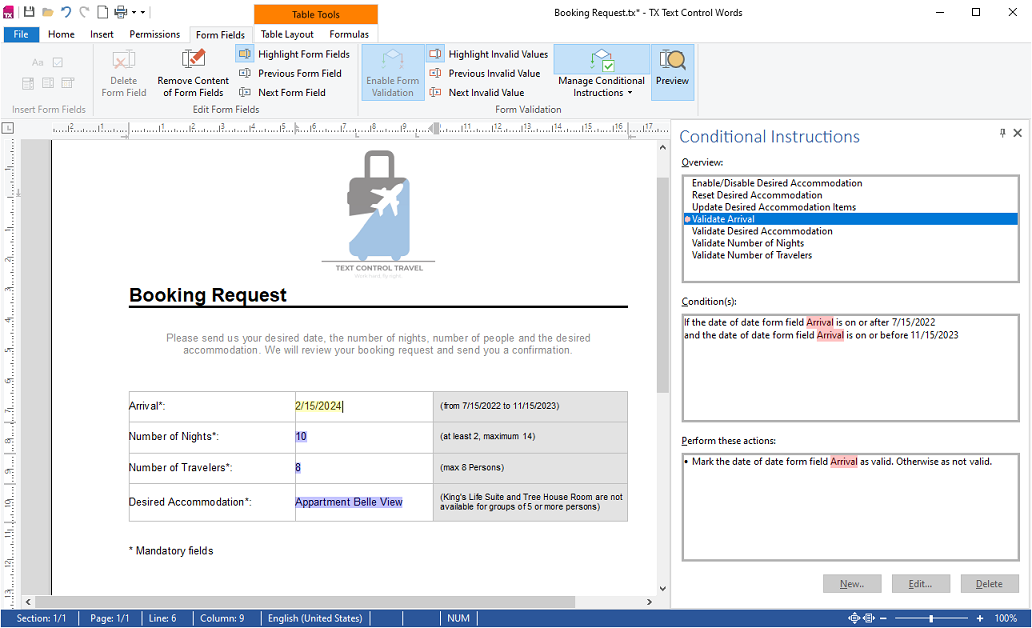
The TX Words sample application, which the setup installs with the other samples, shows what a complete editor looks like: here with a ribbon, the contextual Table Tools group, rulers, a sidebar and a status bar around a form document.
What You Can Build
| Task | Examples | Main classes |
|---|---|---|
| A word processor in your application | Users write and format letters, contracts or notes in a form of your application | TextControl |
| A complete editing user interface | A ribbon or toolbars, rulers, a status bar and a sidebar that control the editor | Ribbon, ButtonBar, RulerBar, StatusBar, Sidebar |
| Templates and reports | Users design a template with merge fields, and your code fills it with data | MailMerge |
| Document processing in the background | Create, load, convert and save documents without showing them | ServerTextControl |
| Barcodes and charts in documents | Place a barcode or a chart in the text of a document | BarcodeFrame, ChartFrame |
The document your users edit in the TextControl is the same kind of document your code processes with ServerTextControl or fills with MailMerge. You can load a template that a user designed, merge it in the background and show the result in the editor again.
Building Blocks
TX Text Control .NET for Windows Forms consists of the editor control TextControl, the controls that make up its user interface (the ribbon, the button bar, the rulers, the status bar and the sidebar) and two components that work without a user interface, MailMerge and ServerTextControl. Components introduces each of them.
The classes are organized in namespaces:
| Namespace | What is in it |
|---|---|
| TXTextControl | TextControl, ServerTextControl, the toolbars, the dialog classes, and the classes of a document: text, paragraphs, tables, images, sections and fields |
| TXTextControl.Windows.Forms | The Sidebar and resource classes. Below it, TXTextControl.Windows.Forms.Ribbon holds the ribbon and its predefined tabs. |
| TXTextControl.DocumentServer | MailMerge and the classes for data sources, fields and merge blocks. Below it, TXTextControl.DocumentServer.Windows.Forms holds the dialog boxes of the reporting features. |
| TXTextControl.DataVisualization | ChartFrame and BarcodeFrame, which position a chart or a barcode in a document |
Charts are Windows Forms chart controls from System.Windows.Forms.DataVisualization. On .NET, this library is not part of the framework, so you add a port of it to your project before you use charts.
How You Install It
On a development machine, you install the setup of the full, trial or Express version, which adds the controls to the Visual Studio toolbox; .NET 8 or higher projects then add the NuGet package TXTextControl.TextControl.WinForms.SDK. Build servers only restore the package. The Installation Guide describes each step, and Getting Started takes you from an empty project to a working editor.
Other Text Control Products
- TX Text Control .NET for WPF is the same word processing component for WPF applications. Its editor is a class of its own,
WPF.TextControl. - TX Text Control .NET Server processes documents on a server and gives users a document editor and a document viewer in the browser. Choose it for web applications and services.
- TX Text Control ActiveX is the editor component for COM-based Windows applications. Version 34.0 was released for all four products at the same time.
- TX Text Control .NET for Windows Forms Express is the free edition of this product for private and non-commercial use, with a smaller set of features.
Next Steps
- Product Architecture: how the controls, the components and the engine work together in an application.
- Components: each control and component in detail.
- Supported Platforms: the .NET and .NET Framework versions, Windows versions and Visual Studio versions.
- Getting Started: build your first Windows Forms application with TX Text Control.