
TX Words WPF Sample Application
TX Words is a word processor built with TX Text Control .NET for WPF, and its source code is the largest sample that comes with the product. It shows how the TextControl, the ribbon tabs, the sidebars, the ruler bars and the status bar fit together in one application, so you can take the parts you need into your own. If you are about to build an editor window, reading TX Words first shows you a working arrangement of all components.
What TX Words Is
Since version 31.0, TX Words is not one application but a set of projects that build on each other:
- The base project, TX Text Control WPF Words, is a window with a classic menu (File, Edit, View, Insert, Format and Table), a button bar, two ruler bars, a status bar and a TextControl.
- Nine ribbon samples follow. The Ribbon sample is a ribbon window with the application menu, the quick access toolbar, contextual tabs and sidebars. The other eight are built on it and each adds one topic; each of them contains a copy of the Ribbon sample's classes in the folder Base.
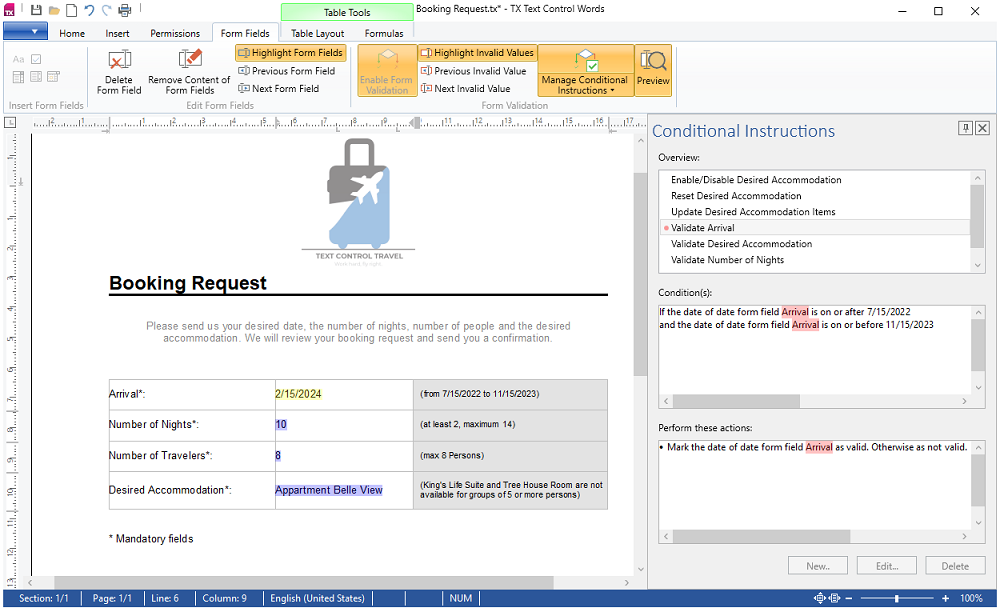
The following picture shows the Conditional Instructions sample, one of the nine: the ribbon with the Form Fields tab and the contextual Table Tools tabs, a booking form in the TextControl, the conditional instructions sidebar on the right and the status bar.
Text Control split TX Words this way so that each sample is easier to understand and its modules are easier to reuse. At run time, each sample shows a Sidebar whose ContentLayout is About, with an explanation of what the sample does. The blog article Windows Forms and WPF Comeback: .NET 6 and 7. Our Commitment to Windows Applications introduced the split.
Where to Find It
- Installed by the setup. The setup of TX Text Control .NET for WPF copies the samples of the current version into your Documents folder: TX Text Control 34.0.NET for WPF\CSharp\TX Words for C# and VB.NET\TX Words for Visual Basic, one folder per sample. See Installing the Product.
- On GitHub. The folder TX Words of TXSamples_WPF_CSharp and TXSamples_WPF_VB.NET contains the same projects, each for the .NET Framework 4.8 and for .NET 6. The GitHub projects were last updated for version 32.0; GitHub Examples describes how to bring them to the current version.
The Samples
All samples are available in C# and Visual Basic. On GitHub, they are written for version 32.0, for the .NET Framework 4.8 and .NET 6:
| Example | What it shows | Where |
|---|---|---|
| TX Text Control WPF Words | The base word processor: a menu, a ButtonBar, two RulerBar controls and a StatusBar around the TextControl | TXSamples_WPF_CSharp, folder TX Words |
| Ribbon | All components in one ribbon application: the application menu with recent files, the quick access toolbar, the ribbon tabs of TX Text Control, three sidebars, the ruler bars, the status bar and contextual tabs | TXSamples_WPF_CSharp, folder TX Words |
| Reporting | A template designed with a sample XML database: merge fields and merge blocks, the field navigation sidebar, and merging and exporting the results | TXSamples_WPF_CSharp, folder TX Words |
| Conditional Instructions | A form whose fields depend on each other, a preview mode and a protected form in which only the form fields can be edited; Conditional Instructions builds the same kind of rules | TXSamples_WPF_CSharp, folder TX Words |
| Context Menu | A new item in the built-in context menu of frames, added in the TextContextMenuOpening event | TXSamples_WPF_CSharp, folder TX Words |
| Drag And Drop | Documents loaded and images inserted when a user drops a file on the editor, with AllowDrag and AllowDrop | TXSamples_WPF_CSharp, folder TX Words |
| Open Hyperlink | Links to a web page, to a target in the same document, which DocumentLinkClicked scrolls to, and to another file | TXSamples_WPF_CSharp, folder TX Words |
| Right To Left | A button that restarts the application with the opposite flow direction | TXSamples_WPF_CSharp, folder TX Words |
| Shortcuts | Keyboard shortcuts of your own, such as switching between insert and overwrite mode, handled in the KeyDown event | TXSamples_WPF_CSharp, folder TX Words |
| User Access | A write-protected document with editable regions for each user; comments and tracked changes are assigned to the signed-in user | TXSamples_WPF_CSharp, folder TX Words |
The Visual Basic versions are in the same folders of TXSamples_WPF_VB.NET.
Find a Sample by Topic
- The ribbon and the sidebars: Ribbon and Sidebar Examples.
- Templates and merging, as in the Reporting sample: Mail Merge Examples.
- Context menus, keyboard shortcuts, drag and drop and right-to-left text in the editor: Document Editor Examples.
Next Steps
- GitHub Examples: run a sample from GitHub and update it to the current version.
- Create a WPF Ribbon Application: build a ribbon window like the one of the Ribbon sample, step by step.
- Examples: the other examples of TX Text Control .NET for WPF.