
Assemblies and XAML Namespaces
XAML knows nothing about TX Text Control until a window maps a prefix to a .NET namespace in an assembly: only then does <WPF:TextControl /> name a real class. TX Text Control .NET for WPF 34.0 consists of a dozen assemblies, and its classes are spread over several namespaces. The tables below show which assembly holds which namespace, how a window declares the namespace of the controls and which using directives the code-behind needs, so you can read the declarations Visual Studio writes and write your own.
The Assemblies
The NuGet package TXTextControl.TextControl.WPF.SDK brings the same managed assemblies into a .NET project, in its folder lib/net8.0, that the setup installs in the Assembly folder for .NET Framework projects:
| Assembly | Namespaces | What it contains |
|---|---|---|
| TXTextControl.WPF.dll | TXTextControl.WPF | The WPF controls: TextControl, the bars, the ribbon tabs, Sidebar, the dialog boxes and the value converters |
| TXTextControl.dll | TXTextControl, TXTextControl.DataVisualization | The document object model that the editor and the engine share, such as Selection and VersionInfo, and the chart frames such as ChartFrame |
| TXTextControl.Server.dll | TXTextControl | ServerTextControl, the document engine without a user interface |
| TXDocumentServer.dll | TXTextControl.DocumentServer and the namespaces below it, such as TXTextControl.DocumentServer.Fields and TXTextControl.DocumentServer.DataSources | MailMerge, the field classes such as DateField, and DataSourceManager |
| TXDocumentServer.WPF.dll | TXTextControl.DocumentServer.WPF | The WPF dialog boxes for merge blocks, such as FilterAndSortDialog |
| TXDrawing.dll, TXDrawing.WPF.dll | TXTextControl.Drawing, TXTextControl.WPF.Drawing | Shapes and drawings, with TXDrawingControl for WPF |
| TXBarcode.dll, TXBarcode.WPF.dll | TXTextControl.Barcode, TXTextControl.WPF.Barcode | Barcodes, with TXBarcodeControl for WPF |
| TXImageProvider.dll, TXSVGResources.dll, txpdf.dll | Supporting assemblies of the engine |
Beside them are the German resources, in the subfolder de, and the native libraries for 32-bit and 64-bit Windows, which 32-bit and 64-bit Applications describes. Your application deploys all of these files; see Managed Assemblies and Native Libraries.
In a .NET project, the package references every assembly for you. In a .NET Framework project, Visual Studio adds the reference to TXTextControl.WPF when you place the first control from the toolbox, and you add references to the other assemblies of the Assembly folder that your code uses, such as TXTextControl.dll for Selection or TXDocumentServer.dll for MailMerge.
Declare the Namespace of the Controls in XAML
A WPF window declares the namespace of the controls in its root element with a clr-namespace mapping. When you add the first control from the toolbox, Visual Studio writes the declaration with the prefix WPF:
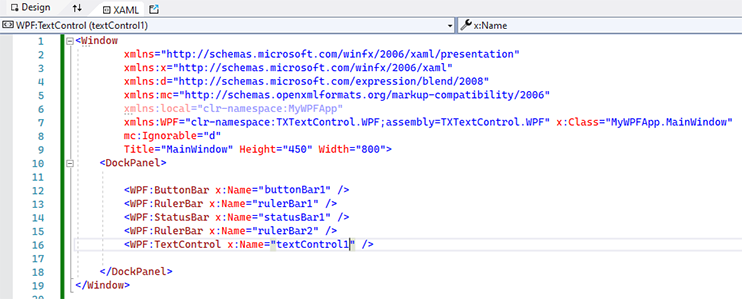
Written by hand, a complete window with the editor looks like this:
<Window x:Class="MyWpfApp.MainWindow"
        xmlns="http://schemas.microsoft.com/winfx/2006/xaml/presentation"
        xmlns:x="http://schemas.microsoft.com/winfx/2006/xaml"
        xmlns:WPF="clr-namespace:TXTextControl.WPF;assembly=TXTextControl.WPF"
        Title="MainWindow" Height="450" Width="800">
    <DockPanel>
        <WPF:TextControl x:Name="textControl1" />
    </DockPanel>
</Window>
The declaration works as follows:
xmlns:WPFdefines the prefix. The name is yours to choose: this documentation and the samples of Text Control useWPF, and the Simple sample usesmy. Every element of the window uses the prefix its root element declares.clr-namespace:TXTextControl.WPFis the .NET namespace of the controls.assembly=TXTextControl.WPFis the name of the assembly, without .dll. The project must reference it, through the package or directly.
All toolbox items of TX Text Control are in this one namespace, so a window with the editor, its bars, sidebars and ribbon tabs needs only this declaration. The Ribbon that hosts the ribbon tabs is part of WPF and needs no prefix.
Declare Further Namespaces
The other namespaces rarely appear in XAML, because drawings, barcodes and the merge block dialog boxes are created in code. When a window does need one, it declares it the same way, with the assembly from the table above:
xmlns:WPF="clr-namespace:TXTextControl.WPF;assembly=TXTextControl.WPF"
xmlns:txdrawing="clr-namespace:TXTextControl.WPF.Drawing;assembly=TXDrawing.WPF"
xmlns:txbarcode="clr-namespace:TXTextControl.WPF.Barcode;assembly=TXBarcode.WPF"
xmlns:txmerge="clr-namespace:TXTextControl.DocumentServer.WPF;assembly=TXDocumentServer.WPF"
xmlns:txtextcontrol="clr-namespace:TXTextControl;assembly=TXTextControl"
A namespace can be spread over several assemblies: TXTextControl is in TXTextControl.dll and in TXTextControl.Server.dll. A clr-namespace mapping names one assembly, so it finds only the classes of that assembly, and a class in the other one needs a second declaration with its own prefix.
TX Spell .NET for WPF, the spell checker for TX Text Control, adds its own namespace, TXTextControl.WPF.Proofing in the assembly TXSpell.WPF. See Integrating TX Spell .NET for WPF.
Use the Namespaces in Code-Behind
In MainWindow.xaml.cs, the field that XAML generates for textControl1 already has its full type, TXTextControl.WPF.TextControl. The classes you reach through it, and the classes you create yourself, need using directives for their namespaces:
using System.Windows;
using TXTextControl;
using TXTextControl.DocumentServer;

namespace MyWpfApp;

public partial class MainWindow : Window
{
    public MainWindow()
    {
        InitializeComponent();
    }

    private void textControl1_Loaded(object sender, RoutedEventArgs e)
    {
        // Selection is in the namespace TXTextControl, in TXTextControl.dll
        textControl1.Selection.Bold = true;

        // MailMerge is in TXTextControl.DocumentServer, in TXDocumentServer.dll
        using (MailMerge mailMerge = new MailMerge())
        {
            mailMerge.TextComponent = textControl1;
        }
    }
}
The code works as follows:
using TXTextControl;makes the shared document classes available, such as theSelectionthat TextControl.Selection returns. Bold formats the selected text.using TXTextControl.DocumentServer;makesMailMergeavailable. TextComponent connects it to the editor.- The handler runs for
Loaded="textControl1_Loaded"on theTextControlelement, once the control is ready to be used.
Add using TXTextControl.WPF; when the code-behind creates WPF controls of TX Text Control itself; Creating and Configuring Controls in Code shows how.