
WPF.TextControl
In a WPF application, the editor your users type in is TXTextControl.WPF.TextControl: an element you declare in the XAML of a window, next to buttons, menus and panels. Read on for what the class is, how it gets into a window, which of its properties and events you use first, and where it differs from ServerTextControl.
What WPF.TextControl Is
TextControl in the TXTextControl.WPF namespace is a WPF control with word processing features, derived from System.Windows.Controls.Control. It is not the Windows Forms class of the same name: the WPF product has its own TextControl, with WPF types such as System.Windows.Point and System.Windows.Controls.PageRange in its signatures. The reference lists the members the class defines; Width, Margin, Visibility and the other inherited members are documented by Microsoft.
The control is built from a template, whose parts show the document in a ScrollViewer; The Template of the TextControl describes them.
The objects a document consists of are not WPF classes. Selection, Table, Image, HeaderFooter, FormField and the other classes of the document live in the TXTextControl namespace and are the same ones that ServerTextControl uses. Code that formats text or fills a table therefore works in the editor and in the background alike.
Some properties are WPF dependency properties, among them ZoomFactor, IsUndoEnabled, FontFamily and HorizontalScrollBarVisibility. Like the properties of other WPF controls, you set them in XAML, in a style or through a binding.
What You Do With It
- Give users a word processor. Users type, select, copy and paste, undo and redo, and format characters and paragraphs with the keyboard and the mouse.
- Change the document in code. The Selection property formats the selected text, and collections such as Tables, Images and HeadersAndFooters return the elements of the document.
- Open and save files in DOCX, RTF, HTML, PDF and the other supported formats, through the built-in Open and Save As dialog boxes or from a file, a stream, a byte array or a string.
- Collaborate and protect. Comments, tracked changes, editable regions and document permissions are part of the editor.
- Print the document with the standard print dialog of Windows, or directly to a printer you name.
The ribbon tabs, the button bar, the rulers, the status bar and the sidebar are separate controls. See Ribbon Tabs, Toolbars, Rulers, and Status Bar and Sidebar.
Declare It in XAML
The TextControl is an item of the toolbox tab TX Text Control 34.0, and in XAML it is an element such as <WPF:TextControl x:Name="textControl1" />, with the prefix that the window declares for the namespace TXTextControl.WPF. Placed as the last child of a DockPanel, the editor fills the space that the bars around it leave:
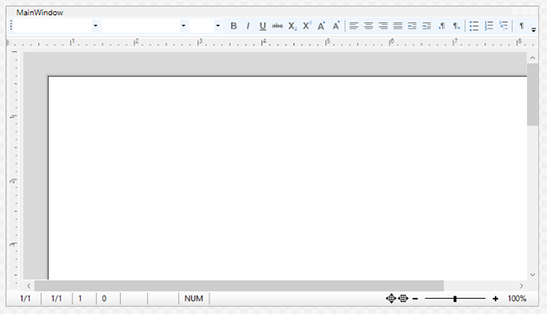
Create Your First WPF Application builds this window step by step, and Add TextControl in XAML explains the XAML.
How You Work With It
Choose How the Document Is Displayed
ViewMode decides whether the control shows pages with headers and footers, text formatted by the page size without pages, or text as wide as the control; Choose a View Mode describes each value. PageSize and PageMargins use the unit that PageUnit selects: Millimeter, CentiInch (1/100 inch), Twips (1/1440 inch) or StandardWPF, the 1/96 inch that WPF measures in. ZoomFactor sets the zoom in percent.
Decide What Users May Change
EditMode controls editing. With Edit, users can change everything. With ReadAndSelect, they can select the text, and DocumentPermissions decides what else they may do. With ReadOnly, the text is only displayed. IsTrackChangesEnabled records each change as a tracked change.
Work With the Content
- The selection.
Selectionis the current selection in the part of the document that has the input focus: the main text, a header or footer or a text frame. Its properties, such asBoldorFontSize, format the selected text. - The collections.
Tables,Images, ApplicationFields, Paragraphs and TrackedChanges refer to the part with the input focus, while Sections and FormFields hold elements of the whole document. - The input position. InputPosition is the place where typed text appears.
Handle Its Events
The Loaded event that every WPF element raises is where the Text Control samples give the editor the keyboard focus and load their first document. The events of TextControl itself report what happens in the document: Changed when the contents change, InputPositionChanged when the input position moves, and DocumentLoaded after a document has been loaded. You connect them in XAML, like the events of any other element.
Where Your Code Starts
The first code most applications write for the editor loads a document in the Loaded handler of the TextControl, because the control can't work with a document before WPF has loaded it into the window. Load a Document When the Editor Is Ready shows this handler, and Track Unsaved Changes uses the Changed event to save only a document that has changed.
Key Members
| Member | Purpose |
|---|---|
| Load, Save | Load a document, replacing the contents, and save it, with or without a file dialog. |
| Append | Adds a document to the existing one. |
| Selection | The current selection, which inserts and formats text. |
| ViewMode, ZoomFactor | How the document is displayed and at which zoom. |
| EditMode | Whether the text can be edited, only selected or only read. |
| Tables, Images, HeadersAndFooters | The tables, images, headers and footers of the document. |
| Comments, TrackedChanges | The comments and the tracked changes. |
| Undo, Redo | Undo and redo the last action. IsUndoEnabled switches the undo buffer off, which saves time and memory when code generates a report. |
| Cut, Copy, Paste | Clipboard operations. |
| Find, Replace | Find searches the text in code or opens the built-in Find dialog box; Replace opens the Replace dialog box. |
| FontDialog, ParagraphFormatDialog | Two of the built-in dialog boxes, for character and paragraph formatting. |
| Prints the document, with the print dialog or with page range, copies and collation you pass. | |
| Changed, InputPositionChanged | Occur when the contents change and when the input position moves. |
The TextControl reference lists all members.
Next Steps
- Create Your First WPF Application: put a
TextControlinto a window and run it. - Ribbon Tabs, Toolbars, Rulers, and Status Bar: the controls that complete the editor.
- XAML Integration: declare, name and configure the controls in XAML.
- Document Editor: every editing feature in detail.