
Document Editor
Which part of a word processor does your WPF window need next: tables, tracked changes, a protected form, a ribbon tab of your own? Each feature of the TextControl in a WPF application has a page here, with the XAML that declares it and the code-behind that drives it.
The pages build on the tutorials of Document Editor in Getting Started, which declare the editor in MainWindow.xaml, connect a ribbon or rulers and add the file commands. Work through them first.
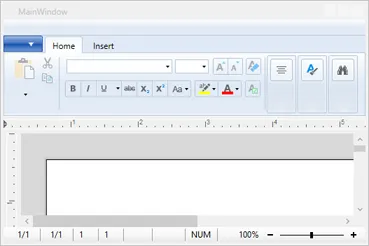
How the WPF Editor Works
- An element of the XAML. TextControl of the
TXTextControl.WPFnamespace is a WPF control, declared in the window as<WPF:TextControl x:Name="textControl1" />. Its document consists of the main text, text frames, headers, footers and footnotes. - Ready after Loaded. The control exists after
InitializeComponent, but code that works with the document belongs in itsLoadedevent. - A shared object model.
Selectionand collections such asTablesbelong to theTXTextControlnamespace and work the same way in ServerTextControl, which Document Processing uses without a user interface. - Connections by name. Rulers, the status bar, the button bar and ribbon tabs such as RibbonFormattingTab are separate elements. The ribbon tabs go inside the
Ribbonof Microsoft'sSystem.Windows.Controls.Ribbon, and theTextControlfinds each element through a string property that holds itsx:Name. - No charts. Chart frames are a feature of the Windows Forms product; the WPF editor supports barcodes.
Find the Right Page
| If you want to | Read |
|---|---|
| Know where startup code goes and how the document is organized | Architecture and Control Lifecycle |
| Work with the selection, the clipboard, undo or search | Editing Text |
| Format text, apply styles or create lists | Text and Paragraph Formatting |
| Add tables, images, frames or barcodes | Tables and Table Formulas and the pages after it |
| Review documents with several people | Track Changes, Comments |
| Declare ribbon tabs, bars and sidebars in XAML | Ribbon and UI |
| Handle routed events and the events of the editor | Events |
Where to Start
- Build a window with Create Your First WPF Application, then read Add TextControl in XAML.
- Add a ribbon with Create a WPF Ribbon Application if your users expect one.
- Read Architecture and Control Lifecycle before you write code that changes the document.
- Continue with the page of your feature, and compare with the TX Words Sample Application.
Pages in This Section
- Architecture and Control Lifecycle — text parts and the
Loadedevent. - Loading and Saving Documents — databases, HTML strings and load errors.
- Document Properties — title, author, keywords and custom properties.
- Editing Text — selections, clipboard, undo, search and keys.
- Text and Paragraph Formatting — fonts, alignment and tab stops.
- Stylesheets — the styles gallery and code.
- Bullets and Numbered Lists — list formats and numbering.
- Tables and Table Formulas — tables and cell formulas.
- Images — images and the text flow.
- Text Frames and Shapes — text frames and drawings.
- Charts and Barcodes — barcodes; WPF has no charts.
- Headers and Footers — headers, footers and page numbers.
- Sections and Page Layout — page formats and section breaks.
- Footnotes — the
Footnotescollection. - Tables of Contents — generated from structure levels.
- Fields, Hyperlinks, and Bookmarks — text fields and links.
- Subtext Parts — named ranges of text.
- Form Fields and Conditional Instructions — forms and validation.
- Signature Fields — places for signatures.
- Track Changes — accepting and rejecting changes.
- Comments — comments and replies.
- Document Protection and Editable Regions — read-only documents and open regions.
- Spell Checking and Hyphenation — connecting TX Spell .NET for WPF.
- Viewing, Zooming, and Navigation — view modes and zoom bindings.
- Printing and Print Preview — page ranges and the WPF
PrintDialog. - Ribbon and UI — the elements around the editor.
- Events — routed events and editor events.