
Application Licensing
A deployed application needs no license of its own on the user's machine. TX Text Control .NET for Windows Forms is licensed per developer, and the license is compiled into your application when a licensed developer or a build server builds it. There is no runtime license, no activation and no license server; what you check before a release is that the build carries the right license in the right assembly and that nothing confidential ships with it.
How a Deployed Application Is Licensed
| Project | Where the license comes from | What the user's machine needs |
|---|---|---|
| .NET 8 or higher | The license file txtextcontrol.winforms.license of the package, embedded into your assembly at build time | Nothing |
| .NET Framework | licenses.licx, compiled into your executable by the license compiler | Nothing |
At run time, TX Text Control checks the license in the application's executable, or in the assembly that TextControl.EntryAssembly or ServerTextControl.EntryAssembly names. Application Licensing in the Installation Guide explains when a class library or a user control has to set these properties.
The application is royalty-free: you may install it on any number of machines, for any number of users, without runtime fees. Royalty-Free Distribution lists the conditions of the license agreement.
Check the Build Before a Release
- Build with your licensed package or setup. A trial version may be used for evaluation only and must not be distributed in a commercial application. It also expires after 30 days.
- Check the edition. A feature outside your edition throws a LicenseLevelException at run time. Check the Edition at Run Time shows how the application reports whether it runs as Enterprise, Professional, Trial or Standard.
- Keep the license where TX Text Control looks for it. When the controls live in a class library or a user control, set
EntryAssemblybefore the first control is created. - Don't rename assemblies after the build. The license belongs to the assembly it was compiled into and isn't found under another file name. Change the assembly name in the project settings and rebuild instead.
- Build on a licensed machine or a build server. Build servers and CI/CD systems need no license of their own; see Build Servers.
Keep Licensing Information Out of the Deployment
The license agreement forbids giving licensing information to the users of your application. Before you ship, make sure your installer or package contains none of these:
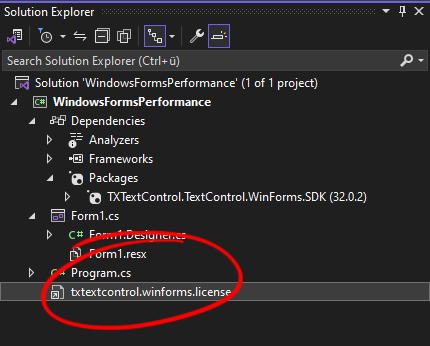
- The license file txtextcontrol.winforms.license, which contains encrypted serial number information unique to your installation
- Your serial number, license keys or other credentials
- A nuget.config file with the email address and the API token of the Text Control Private NuGet Feed
- The NuGet package or the setup of TX Text Control
A publish folder or build output contains none of them by default. They get in only if an installer or a script copies them from the project folder, where the package puts the license file next to your forms:
The Express Edition
TX Text Control .NET for Windows Forms Express is free for private and non-commercial use only and comes with a license agreement of its own. An application that is sold or used commercially needs a commercial license. See Trial Version and Express Edition.