
Subtext Parts
The clauses of a contract, the text blocks of a template or a section that must be stored in a database are pieces of a document that your code has to find again. Subtext parts mark such pieces in a TextControl: you name them, attach data to them, highlight them, save their content and react when the user moves into them.
The examples extend the application of Create Your First Windows Forms Application, with a TextControl named textControl1 on Form1. Form1.cs needs using TXTextControl;. Subtext parts have no ribbon buttons; they are created in code.
What a Subtext Part Is
A document consists of text parts: the main text, the headers and footers, and the text frames. A subtext part is a range of characters inside one of them, defined by your code. Each subtext part has:
- a name and an ID, both optional, to identify it;
- data, a string of your own, for example JSON;
- a highlight mode and a highlight color, to show the user where it is.
The text of a subtext part is ordinary text: users edit it, and the subtext part grows as they type in it. The following rules apply:
- A subtext part covers at least one character. When its last character is deleted, the subtext part is deleted too.
- Subtext parts can be nested, but they can't overlap. A nested subtext part must be shorter than the outer one, and the outer one must be added first.
- Two subtext parts can follow each other directly; the position between them belongs to the second one.
TX Text Control uses subtext parts itself. The merge blocks of mail merge templates are subtext parts whose names begin with txmb_, followed by the block name; see Merge Blocks. To make parts of a protected document editable, use editable regions, described in Document Protection and Editable Regions.
Subtext parts were introduced in version 23.0, and their data in version 26.0.
Mark the Selected Text
The following handler turns the selected text into a subtext part named "clause", highlights it and stores data with it:
private void markSelectionButton_Click(object sender, EventArgs e)
{
    // Without a start and a length, the current selection is marked
    SubTextPart clause = new SubTextPart("clause", 1)
    {
        HighlightMode = HighlightMode.Always,
        HighlightColor = Color.FromArgb(60, Color.Red),
        // Data of your own, stored with the document
        Data = "{\"clauseId\":\"C-100\",\"approved\":false}"
    };

    SubTextPartCollection.AddResult result = textControl1.SubTextParts.Add(clause);

    if (result != SubTextPartCollection.AddResult.Successful)
    {
        MessageBox.Show("The subtext part wasn't added: " + result);
    }
}
Select a paragraph and click the button: the text gets a transparent red background.
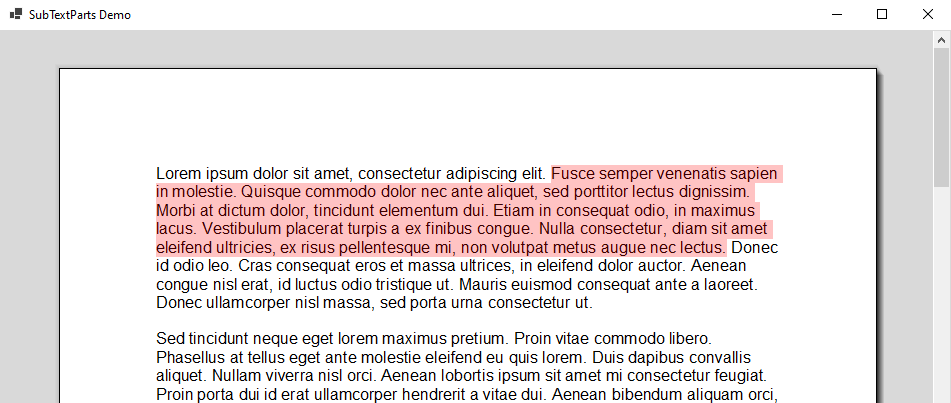
The code works as follows:
- The SubTextPart constructor with a name and an ID creates a subtext part with a length of zero, which marks the current selection when it is added. The second overload takes a one-based start position and a length:
new SubTextPart("intro", 2, 1, 25)marks the first 25 characters. Anullor empty name and an ID of 0 mean none. - HighlightMode is
Always,Never, orActivated, which highlights the subtext part only while it contains the input position and the control has the focus. HighlightColor needs an alpha value below 255, so that the text stays visible; the default is red with an alpha value of 60. - Data holds any string. An empty string means no data.
- SubTextPartCollection.Add, called through TextControl.SubTextParts, returns a value of SubTextPartCollection.AddResult. Besides
Successful, it reports why nothing was added:NoSelection,Overlapping,SelectionTooComplex,PositionInvalid,AlreadyExistsorError.Combinedmeans that the new subtext part directly follows one with the same name and ID and has been merged into it.
TextControl.SubTextParts returns the subtext parts of the text part with the input focus. Headers, footers and text frames have their own collections.
List and Find Subtext Parts
private void listButton_Click(object sender, EventArgs e)
{
    StringBuilder list = new StringBuilder();

    foreach (SubTextPart subTextPart in textControl1.SubTextParts)
    {
        list.AppendLine(subTextPart.Number + " " + subTextPart.Name +
            " (level " + subTextPart.NestedLevel + "): " + subTextPart.Text);
    }

    MessageBox.Show(list.ToString());
}
StringBuilder needs using System.Text;.
- Number is the position of the subtext part in the text flow, starting with 1. When an outer and a nested subtext part start at the same position, the outer one has the lower number.
- NestedLevel is 1 for a top-level subtext part. OuterSubTextPart returns the subtext part that contains this one, and GetChildren all subtext parts nested in it.
- Text is the plain text. GetTextFields returns the fields inside the subtext part, such as the merge fields of a clause.
GetItem finds a single subtext part: without a parameter the one at the input position, which is the one with the highest nesting level when several are nested there, or the first one with a name or an ID. ScrollTo moves the input position to its beginning and scrolls it into view.
Save and Remove a Subtext Part
A subtext part can be saved on its own, with its formatting, for example to store a clause in a database or to insert it into another document:
private void saveClauseButton_Click(object sender, EventArgs e)
{
    SubTextPart clause = textControl1.SubTextParts.GetItem("clause");

    if (clause != null)
    {
        // Only the text of the subtext part, with its formatting
        clause.Save(out byte[] data, BinaryStreamType.InternalUnicodeFormat);
        File.WriteAllBytes("clause.tx", data);
    }
}

private void removeButton_Click(object sender, EventArgs e)
{
    // The subtext part at the input position, or null
    SubTextPart subTextPart = textControl1.SubTextParts.GetItem();

    if (subTextPart != null)
    {
        // true: keep the text, true: keep nested subtext parts
        textControl1.SubTextParts.Remove(subTextPart, true, true);
    }
}
- SubTextPart.Save writes the content to a byte array or a string in any format of
BinaryStreamTypeorStringStreamType, such as the TX Text Control format, RTF or HTML. - SubTextPartCollection.Remove takes two Boolean values: whether the text stays in the document, and whether nested subtext parts stay. The second one is ignored when the text is deleted.
React to Subtext Part Events
TextControl raises SubTextPartCreated and SubTextPartDeleted, SubTextPartEntered and SubTextPartLeft when the input position moves into or out of a subtext part, and SubTextPartClicked and SubTextPartDoubleClicked. The handlers receive a SubTextPartEventArgs. The following handler shows the name and data of the clause the user enters:
public Form1()
{
    InitializeComponent();
    textControl1.SubTextPartEntered += textControl1_SubTextPartEntered;
}

private void textControl1_SubTextPartEntered(object sender, SubTextPartEventArgs e)
{
    Text = e.SubTextPart.Name + ": " + e.SubTextPart.Data;
}
Load and Save Documents With Subtext Parts
- Subtext parts keep their names and IDs when the document is saved and loaded again. Only the TX Text Control format keeps their
Data; other formats keep the ranges. - Bookmarks of DOCX, DOC and RTF documents that span several characters are loaded as subtext parts when LoadSettings.LoadSubTextParts is
true. By default, they become document targets at their first character. - SaveSettings.OmittedContent with
OmittedContent.SubTextPartssaves a document without its subtext parts, but with their text and formatting. It can't be used for PDF.
Loading and Saving Documents explains LoadSettings and SaveSettings. The blog article The Power of SubTextParts: Typical Use Cases stores user data with subtext parts and saves them separately.
Next Steps
- Fields, Hyperlinks, and Bookmarks: mark single words or values instead of longer text.
- Document Protection and Editable Regions: let users edit only parts of a document.
- Merge Blocks: repeat parts of a template for each record.