
Document Object Model
Code that changes a document has to know where things are: which object holds the tables of a header, why Tables sometimes returns the tables of a text frame, and whether a position counts from 0 or from 1. TX Text Control .NET for Windows Forms organizes every document as a tree of objects that is the same in the TextControl on your form and in a ServerTextControl. Read on for its parts, the rules for positions and units, and the one difference between the two classes that surprises most developers.
Two Classes, One Document Model
A document lives in one of two classes:
- TextControl is the editor on your form. Your code and the user work on the same document, and every change is visible at once. TextControl in the Overview introduces it.
- ServerTextControl holds a document without a user interface. It is created in code, initialized with
Createand disposed when the work is done. Using ServerTextControl in Desktop Applications covers it in detail.
Both classes give you the same collections, the same Selection and the same Load and Save methods. Code that builds a table or formats a paragraph works with either one, so the pages of this section show most examples on textControl1, the TextControl of your form, and use a ServerTextControl where the user shouldn't see the work.
What a Document Consists of
A document is made of text parts: the main text, and the text frames, headers, footers and footnote sections beside it. Each text part has its own paragraphs, tables, images and fields. Sections and pages belong to the document as a whole.
TextControl / ServerTextControl
│
├── TextParts ──────────── MainText            the body of the document
│                          TextFrame ...       rectangles of text placed on a page
│                          HeaderFooter ...    headers and footers of the sections
│                          FootnoteSection ... footnotes
│
│   Each text part (IFormattedText) has:
│   ├── Selection          the selected text, or the input position
│   ├── Paragraphs, Lines, TextChars
│   ├── Tables, Images, Frames, Barcodes, Drawings
│   ├── ApplicationFields, TextFields, FormFields, SubTextParts
│   └── Comments, TrackedChanges
│
├── Sections ───────────── page size, margins, headers and footers of each section
├── ParagraphStyles, InlineStyles
├── DocumentSettings        title, author and other properties
└── Charts                  Windows Forms only
TextParts returns a TextPartCollection with the main text first, then the text frames and finally the headers and footers, each group in the order of their position in the document. Every object in it implements IFormattedText, the interface of everything a text part has. TextControl, ServerTextControl, MainText, TextFrame, HeaderFooter and FootnoteSection implement it.
Frames
Images, text frames, charts, barcodes and drawings are frames: objects that are positioned in the text like a character, anchored to a paragraph or fixed on a page. They derive from FrameBase, which provides the name, ID, size, location and text distances. Each kind has its own collection, and Frames returns a FrameCollection with all of them. Images, Text Frames, and Shapes and Charts and Barcodes show how to add them.
The Class Hierarchy
The graphic of Text Control's class hierarchy shows every class of the library with the class it derives from, in groups such as Windows Forms Components, WPF Components, Server Components, Document Formatting, Programmable Objects, Text Fields, Tables and Drawings, Collections, DocumentServer and Exceptions. Its colors mark the classes that exist only for Windows Forms, only for WPF or only for ASP.NET, and the classes new in version 34.0:
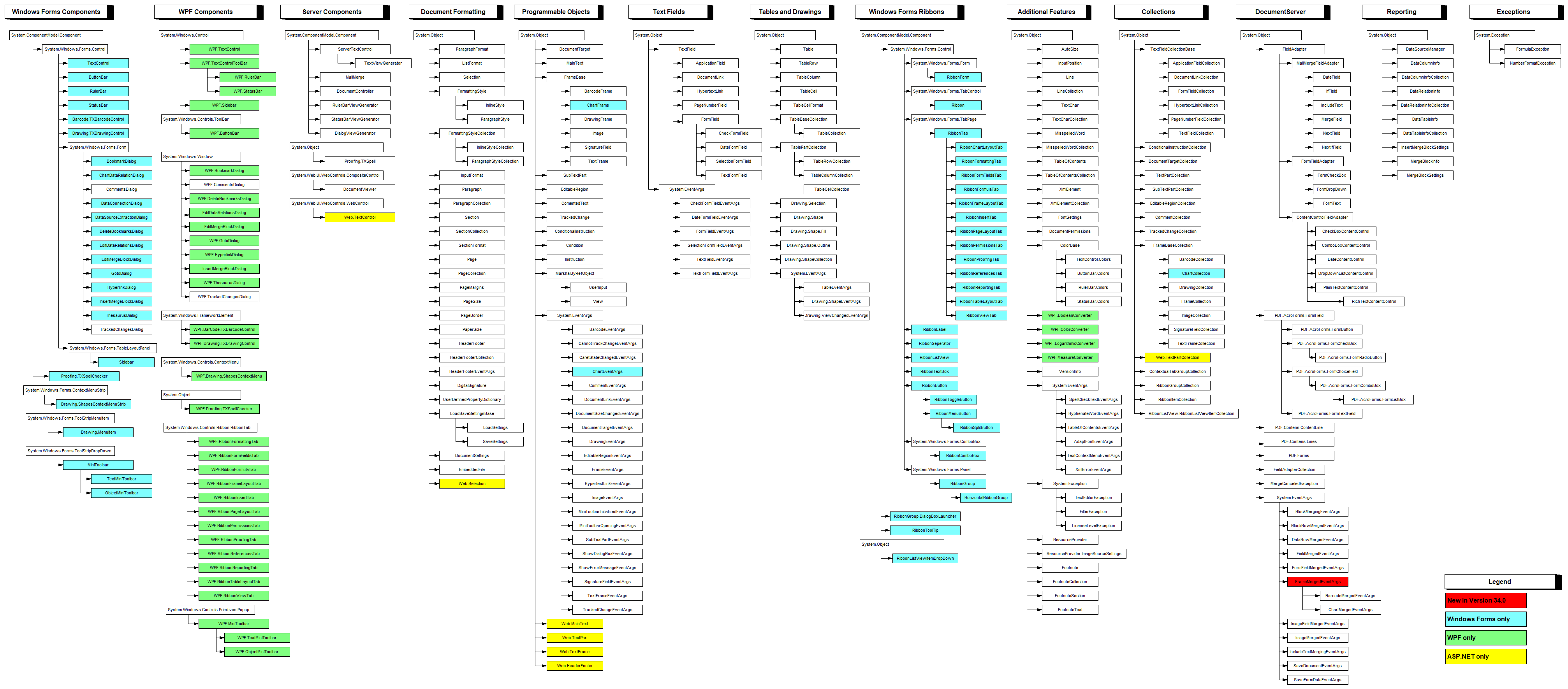
TextControl derives from System.Windows.Forms.Control and ServerTextControl from System.ComponentModel.Component. The classes of a document, such as Selection, Paragraph, Section and Table, derive from System.Object and are shared by all products; the WPF and ASP.NET classes of the graphic aren't part of TX Text Control .NET for Windows Forms.
The Input Focus Decides What a Collection Contains
In a TextControl, the user can click into a header or a text frame. The text part with the input focus is the one the cursor is in, and many properties of TextControl refer to that text part, not to the main text:
Property of TextControl | Refers to |
|---|---|
| Selection, Paragraphs, Tables, Images, TextFrames, Frames, ApplicationFields, Comments, TrackedChanges | The text part with the input focus: the main text, a text frame, a header or a footer |
| Sections, FormFields, TextParts | The whole document |
A ServerTextControl has no user and no input focus: its Selection always refers to the main text.
When your code runs from a button while the cursor is in a header, textControl1.Tables.Add inserts the table into that header. To work on the main text whatever the user has clicked, get it with GetMainText. The collections of a MainText object don't depend on the input focus:
private void mainTextButton_Click(object sender, EventArgs e)
{
    // Depends on the input focus: main text, text frame, header or footer
    int tablesWithFocus = textControl1.Tables.Count;

    // Always the main text
    MainText mainText = textControl1.TextParts.GetMainText();
    int tablesInMainText = mainText.Tables.Count;

    MessageBox.Show($"Text part with the input focus: {tablesWithFocus} tables\r\n" +
                    $"Main text: {tablesInMainText} tables");
}
TextPartCollection.Activate moves the input focus to a text part, for example back to the main text with textControl1.TextParts.Activate(textControl1.TextParts.GetMainText()), and scrolls the document to it.
Positions and Units
- Text positions start at 0. Selection.Start is the position of the first selected character, and 0 is the first position of the text. Selection.Length is the number of selected characters; with a length of 0,
Startis the input position. - Elements are numbered from 1. The first paragraph is
Paragraphs[1], the first table row is row 1, and so are sections, pages and lines. Paragraph.Start is one-based as well, so subtract 1 before you select from it. - Font sizes and distances are in twips, 1/1440 inch, or 20 twips per point. A font size of 240 is 12 pt.
- Page sizes and margins are measured in the unit that PageUnit sets, by default 1/100 inch.
Example
The following handler lists the text parts of the document in the editor with their paragraphs, tables and images, and then the sections, pages and frames. Form1.cs needs using System.Text; and using TXTextControl;:
private void structureButton_Click(object sender, EventArgs e)
{
    StringBuilder report = new StringBuilder();

    // The main text, text frames, footnote sections, headers and footers
    foreach (IFormattedText textPart in textControl1.TextParts)
    {
        report.AppendLine($"{textPart.GetType().Name}: {textPart.Paragraphs.Count} paragraphs, " +
            $"{textPart.Tables.Count} tables, {textPart.Images.Count} images");
    }

    report.AppendLine($"Sections: {textControl1.Sections.Count}, pages: {textControl1.Pages}");
    report.AppendLine($"All frames: {textControl1.Frames.Count}");

    MessageBox.Show(report.ToString());
}
What the code does:
textControl1.TextPartsreturns the text parts of the whole document, whatever has the input focus.GetType().Nameprints the class of each, such asMainTextorHeaderFooter.- IFormattedText.Paragraphs, Tables and Images are the collections of that one text part.
- Pages is the number of pages of the document.
Because every text part implements IFormattedText, one method can process them all. The following method takes the editor, a ServerTextControl, a header or a text frame alike:
// Works with TextControl, ServerTextControl and every other text part
private static void CountElements(IFormattedText document)
{
    MessageBox.Show($"{document.Paragraphs.Count} paragraphs, {document.Tables.Count} tables, " +
                    $"{document.Images.Count} images, {document.Frames.Count} frames");
}
Where Each Element Is Described
| Element | Collection | Page |
|---|---|---|
| Text, characters, paragraphs, styles | Selection, Paragraphs, ParagraphStyles, InlineStyles | Text, Paragraphs, and Stylesheets |
| Tables and formulas | Tables | Tables and Calculations |
| Images, text frames, drawings | Images, TextFrames, Drawings | Images, Text Frames, and Shapes |
| Charts and barcodes | Charts, Barcodes | Charts and Barcodes |
| Sections, pages, headers and footers | Sections, HeadersAndFooters | Sections, Pages, Headers, and Footers |
| Fields and subtext parts | ApplicationFields, TextFields, SubTextParts | Fields and Subtext Parts |
| Form fields | FormFields | Forms and Conditional Instructions |
| Comments and tracked changes | Comments, TrackedChanges | Comments and Tracked Changes |
Key Members
| Member | Purpose |
|---|---|
| TextParts | All text parts of the document: main text, text frames, headers, footers and footnote sections. |
| GetMainText | The main text, independent of the input focus. |
| Selection | The selected text or the input position in the text part with the input focus. |
| InputPosition | The current input position, with its page, line and column. |
| Frames | All images, text frames, charts, barcodes and drawings of the text part with the input focus. |
| Sections | The sections of the document, with their page formats. |
| IFormattedText | The interface shared by the controls and all text parts. |
Next Steps
- Creating Documents: start a new document and build it from pieces.
- Text, Paragraphs, and Stylesheets: select, find and format text.
- Using ServerTextControl in Desktop Applications: process documents without showing them.
- Selections and Caret Position: the selection from the user's side.