
Text Frames and Shapes
A text frame is a box with text of its own that sits anywhere on a page: an address block for a window envelope, a note beside a paragraph, a sidebar with a small table. Drawings add shapes such as lines, arrows, stars and callouts. In a Windows Forms TextControl, users draw both with the mouse from the Insert tab, and your code inserts, finds and formats them through TextFrames and Drawings.
The examples are methods of Form1.cs of the application from Create Your First Windows Forms Application, called from the Click handler of a button. Frames are placed like images, inline, anchored to a paragraph or at a fixed position, as How Frames Are Placed explains. Text frames and drawings in documents processed without a user interface are covered in Images, Text Frames, and Shapes.
How Text Frames Work
A TextFrame is a text part of its own, like a header: it has a Selection, paragraphs, tables, images and fields, and users type into it as into the main text. TextControl.TextFrames returns the TextFrameCollection of the text part with the input focus: the main text, a header or footer, or a text frame, which can hold text frames of its own.
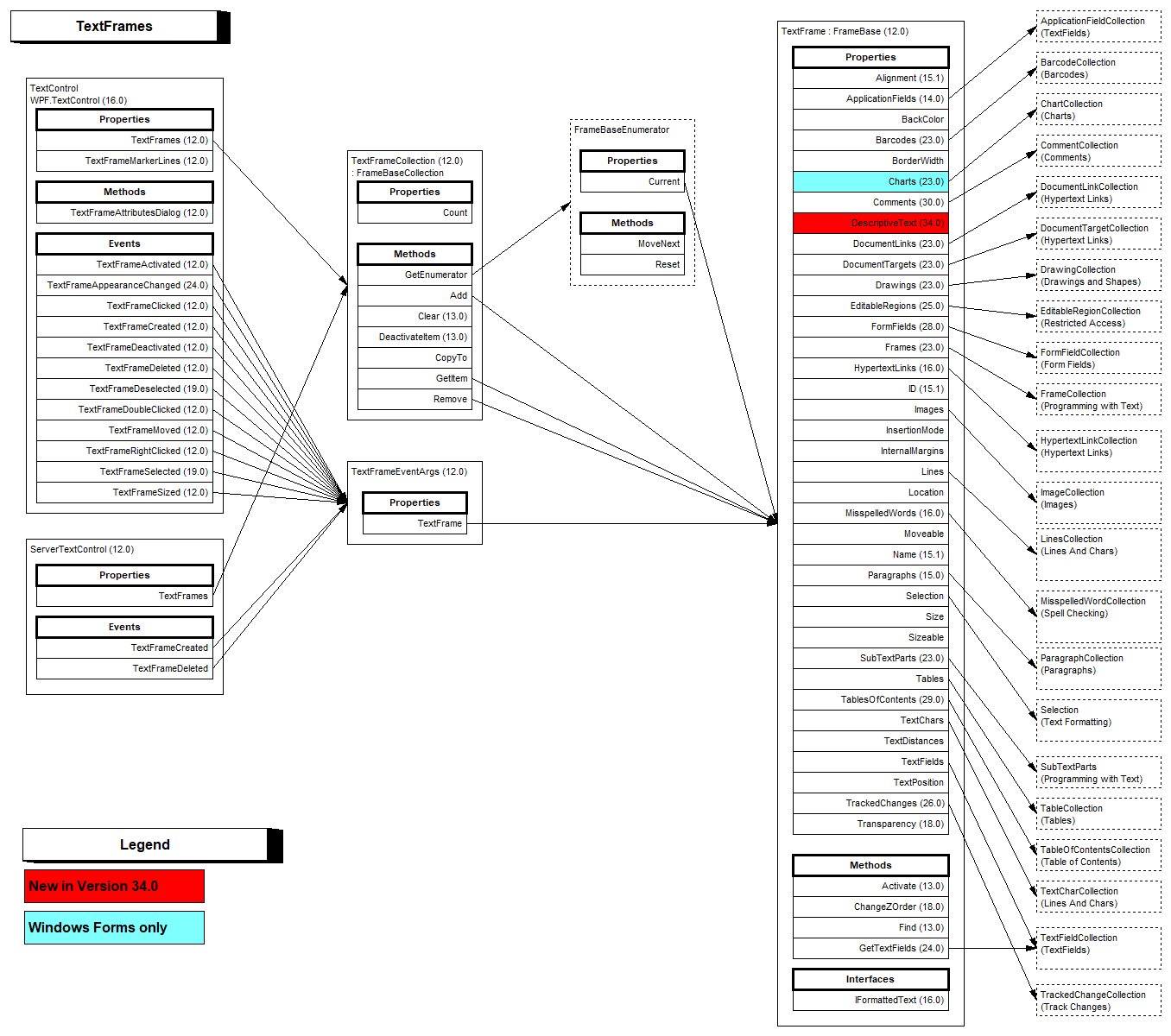
A text frame on the screen is in one of two states:
- Selected. The frame is selected as an object and shows sizing handles; users move, resize or delete it. TextFrameCollection.GetItem without a parameter returns it.
- Activated. The input position is inside the frame, and the user edits its text. GetActivatedItem returns it, and DeactivateItem moves the input position back to the text around it.
Sizes, borders and margins are measured in twips, 1/1440 inch.
Insert Text Frames and Shapes in the Ribbon
Text Frame in the Text group of the Insert tab has two items. Insert Text Frame changes the mouse pointer to a cross, and the user draws the frame; ESC cancels. Show Text Frame Marker Lines shows the outline of frames without a border, which is TextControl.TextFrameMarkerLines in code.
Shape in the Illustrations group opens a gallery of shapes in the categories Lines, Rectangles, Basic Shapes, Block Arrows, Equation Shapes, Flowchart, Stars and Banners and Callouts. New Drawing Canvas inserts an empty canvas that holds several shapes, and Show Drawing Marker Lines shows the frame of each drawing, TextControl.DrawingMarkerLines in code.
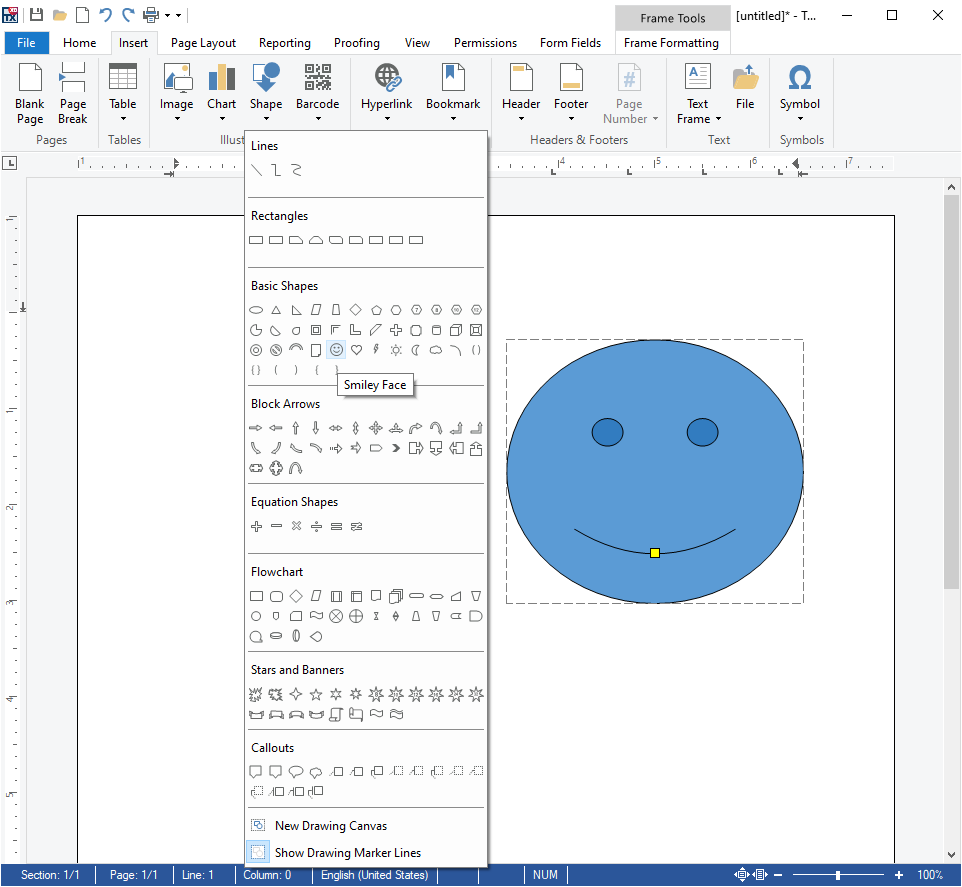
A selected text frame or drawing is formatted on the Frame Formatting tab, the RibbonFrameLayoutTab. Besides Arrange, Size and Properties, which work as for images, it shows a Frames & Background group with Background Color, Transparency, Border Width and Border Color for a text frame, and one with Line Color, Background Color, Line Width, Transparency and Rotate for a drawing.
Insert a Text Frame From Code
The first method lets the user draw a text frame, as Insert Text Frame does. The second inserts a note with a background color and a double border at the right edge of the current paragraph:
using System;
using System.Drawing;
using System.Windows.Forms;
using TXTextControl;

public partial class Form1 : Form
{
    private void DrawTextFrame()
    {
        // The user draws the frame with the mouse; ESC cancels
        TextFrame frame = new TextFrame(new Size(2880, 1440));
        textControl1.TextFrames.Add(frame, TextFrameInsertionMode.DisplaceText);
    }

    private void InsertNote()
    {
        // 3 x 1.5 inches in twips
        TextFrame note = new TextFrame(new Size(4320, 2160))
        {
            Name = "note",
            BackColor = Color.LightYellow,
            BorderWidth = 20,
            BorderColor = Color.DarkBlue,
            BorderStyle = TXTextControl.FrameStyle.Double,
            InternalMargins = new int[] { 144, 144, 144, 144 }
        };

        // Anchored at the right edge of the paragraph at the input position
        textControl1.TextFrames.Add(note, TXTextControl.HorizontalAlignment.Right, -1,
            TextFrameInsertionMode.DisplaceText);

        // The frame has a selection of its own
        note.Selection.Text = "Payment due within 14 days.";
    }
}
The code works as follows:
- The TextFrame constructor takes the size of the frame.
- TextFrameCollection.Add with only a TextFrameInsertionMode starts the built-in mouse interface: the user determines the size and position, and changing the document or pressing ESC cancels it.
DisplaceTextlets the text flow around the frame. Add(frame, alignment, textPosition, insertionMode)anchors the frame to the paragraph with the text position;-1is the input position. Other overloads insert it inline or at a fixed position on a page.- BackColor, BorderWidth, BorderColor and BorderStyle set its appearance, and InternalMargins the distances between border and text, left, top, right and bottom.
FrameStylealso exists inSystem.Windows.Forms, so the code writesTXTextControl.FrameStyle. note.Selection.Textwrites into the frame, astextControl1.Selectiondoes in the main text.
Work With the Selected or Activated Frame
The following methods open the text frame dialog box for the selected frame and insert today's date into the frame the user is editing:
using System;
using System.Windows.Forms;
using TXTextControl;

public partial class Form1 : Form
{
    private void ShowFrameAttributes()
    {
        // A text frame the user has selected, or null
        if (textControl1.TextFrames.GetItem() != null)
        {
            textControl1.TextFrameAttributesDialog();
        }
    }

    private void InsertDateIntoActiveFrame()
    {
        // The text frame whose text the user is editing, or null
        TextFrame frame = textControl1.TextFrames.GetActivatedItem();

        if (frame != null)
        {
            frame.Selection.Text = DateTime.Today.ToShortDateString();
        }
    }
}
- TextFrameAttributesDialog opens the dialog box with tabs for text wrapping and layout, size and distances, and border and background color. It's shown only while a text frame is selected.
GetActivatedItemreturnsnullwhile the input position is in the main text.
The editor reports what users do with text frames: TextFrameActivated occurs when a frame receives the input position, and events such as TextFrameSelected, TextFrameMoved and TextFrameSized follow the mouse actions, each with a TextFrameEventArgs that holds the TextFrame. See Events.
Insert a Shape From Code
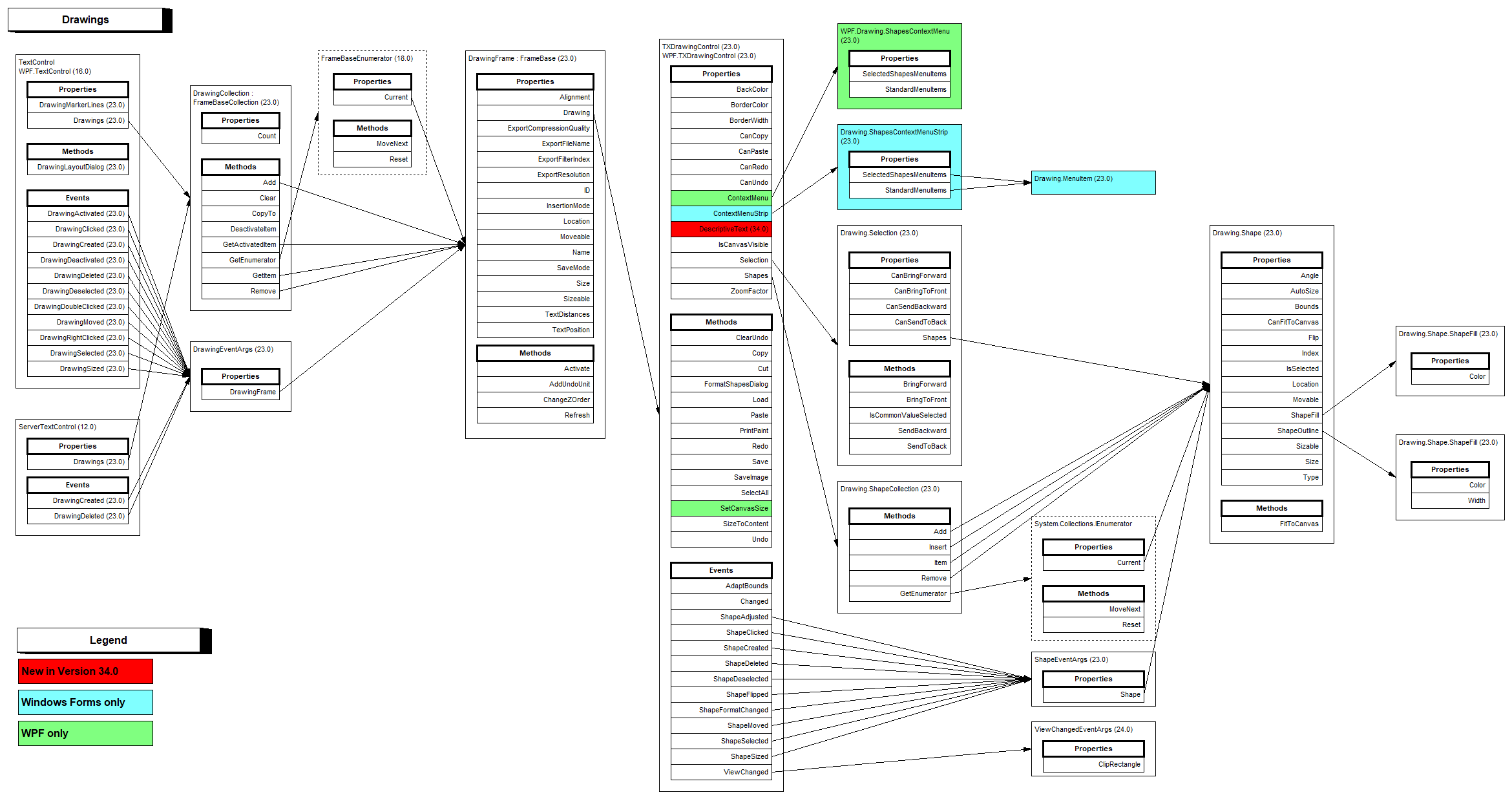
A drawing in the document consists of two objects: a TXDrawingControl that holds the shapes, and a DrawingFrame that places it in the document like a text frame. TextControl.Drawings returns the DrawingCollection.
The following method creates a red donut with a yellow outline and lets the user draw its frame:
using System;
using System.Drawing;
using System.Windows.Forms;
using TXTextControl;
using TXTextControl.DataVisualization;
using TXTextControl.Drawing;

public partial class Form1 : Form
{
    private void DrawDonut()
    {
        // A drawing control holds the shapes of one drawing
        TXDrawingControl drawing = new TXDrawingControl();

        Shape donut = new Shape(ShapeType.Donut);
        donut.ShapeFill.Color = Color.Red;
        donut.ShapeOutline.Color = Color.Yellow;
        donut.ShapeOutline.Width = 200;

        // The shape fills the whole drawing
        drawing.Shapes.Add(donut, ShapeCollection.AddStyle.Fill);

        // The user draws the frame of the drawing with the mouse
        DrawingFrame frame = new DrawingFrame(drawing);
        textControl1.Drawings.Add(frame, FrameInsertionMode.DisplaceText);
    }
}
The code works as follows:
- The reference documents only the
TXDrawingControlconstructor without parameters. The sample of the blog article Inserting Shapes and Drawing Groups also passes the width and height of the drawing, such asnew TXDrawingControl(3000, 3000). - A Shape gets its form from ShapeType, whose values follow the preset shapes of Office Open XML, such as
Rectangle,DiamondandDonut. - ShapeFill sets the fill color, and ShapeOutline the color and width of the outline.
- ShapeCollection.Add with
AddStyle.Fillmakes the shape fill the whole drawing.AddStyle.Noneuses the location and size of the shape, andMouseCreationlets the user draw the shape inside an activated drawing. - DrawingCollection.Add with only a FrameInsertionMode lets the user draw the frame with the mouse.
Add(frame, -1)inserts it inline at the input position instead.
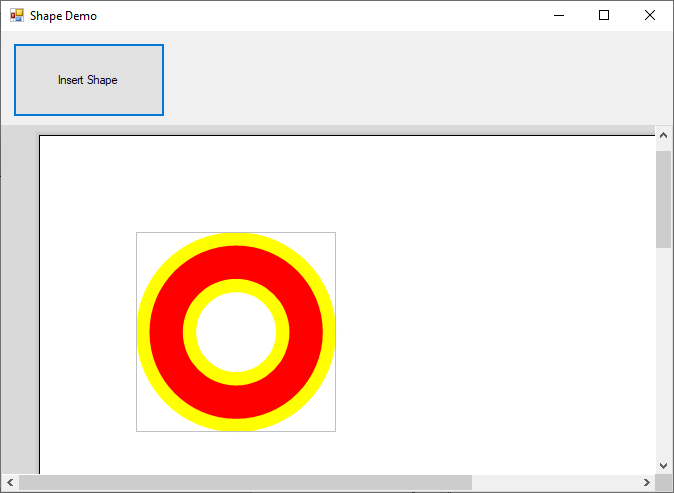
A click on a drawing activates it, and the user edits its shapes; a click on its border selects the drawing, which can then be moved, resized and copied. DrawingCollection.GetActivatedItem returns the activated drawing and DrawingFrame.Activate activates one from code. DrawingLayoutDialog opens the layout dialog box of a selected drawing, and the DrawingActivated event reports the activation.
Text frames and drawings are part of the Enterprise and Professional editions, as Editions and Feature Availability shows. Drawings are saved and loaded with DOCX and the TX Text Control format. TXDrawingCore creates shapes as SVG without a control. The blog article Inserting Shapes and Drawing Groups adds groups of shapes, and Adding Fold Marks and Punch Marks to Documents using Drawings in C# places lines behind the text of a header.
Find and Remove Frames
GetItem with a name or an ID returns a text frame or a drawing by the FrameBase.Name or ID your code or the Properties group gave it, or null. TextFrameCollection.Remove and DrawingCollection.Remove delete a frame. TextControl.Frames holds the images, text frames, charts, barcodes and drawings together.
Next Steps
- Images: insert and arrange pictures.
- Charts and Barcodes: the other kinds of frames.
- Headers and Footers: frames and drawings that appear on every page.
- Images, Text Frames, and Shapes: the same objects with
ServerTextControl.