
Digitally Sign a PDF
A digital signature proves who signed a PDF and that nobody changed it afterward. TX Text Control signs a document while it saves it as PDF, with a certificate from a .pfx file. The steps below create a test certificate, sign the whole document of the editor, add a trusted timestamp, and sign a visible signature field with an image.
How PDF Signing Works
You pass a DigitalSignature to the SaveSettings of a PDF or PDF/A save. It contains an X.509 certificate with its private key, and TX Text Control signs the document with it. There are two ways:
- Sign the whole document. SaveSettings.DigitalSignature signs the document invisibly. The PDF reader shows the signature in its signature panel.
- Sign signature fields. A SignatureField is a visible frame in the document, for example with an image of a handwritten signature. SaveSettings.SignatureFields signs named fields, one certificate per field, which also allows several signers.
Prerequisites
- The application from Create Your First Windows Forms Application, with a
TextControlnamedtextControl1onForm1. - A certificate with its private key as a .pfx file. For testing, create one as shown below.
Form1.cs needs these using directives:
using System.Diagnostics;
using System.Security.Cryptography.X509Certificates;
using TXTextControl;
Create a Self-Signed Certificate for Testing
A self-signed certificate is enough for testing and internal use. Because no trusted certificate authority issued it, use a certificate from a certificate authority for documents that other people must be able to trust.
In PowerShell on Windows, create the certificate in your certificate store:
$cert = New-SelfSignedCertificate `
  -Subject "CN=MyTXCert" `
  -CertStoreLocation "Cert:\CurrentUser\My" `
  -KeyExportPolicy Exportable `
  -KeySpec Signature `
  -FriendlyName "My PDF Signing Certificate" `
  -NotAfter (Get-Date).AddYears(5)
Then export it with its private key and the password 123 to a .pfx file:
$Password = ConvertTo-SecureString -String "123" -Force -AsPlainText

Export-PfxCertificate `
    -Cert "Cert:\CurrentUser\My\$($cert.Thumbprint)" `
    -FilePath "C:\Path\To\certificate.pfx" `
    -Password $Password
Copy certificate.pfx into the output folder of your application, or use its full path in the code below.
Sign the Whole Document
Add a button named signPdfButton and double-click it:
private void signPdfButton_Click(object sender, EventArgs e)
{
    // Load the certificate with its private key
    X509Certificate2 certificate = X509CertificateLoader.LoadPkcs12FromFile(
        "certificate.pfx", "123", X509KeyStorageFlags.Exportable);

    SaveSettings saveSettings = new SaveSettings()
    {
        // An empty string uses the computer's date and time
        DigitalSignature = new DigitalSignature(certificate, "")
    };

    string path = Path.Combine(
        Environment.GetFolderPath(Environment.SpecialFolder.MyDocuments),
        "signed.pdf");

    textControl1.Save(path, StreamType.AdobePDF, saveSettings);

    Process.Start(new ProcessStartInfo(path) { UseShellExecute = true });
}
The code works as follows:
X509CertificateLoader.LoadPkcs12FromFileloads the certificate and its private key from the .pfx file. It is available in .NET 9 and higher. In .NET 8 and in the .NET Framework, use the constructor instead:new X509Certificate2("certificate.pfx", "123", X509KeyStorageFlags.Exportable).- The DigitalSignature constructor takes the certificate and the URL of a timestamp server. With an empty string, the signature carries the date and time of the computer.
- Save signs the document while it writes the PDF. The same works with
StreamType.AdobePDFA.
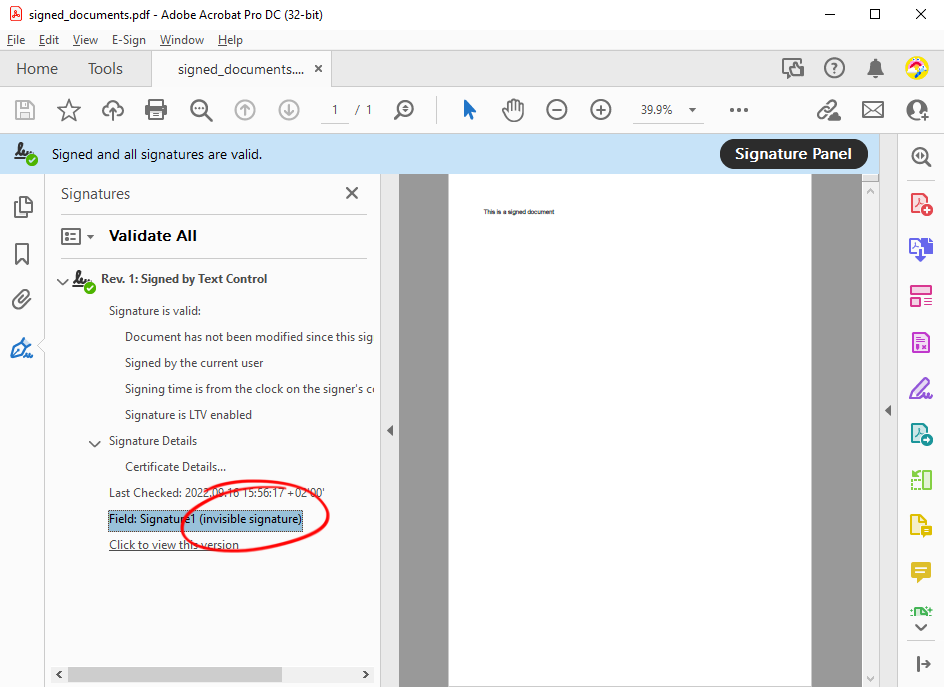
Run the application and click the button. The PDF reader shows the signature in its signature panel, as an invisible signature:
Add a Trusted Timestamp
The date and time of the computer can be changed by anyone. A timestamp server confirms the time of signing independently: TX Text Control sends only a hash of the signature to the server and embeds the server's timestamp in the PDF. In signPdfButton_Click, pass the URL of an RFC 3161 timestamp server instead of the empty string:
SaveSettings saveSettings = new SaveSettings()
{
    // Request a timestamp from a timestamp server
    DigitalSignature = new DigitalSignature(certificate, "http://timestamp.digicert.com")
};
Sign a Signature Field
A signature field shows where and by whom the document is signed. The following handler inserts a field with an image at the input position and signs it:
private void signFieldButton_Click(object sender, EventArgs e)
{
    X509Certificate2 certificate = X509CertificateLoader.LoadPkcs12FromFile(
        "certificate.pfx", "123", X509KeyStorageFlags.Exportable);

    // A field of 3000 x 1500 twips, named "txsign"
    SignatureField signatureField = new SignatureField(
        new System.Drawing.Size(3000, 1500), "txsign", 10);

    // The image of the signature. Filter index 4 is PNG.
    signatureField.Image = new SignatureImage("signature.png", 4);
    signatureField.SignerData = new SignerData(
        "Tim Typer", "CEO", "Charlotte, NC", "tim@example.com", "Approval");

    // -1 inserts the field at the current input position
    textControl1.SignatureFields.Add(signatureField, -1);

    SaveSettings saveSettings = new SaveSettings()
    {
        // Sign the field named "txsign"
        SignatureFields = new DigitalSignature[]
        {
            new DigitalSignature(certificate, "", "txsign")
        }
    };

    textControl1.Save("signed-field.pdf", StreamType.AdobePDF, saveSettings);
}
The code works as follows:
- The SignatureField constructor takes the size of the field in twips, its name and an ID. A field needs a name so that a certificate can be assigned to it.
- SignatureImage loads the image the field shows. The second parameter is the image format: 1 BMP, 2 TIF, 3 WMF, 4 PNG, 5 JPG, 6 GIF, 7 EMF or 8 SVG.
- SignerData describes the signer: name, title, address, contact information and the reason for signing.
- SignatureFields.Add inserts the field into the document.
- The third parameter of
DigitalSignaturenames the field it signs. For several signers, pass oneDigitalSignatureper field.
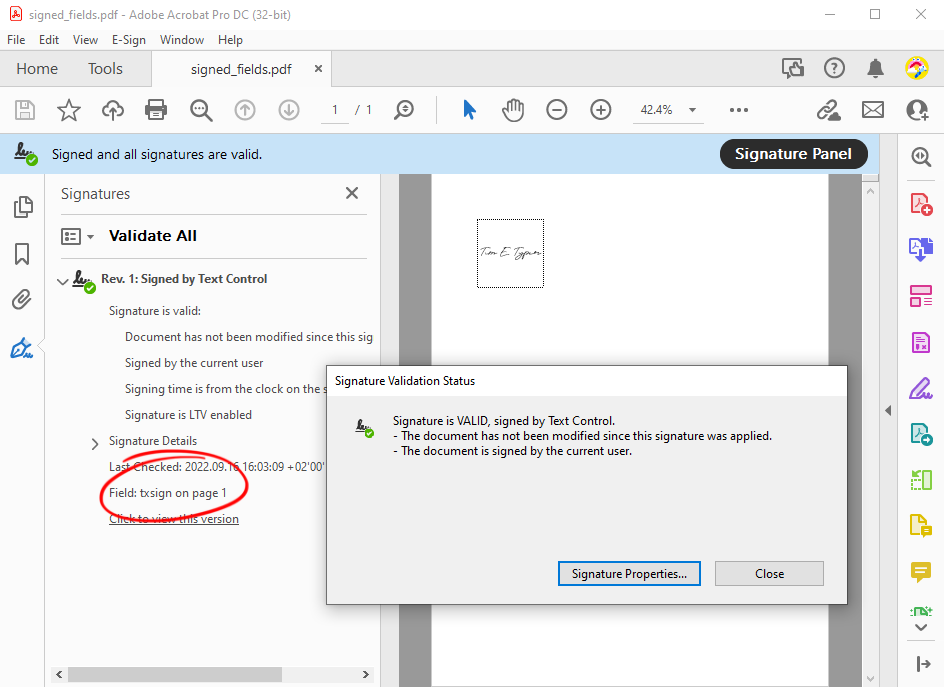
In a PDF reader, the field shows the image, and the signature panel names the field txsign:
Next Steps
- Digital Signatures: certificates, signature fields, multiple signatures and timestamps in detail.
- Create a PDF: document properties, PDF/A and passwords.
- The blog article Signing a PDF Document vs. Signing Signature Fields in a PDF in C#: when to use which way.
- The blog article Building Long-Term Trust with Digital Signatures and Timestamps in C# .NET: why timestamps matter.