
Stylesheets
If the headings of a fifty-page report should become blue, formatting each heading by hand takes fifty edits; changing one style takes one. A formatting style, also called a stylesheet, is a named set of character and paragraph attributes that is stored in the document. Users apply styles from the ribbon, the Styles sidebar and the styles dialog box, and your code creates, applies, changes and copies them. Direct formatting without styles is described in Text and Paragraph Formatting.
What Styles Are
TX Text Control has two kinds of styles, both derived from FormattingStyle:
- A paragraph style, a ParagraphStyle, formats whole paragraphs. Besides character attributes, it has a ParagraphFormat and a ListFormat, and FollowingStyle names the style the next paragraph gets when the user presses ENTER.
- An inline style, an InlineStyle, formats single words in a line. Text with an inline style keeps all attributes of its paragraph except the ones the inline style sets.
Every style is based on another style, and the chain ends at the root style [Normal]. A style inherits the attributes it doesn't set from its base style, which BaseStyle returns. Changing [Normal] therefore changes every style based on it. Since version 32.0, [Normal] can be changed, in Windows Forms through the Font property of the TextControl, at design time or at run time. The blog article Sneak Peek 32.0: Modifying the Normal Stylesheet shows an example.
The styles of a document are in two collections of the TextControl: ParagraphStyles, a ParagraphStyleCollection, and InlineStyles, an InlineStyleCollection. They are saved and loaded with the document.
Work With Styles in the Editor
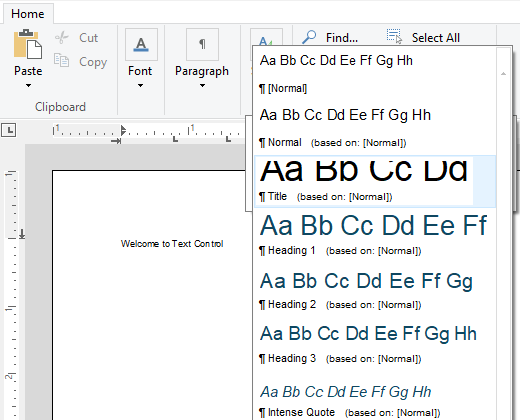
The Styles group of the ribbon's formatting tab shows a gallery of the styles in the document. Each entry shows a preview, the name of the style and its base style:
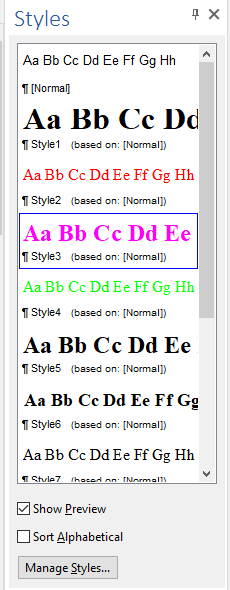
The Styles panel of the Sidebar lists the same styles, with a preview when Show Preview is selected, and has a Manage Styles... button. Set ContentLayout of a sidebar to Styles, or connect a sidebar to the StylesSidebar property of the formatting tab, so that the dialog box launcher of the Styles group opens it:
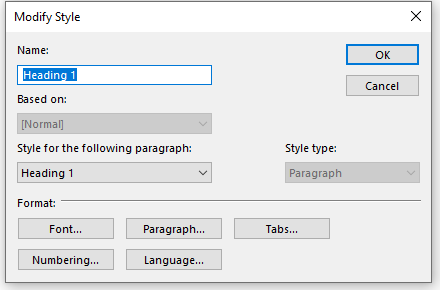
FormattingStylesDialog opens the built-in dialog box for creating, deleting and modifying styles from your own menu. When a style is created or modified, a dialog box asks for its name, its base style, the style of the following paragraph and its type, and its Font, Paragraph, Tabs, Numbering and Language buttons open the formatting dialog boxes for the style:
Create Styles in Code
Styles you create in code are added to the document in the editor. Creating and changing styles in code is part of the Enterprise edition; see Editions and Feature Availability. The following override of OnLoad in Form1.cs adds a heading style, a body style and an inline style. It needs using System.Drawing; and using TXTextControl;:
protected override void OnLoad(EventArgs e)
{
    base.OnLoad(e);

    // A paragraph style based on [Normal]
    ParagraphStyle heading = new ParagraphStyle("Report Heading");
    heading.FontName = "Arial";
    heading.FontSize = 320;
    heading.Bold = true;
    heading.ForeColor = Color.DarkBlue;
    heading.ParagraphFormat.BottomDistance = 120;
    heading.ParagraphFormat.StructureLevel = 1;
    heading.FollowingStyle = "Report Body";

    ParagraphStyle body = new ParagraphStyle("Report Body");
    body.FontName = "Arial";
    body.FontSize = 220;
    body.ParagraphFormat.Alignment = TXTextControl.HorizontalAlignment.Justify;

    // A character style for single words
    InlineStyle highlight = new InlineStyle("Highlight");
    highlight.Bold = true;
    highlight.TextBackColor = Color.Yellow;

    textControl1.ParagraphStyles.Add(body);
    textControl1.ParagraphStyles.Add(heading);
    textControl1.InlineStyles.Add(highlight);
}
The code works as follows:
- The constructor with a name creates a style based on
[Normal].new ParagraphStyle("Report Subheading", "Report Heading")bases a style on another one instead. - The attributes are the same as those of a selection, in twips:
FontSize = 320is 16 points. The paragraph attributes are set on the style'sParagraphFormat. - The structure level 1 makes paragraphs with the heading style entries of a table of contents; see Tables of Contents.
- Following style. After a heading, pressing ENTER continues with "Report Body".
- Adding. Add returns
falseif the style couldn't be added.
Apply a Style
To format text with a style, assign its name to Selection.FormattingStyle. A paragraph style formats the paragraphs of the selection, and an inline style the selected characters:
textControl1.Selection.FormattingStyle = "Report Heading";
Paragraph.FormattingStyle reads or sets the paragraph style of one paragraph of the Paragraphs collection, including the styles that documents loaded from Word bring along, such as "Heading 1", and RemoveInlineStyles removes the inline styles of the selection, so that it has the attributes of its paragraph style again.
Change a Style Everywhere
GetItem returns a style by its name, or null. After changing it, call Apply to update all text formatted with it:
private void redHeadingsButton_Click(object sender, EventArgs e)
{
    ParagraphStyle heading = textControl1.ParagraphStyles.GetItem("Report Heading");

    if (heading != null)
    {
        heading.ForeColor = Color.DarkRed;

        // Update all text formatted with the style
        heading.Apply();
    }
}
Remove deletes a style by its name, and enumerating the collections lists all styles with their Name and BaseStyle.
Copy Styles From a Template
A company template, for example a DOTX file, holds the styles that all documents should share. A ServerTextControl loads the template in the background, and the styles are copied into the editor. The constructor that takes a style creates a copy with all its attributes:
private void ApplyTemplateStyles(string templatePath)
{
    using (ServerTextControl tx = new ServerTextControl())
    {
        tx.Create();
        tx.Load(templatePath, StreamType.WordprocessingML);

        foreach (ParagraphStyle style in tx.ParagraphStyles)
        {
            if (textControl1.ParagraphStyles.GetItem(style.Name) == null)
            {
                textControl1.ParagraphStyles.Add(new ParagraphStyle(style));
            }
        }

        foreach (InlineStyle style in tx.InlineStyles)
        {
            if (textControl1.InlineStyles.GetItem(style.Name) == null)
            {
                textControl1.InlineStyles.Add(new InlineStyle(style));
            }
        }
    }
}
Styles that already exist in the editor are kept. The blog article Applying and Updating Formatting Styles from Master Templates (DOTX) in DOCX Documents also updates existing styles from the template and applies them.
React to Style Changes
- FormattingStyleListChanged occurs after styles have been added, removed or renamed, the moment to refill your own style list.
- FormattingStyleChanged occurs after the attributes of styles have changed.
- InputFormattingStyleChanged occurs when the input position moves to text with another style. InputFormat.StyleName then returns the style at the input position.
In a protected document, CanStyleFormat tells whether styles may be applied. It depends on the edit mode and on DocumentPermissions.AllowFormattingStyles; see Document Protection and Editable Regions.
Next Steps
- Bullets and Numbered Lists: lists defined in paragraph styles.
- Tables of Contents: tables of contents built from styles with structure levels.
- Sidebar and Panels: the Styles panel and the other sidebar panels.
- Formatting and Styling: styles in mail merge templates.