
Migrating From ActiveX
Applications written with TX Text Control ActiveX in Visual Basic 6 or another COM environment move to .NET with TX Text Control .NET for Windows Forms. Most members have a .NET counterpart, but the programming interface is organized differently: the long list of properties, methods and events of the ActiveX control is spread over classes such as Selection, ParagraphFormat and a collection for each kind of document object. The tables below name the .NET replacement of every ActiveX member, grouped by category, followed by the tool bars and the members that .NET doesn't need.
How the .NET Interface Differs
Most ActiveX members map to a .NET member with a similar name. The patterns below explain the rest:
- Formatting belongs to classes. Character formatting of the current selection is set through Selection, so
FontBoldbecomesSelection.Bold. Paragraph attributes such asAlignmentand the indents are properties of ParagraphFormat, and page, column and section settings are properties of PageMargins and SectionFormat. Because a class applies its attributes in one step,LockWindowUpdateis no longer needed. - Document elements are objects in collections. Images, text frames, text fields, tables, sections, headers and footers and editable regions each have a class and a collection. The ActiveX
...Insertand...Deletemethods becomeAddandRemoveof the collection, the...AtInputPosproperties becomeGetItem, and the...Nextmethods become aforeachloop. Properties that selected the "current" object, such asFieldCurrentorObjectCurrent, disappear: you set the properties of the object itself. - Events are named in the past tense.
CharFormatChangebecomes CharFormatChanged,ParagraphFormatChangebecomes ParagraphFormatChanged, andPosChangebecomes InputPositionChanged. - Standard control members come from Windows Forms. TextControl, ButtonBar, RulerBar and StatusBar derive from the Windows Forms class
Control. Members such asClick,KeyDown,Font,EnabledandHandleare inherited from it, so the tables show them in code without a link to the TX Text Control reference. - Errors are exceptions. The ActiveX
Errorevent has no counterpart: .NET methods throw exceptions, as Exceptions and Error Handling describes. - Server-side automation uses ServerTextControl. Where an ActiveX application called
EnableAutomationServer, a .NET application uses ServerTextControl, described in Using ServerTextControl in Desktop Applications.
Port the Code
Start with a Windows Forms project that has a TextControl on its form, as Create Your First Windows Forms Application creates it. Then rewrite each ActiveX call with the tables below. This handler in Form1.cs shows the three most common changes, with the ActiveX code in the comments:
using TXTextControl;

private void PortedCode()
{
    // ActiveX: TXTextControl1.FontBold = True
    textControl1.Selection.Bold = true;

    // ActiveX: TXTextControl1.IndentL = 567
    textControl1.Selection.ParagraphFormat.LeftIndent = 567;

    // ActiveX: FieldNext, FieldCurrent and FieldText in a loop
    foreach (TextField field in textControl1.TextFields)
    {
        System.Diagnostics.Debug.WriteLine(field.Text);
    }
}
The code works as follows:
- Selection.Bold sets the bold attribute of the selected text, the way
FontBolddid. - Selection.ParagraphFormat returns the ParagraphFormat of the selected paragraphs. LeftIndent is given in twips, like
IndentL. - TextFields returns the TextFieldCollection of the document. The
foreachloop visits every TextField, and Text is a property of the field itself.
The pages of the Document Editor section explain each area of the .NET interface in detail, such as Text and Paragraph Formatting, Tables and Table Formulas and Fields, Hyperlinks, and Bookmarks.
Map the Members by Category
Each table lists the members of the ActiveX control TXTextControl in one category, linked to the ActiveX reference, and the .NET classes, properties, methods or events that replace them. Members with no .NET counterpart are listed in Members Without a Counterpart.
Character Formatting
| ActiveX | .NET |
|---|---|
| BaseLine property | TextControl.Baseline, Selection.Baseline |
| CharFormatChange event | TextControl.CharFormatChanged |
| FontBold property | TextControl.Font, Selection.Bold |
| FontDialog method | TextControl.FontDialog |
| FontItalic property | TextControl.Font, Selection.Italic |
| FontName property | TextControl.Font, Selection.FontName |
| FontSize property | TextControl.Font, Selection.FontSize |
| FontStrikethru property | TextControl.Font, Selection.Strikeout |
| FontUnderline property | TextControl.Font, Selection.Underline |
| FontUnderlineStyle property | TextControl.FontUnderlineStyle, Selection.Underline |
| ForeColor property | TextControl.ForeColor, Selection.ForeColor |
| TextBkColor property | TextControl.TextBackColor, Selection.TextBackColor |
Paragraph Formatting
Bullets and Numbered Lists
| ActiveX | .NET |
|---|---|
| BulletAttribute property | the properties of ListFormat, TextControl.ListFormat, Selection.ListFormat |
| ListAttrDialog method | TextControl.ListFormatDialog |
| ListType property | ListFormat.Type |
| NumberingAttribute property | the properties of ListFormat, TextControl.ListFormat, Selection.ListFormat |
Headers and Footers
Text Frames
Page and Document Settings
| ActiveX | .NET |
|---|---|
| Change event | TextControl.Changed |
| CurrentPages property | TextControl.Pages |
| HScroll event | TextControl.HScroll |
| PageFormatChange event | TextControl.PageFormatChanged |
| PageHeight property | TextControl.PageSize |
| PageMarginB property | TextControl.PageMargins, PageMargins |
| PageMarginL property | TextControl.PageMargins, PageMargins |
| PageMarginR property | TextControl.PageMargins, PageMargins |
| PageMarginT property | TextControl.PageMargins, PageMargins |
| PageWidth property | TextControl.PageSize |
| ScrollBars property | TextControl.ScrollBars |
| ScrollPosX property | TextControl.ScrollLocation |
| ScrollPosY property | TextControl.ScrollLocation |
| ViewMode property | TextControl.ViewMode |
| VScroll event | TextControl.VScroll |
| PageChanged event | TextControl.PageChanged |
| PageOrientation property | SectionFormat.Landscape |
Stylesheets
Tables
Zooming
| ActiveX | .NET |
|---|---|
| Zoomed event | TextControl.Zoomed |
| ZoomFactor property | TextControl.ZoomFactor |
Loading, Saving and Database Support
| ActiveX | .NET |
|---|---|
| Load method | TextControl.Load, Selection.Load |
| LoadFromMemory method | TextControl.Load, Selection.Load |
| LoadSaveAttribute property | the properties of LoadSettings, the properties of SaveSettings |
| Save method | TextControl.Save, Selection.Save |
| SaveToMemory method | TextControl.Save, Selection.Save |
| SaveToMemoryBuffer method | TextControl.Save, Selection.Save |
| Text property | TextControl.Text, Selection.Text |
| TextExport method (obsolete) | TextControl.Save |
| TextImport method (obsolete) | TextControl.Load |
Images and OLE Objects
Hypertext Links
Clipboard Operations
| ActiveX | .NET |
|---|---|
| CanCopy property | TextControl.CanCopy |
| CanPaste property | TextControl.CanPaste |
| Clip method | TextControl.Copy, TextControl.Cut, TextControl.Paste |
Undo
| ActiveX | .NET |
|---|---|
| CanRedo property | TextControl.CanRedo |
| CanUndo property | TextControl.CanUndo |
| Redo method | TextControl.Redo |
| Undo method | TextControl.Undo |
| AllowUndo property | TextControl.AllowUndo |
| EndUndoAction method | TextControl.EndUndoAction |
| StartUndoAction method | TextControl.BeginUndoAction |
Printing
| ActiveX | .NET |
|---|---|
| PrintColors property | TextControl.Print, PrintDocument.DefaultPageSettings.Color |
| PrintDevice property | TextControl.Print, PrintDocument.PrinterSettings.PrinterName |
| PrintDoc method | TextControl.Print |
| PrintPage method | TextControl.Print |
Search and Replace
| ActiveX | .NET |
|---|---|
| Find method | TextControl.Find |
| FindReplace method | TextControl.Find, TextControl.Replace |
Columns
Sections
Control Styles and Mode Settings
| ActiveX | .NET |
|---|---|
| BackColor property | TextControl.BackColor |
| BackStyle property | TextControl.BackColor set to Color.Transparent |
| BorderStyle property | TextControl.BorderStyle |
| ControlChars property | TextControl.ControlChars |
| EditMode property | TextControl.EditMode |
| Enabled property | TextControl.Enabled |
| HideSelection property | TextControl.HideSelection |
| InsertionMode property | TextControl.InsertionMode |
| AllowDrag property | TextControl.AllowDrag |
| AllowDrop property | TextControl.AllowDrop |
| DisplayColor property | TextControl.DisplayColors |
| EnableAutomationServer method | ServerTextControl class |
| FontSettings property | TextControl.FontSettings |
| PageViewStyle property | TextControl.DisplayColors |
Line Operations
| ActiveX | .NET |
|---|---|
| GetBaseLinePos method | Line.Baseline |
| GetCharFromLine method | Line.Start |
| GetLineCount method | LineCollection.Count |
| GetLineFromChar method | LineCollection.GetItem |
| GetLineFromPoint method | LineCollection.GetItem |
| GetLineRect method | Line.TextBounds |
Text Controls Without a Built-In Scroll Interface
| ActiveX | .NET |
|---|---|
| AutoExpand property | AutoSize, TextControl.AutoControlSize |
| HExpand event | TextControl.HExpanded |
| VExpand event | TextControl.VExpanded |
Selections and Character Input
| ActiveX | .NET |
|---|---|
| CaretWidth property | TextControl.CaretWidth |
| Click event | TextControl.Click |
| CurrentInputPosition property | InputPosition, TextControl.InputPosition |
| DblClick event | TextControl.DoubleClick |
| FormatSelection property | Selection, TextControl.Selection |
| InputPosFromPoint method | InputPosition, TextControl.InputPosition, TextCharCollection.GetItem |
| KeyDown event | TextControl.KeyDown |
| KeyPress event | TextControl.KeyPress |
| KeyUp event | TextControl.KeyUp |
| MouseDown event | TextControl.MouseDown |
| MouseMove event | TextControl.MouseMove |
| MouseUp event | TextControl.MouseUp |
| MousePointer property | TextControl.Cursor |
| ParagraphChange event | InputParagraphChanged |
| PosChange event | InputPositionChanged |
| RTFSelText property | Selection.Load, Selection.Save |
| SelLength property | Selection.Length |
| SelStart property | Selection.Start |
| SelText property | Selection.Text |
| TabKey property | TextControl.AcceptsTab |
Marked Text Fields
Integrated Dialog Boxes
Handling XML Documents
| ActiveX | .NET |
|---|---|
| XMLEditMode property | TextControl.XmlEditMode |
| XMLElement object | XmlElement |
| XMLElements collection | XmlElementCollection |
| XMLElements property | TextControl.GetXmlElements |
| XMLInvalid event | TextControl.XmlInvalid |
| XMLNotWellFormed event | TextControl.XmlNotWellFormed |
Tool Bar Support
| ActiveX | .NET |
|---|---|
| StatusBarHandle property | TextControl.StatusBar |
| RulerHandle property | TextControl.RulerBar |
| ButtonBarHandle property | TextControl.ButtonBar |
| VerticalRulerHandle property | TextControl.VerticalRulerBar |
Restricted Document Access
Miscellaneous
| ActiveX | .NET |
|---|---|
| hWnd property | TextControl.Handle |
| Refresh method | TextControl.Refresh |
| ResetContents method | TextControl.ResetContents |
Port the Tool Bars
The ActiveX tool bars TXButtonBar, TXRulerBar and TXStatusBar have the .NET counterparts ButtonBar, RulerBar and StatusBar. An ActiveX application connected them through window handles such as ButtonBarHandle. In .NET, you assign the bar object to the properties ButtonBar, RulerBar, VerticalRulerBar and StatusBar of the TextControl, in the Properties window or in code, and the ConnectTools event is no longer needed.
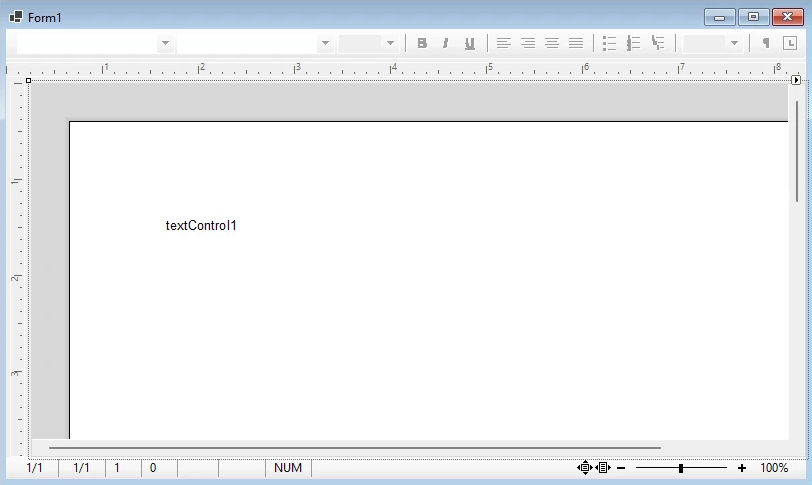
Add Rulers, Toolbars, and a Status Bar builds this layout step by step. Instead of the button bar, a Windows Forms application can also use the ribbon, described in Built-in Ribbon Tabs.
The members of the three bars map as follows.
Button Bar
| ActiveX | .NET |
|---|---|
| Appearance property | ButtonBar.BorderStyle |
| BorderStyle property | ButtonBar.BorderStyle |
| Enabled property | ButtonBar.Enabled |
| hWnd property | ButtonBar.Handle |
| MouseDown event | ButtonBar.MouseDown |
| MouseMove event | ButtonBar.MouseMove |
| MouseUp event | ButtonBar.MouseUp |
| The Pos properties, such as PosFontBold | ButtonBar.ButtonOffsets, ButtonBar.ButtonPositions, ButtonBar.ButtonSeparators |
| Style property | ButtonBar.ButtonStyle |
Ruler Bar
| ActiveX | .NET |
|---|---|
| BorderStyle property | RulerBar.BorderStyle |
| Enabled property | RulerBar.Enabled |
| hWnd property | RulerBar.Handle |
| MouseDown event | RulerBar.MouseDown |
| MouseMove event | RulerBar.MouseMove |
| MouseUp event | RulerBar.MouseUp |
| ScaleUnits property | RulerBar.ScaleUnit |
Status Bar
| ActiveX | .NET |
|---|---|
| BorderStyle property | StatusBar.BorderStyle |
| Enabled property | StatusBar.Enabled |
| Font property | StatusBar.Font |
| FontBold property | StatusBar.Font |
| FontItalic property | StatusBar.Font |
| FontName property | StatusBar.Font |
| FontSize property | StatusBar.Font |
| FontStrikethru property | StatusBar.Font |
| FontUnderline property | StatusBar.Font |
| hWnd property | StatusBar.Handle |
| MouseDown event | StatusBar.MouseDown |
| MouseMove event | StatusBar.MouseMove |
| MouseUp event | StatusBar.MouseUp |
| Text property | StatusBar.Text |
| TextColumn property | StatusBar.ColumnText |
| TextLine property | StatusBar.LineText |
| TextPage property | StatusBar.PageText |
Members Without a Counterpart
No Longer Needed
These ActiveX members have no .NET counterpart because the .NET interface solves their task another way:
| ActiveX | What replaces it |
|---|---|
| TabCurrent property | Nothing: TabPositions and TabTypes hold all tabs of a paragraph as arrays |
| HeaderFooterSelect method | The properties of each HeaderFooter object |
| ObjectCurrent property | The properties of each Image object |
| FieldCurrent property | The properties of each TextField object |
| SectionCurrent property | The SectionCollection of TextControl.Sections |
| LockWindowUpdate property | Nothing: the formatting classes apply their attributes in one step |
| ConnectTools event | Nothing: the bars connect without a window handle, see Port the Tool Bars |
| Error event | Exceptions, see Exceptions and Error Handling |
Language property of TXTextControl, TXButtonBar, TXRulerBar and TXStatusBar | Nothing: the language of the user interface follows the system, see Localization and Resource Kit |
ResourceFile property of TXTextControl, TXButtonBar, TXRulerBar and TXStatusBar | Satellite assemblies, see Localization and Resource Kit |
| PageMode property of TXStatusBar | Nothing: the status bar follows TextControl.ViewMode |
Not Available in .NET
These ActiveX members have no replacement in TX Text Control .NET for Windows Forms:
- Page and Document Settings: Device
- Loading, Saving and Database Support: DataTextFormat
- Images and OLE Objects: ImageDisplayMode, ObjectGetData, ObjectGethWnd, ObjectGetZoom, ObjectItem, ObjectPrint, ObjectScrollOut, ObjectSetData, ObjectSetZoom
- Printing: PrintOffset, PrintZoom
- Control Styles and Mode Settings: ClipChildren, ClipSiblings, WordWrapMode
- Text Controls Without a Built-In Scroll Interface: AutoScroll, CaretOut, CaretOutBottom, CaretOutLeft, CaretOutRight, CaretOutTop, Move, Size, SizeMode
- Selections and Character Input: KeyStateChange
- Chains of Linked Text Controls: AutoLink, NextWindow
- Miscellaneous: GetTextExtent
Next Steps
- Create Your First Windows Forms Application: the project the ported code goes into.
- Add Rulers, Toolbars, and a Status Bar: the .NET button bar, rulers and status bar around the editor.
- Migrating from .NET Framework to .NET: move a ported .NET Framework project on to .NET 8 or higher.
- TX Text Control ActiveX: the documentation of the ActiveX control and its members.