
PDF/A
Contracts, invoices and patient records often have to stay readable for years, on computers that don't exist yet. PDF/A is the PDF format for such archives, and a Windows Forms application writes it by saving with StreamType.AdobePDFA instead of AdobePDF. The standard sets rules for the document, most of all for its fonts, and your code has to meet them before the save succeeds.
A first PDF/A file is saved in Create a PDF/A Document, and a PDF/A copy that leaves the editor's settings alone in Create a PDF/A Copy in the Background. PDF/A is part of the Enterprise edition, as Editions and Feature Availability lists.
What PDF/A Is
PDF/A is the ISO standard 19005 for the long-term archiving of electronic documents. A PDF/A file is self-contained: everything needed to display it, such as its fonts, is embedded in the file. Audio, video, JavaScript and other executable content aren't allowed, and neither is encryption.
The standard has several parts. PDF/A-3 allows files of any format to be embedded, such as the XML data of an electronic invoice. The level "a" adds a logical structure with tags, which assistive technologies such as screen readers use, so a PDF/A-3a document is accessible as well as archivable.
What TX Text Control Writes
- Since version 34.0,
StreamType.AdobePDFAsaves PDF/A-3a. The tagged structure is the same one that PDF/UA requires, so one document can conform to PDF/A-3a and PDF/UA at the same time, as Create an Accessible PDF (PDF/UA) describes. - Before version 34.0, TX Text Control wrote PDF/A-1b, and since version 29.0, documents with attachments as PDF/A-3b.
StreamType AdobePDFA can only be used to save, and only a complete document can be saved with it. A PDF/A file is loaded with StreamType.AdobePDF, like any other PDF. Whatever the editor shows can be saved as PDF/A: a typed document, a loaded DOCX, RTF or HTML file, a merged template or an imported PDF.
The Rules of PDF/A
TX Text Control applies the rules of the standard when it saves. These affect your code:
- Fonts must be embeddable. FontSettings.EmbeddableFontsOnly must be
truebefore a document is saved as PDF/A, and fonts that can't be embedded are replaced. Embed Fonts in PDF/A explains which fonts can be embedded. - No passwords. PDF/A doesn't allow encryption, so a PDF/A document has no user password, master password or access permissions.
- No JavaScript. Scripts in SaveSettings.DocumentLevelJavaScriptActions are left out of PDF/A documents.
- Pages from the page layout. The technical article on PDF import and export of the reference sets ViewMode to
PageViewas the first step for PDF/A, so that the PDF gets the page size of the document. InFloatingTextmode, the page size and margins are ignored. - Attachments are allowed. PDF/A-3 documents can carry embedded files, as Attachments describes.
Save the Editor's Document as PDF/A
The following handler in Form1.cs saves the document of textControl1 as PDF/A and writes every font it replaces to the Output window of Visual Studio:
private void archiveButton_Click(object sender, EventArgs e)
{
    // Report every font that is replaced
    textControl1.FontSettings.AdaptFontEvent = true;
    textControl1.AdaptFont += TextControl1_AdaptFont;

    // Only fonts that can be embedded; all others are replaced
    textControl1.FontSettings.EmbeddableFontsOnly = true;

    textControl1.ViewMode = ViewMode.PageView;

    try
    {
        textControl1.Save("contract-archive.pdf", StreamType.AdobePDFA,
            new SaveSettings() { DocumentTitle = "Service Contract" });
    }
    finally
    {
        textControl1.AdaptFont -= TextControl1_AdaptFont;
    }
}

private void TextControl1_AdaptFont(object sender, AdaptFontEventArgs e)
{
    Debug.WriteLine(e.FontName + " is replaced with " + e.AdaptedFontName);
}
Form1.cs needs using System.Diagnostics; for Debug. The code works as follows:
- AdaptFont reports each replaced font, as Choose the Replacement Fonts describes with its event arguments. The handler is connected before
EmbeddableFontsOnlyis set, because restricting the fonts is one of the moments the event occurs. - The SaveSettings give the archived document a title.
EmbeddableFontsOnly stays set after the save, so the user continues with the replaced fonts. When that isn't wanted, create the PDF/A file from a copy in a ServerTextControl, as Create a PDF/A Copy in the Background shows.
Archive a Folder of Documents
A ServerTextControl converts documents to PDF/A without the editor. The following handler converts every DOCX file in C:\Contracts and logs the files whose fonts prevent the save; it needs using System.IO; as well:
private void archiveFolderButton_Click(object sender, EventArgs e)
{
    foreach (string file in Directory.GetFiles(@"C:\Contracts", "*.docx"))
    {
        using (ServerTextControl tx = new ServerTextControl())
        {
            tx.Create();

            // Set before Load, so that it applies to the fonts of the document
            tx.FontSettings.EmbeddableFontsOnly = true;

            tx.Load(file, StreamType.WordprocessingML);

            try
            {
                tx.Save(Path.ChangeExtension(file, ".pdf"), StreamType.AdobePDFA);
            }
            catch (FilterException exception) when
                (exception.Reason == FilterException.FilterError.NonEmbeddableFont)
            {
                Debug.WriteLine(file + " contains a font that can't be embedded.");
            }
        }
    }
}
A document that still contains a font that can't be embedded throws a FilterException whose Reason is NonEmbeddableFont. A Document Can't Be Saved as PDF/A lists the messages and fixes.
Check the Result
Adobe Acrobat shows the standards a PDF claims to conform to. A document saved with AdobePDFA in version 34.0 lists PDF/A-3A and PDF/UA-1:
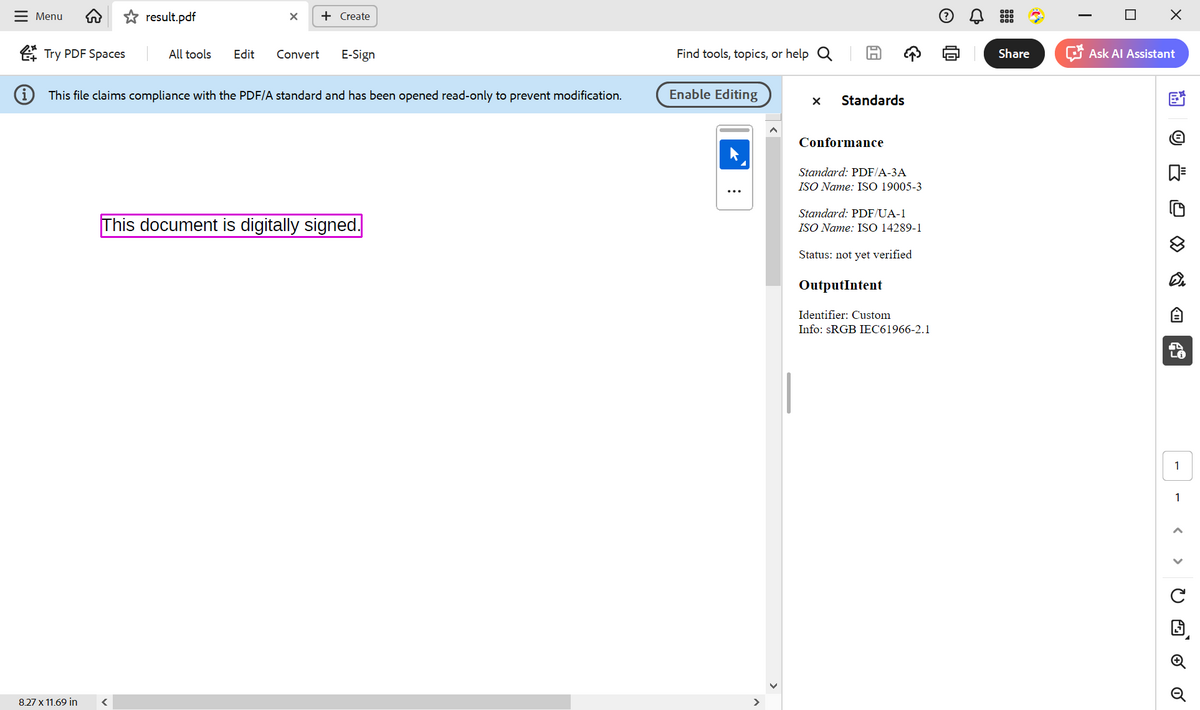
As the note in the screenshot says, Acrobat opens a PDF/A file read-only to prevent changes, and the panel shows what the file claims, not the result of a validation. To validate PDF/A conformance, use a PDF/A validator such as veraPDF. The TXTextControl.PDF.Validation package of Text Control checks PDF/UA, the accessibility part, and only reports whether a PDF/A declaration is present, as Validate the Accessible PDF describes.
Electronic Invoices and Signatures
- Electronic invoices. ZUGFeRD and Factur-X invoices are PDF/A-3 documents with the invoice data embedded as XML. The Windows Forms sample in PDF Examples saves such an invoice from the
TextControl, and Attachments shows how to embed the XML. - Signatures. SaveSettings.DigitalSignature signs a PDF/A document while it is saved, as Signing PDF Documents describes.
The blog article PDF/UA vs. PDF/A-3a: Which Format Should You Use for Your Business Application? compares the two standards.
Next Steps
- Font Embedding and Substitution: choose the fonts that replace others.
- Attachments: embed XML and other files in PDF/A-3 documents.
- Digital Signatures: sign archived documents.