
PDF/A
Invoices, contracts and patient records often have to remain readable for years or decades, long after the software that created them is gone. PDF/A is the format for such archives, and TX Text Control writes it with a single Save call. What follows covers the requirements of the standard, the level TX Text Control produces, the handling of fonts and the combination of PDF/A with electronic invoices, accessibility and digital signatures.
The first PDF/A document, including the setting for embeddable fonts, is created in Create a PDF in Getting Started.
What PDF/A Is
PDF/A, "PDF for Archiving", is the ISO standard 19005 for the long-term preservation of electronic documents. A PDF/A file is self-contained: everything needed to display it, such as fonts and color profiles, is embedded, and content that depends on external software, such as audio, video, JavaScript and executable code, isn't allowed. Encryption isn't allowed either. The standard has several parts:
| Part | Based on | Adds |
|---|---|---|
| PDF/A-1 | PDF 1.4 | The original part, without transparency and layers |
| PDF/A-2 | PDF 1.7 | Transparency, layers and embedded OpenType fonts |
| PDF/A-3 | PDF 1.7 | Embedded files of any format, such as XML or CSV |
In PDF/A-3a, the "a" stands for accessibility: the document also contains a logical structure with tags that assistive technologies such as screen readers use.
What TX Text Control Writes
To create PDF/A, save a document with StreamType.AdobePDFA, or with BinaryStreamType.AdobePDFA for a byte array. StreamType describes the value as a format for saving only, and only a complete document can be saved with it: a PDF/A document is loaded with AdobePDF like every other PDF.
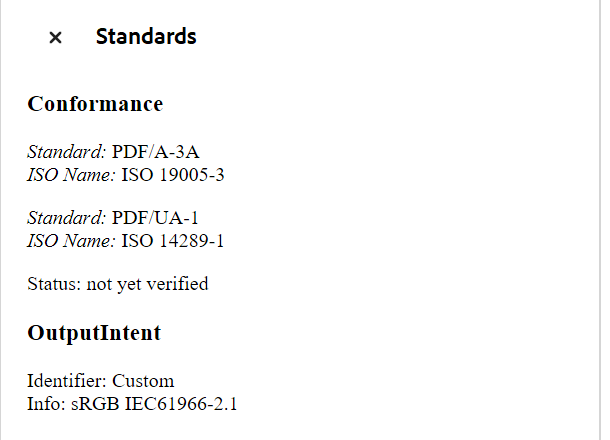
- Since version 34.0, TX Text Control writes PDF/A-3a documents with the tagged structure, and the same document can conform to PDF/UA, the standard for accessible PDF documents.
- Before version 34.0, TX Text Control wrote PDF/A-1b documents, available since version 15.0, and Adobe Acrobat showed documents with attachments as PDF/A-3b.
Adobe Acrobat shows the conformance level of a PDF/A document, so you can check what was written. Its Standards panel lists the standards a document claims:
Whatever you can load or create, such as DOCX, RTF, HTML or a merged template, can be saved as PDF/A. A PDF that you load is rebuilt as an editable document first, as Load and Modify a PDF explains, and saving it with AdobePDFA creates a new PDF/A document from that content.
The Rules of PDF/A
TX Text Control applies the rules of the standard when it saves AdobePDFA. Some of them affect your code:
- Fonts are embedded. A font can't be embedded when its license forbids it or when it's a device font. FontSettings.EmbeddableFontsOnly must be set to
truefor PDF/A: fonts that can't be embedded are then replaced. Only OpenType and TrueType fonts are embeddable. Without the setting, saving a document with such a font throws a FilterException whose Reason isNonEmbeddableFont. - No passwords and no permissions. UserPassword and MasterPassword are for PDF only, and DocumentAccessPermissions is ignored for PDF/A.
- No JavaScript. Scripts in DocumentLevelJavaScriptActions aren't embedded, and links that start other applications aren't allowed.
- Metadata as XMP. The title, author and other metadata are also stored in XMP format, as Document Metadata describes, and a color profile is embedded.
- Attachments with a type. PDF/A-3 allows embedded files, and each of them needs a MIME type and a relationship to the document, as Attachments describes.
Control Which Fonts Replace Others
With EmbeddableFontsOnly set, fonts that can't be embedded are replaced when the document is loaded, and the AdaptFont event reports each replacement and lets you choose the font that replaces it. Use the Right Fonts in PDF Creation shows the code; save with StreamType.AdobePDFA instead of AdobePDF to create PDF/A. How the Core engine provides fonts on a server is described in Make Fonts Available on the Server.
Electronic Invoices
ZUGFeRD and its French counterpart Factur-X are PDF/A-3 documents: the invoice as pages that people read, with the invoice data as an embedded XML file that software processes. XRechnung XML can be embedded in the same way. TX Text Control creates the readable invoice, for example with a mail merge, embeds the XML with the relationship Alternative and saves the document as PDF/A. The XML itself comes from your ERP system or an e-invoice library.
Create an Electronic Invoice shows the complete program. Check the result with a validation service for ZUGFeRD and Factur-X, and sign the invoice so that later changes to its pages or its XML become detectable, as the blog article Why Structured E-Invoices Still Need Tamper Protection using C# and .NET describes.
PDF/A, PDF/UA and Digital Signatures
The standards for archiving, accessibility and signatures complement each other, and one document can meet all three:
- PDF/A-3a and PDF/UA. Both use the tagged structure that TX Text Control writes since version 34.0. Choose PDF/A-3a when documents must be retained for a long time or carry embedded files, and PDF/UA when they must be accessible; a document saved with
AdobePDFAcan serve both purposes. A PDF/UA document needs a title and descriptive texts for images, tables, links and form fields, as PDF/UA describes. - Signatures. SaveSettings.DigitalSignature signs a PDF or a PDF/A document when it's saved. A signed PDF/A-3 document with attachments shows that neither its pages nor its attachments were changed after signing. Signing PDF Documents describes signing.
The blog article PDF/UA vs. PDF/A-3a: Which Format Should You Use for Your Business Application? compares the two standards, and From DOCX to Long-Term Archiving: Generating PDF/A from Office Documents in .NET C# explains why DOCX files alone aren't suitable for archives.
Next Steps
- Attachments: embed XML and other files in PDF/A-3 documents.
- PDF/UA: make PDF documents accessible.
- PDF Validation: check the documents you create.
- Digital Signatures: sign PDF and PDF/A documents.