
Marked Text Fields
Marked text fields are ranges of text in a TXTextControl that your application can address by number: it changes their text, finds their position, protects them and reacts when users click or edit them. Mail merge fields, hypertext links, bookmarks, page numbers and imported Microsoft Word fields are all built on them.
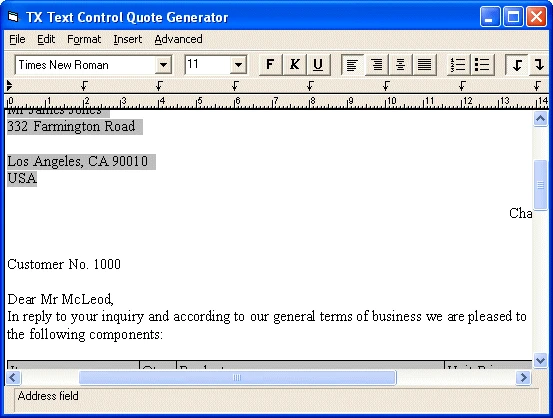
Read on for how you insert fields and work with them in Visual Basic, and for the pages that cover editing, related data, the special field types and the Visual Basic tutorials.
How Marked Text Fields Work
A field gets into the text in one of two ways: your code inserts it with the FieldInsert method, or it arrives as part of a document loaded with the Load method. All communication with fields works through unique numbers, the field identifiers, which FieldInsert returns or which you define.
Before you work with a field, make it the current field by setting the FieldCurrent property to its identifier. Then you can:
- Change or read its text with the FieldText property.
- Delete it with the FieldDelete method.
- Find its position, geometrically with FieldPosX and FieldPosY, or as a character position with FieldStart and FieldEnd.
- Get the next field in the text, or enumerate all fields, with the FieldNext method.
Protect Fields From Users
Two properties restrict what users can do with a field: FieldChangeable prevents its text from being changed, and FieldDeleteable prevents it from being deleted. Further attributes that help users edit the text of a field are the subject of Editing Marked Text Fields.
Respond to Field Events
TXTextControl informs your application about what happens to fields through events:
| Event | Occurs when |
|---|---|
| FieldClicked, FieldDblClicked | The user clicks or double-clicks a field. |
| FieldEntered, FieldLeft | The input position moves into or out of a field. |
| FieldSetCursor | The mouse pointer moves over a field. Use it to define the pointer; the default is the up-arrow cursor. |
| FieldChanged | The text of a field has been changed. |
| FieldCreated, FieldDeleted | Fields have been created or deleted while text is inserted or deleted with the keyboard or the clipboard. |
Properties, Methods and Events
Every property, method and event for programming marked text fields is listed in two programming categories of the reference:
- Text Fields: the
Fieldmembers that every marked text field has. - Hypertext Links: field types, type-related data and the
Targetmembers for link targets and bookmarks.
Find the Right Page
| If you want to | Read |
|---|---|
| Help users type inside or outside a field | Editing Marked Text Fields |
| Store a database field name or other data with a field | Relating Data to a Marked Text Field |
| Insert links, page numbers, highlights or Word fields | Special Types of Marked Text Fields |
Move code from link target fields to the Target members | Link Targets and Bookmarks |
| Build a Visual Basic application step by step | Using Marked Text Fields in Visual Basic, Hypertext Links, Using Microsoft Word Fields |
Pages in This Section
- Editing Marked Text Fields: a second input position, caret width and background at the edges of a field.
- Relating Data to a Marked Text Field: strings and numbers stored with a field through
FieldData. - Special Types of Marked Text Fields: links, page numbers, highlights, topics and Microsoft Word fields.
- Link Targets and Bookmarks: the
Targetmembers that replacetxFieldLinkTargetfields. - Using Marked Text Fields in Visual Basic: a simple example, bookmarks and strings added to fields.
- Hypertext Links: inserting links, an insert dialog box, targets and jumps to external targets in four steps.
- Using Microsoft Word Fields: classes for the MERGEFIELD and FORMTEXT fields of Word.