
What's New in TX Text Control ActiveX 26.0
Developers who maintain a TX Text Control ActiveX 26.0 application, or upgrade one from version 25.0, find here what the version added: tracked changes, the SpreadsheetML format, formulas in table cells, cell references in the ruler bar and two new keyboard actions in tables. The new and extended properties, methods and events follow the features.
New Features
Tracked changes. Track changes shows who has made text changes to a document. The new IsTrackChangesEnabled property turns it on or off. While it is on,
TXTextControlmarks up new text changes made to the document; when it is turned off, new changes are no longer marked up. Changes that were already tracked stay marked up in the document until they are removed.- Enumerate changes. TrackedChangeNext enumerates all tracked changes of a document. TrackedChangeStart and TrackedChangeEnd return the position of a change in the text, and TrackedChangeKind returns its kind: deleted or inserted text.
- Accept or reject. The only way to remove tracked changes from a document is to accept or reject them with the TrackedChangeDelete method.
- Users and times. Each tracked change has a change time (TrackedChangeTime property) and is related to a user (TrackedChangeUserName property). A new tracked change is associated with the current user, the first in the list of users set with the UserNames property. When the list is empty, the name is set to an empty string, which stands for an unknown user.
- Events. Events occur when a tracked change is created (TrackedChangeCreated), deleted (TrackedChangeDeleted) or changed (TrackedChangeChanged).
- Highlighting. A tracked change is highlighted on the screen in a color that depends on the user; the default color for the current user is red. Inserted text is shown as colored text, deleted text as colored, struck-through text.
- Changes that can't be tracked. Some complex text operations, such as deleting a table column, can't be tracked. In these cases, the CannotTrackChange event occurs, and the end user decides whether the change is made.
- File formats. Tracked changes are saved and reloaded with the TX Text Control format (.tx), the Rich Text Format (.rtf) and the Microsoft Word formats (.doc, .docx).
SpreadsheetML format. In addition to WordprocessingML, TX Text Control supports the SpreadsheetML part of the Microsoft Office Open XML format. SpreadsheetML is a ZIP-compressed XML format for spreadsheets and the standard format of Microsoft Excel.
TXTextControlloads .xlsx files: the Format parameter of the Load method accepts a new value for this format. The import is limited to the content of the first worksheet of the document, and formulas with cell references into other worksheets or files are not supported.Formulas in tables. TX Text Control calculates table cells with formulas. A formula is a property of a table cell. It is either loaded with a SpreadsheetML document or inserted with the TableCellFormula and TableCellNumberFormat properties.
- Automatic updates. A formula can reference other table cells, and the text of a formula cell is updated automatically when the content of an input cell changes. IsFormulaCalculationEnabled switches automatic updating off. A formula cell can be the input cell of another formula cell.
- Cell references. Cells are referenced in the A1 or the R1C1 notation, and FormulaReferenceStyle switches between them. The A1 notation specifies a cell by a column letter and a row number: B3 is the cell in the third row and the second column. The R1C1 notation specifies a cell by a row number and a column number: R3C2 is the same cell. Square brackets express relative addresses, such as R[-2]C[-3]. The numbers inside the brackets say how many rows or columns the referenced cell is away from the cell itself. A negative row number means the referenced cell is above the cell that contains the formula; a negative column number means it is to the left of it.
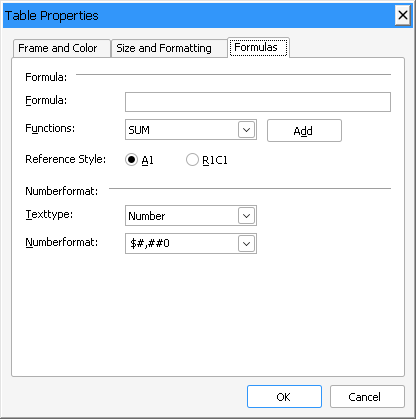
- Dialog box. The dialog box of TableAttrDialog has been extended with a third tab, which sets a formula and a number format for one or more table cells.
- Limitations. Cell references to other tables or to document files are not supported. Number formats are restricted to positive number formats.
- More information. Using Formulas in Table Cells describes formulas, and Number Formats describes how to format their results. Supported Formula Functions lists all functions a formula can use.
Ruler bars. The new TXRulerBar.FormulaMode property supports formulas in tables by showing cell references. Depending on the TXTextControl.FormulaReferenceStyle property, table cells are addressed in the A1 or the R1C1 notation. Depending on the mode, cell references are shown for all cells or only for cells that contain a formula.
Keyboard interface. Pressing the TAB key in the last cell of a table now inserts a new table row at the end of the table. Pressing the ENTER key at the first input position of a document that begins with a table now inserts an empty line in front of the table.
New Properties, Methods and Events
Version 26.0 adds members to TXTextControl and one property to TXRulerBar.
Properties
| Member | Description |
|---|---|
| TXRulerBar.FormulaMode | Gets or sets a value specifying whether the ruler bar shows cell references when the current input position is in a table cell. |
| TXTextControl.FormulaReferenceStyle | Gets or sets a value determining how references to table cells in formulas are specified. |
| TXTextControl.IsFormulaCalculationEnabled | Gets or sets a value indicating whether formulas in tables are calculated automatically when the text of an input cell is changed. |
| TXTextControl.IsTrackChangesEnabled | Gets or sets a value indicating whether track changes is active. |
| TXTextControl.TableCellFormula | Returns or sets the table cell's formula. |
| TXTextControl.TableCellNumberFormat | Returns or sets a number format for the table cell. |
| TXTextControl.TableCellTextType | Returns or sets the text type of the table cell, which determines whether the cell's text is interpreted as a number or as text. |
| TXTextControl.TrackedChangeEnd | Returns the index (one-based) of the last character of the specified tracked change. |
| TXTextControl.TrackedChangeKind | Returns the kind of tracked change. |
| TXTextControl.TrackedChangeStart | Returns the index (one-based) of the first character of the specified tracked change. |
| TXTextControl.TrackedChangeTime | Returns the date and time when the change has been made. |
| TXTextControl.TrackedChangeUserName | Returns the name of the user who has changed the document. |
Methods
| Member | Description |
|---|---|
| TXTextControl.TrackedChangeDelete | Removes a tracked change from the document. |
| TXTextControl.TrackedChangeNext | Returns the identifier of the tracked change that follows the specified tracked change in the current text of TXTextControl. |
Events
| Member | Description |
|---|---|
| TXTextControl.CannotTrackChange | Determines how to handle a change of the document that can't be added to the list of tracked changes. |
| TXTextControl.TrackedChangeChanged | Occurs when the text of a tracked change has been altered. |
| TXTextControl.TrackedChangeCreated | Occurs when a tracked change has been created. |
| TXTextControl.TrackedChangeDeleted | Occurs when a tracked change has been deleted. |
Extended Properties, Methods and Events
| Member | Change |
|---|---|
| Load method | Accepts the new value 15 - SpreadsheetML to load SpreadsheetML documents (*.xlsx). |
| LoadSaveAttribute property | Extended with the txLoadDocumentParts attribute, which enables loading SpreadsheetML documents with several worksheets. |