
What's New in TX Text Control ActiveX 30.0
With version 30.0, end users of TX Text Control ActiveX comment on parts of a document, and text gets automatic subscripts and superscripts, capitals, small capitals, character spacing and character scaling. What follows covers these features and every property, method and event that version 30.0 added since version 29.0.
Version 30.0 was released in November 2021, together with TX Text Control .NET Server, TX Text Control .NET for Windows Forms, TX Text Control .NET for WPF and TX Spell .NET 9.0.
New Features
Extended character attributes.
TXTextControlnow supports automatic subscript and superscript settings, text effects with uppercase letters and a user-defined character spacing and scaling. The new properties AutoBaseLine, Capitals, CharacterSpacing and CharacterScaling define or retrieve these settings.- Automatic subscript and superscript. The font is scaled and moved above or below the baseline by values the font itself defines. When a font doesn't define them,
TXTextControlscales it to 50% and moves it 40% above or 15% below the baseline. - Special subscripts and superscripts. In addition to standard subscript and superscript,
TXTextControloffers subscripts aligned at the baseline and superscripts that don't extend above the ascender line. They serve for the numerators and denominators of diagonal fractions, such as the Spanish c/u (cada uno), and for ordinal indicators, such as the English 1st. All automatic subscript and superscript features can be combined with a user-defined baseline position, set with the BaseLine property. - Capitals and small capitals. Lowercase letters are displayed either as capital letters of the same size or as smaller capital letters. The smaller size is either the size of the lowercase "x" (petite caps) or the size of the lowercase "x" plus 10% (small caps).
- Character spacing. A user-defined fixed value is added to each character. A negative value reduces the character spacing, any other value extends it.
- Character scaling. Character widths are scaled, specified in percent of the average character width.
- Styles, dialog boxes and filters. All new character attributes are also attributes of formatting styles: the Style object has corresponding new properties. The font and formatting style dialog boxes have been extended to make the attributes available to the end user, and all text filters have been extended to exchange them with other applications.
- Automatic subscript and superscript. The font is scaled and moved above or below the baseline by values the font itself defines. When a font doesn't define them,
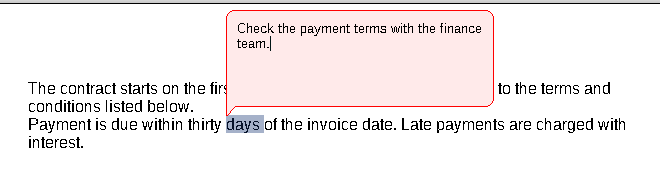
Comments. Parts of a document can now be commented.
- In the user interface. An end user selects a piece of text and opens a comment input control through the context menu to type the comment's text. When the input control is closed, with a mouse click or the Enter key, the comment is added to the document. The commented text is highlighted on the screen in a color that depends on the user; the default color for the current user is red. The comment's context menu offers entries to change, remove and reply to a comment.
- In code. CommentInsert, CommentReply and CommentEdit open the comment input control. Every comment of a document has a unique identifier, and CommentNext enumerates them.
- Users and times. Each comment has a creation time and is related to a user. A new comment is associated with the current user, the first in the list of users set with the UserNames property. When the list is empty, CommentUserName is set to an empty string, which stands for an unknown user.
- Replies. Comments can have replies, which are also contained in the list of comments. A reply is associated with the same piece of text, but it can be related to another user and have another creation time. CommentReplies retrieves an array with the identifiers of all replies to a comment. Removing the original comment from the document removes all its replies.
- Events. Events occur when a comment is created (CommentCreated) or deleted (CommentDeleted) or its text is changed (CommentChanged). Further events occur when the current input position has been moved to a commented piece of text (CommentedTextEntered) or has left it (CommentedTextLeft).
- File formats. Comments are saved and reloaded with the TX Text Control format (.tx), the Rich Text Format (.rtf) and the Microsoft Word formats (.doc, .docx).
Formatting styles. The character input language can now be specified as an attribute of character and paragraph formatting styles. The formatting style dialog box and all text filters have been extended to support it, and the new Style.Locale property sets a style's language in code.
New Properties, Methods and Events
Version 30.0 adds members to TXTextControl and to the Style object.
Properties
| Member | Description |
|---|---|
| Style.AutoBaseLine | Returns or sets values specifying automatically subscripted or superscripted text. |
| Style.Capitals | Returns or sets values specifying whether lowercase letters are displayed with capital letters. |
| Style.CharacterScaling | Returns or sets the style's character scaling, in percent of the average character width. |
| Style.CharacterSpacing | Returns or sets the style's character spacing value, in twips. |
| Style.Locale | Specifies the style's language. |
| TXTextControl.AutoBaseLine | Returns or sets values specifying whether the selected text is automatically subscripted or superscripted. |
| TXTextControl.Capitals | Returns or sets values specifying whether lowercase letters are displayed with capital letters. |
| TXTextControl.CharacterScaling | Returns or sets the character scaling of the selected text, in percent of the average character width. |
| TXTextControl.CharacterSpacing | Returns or sets the character spacing value of the selected text, in twips. |
| TXTextControl.CommentCreationTime | Returns the date and time when the specified comment has been made. |
| TXTextControl.CommentEnd | Returns the index (one-based) of the last character of the text associated with the specified comment. |
| TXTextControl.CommentHighlightMode | Returns or sets a value determining how commented text is highlighted in the document. |
| TXTextControl.CommentReplies | Returns the identifiers of all replies to the specified comment. |
| TXTextControl.CommentStart | Returns the index (one-based) of the first character of the text associated with the specified comment. |
| TXTextControl.CommentText | Returns or sets the comment's text. |
| TXTextControl.CommentUserName | Returns the name of the user who has commented the document. |
| TXTextControl.EditableRegionHighlightMode | Returns or sets a value determining how editable regions are highlighted in the document. |
Methods
| Member | Description |
|---|---|
| TXTextControl.ChangeCapitalization | Changes the capitalization of all selected characters depending on the Option parameter. |
| TXTextControl.CommentDelete | Removes a comment from the document. |
| TXTextControl.CommentEdit | Opens a comment input control in which the end user edits the specified comment. |
| TXTextControl.CommentGetReplied | Gets the comment to which the specified comment is a reply. |
| TXTextControl.CommentInsert | Opens a comment input control in which the end user inserts a new comment in the document. |
| TXTextControl.CommentNext | Returns the identifier of the comment that follows the specified comment in the current text of TXTextControl. |
| TXTextControl.CommentReply | Opens a comment input control in which the end user replies to the specified comment. |
Events
| Member | Description |
|---|---|
| TXTextControl.CommentChanged | Occurs when the text of a comment has been changed. |
| TXTextControl.CommentCreated | Occurs when a comment has been created. |
| TXTextControl.CommentDeleted | Occurs when a comment has been deleted. |
| TXTextControl.CommentedTextEntered | Occurs when the current input position indicated by the caret has been moved to a position that belongs to a commented piece of text. |
| TXTextControl.CommentedTextLeft | Occurs when the current input position indicated by the caret has left a commented piece of text. |