
Character Formatting
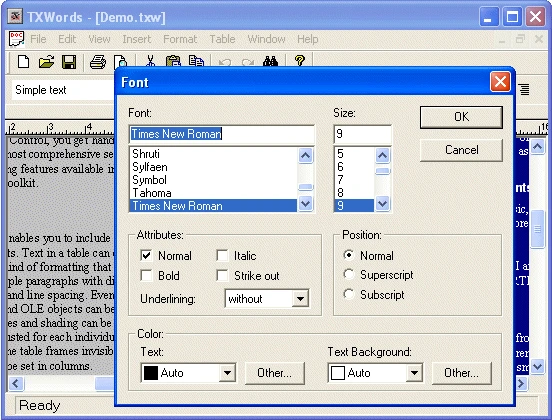
Font, size, style, color, spacing and baseline of characters are set through the members of TXTextControl listed below. Most of them work on the selected text.
The table also names the methods that grow or shrink the font and open the built-in font and symbol dialog boxes, and the event that reports a change of the character formatting.
Properties
| Member | Description |
|---|---|
TXTextControl.AutoBaseLine | Returns or sets values specifying whether the selected text is automatically sub- or superscripted. |
TXTextControl.BaseLine | Specifies the baseline alignment for selected text. |
TXTextControl.Capitals | Returns or sets values specifying whether lowercase letters are displayed with capital letters. |
TXTextControl.CharacterScaling | Returns or sets a character scaling, in percent of the average character width, of the selected text. |
TXTextControl.CharacterSpacing | Returns or sets a character spacing value, in twips, of the selected text. |
TXTextControl.FontBold | Returns or sets the bold font style. |
TXTextControl.FontItalic | Returns or sets the italic font style. |
TXTextControl.FontName | Returns or sets the font used to display text. |
TXTextControl.FontSize | Returns or sets a value that specifies the size of the font used to display text. |
TXTextControl.FontStrikethru | Returns or sets the strikethrough font style. |
TXTextControl.FontUnderline | Returns or sets the underline font style. |
TXTextControl.FontUnderlineStyle | This property determines styles for the FontUnderline property. |
TXTextControl.ForeColor | Returns or sets the color used to display text in a TXTextControl. |
TXTextControl.Locale | Specifies a language for the selected text. |
TXTextControl.TextBkColor | Returns or sets the background color for selected text. |
Methods
| Member | Description |
|---|---|
TXTextControl.FontDialog | Invokes the TXTextControl's built-in font dialog box and, after the user has closed the dialog box, specifies whether the user has changed something. |
TXTextControl.GrowFont | Increases the font size of each font contained in the current text selection. |
TXTextControl.InsertSymbolDialog | Opens a modeless dialog box which can be used to insert symbol characters. |
TXTextControl.ShrinkFont | Decreases the font size of each font contained in the current text selection. |
Events
| Member | Description |
|---|---|
TXTextControl.CharFormatChange | Occurs when the formatting attributes of the selected characters have been changed. |